
這是歷史版本頁面 — 看 iMazing 最新版本
iPhone連電腦管理資料麻煩?iMazing能取代iTunes嗎
 iMazing 2.10.0
資料更新 2019-09-04
閱讀約 6 分鐘
你手上拿著iPhone,想把手機裡的照片、訊息、備份整理到電腦上,打開iTunes卻發現它綁手綁腳——同步邏輯複雜、備份只能存在預設位置、想單獨抓出一則訊息或一首歌出來存檔,怎麼弄都不順。尤其當手機空間快滿、或想換機前把資料完整留下來時,那種「東西明明在手機裡,卻拿不出來」的卡關感,會讓人很想找別條路。
很多人第一個念頭是改用雲端或免費工具,但iCloud空間要錢、免費軟體功能陽春、有的還只支援特定檔案類型。這類iOS管理工具的切入點,就是繞過iTunes的限制,直接把手機當成一顆外接硬碟來讀寫:備份可以選位置、加密、只存差異,檔案可以拖曳進出,訊息可以匯出成PDF或CSV。你不用越獄,也不用改變平常使用手機的習慣,就能把資料的掌控權拿回自己手上。
01iMazing到底能拿來做什麼?
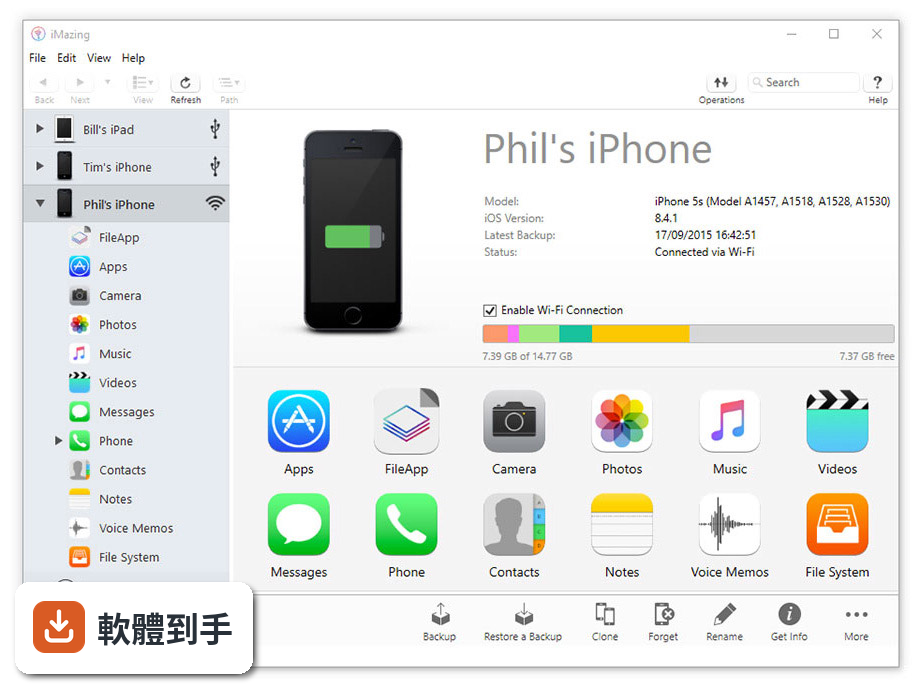
它是一套iOS裝置管理工具,主要功能包含:無線或加密備份手機、把照片音樂影片文件在手機和電腦之間雙向傳輸、直接從電腦安裝或移除App、匯出iMessage和WhatsApp訊息成PDF或CSV、編輯匯出聯絡人、查看電池健康度,以及更新或降級iOS版本。這些操作都不需要越獄,接上USB或設定無線連線就能開始。
02它的備份跟iTunes備份有什麼不同?
最大的差別在於備份方式和存放位置。它支援增量備份,只存上次備份後有變動的部分,不像iTunes每次都是完整備份。備份目的地可以自訂,包含外接硬碟或NAS,也支援AES-256加密。另外它會保留多個時間點的備份快照,你可以回頭找回某個日期的狀態,這對定期備份的人來說很實用。
03想把iPhone照片或影片抓到電腦,用這套軟體怎麼做?
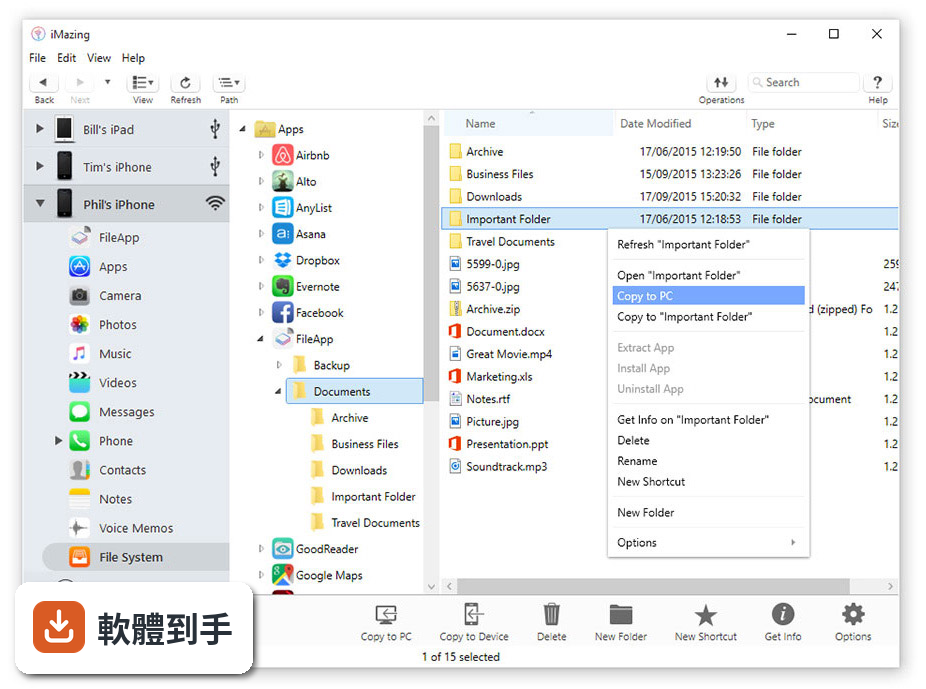
連接裝置後,在介面中找到照片或影片的分類,勾選要匯出的項目,用「Export」功能存到電腦指定資料夾。它走的是拖放式操作,不需要透過iCloud或iTunes同步。反過來,要把電腦裡的音樂或文件放進手機,也是直接拖進對應分類即可。無線傳輸在初次USB設定完成後也能使用。
04訊息可以匯出嗎?格式有哪些?
可以。在「Messages」分頁中選擇對話,就能把簡訊、iMessage、WhatsApp的內容匯出成PDF或CSV格式,匯出時會保留中繼資料(例如時間、傳送者),方便列印或存檔。這對需要保留對話紀錄的人來說,比截圖整理要省事很多。
05它能不能管理App?例如安裝或移除?
能。從電腦端就可以直接安裝或解除安裝手機上的App,也可以下載那些已經從App Store下架的應用程式。另外它支援設定描述檔、監督模式、單一App模式等進階管理功能,這些在大量部署裝置時會用到,一般使用者不一定會碰。
06什麼樣的人適合用這套軟體?
適合不想被iTunes綁住、又希望資料留在自己手上的人。例如:想把手機完整備份到外接硬碟或NAS的家庭用戶、需要匯出訊息或聯絡人做整理的使用者、想把iPhone當隨身碟傳檔案的人,或是管理多台iOS裝置、需要批次檢視裝置狀態的使用者。它強調所有資料都在本機處理,不會上傳到雲端。
07我只有一台iPhone、偶爾傳幾張照片,需要買這套嗎?
如果你的需求只是偶爾傳照片或音樂,免費的iTunes或雲端空間可能就夠用。這套軟體的價值在於進階管理——備份控制、訊息匯出、App管理、電池監控這些功能,對輕度使用者來說不一定用得上。可以先試用免費版,確認哪些功能你真的需要,再決定是否付費。
08它的介面只有英文,對不熟英文的人會不會很難上手?
介面確實只有英文,沒有中文語系。基本操作如備份、傳檔案、匯出訊息,按鈕和流程不算複雜,但進階功能(如設定描述檔、監督模式)需要閱讀英文說明。如果對英文介面感到吃力,操作前最好先看官方教學或找網路上的中文教學文章,會比邊用邊猜來得順利。
09這套軟體有免費版嗎?免費和付費差在哪?
官方說明提到有免費版,但功能有限,付費版才解鎖全部功能。付費採用一次性買斷制,單一電腦授權從59.99美元起,可以安裝在Mac或PC上,最多連接3台Apple裝置,授權永久有效且包含免費更新。家庭或企業方案價格更高,官方網站常有折扣活動,實際價格以官網為準。
10這套軟體評分好像不高,是哪裡有問題?
目前看到的使用者評分是6.6/10,共151人評分,數量不算多。從評價來看,有使用者提到進階功能有學習曲線,而且付費才能用完整功能,這可能是扣分主因。另外介面只有英文,對非英語使用者也有門檻。不過評分人數少,樣本有限,建議先試用免費版,確認操作流程和功能是否符合你的習慣。
11它跟其他iOS管理工具比起來,有什麼明顯的弱點?
它的授權是付費買斷,不像有些工具提供免費版就有基本傳輸功能。介面只有英文,對中文使用者不友善。另外它不支援媒體購買或串流,這部分還是得靠iTunes。市場上還有WinX MediaTrans、Syncios、CopyTrans等類似工具,評分人數和功能各有差異,如果你預算有限或只需要基本傳輸,可以多比較幾套再決定。
12這套軟體適合拿來做商業或企業用途嗎?
官方有提供家庭和企業方案,價格比個人版高,支援多使用者或多裝置。它具備設定描述檔、監督模式、單一App模式等進階管理功能,這些在企業大量部署裝置時會用到。不過個人版授權明確排除商業使用,如果要用在公司,需要購買對應的商業方案,這點在購買前要先確認。
下載與官方連結
iMazingforWindows.exe · 92.5 MB · 連結指向軟體原廠
版本紀錄
- 2026-08-28 iMazing 3.6.5 206 MB
- 2026-08-28 iMazing 3.6.3 204 MB
- 2026-08-01 iMazing 3.6.2 204 MB
再看 5 筆
- 2023-11-14 iMazing 2.17.15
- 2023-11-14 iMazing 2.17.14
- 2023-11-09 iMazing 2.17.13
- 2023-10-12 iMazing 2.17.11
- 2023-09-26 iMazing 2.17.10
這一版改了什麼
What's new in this version:
iMazing 2.10.0
New:
- Compatibility with iTunes downloaded from the Microsoft Store
- Backup: new engine allowing a better error reporting
Messages / WhatsApp: added support for the following languages: Thai, Vietnamese, Hindi, Bengali, Marathi, Telugu Tamil, Gujarati, Urdu, Kannada, Odia, - Malayalam, Punjabi, Sanskrit
- Many minor improvements and others fine tunings
Fixes:
- iMazing Mini: fixed notifications not sorted chronologicaly
- iMazing Mini: fixed serious mode option not saved
- Manage Apps: fixed a rare crash when downloading apps
- Manage Apps: fixed potential issues when trying to download and update apps with wrong CFBundleVersion numbers, not properly incremented by their developers (It's not possible to keep multiple version of such apps, please contact the app developer in case you encounter this issue and ask him to increment the value of CFBundleVersion when releasing an update)
- Messages / WhatsApp: fixed a crash when displaying or exporting conversations with PNG attachments
- File Transfer: fixed an issue with long paths when transferring files to Windows computers. This was potentially affecting the Books Export feature
- Notes: Fixed an error when exporting notes to PDF
iMazing 2.9.13.0
Fixes:
- Manage Apps: fixed issues when downloading or installing app updates which do not increment their bundle version
- Manage Apps: fixed app search function to add apps from the App Store in Arabic
- Music: removed the dialog shown when adding tracks already in the device library to a playlist
- Contacts: fixed an issue preventing the import of contacts exported on Windows
- Quick Transfer: fixed an issue with matching file types to compatible apps. Numbers, Pages and other apps should now be listed correctly when transferring the corresponding file type
- Messages: fixed an issue with dates / timestamps not correctly retrieved from iOS 4 and 5
- Messages / WhatsApp: fixed an issue with traditional Chinese characters not displayed in PDF exports
- Messages / WhatsApp: fixed a rare crash when loading messages
- Preferences: fixed a crash when changing the CSV Data Export delimiter (Windows)
iMazing 2.9.12.0
- Change log not available for this version
iMazing 2.9.11.0
New:
- iMazing Mini: iMazing Mini and automatic backups make the jump to the Windows version of iMazing. The Windows and macOS versions of iMazing now have identical version numbers
- Export to Excel: Call history, Contacts, Safari data, Calendars, Messages and WhatsApp chats can now all be exported to .xlsx files which can be directly opened by Excel
- The Export All Data feature of iMazing includes .xlsx exports for all these data types
Fixes:
- Fixed rare crash when loading Messages or WhatsApp views
- Fixed iMazing Preferences' Detection of media already in iTunes setting not taken into account when set to Disabled
- Stability improvements
iMazing 2.9.9.0
- Change log not available for this version
iMazing 2.8.8.0
Messages/WhatsApp:
- Fixed case where depending on the timezone, very recent messages would only show up after resetting the date range
- Fixed keyboard navigation in threads and chats
- Improved handling of corrupted or missing attachments
Other fixes:
- Fixed crash related to restoring app data to iOS 10.0 or 10.1 devices
- Other minor fixes
iMazing 2.8.7.0
- Call history now includes two new columns: Location and Service (WhatsApp, Skype, Viber...)
- Fixed a crash while loading Messages, WhatsApp or Safari
- Fixed a crash when loading Call History on iOS 9 and lower
- Windows: fixed a crash when clicking cancel on file dialogs
iMazing 2.8.6.0
- Improved jailbreak detection (Chimera and Uncover)
- It is now possible to reverse the sort order of Messages and WhatsApp threads by clicking the header
- Fixed cases where the battery icon would not be displayed or would display stale values
- Fixed case where the date label in the WhatsApp view was displayed according to UTC instead of local time
- Fixed case where loading notes with a lot of markup would cause memory usage to balloon
- Fixed case where very large Messages or WhatsApp databases would cause very high memory usage over time
- Increased backup timeout to one hour to better support very large backups on slower drives
- Other small improvements and stability fixes
iMazing 2.8.5.0
New:
- iOS 12.2 support
- Support for new iPad models
- Messages: support for voice messages sent from iOS 12.2 devices
- Messages and WhatsApp: added Show all dates option
iMazing 2.8.4.0
Fixed:
- Data is invalid error when parsing a backup is now ignored when it is safe to do so
- Bulk exports of Messages and WhatsApp threads now honour the current date range
- Improved support for older versions of WhatsApp
- Fixed rare Error writing file error when exporting Messages or WhatsApp to PDF
iMazing 2.8.3.0
Fixed:
- Timestamps in CSV exports of Messages and WhatsApp are now in standardised format (YYYY-MM-DD HH:MM:SS)
- Fixed exporting to PDF in Asian languages (Chinese, Japanese and Korean)
- Minor stability improvements
iMazing 2.8.2.0
Browsing Messages and WhatsApp chats:
Performance:
- Loading times greatly improved
- Supports arbitrarily large quantities of messages, even on older computers
- New displayed data types:
- Subject line (Messages)
- Message Status (sent, delivered, read)
- Group events (who joined or left and when, more...)
- Service type change (SMS, MMS, iMessage)
- (Optional) Contact details (email or phone number)
- Windows: Emojis are finally displayed in all their colorful glory
Search:
- Added date range filter
- Added search in conversations (find all threads or chats whith a specific contact)
- Text search now retains context when cleared (search for a word, select a message in the result and clear search to identify which chat the message belongs to)
- Export behaviours
Added contextual menu on threads:
- Selecting multiple threads no longer aggregates their content, instead used for bulk export of multiple conversations
- Drag out selection with attachments only will export attachments. Drag out selection containing text will export to PDF
Exporting to PDF and Printing:
iMazing now features native PDF generation, allowing for greatly improved performance and expanded features when both exporting to PDF and printing both Messages
conversations and Whatsapp chats:
- Bulk export of threads to PDF (split files or single file)
- Choose scale, margins and orientation
- Choose paper size
Optional:
- Chat session name and participant details in header
- Page numbers in footer
- Extraction metadata in footer (great for increased legal weight)
Exporting to CSV or TXT:
New fields in CSV exports:
- Delivered date
- Read Date
- Service Type (SMS, MMS, iMessage)
- Sender name
- Sender contact details (email or phone number)
- Subject
- Attachment type
- (Optional) Include header row
- (Optional) Include thread/chat name (useful for bulk exports to spreadsheets)
Text exports now optionally include:
- Chat session name
- Sender (group chats)
- Date/Time
- Status (Sent, Delivered, Read)
- Attachment informations
- Notifications
- Separator between messages
iMazing 2.8.0.0
- Fixes and smaller changes in 2.8
- Apps: when searching in the App Store, iMazing no longer defaults to the US store
- Apps: don’t offer update of apps if the update is incompatible with the iOS version of the target device
- Apps: improved restore of multiple .imazingapp files at the same time which in some cases could cause a ‘Unique constraint’ SQLite error
- Device Info: dual e-SIM info is now displayed
- iMazing Mini: fixed rare case where iMazing Mini thread count would keep rising when the app has been running for 10+ days without interruption
- Media sync: copy to Photos, Music, Ringtones and Videos now use much less CPU
- Music: improved exporting playlists to iTunes
- Music: fixed case where a special character in the Album Artist tag would cause tracks to be copied as separate albums
- Photos: better handling of copying photos to iOS when the photo library of the target device is empty or nearly empty
- Photos: fixed 'Error communicating with device' error when there are more than 5'000 photos in synced albums
- Photos: better interaction with albums originally synced with iTunes
- Restore: when restoring a backup without erasing the target device, iMazing will no longer uninstall apps which are on the target device but not in the backup
- Voice memos: better handling of missing or corrupt files in bulk exports
Browsing Messages and WhatsApp chats:
Performance:
- Loading times greatly improved
- Supports arbitrarily large quantities of messages, even on older computers
New displayed data types:
- Subject line (Messages)
- Message Status (sent, delivered, read)
- Group events (who joined or left and when, more...)
- Service type change (SMS, MMS, iMessage)
- (Optional) Contact details (email or phone number)
- Windows: Emojis are finally displayed in all their colorful glory
Search:
- Added date range filter
- Added search in conversations (find all threads or chats whith a specific contact)
- Text search now retains context when cleared (search for a word, select a message in the result and clear search to identify which chat the message belongs to)
Export behaviours:
- Added contextual menu on threads
- Selecting multiple threads no longer aggregates their content, instead used for bulk export of multiple conversations
- Drag out selection with attachments only will export attachments. Drag out selection containing text will export to PDF
Attachments:
- Videos, audio clips and GIFs can now be played within the view
- Shared locations are displayed as such, and can be opened in Google maps or exported as links
- Shared URLs displayed with site description, and can be opened in default browser or exported as links
- Shared vCards containing multiple contacts are now exported to split vCards on Windows for better compatibility
Exporting to PDF and Printing:
IMazing now features native PDF generation, allowing for greatly improved performance and expanded features when both exporting to PDF and printing both Messages conversations and Whatsapp chats:
- Bulk export of threads to PDF (split files or single file)
- Choose scale, margins and orientation
- Choose paper size
Optional:
- Chat session name and participant details in header
- Page numbers in footer
- Extraction metadata in footer (great for increased legal weight)
Exporting to CSV or TXT:
New fields in CSV exports:
- Delivered date
- Read Date
- Service Type (SMS, MMS, iMessage)
- Sender name
- Sender contact details (email or phone number)
- Subject
- Attachment type
- (Optional) Include header row
- (Optional) Include thread/chat name (useful for bulk exports to spreadsheets)
Text exports now optionally include:
- Chat session name
- Sender (group chats)
- Date/Time
- Status (Sent, Delivered, Read)
- Attachment informations
- Notifications
- Separator between messages
iMazing 2.7.5.0
- Change log not available for this version
iMazing 2.7.4.0
Quite a few small but substantial improvements in this update:
- New 2018 iPads Pro support
- iOS 12.1 support
- Managing app updates from the “Manage Apps” section is now much easier to use: a dedicated window lists available updates, and it is now easy to download updates or directly update apps on a specific device
-Installing VPP apps is now supported, as long as device assignment is already done
- The calendar view will now display multi-day events on multiple days and not just on the day of the event
- When a device’s backup location is on an unavailable NAS, iMazing will let you know and will offer to stop trying to connect
- Other tiny improvements
Fixes:
- Fixed regression in 2.8.3 which caused reinstalling iOS to wrongly try to ask for device unlock, thereby making reinstalling iOS impossible
iMazing 2.7.2.0
- Fixed a memory leak while converting HEIC files to JPEG
Fixes for drag and drop to Windows File Explorer:
- After installing this update, iMazing will ask you to reboot your computer. This can be done later, but a reboot is required at some point for the system to properly install iMazing's drag and drop extension.
- When dragging out an item for the first time from iMazing to Windows File Explorer, iMazing will ask you to register iMazing's Shell Extension.
- You will then be asked for permission to let iMazing restart Windows File Explorer.
- Fixed issues when exporting items with back slash characters "" from a backup or the iOS file system
- Excluded Adobe Lightroom app from Quick Transfer, importing files to Lightroom via the File Sharing is unfortunately not supported in Lightroom
- Other minor fixes and improvements
iMazing 2.7.1.0
- Fixed iPhone XR model details not retrieved properly
- Other minor fixes and improvements
iMazing 2.7.0.0
Quite a few small but substantial improvements in this update:
- New 2018 iPads Pro support
- iOS 12.1 support
- Managing app updates from the “Manage Apps” section is now much easier to use: a dedicated window lists available updates, and it is now easy to download updates or directly update apps on a specific device
- Installing VPP apps is now supported, as long as device assignment is already done
- The calendar view will now display multi-day events on multiple days and not just on the day of the event
- When a device’s backup location is on an unavailable NAS, iMazing will let you know and will offer to stop trying to connect
- Other tiny improvements
- Fixes and improvements in 2.7.0
- Fixed issues in the "Manage Apps" section when updating or downloading apps
- Fixed few issues in the "Calendars" section
- Many improvements and other minor fixes
iMazing 2.6.4.0
- This update is advised for all Windows users
- We fixed a regression where copying files to computer or exporting photos were not working anymore. We are sorry for the inconvenience
- Windows users who connect iPhone XS or XS Max to iMazing or iTunes must accept the Apple drivers update offered by iMazing, or update iTunes to 12.9
- iPhone XS and XS Max should be displayed beautifully when connected to iMazing
- iOS 12 is fully supported, including updating to iOS 12 with iMazing
Quick Transfer Wizard:
- Easily transfer documents, media, books and files to your iOS devices via drag and drop
- Drop files and folders in the Quick Transfer window, and iMazing will automatically detect compatible apps
Export All Data:
- Export all data from iOS devices in human readable format in 2 clicks only
- Aimed at repair shops, data recovery pros and lawyers
- Special shout out to Geneva’s Maclinic repair shop for suggesting the feature
Fixes and improvements:
- Fixes a regression where copying files to computer or exporting photos were not working anymore. We are sorry for the inconvenience
iMazing 2.6.2.0
- This update is advised for all iPhone XS and XS Max owners. It features improvements in setting up these devices with iMazing.
- Windows users who connect iPhone XS or XS Max to iMazing or iTunes must accept the Apple drivers update offered by iMazing, or update iTunes to 12.9.
iPhone XS and XS Max Ready, iOS 12 Compatibility:
- iPhone XS and XS Max should be displayed beautifully when connected to iMazing
- iOS 12 is fully supported, including updating to iOS 12 with iMazing
Quick Transfer Wizard:
- Easily transfer documents, media, books and files to your iOS devices via drag and drop
- Drop files and folders in the Quick Transfer window, and iMazing will automatically detect compatible apps
Export All Data:
- Export all data from iOS devices in human readable format in 2 clicks only
- Aimed at repair shops, data recovery pros and lawyers
- Special shout out to Geneva’s Maclinic repair shop for suggesting the feature
Fixes and improvements:
- iPhone XS & XS Max compatibility update
- Other minor improvements
iMazing 2.6.1.0
- Fixed "Permission Denied" error when installing or exporting apps from library
- Fixed an issue when installing or updating iOS
- Other minor improvements
iMazing 2.6.0.0
- iPhone XS and XS Max should be displayed beautifully when connected to iMazing
- iOS 12 is fully supported, including updating to iOS 12 with iMazing
- Easily transfer documents, media, books and files to your iOS devices via drag and drop
- Drop files and folders in the Quick Transfer window, and iMazing will automatically detect compatible apps
- Export all data from iOS devices in human readable format in 2 clicks only
- Aimed at repair shops, data recovery pros and lawyers
- Special shout out to Geneva’s Maclinic repair shop for suggesting the feature
iMazing 2.5.7.0
- Fixed freeze when loading calendars with recurring events
- Fixed infinite loop when trying to turn off backup encryption and backup encryption is required by a configuration profile
- Fixed importing songs truncated to less than a second, now you can import such of file in Ringtones to use them as alerts
- Other minor fixes
iMazing 2.5.6.0
- Change log not available for this version
iMazing 2.5.5.0
- Added a “Check for updates automatically” option in Preferences
- Fixed ocasional issues with transferring large media files to the device (in Music, Videos and Books)
- Fixed Messages sorting which in rare cases could be wrong if many messages were unread
- Fixed issues with HEIC photo attachments not displayed in Messages (Windows and older macOS versions)
- Fixed an issue in exported VCards when a contact address contains line breaks
- Fixed a freeze when loading Calendars containing lots of events. Greatly improved loading speed.
- Fixed a hang at launch when an unpaired Apple TV triggers iMazing’s pairing screen via Wi-Fi
- Fixed backup and restore app data from a jailbroken device (.imazingapp files)
- Fixed exporting ringtones to an external drive
iMazing 2.5.4.0
- Fixed a potential crash when loading some datasets exported from a Backup such as Calendars
- Other minor fixes
iMazing 2.5.3.0
- Fixed backup location wizard not displayed in macOS 10.8 and 10.9
- Fixed case where starting a new backup could cancel another ongoing backup operation (macOS)
- Apple TV 4K can now be paired (macOS)
- Exported voicemail are now converted to mp3 (Windows) or m4a (macOS)
iMazing 2.5.2.0
- Fixed a potential crash when restoring a backup
- Fixed a crash when trying to change file browser view
- Other minor fixes and stability improvements
iMazing 2.5.1.0
- Fixed random crashes in 2.5.0
- Other minor fixes and improvements
iMazing 2.5.0.0
iOS 11.4 Compatibility:
- Fixed message attachments not displayed in some cases
- General compatibility fixes
Safari Data:
- Browse and export Safari browsing history, bookmarks, and reading lists
- 2 export formats: CSV for spreadsheets or HTML to import in another browser
- Recover Safari data from backups too, including from iTunes backups
Calendars:
- Browse and export events from the iOS Calendars app
- 2 export formats: CSV for spreadsheets or ICS to import in other calendar apps
- Recover Calendar data from backups too, including from iTunes backups
Better CSV Exports:
All CSV exports have been completely overhauled: Call History, Contacts and Messages:
- Added column headers for all CSV exports
- Completely reworked the Contacts CSV export for better compatibility with Outlook and Google Contacts
- Better handling of illegal characters
Resizable Wizards:
- All wizard screens now feature resizable contents. This is especially useful in the Manage Apps wizard: more room for your content!
- Memory and Performance Optimizations:
- Loaded backups now take twice less space in RAM
- faster and more efficient memory management
iMazing 2.4.7
- Fixed apps not downloaded from App Store after restoring a backup
- Fixed photo transfer to device when operation hangs on "Waiting for device to acknowledge changes..."
- Fixed music transfer to device when operation hangs on "Waiting for device to acknowledge changes..."
iMazing 2.4.6
- App download: fixed failed connections to the App Store linked to changes by Apple. Downtime was minimal (less than 36 hours)
- Restoring backups: added an option to install apps which have already been downloaded to iMazing's app library
- Fixed cases where deleting photos would randomly not work or throw an error
- Other tiny fixes
iMazing 2.4.5
- Change log not available for this version
iMazing 2.4.4
- Fixed Korean characters in file paths not being displayed correctly (Windows)
- Removed App incompatible with this device label in iMazing’s app library view, it showed up erroneously
- Better handling of edge cases when copying playlists to device or deleting music on device
- Other tiny fixes and invisible improvements…
iMazing 2.4.3
Fixed:
- Apps: Added label to identify apps not compatible with current device type (Manage Apps wizard)
- Apps: Added Delete and Hide from Library option to permanently remove an app from iMazing's Library
- Books: Much improved robustness when transferring books and pdfs to iOS devices
- Books: Book titles with special characters are now always displayed correctly
- Call History: added FaceTime info to identify FaceTime Audio and Video calls
- Console: Much improved robustness on Windows, the Console should now just work!
- Console: Improved performance when leaving the console window open for a long time
- Contacts: Importing vCard files to iOS now supports more vCard format variants
- Contacts: More tiny improvements in imports/exports
- File Transfer: Fixed case where transferring multi-gigabyte files over Wi-Fi could fail
- Localisation: fixed German translation of the Windows Files menu, thank you Theodor!
- Music: Exporting compilations to iTunes should now work as expected
- Music: Fixed case where iMazing hanged when transferring a folder containing a lot of tracks to iOS
- Music: Fixed Import from iTunes when the iTunes Music Library is on an external drive (Windows)
- Music: iMazing now display a warning when exporting DRM protected music
- Music: Improved Composer metadata handling
- Photos: Added location data when transferring photos to iOS
- Photos: Fixed case where creating or renaming albums could result in iMazing not displaying them immediately
- Photos: Fixed case where importing large number of photos could fail
- Photos: Much improved stability when copying photos to device, especially to older/less powerful models
- Photos: Ordering of imported photos is now always based on date, just as in the iOS Photos app
- UI: Improved reactivity of dataset loading (stop/refresh)
- UI: Added Options button to the actions list to increase backup options discoverability
- UI: Re-organised contextual menus of the sidebar
- UI: Fixed a few harmless glitches
iMazing 2.4.2
iPhone X:
- Support for new resolution in iMazing's UI
- Minor compatibility adjustments
Brand new Manage Apps wizard:
- Download IPAs from the App Store
- Manage an App Library on your computer, install/uninstall, backup or restore all from the same view
- Sort apps by size, filter them by Apple ID
- Restoring .imazingapp apps now installs the app straight from the App Store
- Read our blog post to learn more
Fixes:
- Fixed a crash when restoring a backup
- Fixed a crash when re-installing or updating iOS
- Other minor issues fixed and stability improvements
iMazing 2.4.1
- Change log not available for this version
iMazing 2.4.0
- Change log not available for this version
iMazing 2.3.9
iPhone X:
- Support for new resolution in iMazing's UI
- Minor compatibility adjustments
Fixes in version 2.3.9:
- Fixed installation of .ipa packages not downloaded from the App Store
iMazing 2.3.8
iPhone X:
- Support for new resolution in iMazing's UI
- Minor compatibility adjustments
- Fixes in version 2.3.8
- Fixed an issue where apps were not installed when restoring a backup. Make sure to do a new backup if you were experiencing this issue
iMazing 2.3.7
iPhone X:
- Support for new resolution in iMazing's UI
- Minor compatibility adjustments
Fixes:
- Backup: fixed an issue where backing up to a NAS volume which was not mounted when the backup started could cause an 'Cannot Optimise Backup Size' error.
- Books: better metadata support (Artist field)
- HEIC conversion: added support for color profiles, improved robustness
- Notes: fixed case where some notes could appear twice
- UI: fixed screenshot display issues with some rarer devices
New:
- Photos: iOS 11’s new .HEIC images are now converted on the fly to .JPG if needed
- Preferences: Photo Export Format settings in Other Data tab. Choose in which format iMazing will export iOS 11 .HEIC photos
- Backup: Better handling of unavailable (disconnected) backup locations
- General: Small stability fixes and improvements
iMazing 2.3.6
- Change log not available for this version
iMazing 2.3.5
- Apps: Better handling of app installation: iMazing no longer asks for the target device to be backed up when installing a fresh IPA
- Apps: Better handling of app extraction on older iOS versions (< 8.3)
- Optimisation: major improvements in memory usage
- UI: Changed the way devices and backups are grouped in the sidebar. The new sections are: Available, Disconnected, Old Backups, Editable Backups. Backup location is now displayed in the device’s description text along with backup size
- UI: Battery icon and disk usage bar are now clickable to display extra info
- UI: Device info is now showing the backup location, backup size and number of backups
- Preferences: New options to add or remove loaded backup locations
- Device Info: Exporting device info now includes paths of apps, including GUID
- Transfer to device: Improved handling of ‘dangling’ syncs when transferring music, photos, videos or iBooks to devices (‘Error Communicating with Device’ error)
- Notes: Fixed case where some notes could be missing if the user had notes in both the old iOS 9 format and the new iOS 10 one
iMazing 2.3.4
- Change log not available for this version
iMazing 2.3.2
- Various bug fixes and stability improvements
iMazing 2.3.1
- Fixed a crash happening at the end of a backup, during the backup migration or while extracting data from a backup. We are sorry for the inconvenience
iMazing 2.2.13
- Fixed some rare other issues while installing iOS, the operation is now more stable
iMazing 2.2.12
- Fixed a regression where installing iOS was not working any more (error message: "Cannot restore device AMRestorableDeviceRestore: AMRestorableDeviceRestore exited."), we are sorry about that
- Fixed memory leaks resulting in a very high memory usage when backing up / restoring a backup or reinstalling iOS
iMazing 2.2.11
- Devices are now always backed up before updating or reinstalling iOS
- Better handling of iOS reinstallation on multiple devices simultaneously
- Reinstall iOS: Added warning before iMazing puts the device in Recovery Mode
- Fixed a potential crash when connecting Wacom tablet
- Minor improvements and stability fixes
iMazing 2.2.10
- Critical fix for iOS 10.3.3. Please update iMazing before updating your device
iMazing 2.2.9
iOS 11 Compatibility:
- iMazing is now compatible with the new iOS 11
New iPad Pro info and icons:
- 10.5-inch
- 12.9-inch
iMazing 2.2.8
iOS 11 Ready:
- iMazing is now compatible with the new iOS 11
Bugfixes and improvements:
- Preferences window is now larger to prevent tabs from wrapping in some languages on Windows
- When the full resolution version of a photo is on iCloud Photo Library and not on the device, iMazing will now try to transfer the largest available preview file instead of the thumbnail
- Nearly all help buttons now point to specific articles to provide contextual help
- Improved available iOS version checker, will show a warning dialog if iMazing cannot connect to Apple servers
- Fixed wrong birthdate when exporting to Windows Contacts
- Improved “Forget” function to let the user choose wether or not to elevate privileges on Windows
- Datasets were not loaded properly when viewing a previous version of a backup on Windows
- Re-install iOS wizard was not working when a device was in DFU mode
- Removed a check preventing manual installation of IPSW when iMazing was not able to contact Apple Servers
- Fixed rare case where restoring an .ipa file to an iOS 9 or 10 device was not working properly
- Optimized memory usage
iMazing 2.2.7
- Fixed a general issue with iOS 10.3 which causes files and folders with some specific special characters from not appearing properly in iOS third-part apps. For the moment, iMazing is the only available software fixing this problem
iMazing 2.2.6
- Preferences window is now larger to prevent tabs from wrapping in some languages on Windows
- When the full resolution version of a photo is on iClo6d Photo Library and not on the device, iMazing will now try to transfer the largest available preview file instead of the thumbnail
- Nearly all help buttons now point to specific articles to provide contextual help
- Improved available iOS version checker, will show a warning dialog if iMazing cannot connect to Apple servers
- Fixed wrong birthdate when exporting to Windows Contacts
- Improved “Forget” function to let the user choose wether or not to elevate privileges on Windows
- Datasets were not loaded properly when viewing a previous version of a backup on Windows
- Re-install iOS wizard was not working when a device was in DFU mode
- Removed a check preventing manual installation of IPSW when iMazing was not able to contact Apple Servers
- Fixed rare case where restoring an .ipa file to an iOS 9 or 10 device was not working properly
- Optimized memory usage
iMazing 2.2.5
- Fixed some rare crashes when restoring an .imazingapp file
- Fixed other rare crashes
iMazing 2.2.4
- Fixed option "Prevent iTunes from launching when connecting a device", was not working properly on Mac
- Fixed empty .ipa files when exporting apps on old iOS versions
- Fixed few crashes and improved overall stability
iMazing 2.2.3
- Detects malfunctioning USB cables and shows a warning
- Read EXIF date/time when importing photos in albums
- Stability improvements
iMazing 2.2.2
- Change log not available for this version
iMazing 2.2.1
- Fixed a crash when deleting photos on Mac
- Fixed backup books on iOS 5 and above
iMazing 2.2.0
- Fixed console issues where all system logs were not reported properly
- Fixed rare crash when importing music from a folder on Windows
- Fixed a rare issue when a message is displayed at launch "There is no disk in the drive..." on Windows
- Delete photo on Windows is now much faster
- Fixed case where some backup archival options would not save (Windows)
- Fixed rare Windows issue where decryption of backups would fail
- Stability improvements
iMazing 2.1.9
- Fixed delete photo crashing on Windows
iMazing 2.1.8
- Fixed delete photo not working in rare cases on Windows
- Backups: iMazing was asking the backup password inappropriately in some cases
- Restore apps: iMazing was asking the backup password inappropriately
- Fixed rare crash at startup on Windows
- Stability improvements
iMazing 2.1.6
- Fixed some rare crashes
- Stability improvements
iMazing 2.1.5
What's New:
- Apps: It is now required to disable backup encryption before restoring a .imazingapp file
- Erase: It is now necessary to disable Find my iPhone before erasing a device
- Stability improvements
Bug Fixes and Improvements:
- Backup: Fixed crash with disconnected network drives in backup location selection window (Windows)
- Photos: Handling of case where deleting photos from the Camera Roll hanged (Mac)
- Minor bug fixes
iMazing 2.1.4
New:
- New "iTunes Archived Backups" section in iMazing's left sidebar to show iTunes archived backups which are not longer needed and could be removed to gain disk space on your computer
- Differentiate backups and devices is now easier in the sidebar, "Backup" is now shown in the description for backups
Bug Fixes and Improvements:
- Loading music from an iPod Classic, Mini or Nano was never finishing in some rare cases
- First access to an app shortcut was slow, it's now much faster
- Extracting an app from a backup could fail when app was not installed on the connected device
- Extracting, Installing or Deleting an app is now faster
- Fixed a rare crash on Windows when disabling Find My iPhone
- Fixed an error when installing apps not downloaded from the App Store
- When loading the "Device info" view, apps icons were blinking on Mac
- Progress bar was blinking on Mac when updating the software
- New MacBook Pro Touch Bar was not working with an iPod Classic connected
- Other minor bug fixes and improvements
iMazing 2.1.3
- Change log not available for this version
iMazing 2.1.2
- Change log not available for this version
iMazing 2.1.1
- Change log not available for this version
iMazing 2.1.0
- Backups: the ‘Backups’ button now appears for all devices, even if no backup exists. This makes it easier to confirm that there is no current backup for a device, or that the current backup has not been archived by iMazing yet
- Backups: better management of backup passwords. iMazing won’t ask for your password so often
- Contacts: much improved support for importing non-standard Vcards
- Media: improved check of imported media format. Some incompatible formats could make it through our previous filter, resulting in unusable uploads
- Stability improvements and tiny fixes
iMazing 2.0.8
- Apps: fixed .IPA export from iOS 7 and 8 devices
- Backups: handling of case where iTunes backup is corrupted ("Manifest Invalid" error)
- Backups: symlink in default backup location will now be migrated to iMazing 2’s new backup location management system only once, so that power users can re-create the symlink if they need to share a custom backup location with iTunes
- Backup archiving: iMazing now warns before archiving backup if encryption status has changed
- Backup archiving: better size calculations of backup archives in edge cases
- Backup browsing: fixed UI glitch resulting in photos not being displayed when switching between archives multiple times
- Backup editing: fixed adding files to a backup crash (Win)
- Backup extractor: support for extracting large files (>1GB) from encrypted backups
- Backup location: full path of custom location is now displayed in the backup location wizard
- Contacts: fixed rare crash in Contacts view
- Sidebar: ctrl-click on device now works as expected
- Minor stability fixes and improvements
iMazing 2.0.5
- Backups: Fix for importing .iMazing files
- Backups: Guard against invalid file names when exporting backups
- Backups: fixed crash when adding files to an editable backup
- Music: Fix for better iTunes 12.5 library parsing
- Photos: Fix for exporting parent Moments in ‘All Photos’ album
- UI: Fix for iPhone 7 and 7 Plus icons
- UI: Fix for selection status not refreshed in toolbar
- UI: Removed duplicate ‘Export as Folder’ button when browsing a backup
- General: Stability improvements
iMazing 2.0.4
- Photos: fixed regression which could cause a crash when loading photos from a USB connected device in the first minute after launching the app
- Restore: Guard against restoring partial backups
iMazing 2.0.3
- Photos: Compatibility fix for iOS 6 and 7
- Restore a backup: Prevent users from trying to restore a backup when they have none, or to restore a backup to no device
- Restore a backup: Fixed case where restoring all datasets but not all apps would result in all apps being restored
- Connection: Fixed rare crash at the end of the connection wizard when connecting an empty device for the first time
- Storage: Documents folder for USB storage is available again
- Storage: Fix for diacritic case-insensitive sorting in tree view
- Labels: Better labelling of option screens of wizards, ‘Save’ replaces ‘Done’ to better reflect the action
- Various stability improvements
iMazing 2.0.2
- Fixed issue where restoring a customised backup from an external drive did not work
- Fixed installation path following user feedback (Mac)
- Fix for jailbreak compatibility
- Better handling of choice of backup location when write permission is denied
- Removed obsolete ‘Export to TXT’ button from the Call History view and fixed routing of Export to CSV’ button
- Fixed lacking extension when exporting archive to .imazing
Version 2.0.1:
- Full iOS 10 Compatibility, including for encrypted backups
- Full iPhone 7 and 7 Plus Compatibility
- Automatic archiving of backups: backups are not overwritten, and disk use is optimised to store many backups of a single device
- Backups popover: navigate your device’s backup history
- Backup history cleaner: iMazing will offer to delete older backups of a device if they take too much space
- Ability to set backup locations per device
- Step-by-step wizards for backup, restore and transfer operations
- Restoring a backup, or transferring data from one device to another now supports choosing which apps to restore/transfer
- Wizards for activating and pairing new devices
- Battery health popover
- UI: new layout, colourful looks
- UI: Home screen and lock screen of devices are displayed in iMazing.
- Photos: iMazing will now display your entire iCloud Photo Library, even if full res pictures are not on the device. See the ‘All Photos’ album.
- Photos: Export thumbnails if the full res picture is in the cloud
- Privacy: iMazing actively encourages users to enable backup encryption 3 Data: Export raw data feature to export device backup data in files and folders