
這是歷史版本頁面 — 看 IObit Uninstaller 最新版本
軟體老是卸不乾淨?IObit Uninstaller 能幫你清掉什麼
 IObit Uninstaller 10.0.2.23
資料更新 2020-09-24
閱讀約 6 分鐘
你是否有過這種經驗:從「控制台」移除某個程式,以為刪乾淨了,結果打開資料夾,殘留的檔案還在;開機時跳出錯誤訊息,指向一個你早就刪掉的軟體;硬碟空間莫名其妙變少,卻找不到是哪個程式佔的。這些都是「卸載不徹底」留下的後遺症,尤其是一些綁定工具列、登錄檔寫得很深的軟體,用內建移除功能根本清不掉。
一般人遇到這種狀況,會手動去刪資料夾、用「執行」開 regedit 找登錄檔,但這既花時間又容易誤刪系統檔。這類卸載工具的切入點,就是幫你把「移除程式」這件事做得更完整:掃描殘留的登錄檔與檔案、處理無法正常移除的程式、甚至連瀏覽器工具列一起清掉。它不改變你安裝軟體的方式,只負責在你要說再見時,把痕跡收拾乾淨。
01IObit Uninstaller 跟 Windows 內建的新增移除程式有什麼不同?
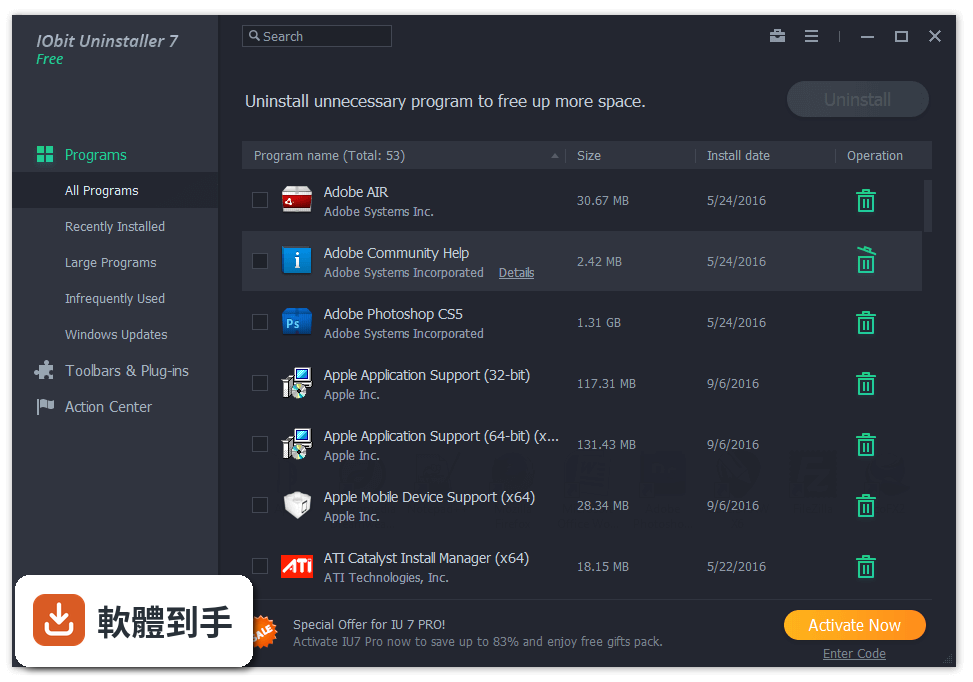
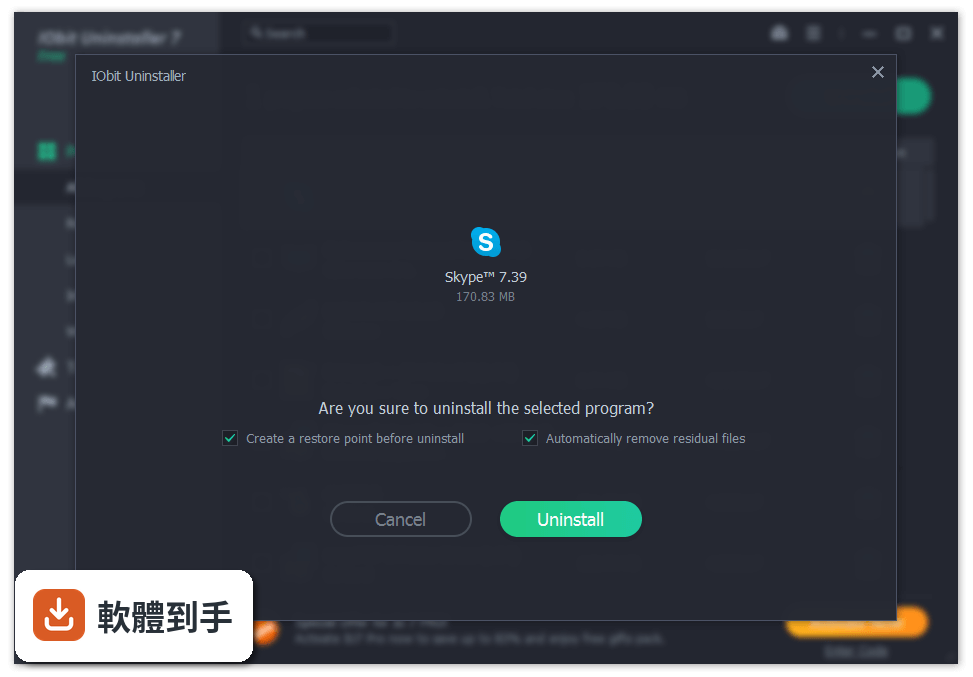
內建移除程式只會跑軟體自己的解除安裝程式,跑完就結束,殘留的登錄檔、資料夾不會處理。IObit Uninstaller 在解除安裝後會多一步「強力掃描」,把剩下的登錄項目、檔案和資料夾列出來讓你確認刪除。另外它支援一次勾選多個程式批次移除,這點內建功能做不到。
02這套軟體能處理那些「刪不掉」的程式嗎?
可以。它有一個「強制移除」功能,專門處理用標準方式無法刪除的程式。操作方式是先選中那個刪不掉的程式,按強制移除,它會嘗試停止相關程序、清除登錄檔和檔案。要注意的是,強制移除不一定百分之百成功,如果程式有服務或驅動在執行,可能需要先重開機再試一次。
03除了移除程式,它還能做哪些清理工作?
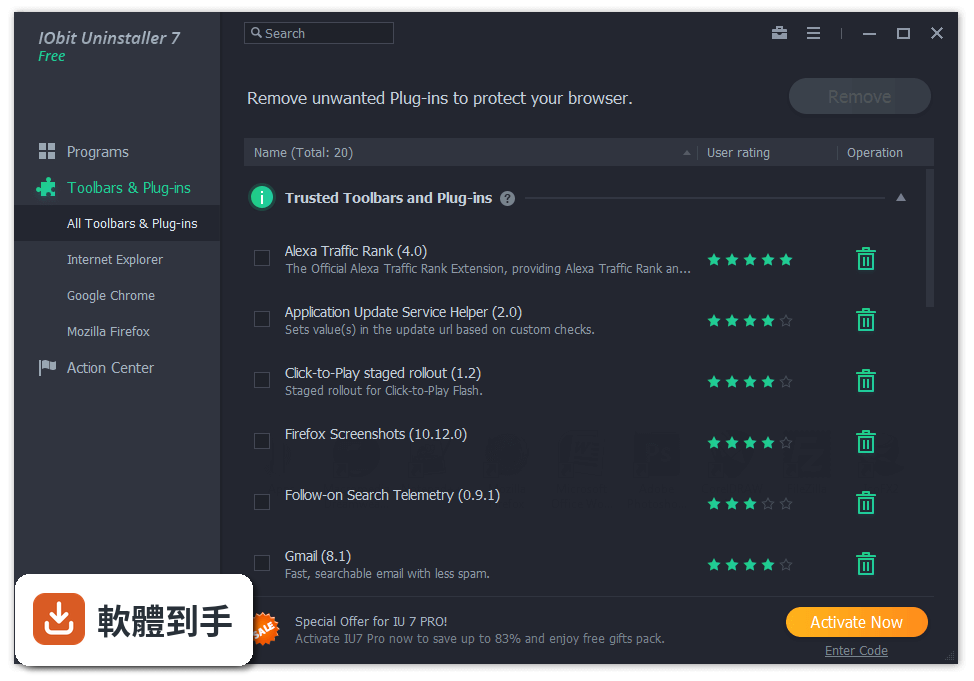
它內建幾個周邊工具:一個是瀏覽器工具列與外掛移除,可以掃描各大瀏覽器的工具列並解除安裝;一個是軟體更新器,會列出已安裝程式的更新狀態;還有啟動管理員,可以檢視並停用開機時自動啟動的程式;另外有檔案粉碎機,可以徹底刪除敏感檔案,防止被救援軟體還原。
04批次移除是怎麼運作的?可以同時刪很多程式嗎?
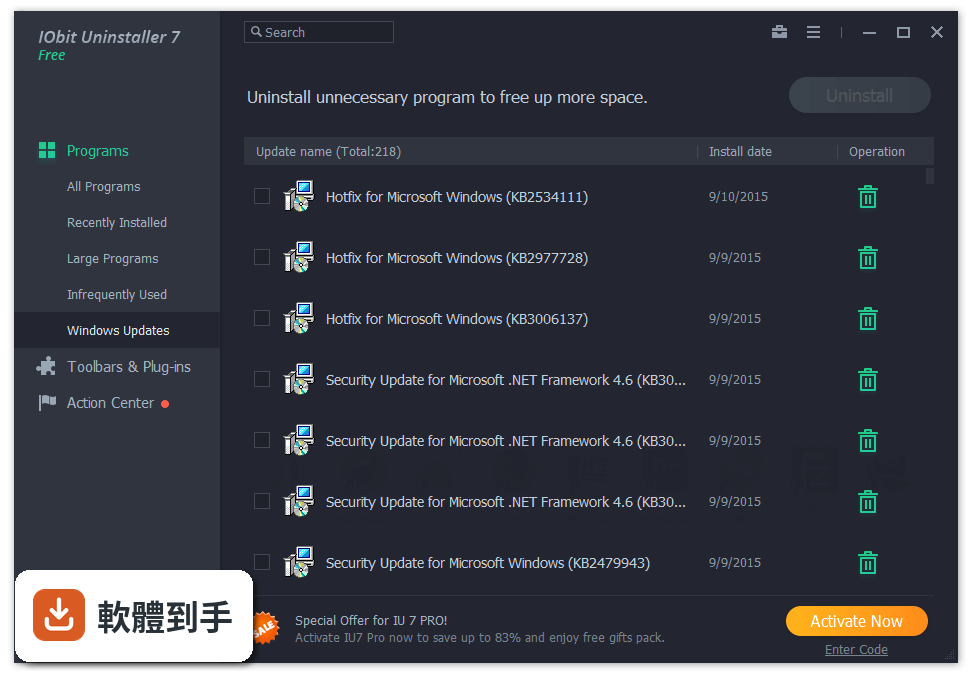
在「已安裝程式」清單中,每個程式前面都有勾選框,你可以一次勾選多個,然後按「卸載」按鈕,它會依序執行每個程式的解除安裝程序。這在要清掉一整包預載軟體或試用版軟體時很省時間。不過要注意,批次移除過程中每個程式還是會跳出自己的解除安裝精靈,需要你手動按下一步。
05它會追蹤之前移除過哪些程式嗎?
會。它有一個「卸載歷史」功能,會記錄你透過這套軟體移除過的程式名稱和時間,方便之後查詢。如果你想知道某個程式是什麼時候被刪掉的,或是想確認某個殘留檔案是不是來自某個已移除的軟體,可以到這個頁面查看。
06這套軟體適合什麼樣的人用?
適合兩種人:一種是常裝試用版軟體、玩完就刪,但發現系統越來越慢、硬碟空間越來越少的人;另一種是遇到特定軟體怎麼刪都刪不乾淨,會跳出錯誤訊息或殘留右鍵選單的人。它介面是英文,但操作流程很直觀,不太需要看說明就能上手。如果你只是偶爾刪一兩個程式,內建功能可能就夠了,不一定需要它。
07免費版跟付費版差在哪裡?免費版夠用嗎?
根據官方說明,免費版提供基本卸載功能,付費版(Pro)多了批次卸載、自動更新、強制移除和更深層的清理。但要注意,官方問答中說批次卸載是 Pro 版功能,而功能列表又把它列為主要功能,這部分有出入,建議下載後先確認免費版實際開放了哪些功能。如果你只是要刪單一軟體,免費版應該夠用。
08這套軟體有中文介面嗎?
沒有。官方資料顯示介面語系只有英文,操作按鈕、選單、提示訊息都是英文。如果你對英文介面不熟悉,可能要花一點時間對照功能位置。不過它的介面設計是左側選單加上主視窗,圖示和提示文字都算清楚,用幾次之後就能記住位置。
09它支援哪些 Windows 版本?
官方資料顯示支援 Windows 7、8、10、11,系統需求是 1 GHz 以上處理器、512 MB 以上記憶體、50 MB 可用磁碟空間。如果你還在用 Windows 7,可以正常安裝使用。但要注意,微軟已停止支援 Windows 7,這套軟體雖然支援,但系統本身的安全性更新已經停止,這點要自行衡量。
10這套軟體更新頻率高嗎?還有人在維護嗎?
根據收錄的版本紀錄,它從 2017 年開始收錄,最近一次更新在 2026 年 8 月,但近 24 個月只更新了 1 次,更新頻率不算高。這代表它還有在維護,但不像一些熱門軟體每個月都有新版本。如果你很在意軟體是否頻繁更新,這點可以列入考量。
11我聽說有其他類似的卸載工具,這套跟它們比起來如何?
市面上有幾套功能相近的免費卸載工具,例如 GeekUninstaller、Wise Program Uninstaller、Revo Uninstaller Free。GeekUninstaller 是免安裝的輕量工具,評分人數較少;Wise Program Uninstaller 和 Revo Uninstaller Free 的評分人數都比 IObit Uninstaller 少。IObit Uninstaller 的評分人數較多,但分數是 7.8/10,不算特別高。如果你只需要單純的卸載功能,可以比較看看哪套的操作方式你比較順手。
12什麼情況下不建議用這套軟體?
如果你只需要偶爾刪一兩個程式,用 Windows 內建功能就夠了,不需要多裝一套軟體。另外,它介面只有英文,如果你完全看不懂英文,操作上會比較吃力。還有,免費版有些功能鎖在付費版後面,如果你不想看到升級提示,這套軟體可能會打擾你。最後,如果你在找免安裝的攜帶版工具,這套需要安裝才能使用,可以考慮 GeekUninstaller 這類免安裝的選擇。
下載與官方連結
iobituninstaller.exe · 21.5 MB · 連結指向軟體原廠
版本紀錄
- 2026-09-14 IObit Uninstaller 16.0.0.34 32.7 MB
- 2026-09-11 IObit Uninstaller 16.0.0.33 32.7 MB
- 2026-09-10 IObit Uninstaller 16.0.0.32 32.7 MB
再看 5 筆
- 2026-08-01 IObit Uninstaller 15.6.0.6 31.7 MB
- 2023-09-21 IObit Uninstaller 13.1.0.3
- 2023-07-31 IObit Uninstaller 13.0.0.13
- 2023-04-10 IObit Uninstaller 12.4.0.4
- 2022-12-16 IObit Uninstaller 12.2.0.6
這一版改了什麼
What's new in this version:
IObit Uninstaller 10.0.2.23
- Change log not available for this version
IObit Uninstaller 9.6.0.3
- Change log not available for this version
IObit Uninstaller 9.6.0.2
- Change log not available for this version
IObit Uninstaller 9.6.0.1
- Change log not available for this version
IObit Uninstaller 9.5.0.15
- Change log not available for this version
IObit Uninstaller 9.5.0.12
- Change log not available for this version
IObit Uninstaller 9.5.0.6
- Change log not available for this version
IObit Uninstaller 9.4.0.20
- Improved leftovers scanning to uninstall Windows apps more thoroughly
- Enhanced Software Health to scan for more uninstallation leftovers
- Improved multiple languages for better localization
- Fixed known bugs
IObit Uninstaller 9.4.0.12
- Change log not available for this version
IObit Uninstaller 9.3.0.11
- Change log not available for this version
IObit Uninstaller 9.3.0.9
- Optimized Bundleware to detect more bundleware more accurately
- Detect and delete more leftovers of programs uninstalled by other uninstaller more timely
- Expanded database of Software Updater to update 30% more software
- Fixed the occasional issue of high CPU usage when Install Monitor is logging a program's installation
- New language added: Ukrainian
- Fixed known bugs
IObit Uninstaller 9.2.0.20
- Enlarged stubborn program database to remove 30% more stubborn programs
- Expanded database to remove 50% more malicious/ad plugins for a safer and cleaner browser
- Fixed the occasional failure of creating a system restore point before uninstalling programs
- Optimized Software Health for more intuitive interface and easier operation
- Improved File Shredder to shred files more thoroughly
- New language added: Azerbaijani
- Fixed known bugs
IObit Uninstaller 9.2.0.16
- Change log not available for this version
IObit Uninstaller 9.2.0.14
- Change log not available for this version
IObit Uninstaller 9.2.0.13
- Change log not available for this version
IObit Uninstaller 9.1.0.11
- Enhanced leftover scanning to clean more files and registry entries left after uninstall
- Improved Software Health to clean 50% more leftovers of already uninstalled programs
- Improved Software Health to fix the bug of inaccurate leftover scanning for IrfanView, Firefox, and Mozilla Thunderbird
- Optimized Software Updater to reduce the software update time by 20%
- New languages added: Persian, Malay
- Fixed known bugs
IObit Uninstaller 9.1.0.8
- Change log not available for this version
IObit Uninstaller 9.0.2.40
- Change log not available for this version
IObit Uninstaller 9.0.2.20
- New: Install Monitor detects and logs system changes during program installation to ensure all changes can be restored in future thorough - uninstall
- New: Software Health helps optimize all your software to make them run smoother and also reduces security risks
- Enhanced scan engine to scan leftovers more quickly and thoroughly
- Enlarged stubborn program database to remove 150% more stubborn programs
- Expanded database to remove 50% more malicious/ads plug-ins for faster and more secure browsing
- Added ratings for Windows Apps to help users decide whether to keep them or not
- Optimized Software Updater supports selecting and updating multiple programs with one click
- Improved File Shredder to wipe out unwanted files effectively and make them unrecoverable
- Added support for uninstalling extensions of the latest Firefox 68 and Opera 62
- Two skins: Classic & White
- Localization: 34 languages
IObit Uninstaller 8.6.0.10
- Change log not available for this version
IObit Uninstaller 8.6.0.6
- Change log not available for this version
IObit Uninstaller 8.5.0.8
- Change log not available for this version
IObit Uninstaller 8.5.0.6
- Change log not available for this version
IObit Uninstaller 8.4.0.8
- Change log not available for this version
IObit Uninstaller 8.4.0.7
- Change log not available for this version
IObit Uninstaller 8.3.0.14
- Change log not available for this version
IObit Uninstaller 8.3.0.11
- Improved Bundleware for faster and more accurate detection
- Enhanced scan engine to clean more residuals after uninstalling Windows apps
- Expanded database to remove 300+ new ads and malicious plugins
- Optimized algorithm for Easy Uninstall to detect programs more quickly and accurately
- Fixed known bugs
IObit Uninstaller 8.2.0.14
- Change log not available for this version
IObit Uninstaller 8.1.0.13
- Change log not available for this version
IObit Uninstaller 8.1.0.12
- Enhanced scan engine to clean more registry leftovers
- Expanded Software Updater database by 10% to update more important programs
- Enhanced Cleanup Residual to clean more residuals
- Improved algorithm for File Shredder to shred files more thoroughly and quickly
- Fixed known bugs
IObit Uninstaller 8.0.2.29
- Change log not available for this version
IObit Uninstaller 8.0.2.19
- Change log not available for this version
IObit Uninstaller 7.5.0.7
- Expanded database to remove 300+ new malicious toolbars & plug-ins
- Optimized algorithm for File Shredder to shred files more thoroughly
- Updated multiple languages
- Fixed minor bugs
IObit Uninstaller 7.4.0.8
- Optimized Powerful Scan for more thorough and deeper scan
- Expanded database to remove 280+ new malicious toolbars & plug-ins
- Enhanced Cleanup Residual to speed up scan and deletion up to 500% faster
- Updated multiple languages
- Fixed bugs
IObit Uninstaller 7.3.0.13
- Quicker program startup
- Expanded database to remove more stubborn programs
- Optimized the algorithm to support removing more Windows 10 apps
- Fixed the occasional failure in removing Firefox plug-ins
- Updated multiple languages
- Fixed bugs
IObit Uninstaller 7.2.0.11
- Expanded database to remove 220+ new malicious toolbars & plug-ins
- Enhanced scan engine for more thorough and faster scan
- Improved File Shredder to increase the deletion speed by 10%
- Updated multiple languages
- Fixed all known bugs
IObit Uninstaller 7.1.0.19
- Newly supported completely uninstalling the stubborn Avira System Speedup and Yet Another Cleaner
- Expanded database to remove 200+ new malicious toolbars & plug-ins
- Supported removing plug-ins & extensions of the latest Microsoft Edge
- Optimized Cleanup Residual to speed up scan and deletion by 20%
IObit Uninstaller 7.1.0.17
- Change log not available for this version
IObit Uninstaller 7.0.2.49
- Change log not available for this version
IObit Uninstaller 7.0.2.32
- Newly supported removing bundleware & bundled plugins completely
- Added Software Updater to update important programs easily and quickly
- Enhanced scan engine for faster and more thorough scan
- Improved uninstall process for better user experience
- Supported two skins: White & Classic
- Supported 38 languages
- And more can be discovered by you
IObit Uninstaller 6.4.0.2119
- Change log not available for this version
IObit Uninstaller 6.4.0.2118
- Change log not available for this version
IObit Uninstaller 6.3.0.18
- Change log not available for this version
IObit Uninstaller 6.3.0.17
- Enhanced Force Uninstall
- Improved program algorithm to display Infrequently Used programs more accurately
- Continually optimized Powerful Scan to scan out and remove more leftovers
- Fixed the occasional failure of installation directory recognition
- Updated current languages
- Fixed known bugs
IObit Uninstaller 6.2.0.934
- Change log not available for this version
IObit Uninstaller 6.2.0.933
- Change log not available for this version
IObit Uninstaller 6.1.0.26
- Change log not available for this version
IObit Uninstaller 6.1.0.20
- Change log not available for this version
IObit Uninstaller 6.1.0.19
- Supported uninstalling more than 8,000 stubborn programs & browser plug-ins with helpful hints
- Fixed known failures of removing plug-ins of some programs, such as Comodo Internet Security, Comodo Cloud Antivirus, Comodo Antivirus and MPC cleaner, with optimized removal process
- Optimized real-time monitoring of leftovers missed by other uninstall programs
- More thorough and faster Powerful Scan
- Fixed known bugs
IObit Uninstaller 6.0.2.156
- Change log not available for this version
IObit Uninstaller 6.0.2.147
- Change log not available for this version
IObit Uninstaller 6.0.2.143
- Change log not available for this version
IObit Uninstaller 5.4.0.119
- Change log not available for this version
IObit Uninstaller 5.4.0.118
- Supported the latest Google Chrome Plug-ins and Extensions
- Optimized engine for faster and more stable experience
- Fixed the issue of failing to uninstall programs from Startup
- Updated current languages
- Fixed known bugs
IObit Uninstaller 5.3.0.138
- Change log not available for this version
IObit Uninstaller 5.2.5.126
- Change log not available for this version
IObit Uninstaller 5.2.1.117
- Change log not available for this version
IObit Uninstaller 5.2.0.7
- Change log not available for this version
IObit Uninstaller 5.1.0.7
- Change log not available for this version
IObit Uninstaller 5.0.3.171
- Change log not available for this version
IObit Uninstaller 5.0.3.169
- Change log not available for this version
IObit Uninstaller 5.0.3.168
- Added New Win Manager Module to manage start-up items, processes and Windows updates
- Added 4 New Tools: Cleanup Residual, Uninstall History, File Shredder, Windows Tools
- Newly supported uninstalling stubborn programs like some antivirus programs
- Enhanced Toolbar & Plug-in removal to monitor and remove malicious browser plug-ins and injected programs
- Enhanced Powerful Scan to remove leftovers faster and more completely
- Enhanced Chrome plug-ins removal to remove the plug-ins not installed via Chrome store
- Support continuing the last uninstall interrupted by system reboot
- Fully supported Windows 10 to remove programs even default apps in Windows 10
- Brand new UI and two new skins
- Supported more than 30 languages
- More can be discovered by you
IObit Uninstaller 4.3.0.122
- Change log not available for this version
IObit Uninstaller 4.3.0.118
- Change log not available for this version
IObit Uninstaller 4.2.6.1
- Change log not available for this version
IObit Uninstaller 4.1.5.30
- Change log not available for this version
IObit Uninstaller 4.0.4.30
- Change log not available for this version
IObit Uninstaller 4.0.4.25
- Change log not available for this version
IObit Uninstaller 4.0.4.1
- Added uninstallation for Win8 Apps to make your Windows 8 clean of all unwanted apps
- Added Quick Uninstall for some programs so that no more confirmation box will disturb you
- Added monitoring for all program uninstallation that not using IObit Uninstaller to call Powerful Scan
- Added management for System Restore Point
- Improved Powerful Scan to clean leftovers thoroughly, quickly, and faultlessly
- Improved the ability of detecting and removing malicious Plug-ins
- Improved the detection and uninstallation for Windows Update
- Improved User Interface to be simple, concise, and user-friendly
IObit Uninstaller 3.3.8.2663
- Improved File Shredder by supporting shred folders
- Enhanced Forced Uninstall by adding powerful scan process
- Boosted launching speed
- Fixed bugs
- Updated multi-languages
- Minor UI improvement
IObit Uninstaller 3.2.0.128
- Change log not available for this version
IObit Uninstaller 3.1.7.2405
- Change log not available for this version
IObit Uninstaller 3.1.7.2379
- Added Forced Uninstall button on the main interface
- Added real-time detection of new installation for both programs and plug-ins
- Added settings for whether to show Shred File button in Windows Explorer
- Simplified the uninstalling process by adding automatic uninstall and powerful scan options
- Improved the rating system for Toolbars & Plug-ins
- Enhanced the removing ability of toolbars
- Fixed bugs in previous version
- Added support for Hrvatski
IObit Uninstaller 3.0.4.922
- With brand-new and redesigned user interface, IObit Uninstaller 3 gets evidently enhanced and improved to powerfully uninstall undesired programs, deeply detect and delete leftovers, easily remove undesired toolbars and plug-ins in browsers to save disk spaces and secure users' computers and browsers.
- Moreover, IObit Uninstaller 3 offers smart and convenient features by adding “Powerful Uninstall” to program's right-click menu and “Add & Remove Programs” in control panel.
- Also, File Shedder can help users remove files thoroughly and permanently.
- And if there's a potential threat in users' IE, Chrome, Firefox or Opera, IObit Uninstaller 3 will warn users by a red notification. If users are not sure whether they need to remove the plug-in/toolbar, IObit smart rating system will make suggestions.
IObit Uninstaller 2.4.7.340
- Change log not available for this version
IObit Uninstaller 2.4.6.325
- Change log not available for this version
IObit Uninstaller 2.3.1.295
- Change log not available for this version
IObit Uninstaller 2.3.0.178
- Change log not available for this version
IObit Uninstaller 2.1.0.71
- Change log not available for this version
IObit Uninstaller 2.0.0.0
- Brand new interface
- Added a "Search" feature in "Forced Uninstall"
- Added an option for not creating a restore point
- Added multi-language support
- Enhanced program detection
- Enhanced "Powerful Scan"
- Improved 1-Click Toolbars Removal
IObit Uninstaller 1.1.6.0
- Runs much more efficiently
- With the unique "1-click toolbars removal" feature, IObit Uninstaller 1.1 can uninstall the targeted software completely, including files, folders and Registry keys. This unique feature allows computer users to uninstall browsers’ tool bars which are hard to be detected in Control Panel.