
這是歷史版本頁面 — 看 JabRef 最新版本
寫 LaTeX 論文文獻亂糟糟?JabRef 能幫你整理什麼
 JabRef 3.6 (32-bit)
資料更新 2016-08-26
閱讀約 6 分鐘
你正在寫學術論文,手邊累積了幾十篇 PDF 和上百條參考文獻。過去你習慣把 BibTeX 條目直接貼進 .bib 檔,但現在條目一多,重複的 key、漏掉的欄位、格式不一致的引用,讓編譯時老是跳出警告。你想找個方式把這些文獻好好管起來,卻不確定該從哪裡下手。
手動維護 BibTeX 檔案不是不能做,只是當文獻量超過某個程度,出錯的機率會高到讓人煩躁。這類工具切入的點,是讓你把文獻資料集中在一處管理,用介面代替純文字編輯,再自動產生格式正確的引用條目。你不需要記住 BibTeX 語法,也不用擔心某條引用少了必要欄位。
01JabRef 到底能幫我做到什麼程度?
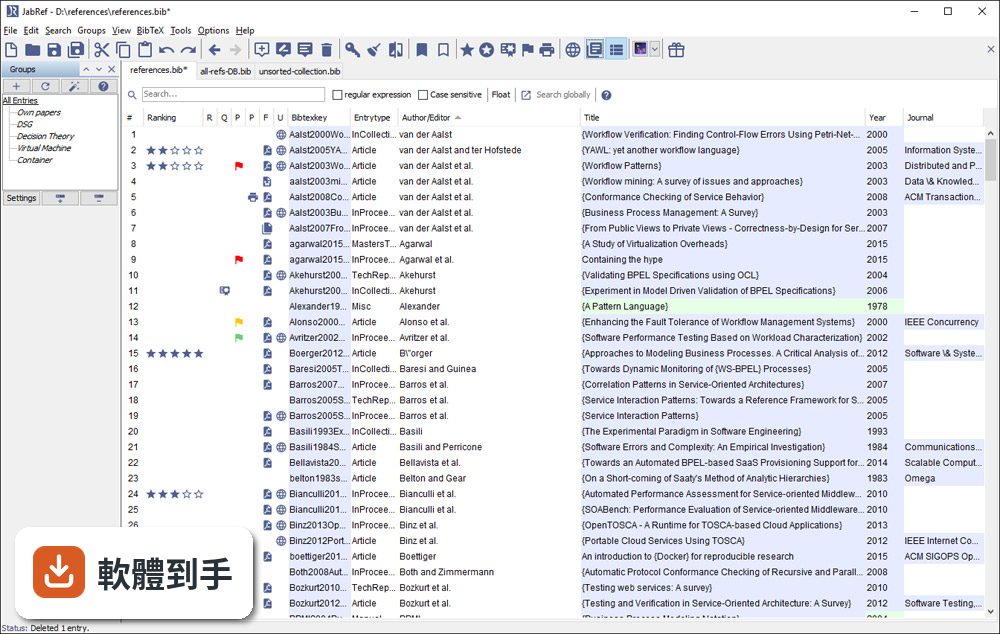
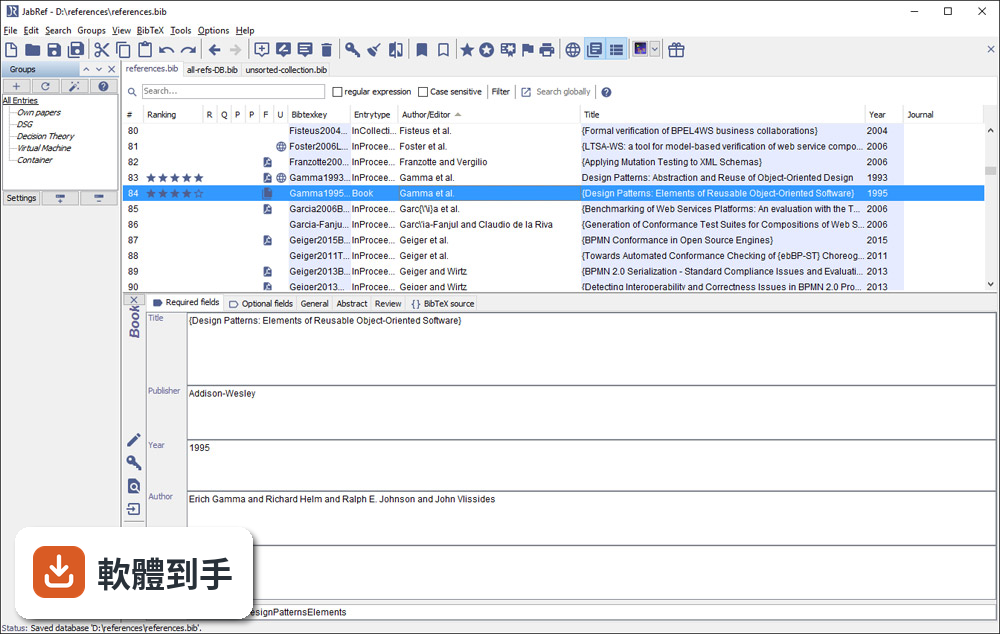
它是一套以 BibTeX 為基礎的文獻管理工具,主要功能是建立、編輯、整理書目資料庫。你可以手動新增條目,也可以從 DOI、ISBN 或線上資料庫自動抓取引用資訊。它支援 BibTeX 和 BibLaTeX 兩種格式,也能把 PDF 連結到對應的條目上,讓文獻庫不只是文字資料,還包含全文檔案。
02它可以從 Google Scholar 直接抓文獻資料嗎?
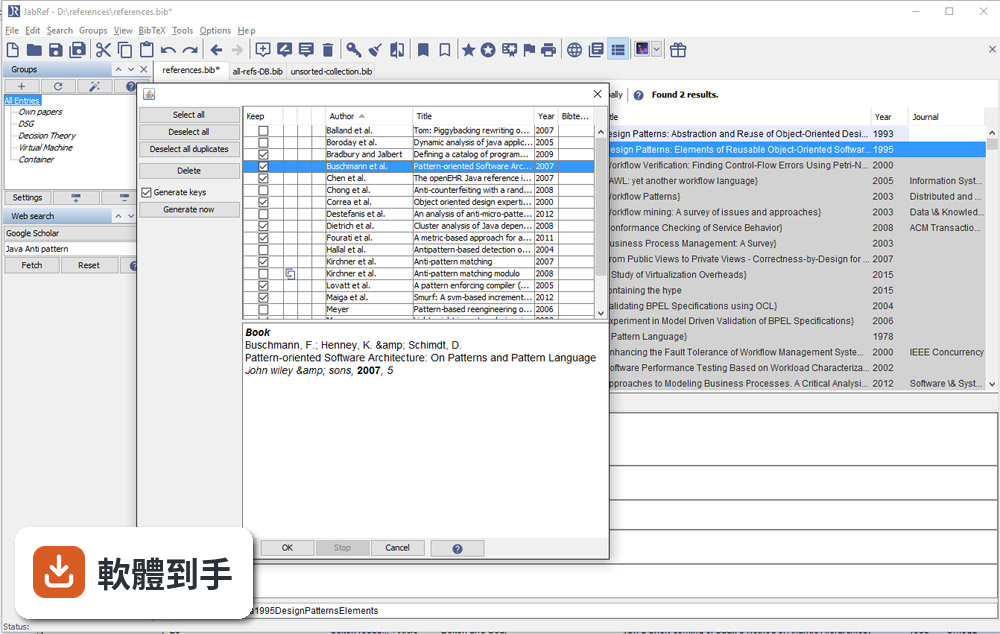
可以。官方說明指出它支援從 Google Scholar、PubMed 和 CrossRef 等學術資料庫檢索並匯入參考文獻。實際使用時,你可以在軟體內輸入關鍵字搜尋,找到後直接加入你的文獻庫,省去手動複製貼上條目的步驟。不過不同資料庫的匯入成功率可能會有差異,建議自己試過再決定主要用哪個來源。
03我有一堆 PDF 論文,它能幫我整理嗎?
它提供 PDF 與檔案連結功能,可以把全文 PDF 附加到對應的文獻條目上。另外有 metadata 擷取功能,能從 PDF 中自動讀取 DOI、ISBN 等資訊,再從線上資料庫補齊引用細節。這表示你不需要逐筆手動輸入,只要把 PDF 丟進去,它有機會自己找出這篇論文是誰寫的、發表在哪裡。
04在 Word 或 LibreOffice 裡寫論文,能用它插入引用嗎?
可以。JabRef 有直接與 Word 和 LibreOffice 整合的功能,可以在文件裡插入引用,並產生格式化書目。這對不用 LaTeX 的人來說是重要的替代路徑。不過要注意,它主要還是以 LaTeX 使用者為核心設計,Word 整合的完整度可能不如 Zotero 或 Mendeley 那類以 Word 為主的工具。
05多人一起寫論文,文獻庫要怎麼共用?
它沒有內建雲端同步功能,但官方說明提到可以把資料庫檔案放在 Dropbox、Google Drive 或 GitHub 上,透過雲端儲存或版本控制系統來同步。也就是說,共用方式是「檔案層級」的合作,不是多人同時編輯同一份資料庫。如果你需要即時協作,可能要考慮其他方案。
06我不用 LaTeX,只寫 Word 文件,適合用這套軟體嗎?
官方說明明確表示,它雖然主要為 LaTeX 使用者設計,但也支援將引用匯出到 Word 及其他格式。如果你只是偶爾需要插入引用,它可以用;但如果你整個寫作流程都依賴 Word,Zotero 或 Mendeley 的瀏覽器擴充功能和 Word 整合會更順手。JabRef 的優勢還是在 BibTeX 生態系裡。
07它介面只有英文,會不會很難上手?
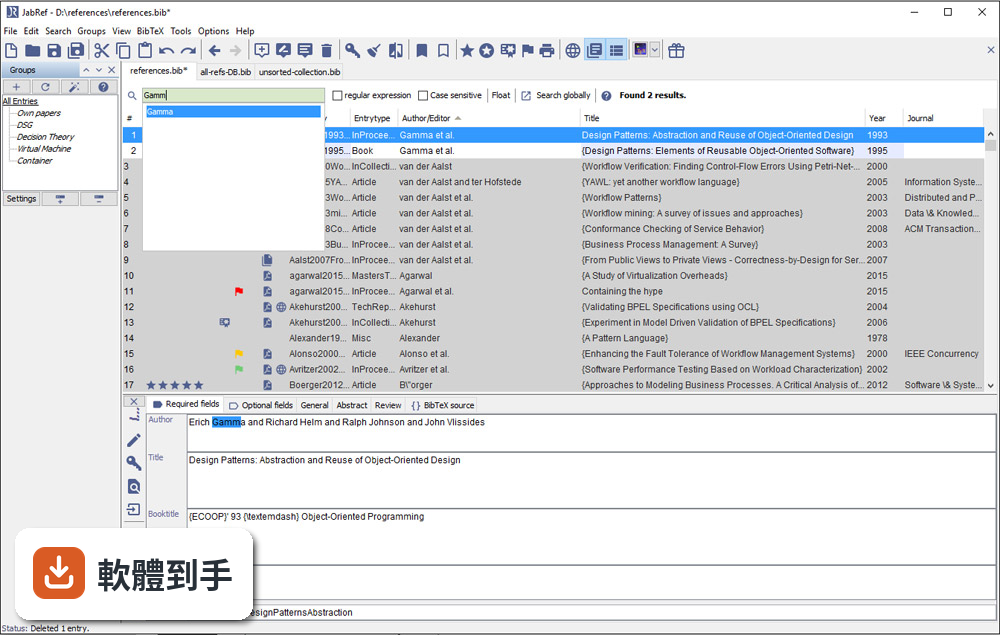
介面確實只有英文,但它的操作邏輯不算複雜:上方是工具列,中間是表格形式的文獻列表,右側是 metadata 面板。對習慣英文介面的人來說,學習成本不高。如果你對英文介面感到吃力,可以考慮 Zotero,它有完整的中文介面,社群文件也比較多。
08它跟 Zotero 比起來,主要差在哪?
兩者都是免費開源文獻管理工具,但定位不同。JabRef 以 BibTeX 為核心,適合 LaTeX 工作流程;Zotero 則以瀏覽器整合和 Word 外掛見長,對一般學術寫作更直覺。Zotero 有內建雲端同步(免費帳號有容量限制),JabRef 沒有。另外 Zotero 的 PDF 註記功能比 JabRef 完整,後者官方說明也承認這點是弱項。
09我習慣用瀏覽器擴充功能一鍵儲存網頁上的文獻,它能做到嗎?
官方功能說明中沒有提到瀏覽器擴充功能。它的匯入方式主要是從學術資料庫檢索、載入 BibTeX 檔案或手動輸入。如果你很依賴「在瀏覽器看到論文,一鍵存進文獻庫」的工作流程,Zotero 或 Mendeley 的瀏覽器外掛會更符合你的需求。JabRef 的匯入路徑比較偏向「先有條目,再整理」。
10它更新頻率好像不高,會不會有相容性問題?
根據版本紀錄,近 24 個月只有 1 次更新,確實不算頻繁。它需要 Java Runtime Environment 11 以上才能執行,如果你系統的 Java 版本太舊,可能無法啟動。另外它支援 Windows 10/11,官方也提供 Mac 和 Linux 版本。如果你擔心長期維護問題,可以觀察社群是否活躍,或考慮更新更頻繁的替代方案。
11我文獻量不大,大概幾十條而已,需要特別用工具管理嗎?
幾十條文獻用手動維護 .bib 檔還算可行,但如果你會持續累積,或需要從多個來源匯入資料,早點建立管理習慣會比較省事。JabRef 的學習曲線不算陡,安裝後把現有 .bib 檔載入就能開始用。不過如果你只是偶爾寫一篇短文,用純文字編輯器也夠用,不必多裝一套需要 Java 環境的軟體。
12這套軟體有內建雲端同步嗎?我需要在不同電腦間同步文獻庫。
沒有內建雲端同步。官方說明明確指出,它不提供雲端儲存功能,但你可以把資料庫檔案放在 Dropbox、Google Drive 或 GitHub 上自行同步。這表示你必須手動管理檔案版本,多人同時編輯時可能會有衝突。如果你需要無縫的跨裝置同步,Zotero 或 Mendeley 的內建同步功能會更省心。
下載與官方連結
JabRef_windows_3_6.exe · 25.43 MB · 連結指向軟體原廠
版本紀錄
- 2026-05-14 JabRef 6.0 Alpha 6 380 MB
- 2024-07-11 JabRef 5.15 196 MB
- 2024-07-09 JabRef 5.14 195 MB
再看 5 筆
- 2024-04-02 JabRef 5.13 196 MB
- 2023-12-25 JabRef 5.12 197 MB
- 2023-10-22 JabRef 5.11
- 2023-09-02 JabRef 5.10
- 2023-01-09 JabRef 5.9
這一版改了什麼
What's new in this version:
CHANGED:
- Extend the OpenConsoleFeature by offering a selection between default terminal emulator and configurable command execution.
- Implementation of shared database support (full system) with event based synchronization for MySQL, PostgreSQL and Oracle database systems.
- JabRef does no longer delete user comments outside of BibTeX entries and strings
- Hotkeys are now consistent
- Date layout formatter added
- Cleanup ISSN
- Selected field names are written in uppercase in the entry editor
- Added tooltip to web search button
- Added a button to open Database Properties dialog help
- The "etal"-string in the Authors layout formatter can now be empty
- Added EntryTypeFormatter to add camel casing to entry type in layouts, e.g., InProceedings
- Added print entry preview to the right click menu
- Added links to JabRef internet resources
- Added integrity check to avoid non-ASCII characters in BibTeX files
- Added ISBN integrity checker
- Added filter to not show selected integrity checks
- Automatically generated group names are now converted from LaTeX to Unicode
- Enhance the entry customization dialog to give better visual feedback
- Externally fetched information can be merged for entries with an ISBN
- Externally fetched information can be merged for entries with an ArXiv eprint
- File open dialogs now use default extensions as primary file filter
- For developers: Moved the bst package into logic. This requires the regeneration of antlr sources, execute: gradlew generateSource
- It is now possible to generate a new BIB database from the citations in an OpenOffice/LibreOffice document
- It is now possible to add your own lists of protected terms, see Options -> Manage protected terms
- Improve focus of the maintable after a sidepane gets closed (Before it would focus the toolbar or it would focus the wrong entry)
- Table row height is adjusted on Windows which is useful for high resolution displays
- The field name in the layout files for entry type is changed from bibtextype to entrytype. Please update your existing files as support for bibtextype will be removed eventually.
- The contents of crossref and related will be automatically updated if a linked entry changes key
- The information shown in the main table now resolves crossrefs and strings and it can be shown which fields are resolved in this way (Preferences -> Appearance -> Color codes for resolved fields)
- The formatting of the main table is based on the actual field shown when using e.g. title/author
- The arXiv fetcher now also supports free-text search queries
- Undo/redo are enabled/disabled and show the action in the tool tip
- Unified dialogs for opening/saving files
FIXED:
- Fixed: DOI in export filters
- Fixed: Preferences for the BibTeX key generator set in a version prior to 3.2 are now migrated automatically to the new version
- Fixed: S with caron does not render correctly
- Fixed: Newly opened bib-file is not focused
- Fixed: LaTeX commands in fields not displayed in the list of references
- Fixed: Save-Dialog for Lookup fulltext document now opens in the specified working directory
- Fixed: {} braces are now treated correctly in in author/editor
- Fixed: 'Get BibTeX data from DOI' Removes Marking
- Fixed: The word "Seiten" is automatically removed when fetching info from ISBN
- Fixed: relax can be used for abbreviation of author names
- Fixed: Import dialog is no longer hidden behind main window
- Fixed: LibreOffice: wrong numbers in citation labels
- Fixed: Adding a file to an entry opened dialog in the parent folder of the working directory
- Fixed: User comments (@Comment) with or without brackets are now kept
- Fixed: Google Scholar fetching works again.
- Fixed: Searching with double quotes in a specific field ignores the last character
- Fixed: Dialog for manual connection to OpenOffice/LibreOffice works again on Linux
- Fixed: An entry now must have a BibTeX key to be cited in OpenOffice/LibreOffice
- Fixed: "month" field ascending/descending sorting swapped
- Fixed: @-Symbols stored in BibTeX fields no longer break the database
- Fixed: BibLaTeX date field is now correctly exported as year in MS-Office 2007 xml format
- Fixed: Preview updated correctly when selecting a single entry after selecting multiple entries
- Fixed: Show all supported import types as default
- Fixed: Integrity check no longer removes URL field by mistake
- Fixed: LaTeX characters in author names are now converted to Unicode before export in MS-Office 2007 xml format
- Fixed: volume, journaltitle, issue and number(for patents) fields are now exported correctly in MS-Office 2007 xml format
- Fixed NullPointerException when clicking OK without specifying a field name in set/clear/rename fields
- Fixed IndexOutOfBoundsException when trying to download a full text document without selecting an entry
- Fixed NullPointerException when trying to set a special field or mark an entry through the menu without having an open database
- Fixed NullPointerException when trying to synchronize file field with an entry without BibTeX key
- Fixed NullPointerException when importing PDFs and pressing cancel when selecting entry type
- Fixed a number of issues related to accessing the GUI from outside the EDT
- Fixed NullPointerException when using BibTeX key pattern authFirstFull and the author does not have a "von"-part
- Fixed NullPointerException when opening Customize entry type dialog without an open database
- LaTeX to Unicode converter now handles combining accents
- Fixed NullPointerException when clicking Browse in Journal abbreviations with empty text field
- Fixed NullPointerException when opening file in Plain text import
- Fixed NullPointerException when appending database
- Fixed NullPointerException when loading a style file that has not got a default style
- Date fields in the BibLatex standard are now always formatted in the correct way, independent of the preferences
- The merge entry dialog showed wrong heading after merging from DOI
- Manage content selectors now saves edited existing lists again and only marks database as changed when the content selectors are changed
- When inserting a duplicate the right entry will be selected
- Preview panel height is now saved immediately, thus is shown correctly if the panel height is changed, closed and opened again
REMOVED:
- Removed the possibility to auto show or hide the groups interface
- It is not longer possible to choose to convert HTML sub- and superscripts to equations
- Removed option to open right-click menu with ctrl + left-click as it was not working
- Removed option to disable entry editor when multiple entries are selected as it was not working
- Removed option to show warning for empty key as it was not working
- Removed option to show warning for duplicate key as it was not working
- Removed preview toolbar (since long disabled)