
這是歷史版本頁面 — 看 JabRef 最新版本
寫 LaTeX 論文文獻亂糟糟?JabRef 能幫你整理什麼
 JabRef 3.7 (64-bit)
資料更新 2016-11-14
閱讀約 6 分鐘
你正在寫學術論文,手邊累積了幾十篇 PDF 和上百條參考文獻。過去你習慣把 BibTeX 條目直接貼進 .bib 檔,但現在條目一多,重複的 key、漏掉的欄位、格式不一致的引用,讓編譯時老是跳出警告。你想找個方式把這些文獻好好管起來,卻不確定該從哪裡下手。
手動維護 BibTeX 檔案不是不能做,只是當文獻量超過某個程度,出錯的機率會高到讓人煩躁。這類工具切入的點,是讓你把文獻資料集中在一處管理,用介面代替純文字編輯,再自動產生格式正確的引用條目。你不需要記住 BibTeX 語法,也不用擔心某條引用少了必要欄位。
01JabRef 到底能幫我做到什麼程度?
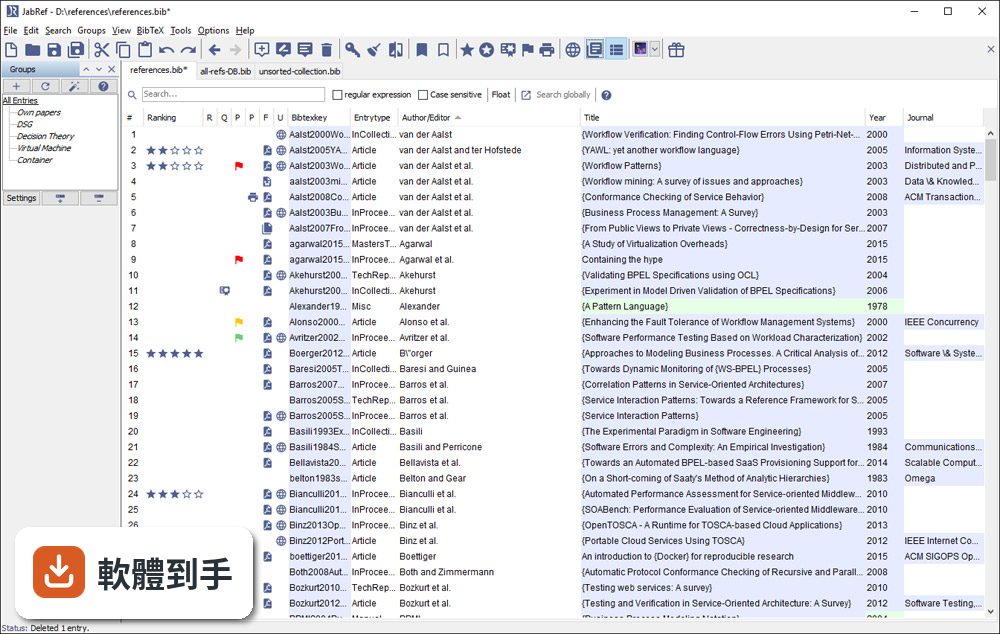
它是一套以 BibTeX 為基礎的文獻管理工具,主要功能是建立、編輯、整理書目資料庫。你可以手動新增條目,也可以從 DOI、ISBN 或線上資料庫自動抓取引用資訊。它支援 BibTeX 和 BibLaTeX 兩種格式,也能把 PDF 連結到對應的條目上,讓文獻庫不只是文字資料,還包含全文檔案。
02它可以從 Google Scholar 直接抓文獻資料嗎?
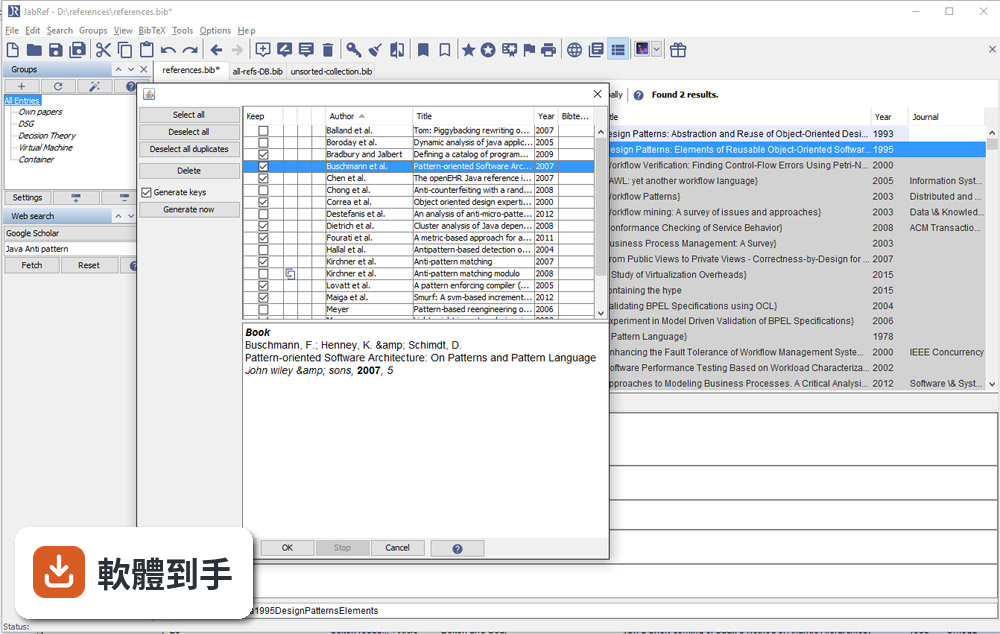
可以。官方說明指出它支援從 Google Scholar、PubMed 和 CrossRef 等學術資料庫檢索並匯入參考文獻。實際使用時,你可以在軟體內輸入關鍵字搜尋,找到後直接加入你的文獻庫,省去手動複製貼上條目的步驟。不過不同資料庫的匯入成功率可能會有差異,建議自己試過再決定主要用哪個來源。
03我有一堆 PDF 論文,它能幫我整理嗎?
它提供 PDF 與檔案連結功能,可以把全文 PDF 附加到對應的文獻條目上。另外有 metadata 擷取功能,能從 PDF 中自動讀取 DOI、ISBN 等資訊,再從線上資料庫補齊引用細節。這表示你不需要逐筆手動輸入,只要把 PDF 丟進去,它有機會自己找出這篇論文是誰寫的、發表在哪裡。
04在 Word 或 LibreOffice 裡寫論文,能用它插入引用嗎?
可以。JabRef 有直接與 Word 和 LibreOffice 整合的功能,可以在文件裡插入引用,並產生格式化書目。這對不用 LaTeX 的人來說是重要的替代路徑。不過要注意,它主要還是以 LaTeX 使用者為核心設計,Word 整合的完整度可能不如 Zotero 或 Mendeley 那類以 Word 為主的工具。
05多人一起寫論文,文獻庫要怎麼共用?
它沒有內建雲端同步功能,但官方說明提到可以把資料庫檔案放在 Dropbox、Google Drive 或 GitHub 上,透過雲端儲存或版本控制系統來同步。也就是說,共用方式是「檔案層級」的合作,不是多人同時編輯同一份資料庫。如果你需要即時協作,可能要考慮其他方案。
06我不用 LaTeX,只寫 Word 文件,適合用這套軟體嗎?
官方說明明確表示,它雖然主要為 LaTeX 使用者設計,但也支援將引用匯出到 Word 及其他格式。如果你只是偶爾需要插入引用,它可以用;但如果你整個寫作流程都依賴 Word,Zotero 或 Mendeley 的瀏覽器擴充功能和 Word 整合會更順手。JabRef 的優勢還是在 BibTeX 生態系裡。
07它介面只有英文,會不會很難上手?
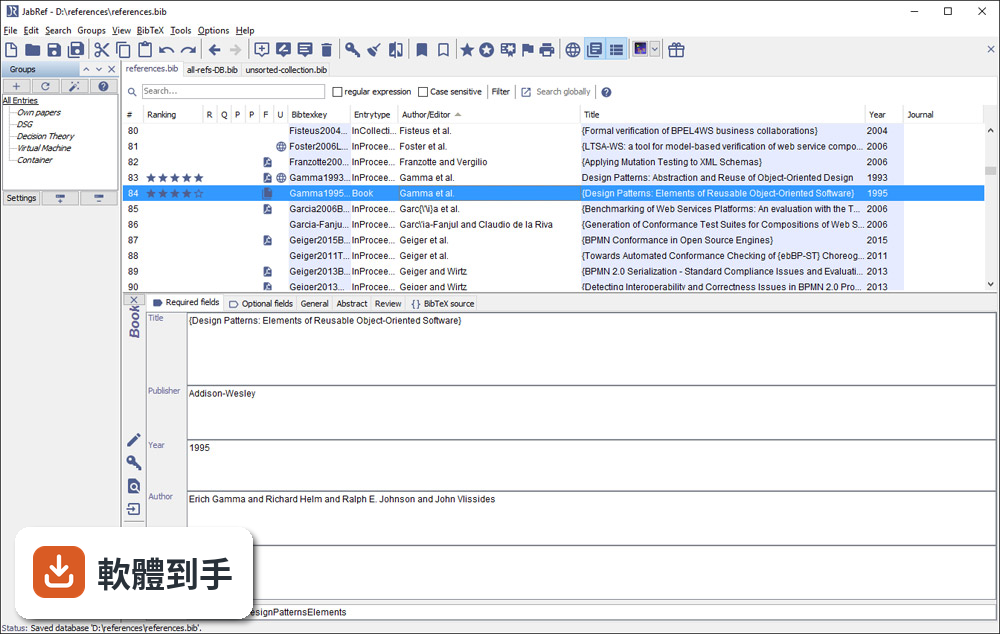
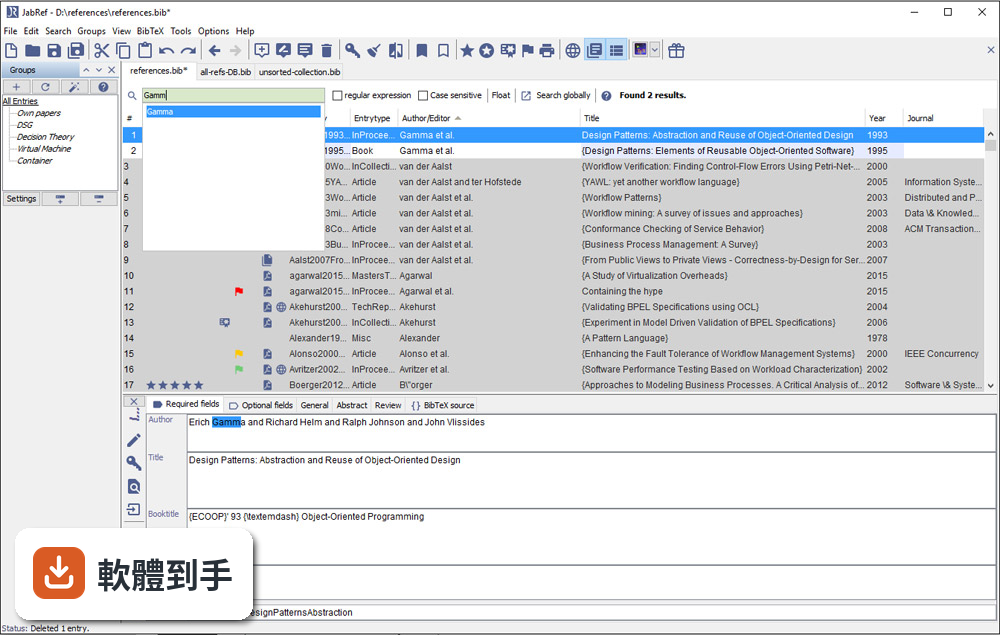
介面確實只有英文,但它的操作邏輯不算複雜:上方是工具列,中間是表格形式的文獻列表,右側是 metadata 面板。對習慣英文介面的人來說,學習成本不高。如果你對英文介面感到吃力,可以考慮 Zotero,它有完整的中文介面,社群文件也比較多。
08它跟 Zotero 比起來,主要差在哪?
兩者都是免費開源文獻管理工具,但定位不同。JabRef 以 BibTeX 為核心,適合 LaTeX 工作流程;Zotero 則以瀏覽器整合和 Word 外掛見長,對一般學術寫作更直覺。Zotero 有內建雲端同步(免費帳號有容量限制),JabRef 沒有。另外 Zotero 的 PDF 註記功能比 JabRef 完整,後者官方說明也承認這點是弱項。
09我習慣用瀏覽器擴充功能一鍵儲存網頁上的文獻,它能做到嗎?
官方功能說明中沒有提到瀏覽器擴充功能。它的匯入方式主要是從學術資料庫檢索、載入 BibTeX 檔案或手動輸入。如果你很依賴「在瀏覽器看到論文,一鍵存進文獻庫」的工作流程,Zotero 或 Mendeley 的瀏覽器外掛會更符合你的需求。JabRef 的匯入路徑比較偏向「先有條目,再整理」。
10它更新頻率好像不高,會不會有相容性問題?
根據版本紀錄,近 24 個月只有 1 次更新,確實不算頻繁。它需要 Java Runtime Environment 11 以上才能執行,如果你系統的 Java 版本太舊,可能無法啟動。另外它支援 Windows 10/11,官方也提供 Mac 和 Linux 版本。如果你擔心長期維護問題,可以觀察社群是否活躍,或考慮更新更頻繁的替代方案。
11我文獻量不大,大概幾十條而已,需要特別用工具管理嗎?
幾十條文獻用手動維護 .bib 檔還算可行,但如果你會持續累積,或需要從多個來源匯入資料,早點建立管理習慣會比較省事。JabRef 的學習曲線不算陡,安裝後把現有 .bib 檔載入就能開始用。不過如果你只是偶爾寫一篇短文,用純文字編輯器也夠用,不必多裝一套需要 Java 環境的軟體。
12這套軟體有內建雲端同步嗎?我需要在不同電腦間同步文獻庫。
沒有內建雲端同步。官方說明明確指出,它不提供雲端儲存功能,但你可以把資料庫檔案放在 Dropbox、Google Drive 或 GitHub 上自行同步。這表示你必須手動管理檔案版本,多人同時編輯時可能會有衝突。如果你需要無縫的跨裝置同步,Zotero 或 Mendeley 的內建同步功能會更省心。
下載與官方連結
JabRef_windows-x64_3_7.exe · 34.9 MB · 連結指向軟體原廠
版本紀錄
- 2026-05-14 JabRef 6.0 Alpha 6 380 MB
- 2024-07-11 JabRef 5.15 196 MB
- 2024-07-09 JabRef 5.14 195 MB
再看 5 筆
- 2024-04-02 JabRef 5.13 196 MB
- 2023-12-25 JabRef 5.12 197 MB
- 2023-10-22 JabRef 5.11
- 2023-09-02 JabRef 5.10
- 2023-01-09 JabRef 5.9
這一版改了什麼
What's new in this version:
Changed:
- Implementation of eventbased autosave and backup functionality and file synchronization for shared DBs. Related to #344
- Source tab in the entry editor displays "BibLaTeX Source" when using biblatex mode
- koppor#171: Add Shortcuts to context menu
- Add session restoring functionality for shared database. Related to #1703
- Implementation of LiveUpdate for PostgreSQL & Oracle systems. Related to #970.
- koppor#31: Number column in the main table is always Left aligned
- Added support for 1.0.1 CitationStyles
- You can set and cycle between different preview styles (including CitationStyles)
- Added fetcher for MathSciNet, zbMATH and Astrophysics Data System
- Improved search:
- Search queries consisting of a normal query and a field-based query are now supported (for example, JabRef AND author == you)
- Implemented #825: Search Bar across all bib files instead each having its own
- Implemented #573: Add key shortcut for global search (ctrl+shift+f, if the searchfield is empty it will be focused instead)
- The search result Window will now show which entry belongs to which bib file
- The search result Window will now remember its location
- The search result Window won't stay on top anymore if the main Window is focused and will be present in the taskbar
- The user can jump from the searchbar to the maintable with ctrl+enter
- Implemented #573 (comment): Added shortcut: closing the search result window with ctrl+w
- Added integrity check for fields with BibTeX keys, e.g., crossref and related, to check that the key exists
- Fields linking to other entries (e.g., crossref and related) have now specialized editors in the entry editor. Check the tabs "Other fields" and "General".
- #1496 Keep track of which entry a downloaded file belongs to
- Made it possible to download multiple entries in one action
- #1506 It is possible to apply two new key modifier title_case for Title Case, capitalize for Capitalized first character of each word (difference is that title case will leave prepositions etc in lower case), and sentence_case for normal sentence case (first word capitalized). In addition lower_case and upper_case can be used instead of lower and upper.
- Added two new pseudo-fields for search: anykeyword to search for a specific keyword and anyfield to search in all fields (useful in combination with search in specific fields)
- #1813 Import/Export preferences dialog default directory set to working directory
- #1897 Implemented integrity check for year field: Last four nonpunctuation characters should be numerals
- Address in MS-Office 2007 xml format is now imported as location
- #1912 Implemented integrity check for edition field: Should have the first letter capitalized (BibTeX), Should contain an integer or a literal (BibLaTeX)
- The dialog for choosing new entries additionally supports ID-based entry generation
- number field is now exported as number field in MS-Office 2007 xml format, if no issue field is present and the entry type is not patent
- note field is now exported as comments field in MS-Office 2007 xml format
- comments field in MS-Office 2007 xml format is now imported as note field
- #463: Disable menu-item and toolbar-buttons while no database is open
- Implemented integrity check for note and howpublished field: Should have the first letter capitalized (BibTeX)
- Pos1 / HOME now select the first/last entry in the main table and the search result frame.
- UP / Down / Tab / shift+Tab in the search result frame have now the same functionality as in the main table.
- Importer for MODS format added
- #2012 Implemented integrity check for month field: Should be an integer or normalized (BibLaTeX), Should be normalized (BibTeX)
- #1779 Implemented integrity check for bibtexkey field: Empty BibTeX key
- Prohibit more than one connections to the same shared database.
- Implemented integrity check for journaltitle field: BibLaTeX field only (BibTeX)
- #463: Disable certain menu items, toolbar buttons and context menu items while multiple entries are selected
- #490 Added right click menu to main table and entry editor to allow copying doi url
- #549 Added new shortcut to copy the BibTeX key as a hyperlink to its url to the clipboard
- Complete vietnam language translation in menu
- Generalize German translation of database into "Datenbank"
- Improve language quality of the German translation of shared database
- Change "Recent files" to "Recent databases" to keep the file menu consistent
- Customized importer files need to be slightly changed since the class ImportFormat was renamed to Importer
- koppor/#97: When importing preferences, the explorer will start where the preferences are last exported
- koppor#5 When entries are found while dropping a pdf with xmp meta data the found entries will be displayed in the import dialog
- koppor#61 Display gray background text in "Author" and "Editor" field to assist newcomers
- Updated Vietnamese translation
- Added greyed-out suggestion for year/date/url fields
- #1908 Add a shortcut for check integrity CTRL+F8
- When creatig an entry based on an ISBN, but the ISBN is not available on ebook.de, the error message is now more clear.
Fixed:
- Fixed problem where closing brackets could not be used as texts in layout arguments
- Fixed NullPointerException when opening search result window for an untitled database
- Fixed selecting an entry out of multiple duplicates
- Entries in the SearchResultPanel will be shown correctly (Latex to Unicode)
- Suggestions in the autocomplete will be shown correctly (Latex to Unicode)
- Selecting an entry in the search result Window will now select the correct entry in the bib file
- Suggestions in the autocomplete (search) are now in Unicode
- Entries in the SearchResultDialog are now converted to Unicode
- Fixed NullPointerException when opening search result window for an untitled database
- Fixed entry table traversal with Tab (no column traversal thus no double jump)
- Fixed: When searching the first match will be selected if the current selection is no match
- Fixed koppor#160: Tooltips now working in the main table
- Fixed koppor/#128: Sensible default settings for "Enable save actions" and "Cleanup"
- Fixed loop when pulling changes (shared database) when current selected field has changed
- Fixed field key field is not exported to MS-Office 2008 xml format
- Fixed field location containing only city is not exported correctly to MS-Office 2007 xml format
- Fixed close action of entry editor not working after parsing error corrected
- Fixed RTFChars would only use "?" for characters with unicode over the value of 127, now it uses the base character (é -> e instead of ?)
- Fixed download files failed silently when an invalid directory is selected
- Fixed InvalidBackgroundColor flickering with Ctrl-s and File > Save database
- Fixed file menu displays wrong hotkey in the German translation
- Fixed #617: Enter in global search opens the selected entry & Enter in search dialog window opens the selected entry
- Fixed #1181 and #1504: Improved "Normalize to BibTeX name format": Support separated names with commas and colons. Considered name affixes such as "Jr".
- Fixed #1235: Modified Key bindings do not work correctly
- Fixed #1542: Improved error messages when using fetcher
- Fixed #1663: Better multi-monitor support
- Fixed #1757: Crash after saving illegal argument in entry editor
- Fixed #1808: Font preference dialog now keeps changes
- Fixed #1882: Crash after saving illegal bibtexkey in entry editor
- Fixed #1937: If no help page for the current chosen language exists, the english help page will be shown
- Fixed #1949: Error message directs to the wrong preference tab
- Fixed #1958: Verbatim fields are no longer checked for HTML encoded characters by integrity checks
- Fixed #1993: Various optimizations regarding search performance
- Fixed #2021: All filetypes can be selected on MacOS again
- Fixed #2054: Ignoring a new version now works as expected
- Fixed #2060: Medline fetcher now imports data in UTF-8 encoding
- Fixed #2064: Not all other fields are shown on entry change of same type
- Fixed #2089: Fixed faulty cite key generation
- Fixed #2090: If special fields were not selected, two menu item separator were shown
- Fixed #2092: "None"-button in date picker clears the date field
- Fixed #2104: Crash after saving BibTeX source with parsing error
- Fixed #2109: Ctrl-S doesn't trigger parsing error message
- Fixed #2200: Sorting now uses the same unicode representation that is also used for showing the content in the maintable
- Fixed #2201 and #1825: Status of the Group panel is saved and reused for next startup of JabRef
- Fixed #2228: Fixed Medline fetcher no longer working. The fetcher now uses https for fetching
Removed:
- Removed 2nd preview style
- The non-supported feature of being able to define file directories for any extension is removed. Still, it should work for older databases using the legacy ps and pdf fields, although we strongly encourage using the file field.
- Automatic migration for the evastar_pdf field is removed.
- We removed the customizable "content selectors" since they are replaced by the auto-completion feature
- Removed optional fields from other fields (BibTeX), Removed deprecated fields from other fields (BibLaTeX)