
英文介面的專業剪輯軟體 Lightworks 免費版夠用嗎
 Lightworks 2026.1
資料更新 2026-10-23
閱讀約 7 分鐘
你手上有一批影片素材,可能是活動紀錄、上課內容或生活片段,想把它們剪成一支像樣的影片。你試過系統內建的照片應用程式,只能做最陽春的裁剪,連字幕都加不進去;你也想過找網路上那些號稱免費的剪輯軟體,但裝了之後才發現浮水印蓋在正中央,或是一匯出就鎖住進階功能。你只是想好好剪一支片,不是想跟軟體鬥智。
一般人遇到這種狀況,通常會先找免費軟體,但免費方案往往限制一堆,不是輸出解析度被鎖,就是功能精簡到連多軌都放不開。另一條路是直接上專業級工具,可是那價格和學習曲線又讓人卻步。於是市場上出現一類「從專業領域下放」的剪輯工具:它本來是給電影工業用的,但另外提供一個功能受限、卻足以完成日常剪輯工作的免費版本。這類軟體的切入點,是讓你在不花錢的前提下,先體驗專業剪輯流程的運作方式,再決定要不要為了解鎖更多功能而付費。
01Lightworks 免費版和付費版差在哪裡
官方說明指出,Lightworks 提供兩種授權:一種是免費的七天循環授權,安裝後註冊即可啟用;另一種是 Pro 付費授權,可選擇月費、年費或永久買斷。免費版可以正常使用剪輯功能,但輸出格式和解析度會受限,例如無法使用 AVID DNxHD、Panasonic、Sony 等廣播級格式,也不能輸出 AAF、EDL、XML 這類與其他軟體交換的專案檔。付費版才解鎖全部輸出選項,包括 4K 的 MPEG-4 和 DVD、Blu-ray 輸出。
02這套軟體能剪 4K 影片嗎
官方資料顯示,Lightworks 支援最高 4K 的影片解析度,並提供多種格式的輸出選項。但要注意,免費版的輸出格式和解析度會受到限制,官方說明中明確提到 4K 輸出是付費版的功能之一。如果你手上的素材是 4K 畫質,免費版可能可以匯入編輯,但最終要輸出成 4K 檔案時,就需要確認免費授權是否涵蓋,否則就得考慮付費方案。
03它有哪些內建特效和轉場可以用
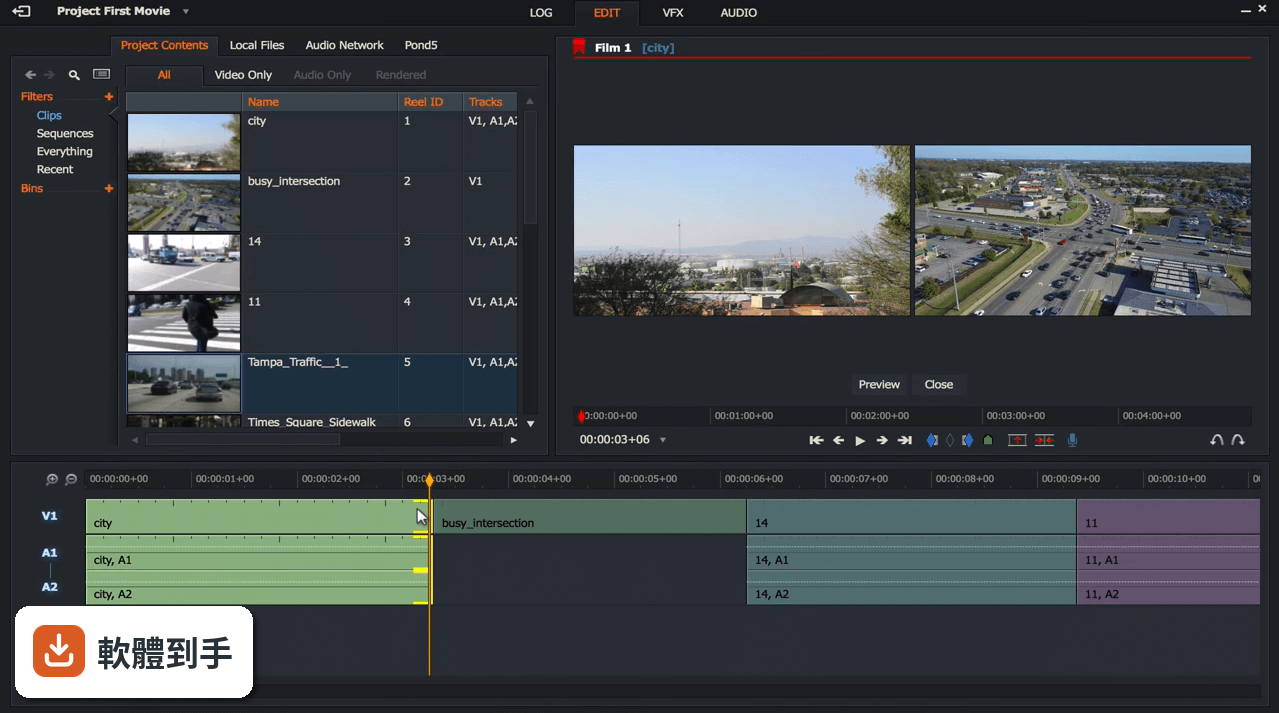
根據官方說明,Lightworks 內建超過 100 種影片特效和轉場,另外搭配 NewBlue TotalFX 工具包,提供超過 1,500 種預設效果,涵蓋字幕、穩定、轉場、濾鏡、背景產生器和影片特效。轉場部分有 69 種,加上 861 個預設可供選擇,包含 3D、燈光、色彩和動態等類型。這些特效在免費版中是否全部開放,官方資料沒有明確列出,需要實際安裝後確認。
04音訊編輯能做到什麼程度
官方說明中提到,Lightworks 具備進階音訊編輯功能,包括混音、即時音訊特效和精確的音訊同步。這表示你不只能把影片剪好,還能針對聲音做細部調整,例如把訪談的雜音處理掉、調整背景音樂的音量,或是讓多軌音訊精準對齊畫面。對於需要處理訪談、Podcast 或活動錄影的人來說,這些功能足以應付多數日常需求。
05剪好的影片可以直接上傳 YouTube 嗎
可以。官方說明指出,Lightworks 提供與 YouTube 和 Vimeo 的整合,可以直接從軟體內部上傳影片,不需要先輸出成檔案再手動上傳。這對經常發布影片到網路的人來說很方便,省去轉檔和上傳的步驟。不過要注意,免費版的輸出格式和解析度限制會影響上傳的畫質,如果要用 4K 上傳,還是得確認付費授權的涵蓋範圍。
06新手完全沒剪過片,用這套會太難嗎
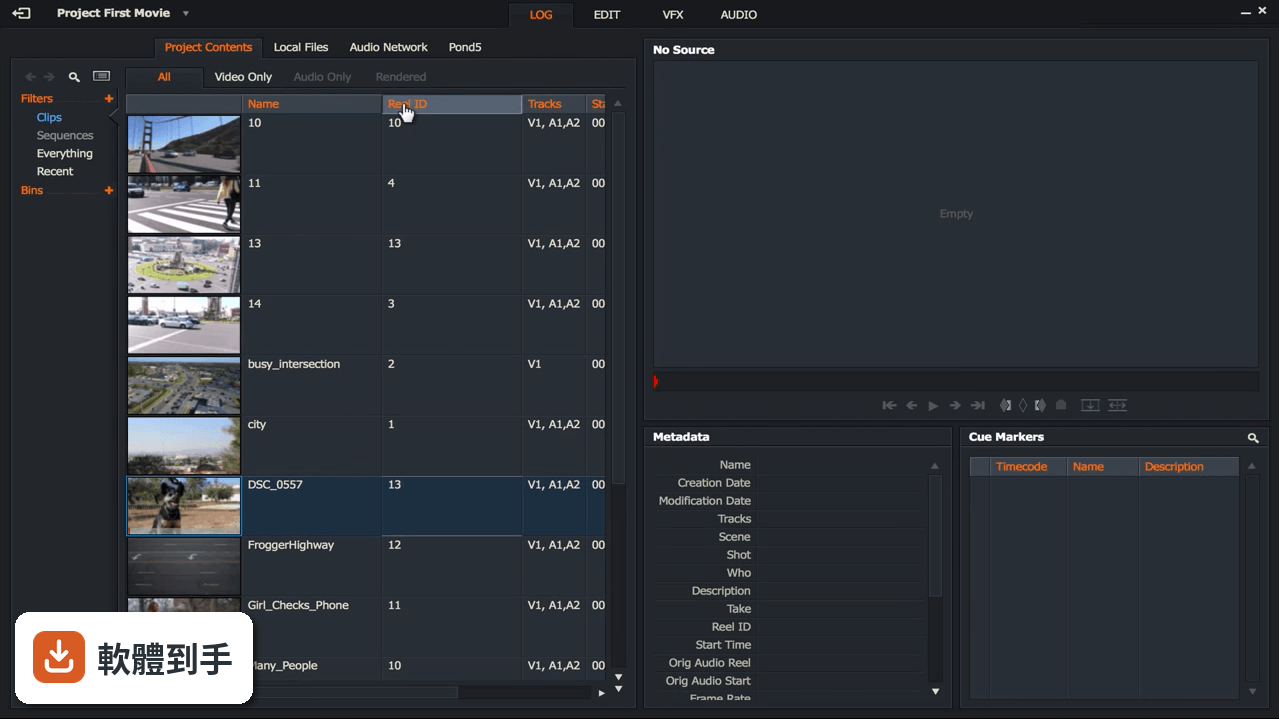
官方說明強調,Lightworks 不需要先備經驗或技術能力,介面設計是基於時間軸的剪輯方式,可以做逐格精確的編輯,適合從簡單的影片裁剪到複雜的製作。但這套軟體原本是專業領域使用的工具,操作邏輯和一般消費級軟體不同,新手需要花時間熟悉時間軸、軌道和工具列的概念。如果你完全沒碰過剪輯軟體,建議先看官方教學影片,或從簡單的專案開始練習。
07英文不好,介面只有英文會很卡嗎
Lightworks 的介面語言只有英文,官方資料沒有提到其他語系。如果你不熟悉英文介面,操作上會需要花額外時間查詢按鈕功能和選單名稱。剪輯軟體的功能名稱通常有固定用語,例如 timeline(時間軸)、trim(修剪)、export(輸出),這些詞彙學起來之後,往後用其他剪輯軟體也能通用。但如果完全看不懂英文,操作門檻會明顯提高,建議先確認自己能否接受全英文環境。
08這套軟體適合哪種人用
根據官方說明,Lightworks 的定位是從 YouTube 創作者到好萊塢專業人士都能使用的工具,強調具備專業級剪輯功能,包括即時特效、進階修剪和多機位編輯。適合需要精確控制剪輯細節、想要體驗專業剪輯流程的人,尤其是對輸出格式有特定要求、或需要與其他專業軟體交換專案檔的使用者。如果你只是偶爾剪個生活影片,這套軟體的功能可能超出你的需求。
09想要中文介面,這套適合嗎
不適合。Lightworks 的介面語系只有英文,官方資料中沒有提供中文選項。如果你需要中文介面才能順利操作,這套軟體會讓你花很多時間在理解選單和按鈕上,而不是專注在剪輯本身。市面上有其他免費剪輯軟體提供中文介面,例如 VSDC Free Video Editor 或 VideoPad Video Editor,雖然功能定位不同,但至少語言門檻較低,可以考慮先從那些軟體開始。
10免費版輸出影片有什麼限制
官方說明指出,免費版採用七天循環授權,註冊後即可使用,但輸出選項會受限。具體來說,付費版才能解鎖所有輸出格式,包括 AVID DNxHD、Panasonic、Sony、AVCHD、MOV、MXF、AVI 等廣播級格式,以及 4K 的 MPEG-4 輸出。免費版的輸出格式和解析度上限,官方資料沒有明確列出,需要安裝後實際測試,或到官方網站查閱最新的授權比較表。
11這套軟體更新頻率如何
根據收錄的版本紀錄,Lightworks 從 2021 年 7 月到 2025 年 11 月之間共收錄 8 個版本,近 12 個月更新 1 次,近 24 個月更新 2 次。以這個頻率來看,它不算頻繁更新的軟體,但也不是完全停擺。如果你很在意軟體是否持續獲得修補和功能更新,這個更新節奏可以作為參考,但實際情況還是要以官方發布為準。
12和 VSDC、VideoPad 比起來,這套的定位有什麼不同
這三套都是免費或提供免費版本的剪輯軟體,但定位不同。Lightworks 強調專業級功能,例如多機位編輯、逐格精確修剪、與 Media Composer、ProTools、FCP、Resolve 等軟體的專案交換能力,這是它與其他免費軟體最大的差異。VSDC 和 VideoPad 的評分人數分別是 192 人和 161 人,比 Lightworks 的 75 人多,表示有較多使用者實際體驗過。如果你需要的是專業工作流程,Lightworks 的切入點不同;如果只是要順手好用的免費剪輯工具,另外兩套可能更親民。
下載與官方連結
Lightworks-2026.1.0.exe · 105 MB · 連結指向軟體原廠
版本紀錄
- 2026-10-23 Lightworks 2026.1 105 MB
- 2025-11-27 Lightworks 2025.2 97.2 MB
- 2025-01-14 Lightworks 2025.1 106 MB
再看 5 筆
- 2023-12-06 Lightworks 2023.2 99.2 MB
- 2023-02-04 Lightworks 2023.1
- 2022-08-12 Lightworks 2022.3
- 2022-04-07 Lightworks 2022.2
- 2022-01-04 Lightworks 2022.1.1
這一版改了什麼
Their edit, their rules. Creates, defines, and adjusts workspace layouts to maximize their edit.
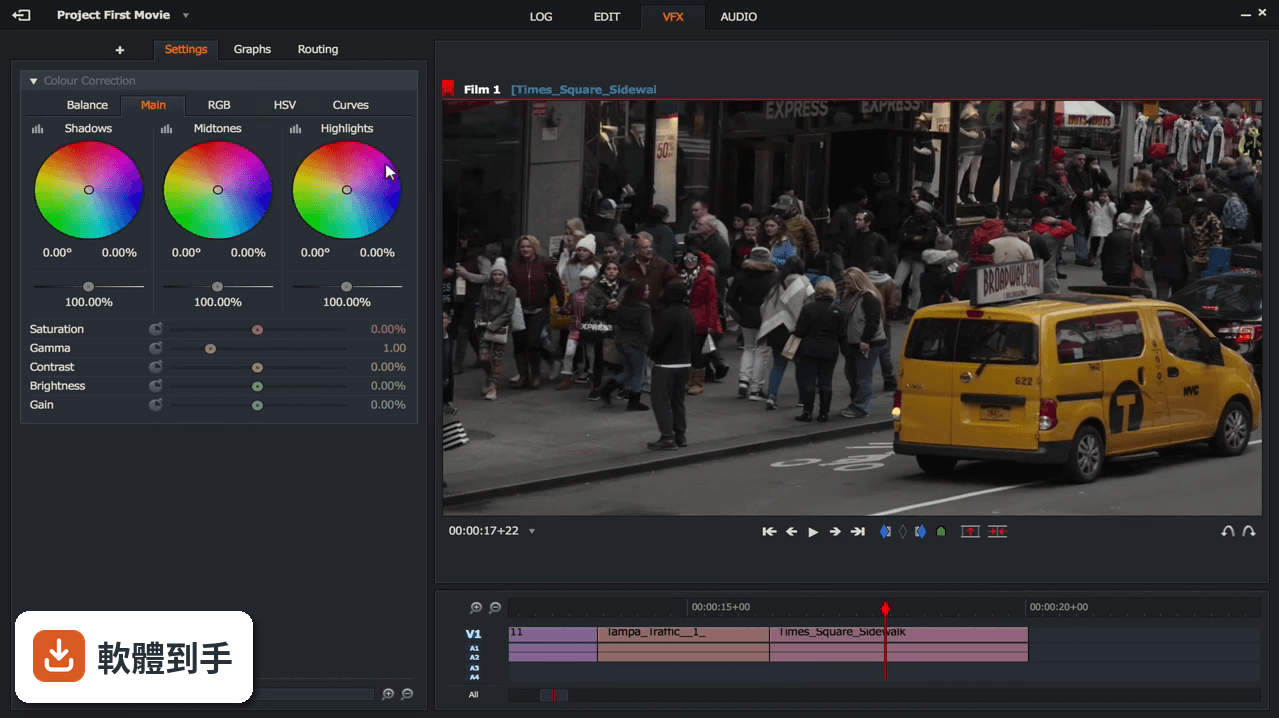
Maximizes color with HDR workflows
Gets the most from their footage by utilizing the full range of color and contrast available.
Controls their VFX with video mask effects
Creates and improves a variety of professional-quality effects and adjustments.
Sounds better than ever with improved audio
They've made further improvements to their audio suite to help their project sound its best.
Sprinkles some magic with video FX improvements
Enhancements to the VFX toolset mean it's easier than ever to add visual effects to their production.
Looks good with an improved UI
They've made a host of big and small upgrades to the user interface.
User Interface
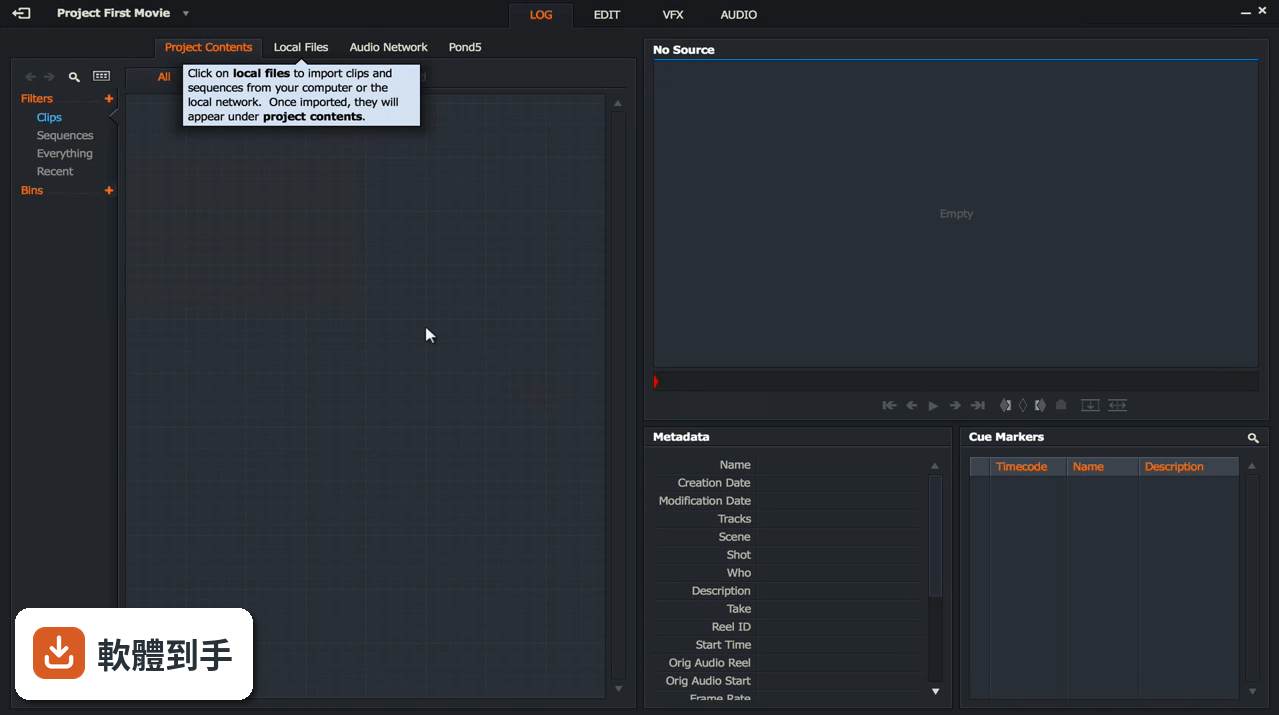
The user interface is designed with professionals in mind. While it may seem intimidating for beginners, it offers a comprehensive set of tools and a customizable layout that can be tailored to your workflow.
The dark-themed interface is easy on the eyes during long editing sessions, and the various panels for editing, effects, and media management are logically organized.
Installation and Setup
Installation: Downloading and installing the program is a straightforward process. The software is available on the official website and can be installed with a few clicks.
Setup: Upon first launch, it guides you through project settings and initial configuration, making it user-friendly even for newcomers to video editing.
How to Use
Import Media: Start by importing your video and audio clips into the media pool.
Edit on the Timeline: Drag and drop your clips onto the timeline to start editing. Use the timeline tools for precise trimming, cutting, and arranging.
Add Effects and Transitions: Enhance your video with built-in effects and transitions. It provides a wide range of options.
Audio Editing: Fine-tune your audio using the audio tools, including mixing and applying audio effects.
Export Your Project: When you're satisfied with your project, export it in your preferred format and resolution.
FAQ
Is Lightworks FREE to use?
Yes, it offers a free version with limitations on export formats and output resolution. A Pro version with additional features is also available for a subscription fee.
What are the system requirements for Lightworks?
Lightworks' system requirements vary based on the platform. Generally, it requires a multi-core CPU, dedicated GPU, and a minimum of 4GB RAM. Detailed specifications can be found on their website.
Can I use Lightworks for professional video production?
Yes, many professional filmmakers and editors use the software for video production. Its feature set and flexibility make it a viable option for professional work.
Does Lightworks support third-party plugins?
Yes, it supports third-party plugins, allowing users to expand its capabilities with additional effects and transitions.
How do I get support for Lightworks-related issues?
It offers a community forum and comprehensive online documentation. Paid users can access dedicated support through the Pro version.
Alternatives
Adobe Premiere Pro: A widely-used professional video editing software with a broad range of features, known for its seamless integration with other Adobe products.
Filmora: Easy video editor everyone can use, support 800+ effects & 50+ formats!
DaVinci Resolve: Offers professional-grade video editing, color correction, and audio post-production in a single software, available in both free and paid versions.
HitFilm: A free video editing and VFX software that's suitable for both beginners and advanced users.
Pricing
Lightworks Free - Best for newbies and anyone who needs to be able to easily cut & edit video clips together.
- Now comes with a 90 day renewable license
- Now includes the ability to render in the timeline
- Includes free Transitions FX pack from NewBlue.
Best for YouTubers, gamers and anyone who wants to do more more than cut clips together.
Lightworks PRO - $23.99 user / mo
Best for film makers, broadcasters or anyone who wants to be one. Hollywood-level editing.
Includes
- Timeline Editing
- Automatic Saving
- Advanced Transitions
- Simple VFX
- 4K Video Export
- Social Media Templates
- NewBlue Titler Pro
- Dynamic Motion Graphics
- Powerful Colour Controls
- Advanced Audio EQ
- Quick LUT Support
- High Res Proxy Editing
- High Res Timeline Rendering
- 10-Bit Support
- Audio and Video Plugin Support
- Increased File Formats
- Advanced Video Effects
- Custom Format Creation
- Support for NewBlue TotalFX
- Export Interchange Formats
- Advanced Colour Scopes
- In Timeline QC
- Cloud Export/Upload
- OS: Windows 11, 10, 8 or 7 (64-bit)
- Multi-core CPU
- At least 4GB RAM (8GB+ recommended)
- Dedicated GPU with DirectX 9 support
- Professional-grade video editing capabilities
- Frame-accurate editing
- Real-time effects and transitions
- Multi-platform support
- Integration with popular online platforms
- Advanced audio editing features
- Steeper learning curve for beginners
- Free version limitations on export formats and resolution
- Can be resource-intensive on lower-end systems
Lightworks is a formidable video editing software solution that caters to both novice editors and professionals. With its powerful editing features, real-time effects, and flexible export options, it competes well with other industry-standard tools. The availability of a free version makes it accessible to a broader user base, while the Pro version offers additional advanced capabilities for those who require them.
If you're willing to invest time in mastering its interface, it can be an excellent choice for your video editing needs, delivering impressive results that stand up to industry standards.
Note: Limited functionality in demo version.
Also Available: Download Lightworks for Mac
Download Lightworks Latest Version Why is this app published on FileHorse? (More info)