
這是歷史版本頁面 — 看 Lightworks 最新版本
英文介面的專業剪輯軟體 Lightworks 免費版夠用嗎
 Lightworks 2021.2.1
資料更新 2021-07-12
閱讀約 7 分鐘
你手上有一批影片素材,可能是活動紀錄、上課內容或生活片段,想把它們剪成一支像樣的影片。你試過系統內建的照片應用程式,只能做最陽春的裁剪,連字幕都加不進去;你也想過找網路上那些號稱免費的剪輯軟體,但裝了之後才發現浮水印蓋在正中央,或是一匯出就鎖住進階功能。你只是想好好剪一支片,不是想跟軟體鬥智。
一般人遇到這種狀況,通常會先找免費軟體,但免費方案往往限制一堆,不是輸出解析度被鎖,就是功能精簡到連多軌都放不開。另一條路是直接上專業級工具,可是那價格和學習曲線又讓人卻步。於是市場上出現一類「從專業領域下放」的剪輯工具:它本來是給電影工業用的,但另外提供一個功能受限、卻足以完成日常剪輯工作的免費版本。這類軟體的切入點,是讓你在不花錢的前提下,先體驗專業剪輯流程的運作方式,再決定要不要為了解鎖更多功能而付費。
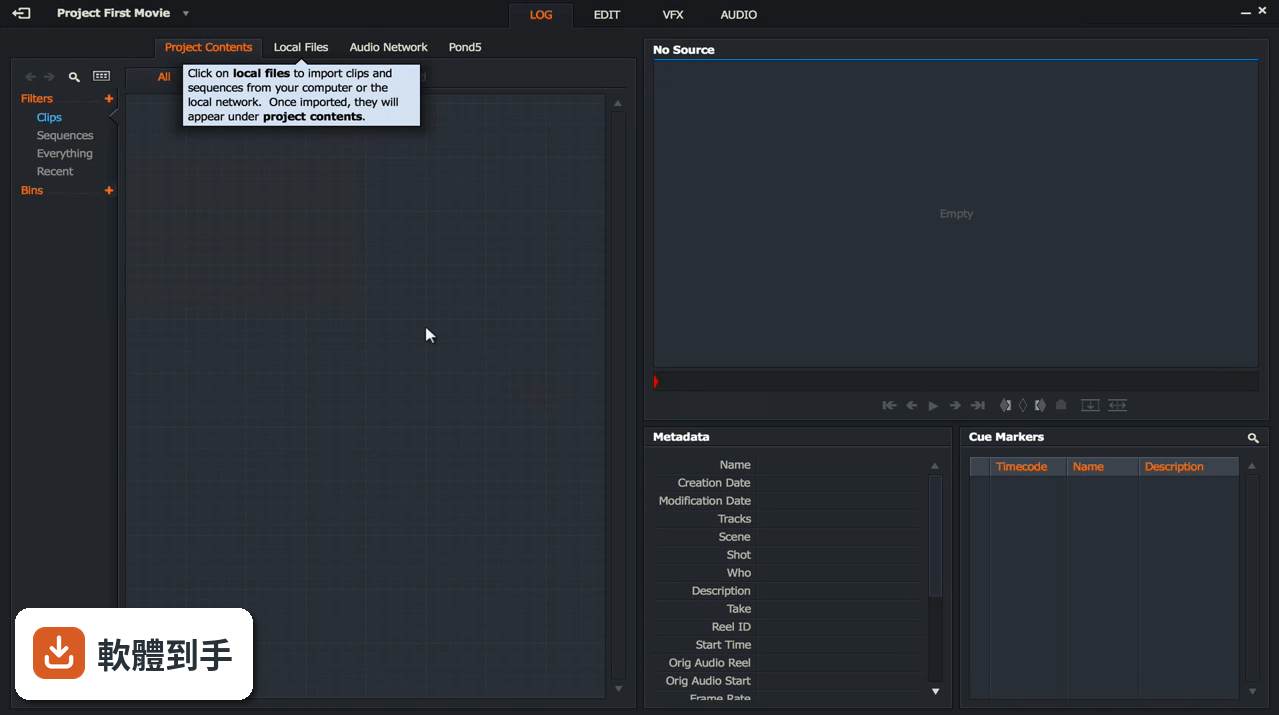
01Lightworks 免費版和付費版差在哪裡
官方說明指出,Lightworks 提供兩種授權:一種是免費的七天循環授權,安裝後註冊即可啟用;另一種是 Pro 付費授權,可選擇月費、年費或永久買斷。免費版可以正常使用剪輯功能,但輸出格式和解析度會受限,例如無法使用 AVID DNxHD、Panasonic、Sony 等廣播級格式,也不能輸出 AAF、EDL、XML 這類與其他軟體交換的專案檔。付費版才解鎖全部輸出選項,包括 4K 的 MPEG-4 和 DVD、Blu-ray 輸出。
02這套軟體能剪 4K 影片嗎
官方資料顯示,Lightworks 支援最高 4K 的影片解析度,並提供多種格式的輸出選項。但要注意,免費版的輸出格式和解析度會受到限制,官方說明中明確提到 4K 輸出是付費版的功能之一。如果你手上的素材是 4K 畫質,免費版可能可以匯入編輯,但最終要輸出成 4K 檔案時,就需要確認免費授權是否涵蓋,否則就得考慮付費方案。
03它有哪些內建特效和轉場可以用
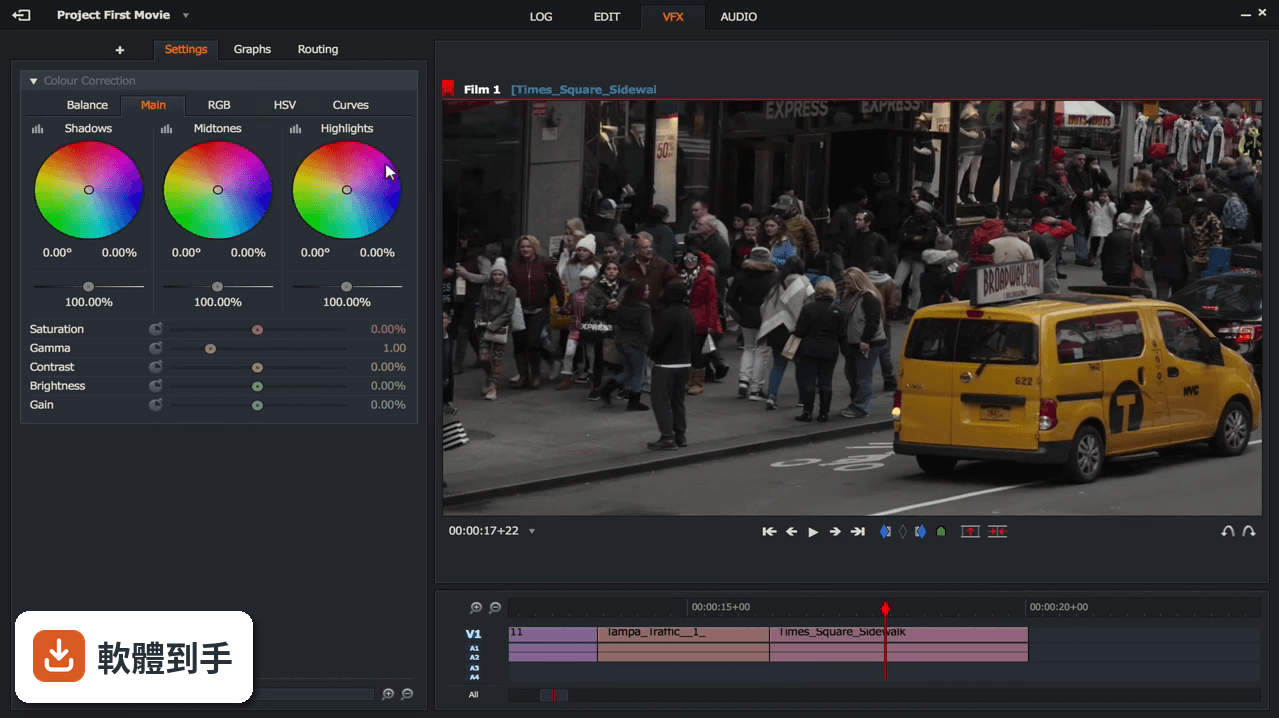
根據官方說明,Lightworks 內建超過 100 種影片特效和轉場,另外搭配 NewBlue TotalFX 工具包,提供超過 1,500 種預設效果,涵蓋字幕、穩定、轉場、濾鏡、背景產生器和影片特效。轉場部分有 69 種,加上 861 個預設可供選擇,包含 3D、燈光、色彩和動態等類型。這些特效在免費版中是否全部開放,官方資料沒有明確列出,需要實際安裝後確認。
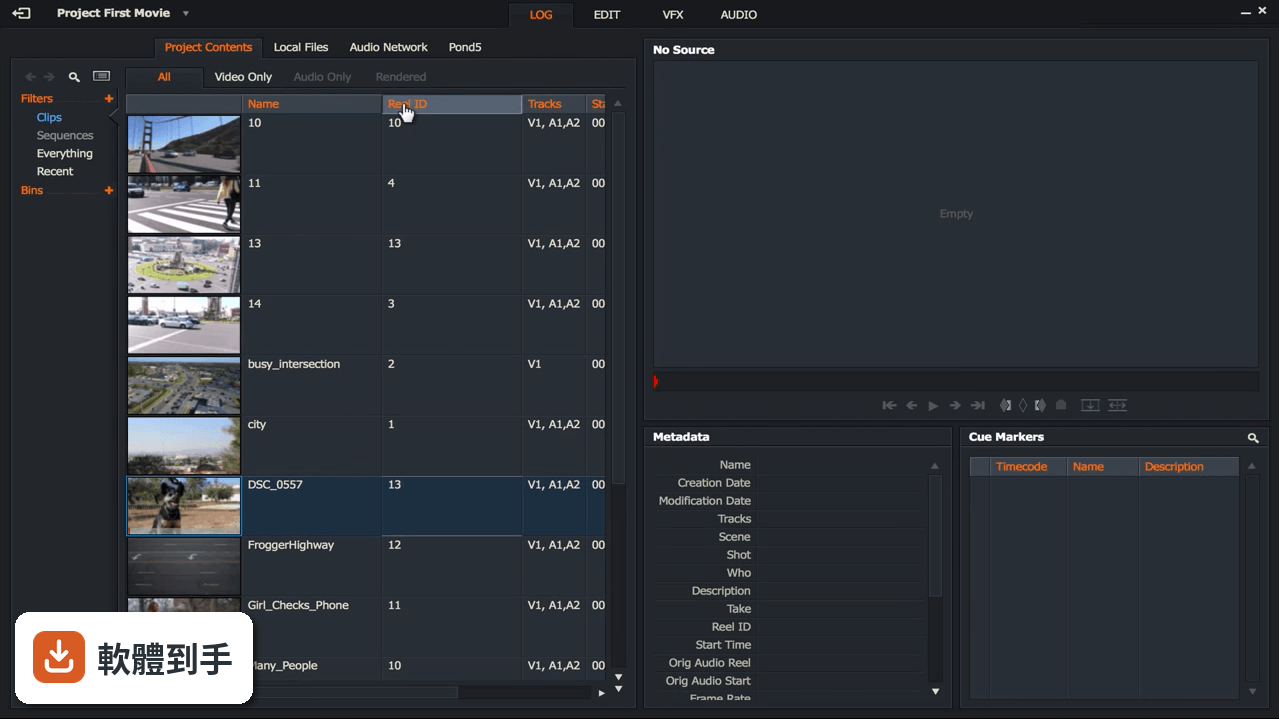
04音訊編輯能做到什麼程度
官方說明中提到,Lightworks 具備進階音訊編輯功能,包括混音、即時音訊特效和精確的音訊同步。這表示你不只能把影片剪好,還能針對聲音做細部調整,例如把訪談的雜音處理掉、調整背景音樂的音量,或是讓多軌音訊精準對齊畫面。對於需要處理訪談、Podcast 或活動錄影的人來說,這些功能足以應付多數日常需求。
05剪好的影片可以直接上傳 YouTube 嗎
可以。官方說明指出,Lightworks 提供與 YouTube 和 Vimeo 的整合,可以直接從軟體內部上傳影片,不需要先輸出成檔案再手動上傳。這對經常發布影片到網路的人來說很方便,省去轉檔和上傳的步驟。不過要注意,免費版的輸出格式和解析度限制會影響上傳的畫質,如果要用 4K 上傳,還是得確認付費授權的涵蓋範圍。
06新手完全沒剪過片,用這套會太難嗎
官方說明強調,Lightworks 不需要先備經驗或技術能力,介面設計是基於時間軸的剪輯方式,可以做逐格精確的編輯,適合從簡單的影片裁剪到複雜的製作。但這套軟體原本是專業領域使用的工具,操作邏輯和一般消費級軟體不同,新手需要花時間熟悉時間軸、軌道和工具列的概念。如果你完全沒碰過剪輯軟體,建議先看官方教學影片,或從簡單的專案開始練習。
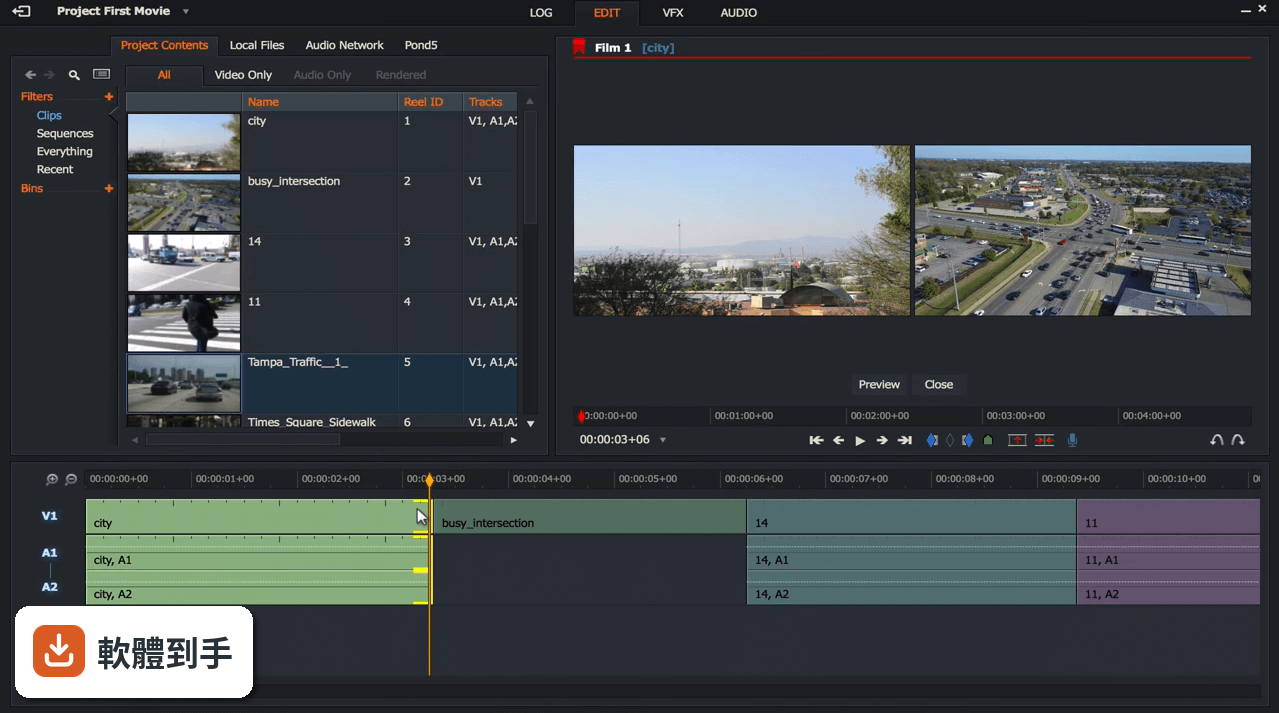
07英文不好,介面只有英文會很卡嗎
Lightworks 的介面語言只有英文,官方資料沒有提到其他語系。如果你不熟悉英文介面,操作上會需要花額外時間查詢按鈕功能和選單名稱。剪輯軟體的功能名稱通常有固定用語,例如 timeline(時間軸)、trim(修剪)、export(輸出),這些詞彙學起來之後,往後用其他剪輯軟體也能通用。但如果完全看不懂英文,操作門檻會明顯提高,建議先確認自己能否接受全英文環境。
08這套軟體適合哪種人用
根據官方說明,Lightworks 的定位是從 YouTube 創作者到好萊塢專業人士都能使用的工具,強調具備專業級剪輯功能,包括即時特效、進階修剪和多機位編輯。適合需要精確控制剪輯細節、想要體驗專業剪輯流程的人,尤其是對輸出格式有特定要求、或需要與其他專業軟體交換專案檔的使用者。如果你只是偶爾剪個生活影片,這套軟體的功能可能超出你的需求。
09想要中文介面,這套適合嗎
不適合。Lightworks 的介面語系只有英文,官方資料中沒有提供中文選項。如果你需要中文介面才能順利操作,這套軟體會讓你花很多時間在理解選單和按鈕上,而不是專注在剪輯本身。市面上有其他免費剪輯軟體提供中文介面,例如 VSDC Free Video Editor 或 VideoPad Video Editor,雖然功能定位不同,但至少語言門檻較低,可以考慮先從那些軟體開始。
10免費版輸出影片有什麼限制
官方說明指出,免費版採用七天循環授權,註冊後即可使用,但輸出選項會受限。具體來說,付費版才能解鎖所有輸出格式,包括 AVID DNxHD、Panasonic、Sony、AVCHD、MOV、MXF、AVI 等廣播級格式,以及 4K 的 MPEG-4 輸出。免費版的輸出格式和解析度上限,官方資料沒有明確列出,需要安裝後實際測試,或到官方網站查閱最新的授權比較表。
11這套軟體更新頻率如何
根據收錄的版本紀錄,Lightworks 從 2021 年 7 月到 2025 年 11 月之間共收錄 8 個版本,近 12 個月更新 1 次,近 24 個月更新 2 次。以這個頻率來看,它不算頻繁更新的軟體,但也不是完全停擺。如果你很在意軟體是否持續獲得修補和功能更新,這個更新節奏可以作為參考,但實際情況還是要以官方發布為準。
12和 VSDC、VideoPad 比起來,這套的定位有什麼不同
這三套都是免費或提供免費版本的剪輯軟體,但定位不同。Lightworks 強調專業級功能,例如多機位編輯、逐格精確修剪、與 Media Composer、ProTools、FCP、Resolve 等軟體的專案交換能力,這是它與其他免費軟體最大的差異。VSDC 和 VideoPad 的評分人數分別是 192 人和 161 人,比 Lightworks 的 75 人多,表示有較多使用者實際體驗過。如果你需要的是專業工作流程,Lightworks 的切入點不同;如果只是要順手好用的免費剪輯工具,另外兩套可能更親民。
下載與官方連結
ightworks_2021.2_r128456_64bit_setup.exe · 連結指向軟體原廠
版本紀錄
- 2026-10-23 Lightworks 2026.1 105 MB
- 2025-11-27 Lightworks 2025.2 97.2 MB
- 2025-01-14 Lightworks 2025.1 106 MB
再看 5 筆
- 2023-12-06 Lightworks 2023.2 99.2 MB
- 2023-02-04 Lightworks 2023.1
- 2022-08-12 Lightworks 2022.3
- 2022-04-07 Lightworks 2022.2
- 2022-01-04 Lightworks 2022.1.1
這一版改了什麼
What's new in this version:
Lightworks 2021.2.1 (64-bit)
- No changelog available for this version
Lightworks 2021.2 (64-bit)
Main Features:
Sequence Export Improvements:
- This latest release adds intelligence to the export panel allowing you to easily see what format option your sequence can be exported as, even allowing you to export if the exact sequence frame rate is not allowed/supported.
- Any export options that cannot generate the chosen aspect ratio are now clearly marked in red on the export panel and if chosen, show a helpful explanatory message regarding what will happen.
Transition Appearance Improvements:
- Lightworks 2021.2 shows a much better representation of the transition and what media is available on either side of the cut. The image below shows the standard transition over two clips that have enough media available.
- In previous versions of Lightworks (prior to 2021.2) this would have looked the same had there not been enough media present. Lightworks now provides a clear indication that the incoming clip does not have enough media present to perform the transition (the red line and darker grey section) This indicates that playback will be incorrect over this section, giving you a clear warning that the effect needs adjustment.
Subtitle Workflow:
- Using a combination of ranged Cue Markers and BITC (Burnt in Timecode) functionality now performs a subtitle workflow. Simply mark and park the section where you want the subtitle to appear and click the Cue Marker icon (keyboard shortcut 'm')
- In the ‘Description’ field of the Cue Marker, type the text you want to appear.
- Open the BITC tab, select the ‘Sequence’ subtab and enable the ‘Cue description’ label. This then displays the Cue Marker text on the sequence viewer which can be modified as desired, change the font, size, colour, background colour, position and more.
- This can be done throughout the entire sequence and the best part is with 2021.2 you can now export the Cue Marker list as the Subtitle SRT format, which can be shared and imported into other applications such as Davinci Resolve.
Find: Clip References Improvements:
- One of the extremely powerful features of the Lightworks application is the ability to search through a sequence and generate results based purely on the search criteria, to either highlight the matches, create a bin of matches, or create an entirely new sequence that contains just the sections that match the search criteria, removing everything else.
In Lightworks 2021.2 the ‘Jump to’ options have been restored and new search criteria has been added to make it even easier to find or create results based on these new options:
- All the Segments within your sequence with or without “Effects” can now be searched for and the results displayed as required. To narrow down the search simply deselect the Video or Audio tracks on the sequence timeline.
- Need to see if there is media offline in a large sequence? Set the ‘Media’ search option to ‘Without’ select the “Create bin of matches’ results option and click ‘Search’ all the clips within the sequence that are missing media will appear within a new Bin, simply right click the bin and select: Media->Repair to fix all the offline media within the sequence.
- Deactivated multiple clips within your sequence but you don’t remember which ones? Set the ‘Active’ search option to ‘No’ select the “Highlight matches’ results option and click ‘Search’ all the deactivated clips within the sequence will show with a yellow border, all of which can be reactivated with a single keypress.
- Just want to see the segments within your sequence that contains Cue Markers? Set the ‘Cue Marker’ search option to ‘With’ select the ‘Create sequence of matches’ results option and click ‘Search’ A new sequence will be created instantly containing just the areas of the sequence where Cue Markers reside.
Set Default Frame Rate On Import:
- The flexibility that Lightworks Universal Projects brings allows any frame rate media to be imported into a project, but what if that media does not have a frame rate, how should it be handled?
- Lightworks 2021.2 answers that question by allowing you to set the default frame rate for any media that doesn’t have a frame rate (audio only files, EDLs, Image Sequences etc).
- Open the ‘Local Files’ library and right click the panel to reveal the ‘Import Commands’ panel, click the dropdown arrow next to ‘Default frame-rate’ and choose the frame rate required from the list of options. Once set, all files that import that do not have a native frame rate, will be correctly set to the frame rate chosen.
Improved the Batch Metadata panel:
- The Batch Metadata panel is a really fast and effective way of changing data within columns quickly and easily.
- With Lightworks 2021.2 that flexibility has been extended even further to allow you to specify the name of another metadata field to copy text from (eg. ) within the ‘Value’ column. This is an extremely fast way of moving metadata between fields in huge chunks.
Lightworks 2021.1 (64-bit)
New Features:
- Added correct support for languages that support character composition (ie, Korean)
- Improved performance with Apple ProRes decoding
- Improved the installation procedure
- Removed the option for setting the machine number during installation
Fixed:
- Fixed potential hang moving the mouse to the top ofthe screen when in fullscreen playback
- Fixed failures launching the application on Windows 7 and 8.1
- Fixed an error regarding the 'VFWcodecs' when starting Lightworks (installer issue)
- Fixed potential crash/failure launching Boris plugins
- Fixed images turning upside down after adding a Boris effect
- Fixed crash selecting the 'MXF' option on the Export and Transcode panels
- Fixed potential crash with Boris plugins with a tile and a viewer drawing stills simultaneously
- Fixed some keys on non-UK keyboards not triggering key assignments on the first press
- Fixed Alt key not working when combined with a dead key with keyboard shortcuts
- Fixed AltGr key not working at all with keyboard shortcuts
- Fixed automatically rotated .MOV files appearing upside down in the sequence viewer when applying a Boris
Lightworks 2020.1.1 14.6.0 (64-bit)
New Features:
- Updated the EULA agreement to reflect the LWKS Software LTD ownership
- Added ability to show the password on sign in panels within the application
Fixes:
- Fixed YouTube uploads failing when there are non-ascii characters in the Tags section
- Fixed failure to show a warning message when entering incorrect sign in details
- Fixed potential crash revealing a MediaFileRepositoryPanel
Lightworks 14.5.0 (64-bit)
New and updated features:
Added support of variable frame rate files (.mov .mp4, .m4v):
- A major new feature enabling content from non traditional broadcast cameras to be edited with Lightworks 14.5. No need to transcode these files prior to importing in to Lightworks, simply drag your files directly into your project, start work straight away
- [Variable frame rate support]
Added new GPU precision options:
- Added 16 bit replacing 10 bit
- Added 16 bit Floating point
- Added 32 bit Floating point (Windows only)
Added Histogram Graph to the Video Tools panel:
- Stay in one application longer by utilizing the true colour correction by checking your colour details against the new histogram graph
Added export option to Reaper (Lightworks Pro only):
- REAPER is a complete digital audio production application for computers, offering a full multitrack audio and MIDI recording, editing, processing, mixing solution for live recording and broadcast applications. Send your compositions directly for audio fine tuning
Added support for handling .MOD and .TOD files:
- Lightworks offers unrivalled choice. Native format support and integration with JVC Everio video cameras recording formats via .TOD file extension. Native integration with JVC, Panasonic, and Canon camera which support the .MOD file extension
- Added ability to adjust RED R3D RAW metadata parameters (.rmd)
Added individual clip R3D decode settings panel next to the Metadata panel in Log view:
- Added project wide R3D Decode settings to the Video tab of the project card
Added support for media structures:
- Added support for XDCAM HD folder structure
- Added support for AVCHD folder structure
- Added support for GFCAM folder structure
- Added support for JVC folder structure
- Added support for Ikegami FieldPak
- Added support for GOPRO/FlipVideo/Canon folder structures
- Added support for chunked Canon XF clips
- A huge raft of new format support across the board by supporting new folder structures from multiple camera vendors, including Sony’s XDCam right through to Ikegami GFCAM. We’ve taken the headache out of the implementation of folder structures.
Added support for Fusion 9 on Mac:
- Native integration with Blackmagic’s leading compositing software for round tripping with the VFX package on the Mac platform
Added support for decode/encode of Cineform codecs:
- Now that the incredible Cineform codec is available as Open Source we have added decode and encode functionality into Lightworks. Transcode, render or generate Cineform proxies for smooth and efficient editing within 14.5. Even export to Cineform from within Lightworks Pro
Added Voice Over and Mackie MIDI support for Linux users:
- New in 14.5 is the ability to record direct to your sequence timeline with the voice over tool and ability to mix audio levels with the Mackie MIDI device. Choosing Lightworks as your editing application on any platform just got even easier. Great for those who want to add a narrative to their timeline
Added ability to acknowledge project wide LUT setting on export:
- Add a project wide LUT to all your media and have that LUT applied into your exported file
Added ability to set a Ranged Cue Marker (Start and End point):
- Previously users of Lightworks have only been able to mark an individual frame, with Lightworks 14.5 you can mark an entire range! Once the clip has had the markers added right click the clip to generate a sequence of just those marked sections
Lightworks 14.0.0 (64-bit)
New features:
Added new user interface options:
- Added new project browser layout
- Choose between Fixed and Flexible (Historic Lightworks) layouts on the project browser
Added access to Pond5 media repository from within the application:
- Browse the entire Pond5 database by entering search criteria
- Play the clip direct from the import panel
- Play the clip back in full screen mode
- Import the clip into the project and use it as local media (Lo-Res watermarked proxy)
- Sign into your Pond5 account, to add clips to the cart for purchase
Added access to Audio Network audio repository from within the application:
- Browse the entire Audio Network database by entering search criteria
- Play the clip direct from the import panel
- Play the clip back directly over your sequence
Added new Cues panel and renamed to Cue Markers:
- Added the ability to change the colors of Cue Markers
- Added the ability to search for Cue Markers
- Added quick pop up of Cue Marker information
Added new import panel functionality:
- Clips can now be played on the import panel the same as a tile in a bin
- Clips can now be marked/parked on the import panel the same as a tile in a bin
- Clips can now be inserted/replaced directly from the import panel to the edit timeline
- Full Screen display can now be activated on any selected tile on the import panel
- You can now use Ctrl and mouse wheel to change the size of the tiles on the import panel
- Improved Voice Over tool functionality and made it available with the Free license:
- Allowed Voice over recordings at all frame rates and formats
- Removed the functionality from the record tool and added to a right click menu /9Flexible mode)
- Improved VU audio meters on the Voice Over tool
- Allowed Voice Over recording with the Free version
- Added new Effects panel combining Adding, Settings, Graphs and Routing
- Added new auto effect capability to the Effects panel
- Added proxy workflow (create proxies directly from a clip or bin)
- Added full screen playback preview controls (play, mark, cue marker, switch clip in the bin)
- Added Avid DNxHD MOV encoding to the import, render and export panels
- Separate Avid DNxHD license required)
- Added ability to right click an empty area of the timeline and close the gap
- Added ability to Play, Scrub and Mark clips in List view bins
- Added improved RED R3D playback to utilize OpenCL
- Added ability to rename a grouped track
- Added ability to automatically sync chunked Panasonic P2 files on import
- Added keybinds for adding a video track and/or audio track
- Added 'Make > Bin of sources not used' to the edit menu
- Added 'Remove > Redundant cuts' and 'Remove > Gaps' menu options, and removed ‘simplify’ menu option.
- Added 'make subclip' keybindable command
- Added 'Find > Bins' for edits
- Added better FX node removal logic
- Added Faster effects thumbnails (avoid regenerating the temp/preview edit for every time change)
- Added ability to input hex values in color gradient dialogs
- Added ability to create user defined sub category for Effects
- Added new sequence timeline menu category ’Segment Commands’
- Added system-settings menu ’Full Screen preview monitor’ for when there are multiple monitors attached (with choices 1,2,3,etc)
- Added 'Make > Video Black' to bin menus
- Added better support for dual monitor setups with the new project browser
- Added key shortcut assignment for 'Tidy' (Flexible layout)
- Added support for Intel ADPCM audio types
- Added project backup functionality to the Project Card (removed from export panel)
- Added RGB video waveform analysis
- Added video-routing orientation toggle to the cogs menu (Fixed layout)
- Added a ’Clear’ option as a way of removing ’Recent’ locations from the Import panel Places menu
- Added a right-click 'Rename' option for bin groups
- Added ability to Shift-click the Content Manager '+' icon to create an empty bin group
- Added 'AltG+ß' handling for German keyboards
- Added skin-tone line on vectorscope (Thanks to khaver)
- Added num_projects_across/down to config.dat
- Added support for uncompressed RGBA QuickTimes with alpha channel
- Added YouTube/Vimeo export at 48 fps
Fixes:
- Resurrected on-viewer image scaling for 2D DVEs
- Fixed Timecode labels do not appear correctly
- Fixed 1080p50/720p50 MOV UYVY incorrect renders when set to 10-bit
- Fixed being able to drag and drop a source clip to an edit that has grouped audio tracks
- Fixed appearance of text under the Lightworks Logo on the project browser screen
- Fixed license activation failing if an expired Shark.e2c file is present
- Fixed incorrect timecodes on Panasonic P2 chunked files
- Fixed effect node de-orphaning (when reconnecting a non-topmost orphan)
- Fixed video routing after doing unfold then undo
- Fixed exports failing with a sensible error message when the stored export directory for a preset no longer exists
- Fixed making a print of a marked edit always making a subclip regardless of the choice made on the 'Make Copy' dialog
- Fixed making a print of an unmarked edit always making a subclip from the point at which you are parked
- Fixed Groups not dragging out of the content manager if any part of the dragged name overlays another panel
- Fixed error in timeline track Sync/loss number
- Fixed audio levels being ignored during JKL trimming
- Prevented Audio mixer panel being opened on the project browser screen using the keyboard shortcut key
- Export presets now start immediately when selecting them
- Reworded some of the menu clip/edit menu items
- Reorganized track-related clip/edit menu items
- Do not provide 'Remove selected items' for Filters
- Modified AAF export to deal with clip sections that have been extended beyond the clip boundaries
- Ignored hidden files during media relinking
- Fixed incorrect pixelation on edge of Image Key effects
- Improved appearance of the BITC panel
- Relink missing media option now remembers the last location used
- Correctly transfer focus when closing a record edit viewer
- You can now use Ctrl and mouse wheel to zoom when over the routing panel
- You can now use Ctrl+wheel to zoom when over the edit timeline
- Removed password protection from projects
- Updated the Dream Glow Color Correction Preset to use the new color correction
- Mark/Park renders now create a history when marking one segment
- Increased buffer size when reading uncompressed audio (to take account of sector size) and retry with larger buffer in the case of failure
- Introduced the ability for new users to run Lightworks without having to register or sign in on the first attempt
- Improved ’Align Marks’ functionality in a much simpler and easier way
- Removed debug error messages related to LwImageDefs.cpp line 391
- Ensured that 'Fit to fill' option is always available
- Fixed multiple copies of the delete panel being opened
- Fixed audio corruption on MP4 sample file
- Fixed sequence viewers jumping to a new position when double clicking a viewer
- after double clicking to enable full screen playback (Flexible layout)
- Fixed tiles turning black in bins with letterboxing enabled
- Fixed crash when encountering logs with invalid audio mix settings (Fixed layout)
- Fixed crash deleting a file with the import panel open on the file that was just deleted (Flexible layout)
- Fixed Effects panel jumping position after double clicking an effect to add it then clicking back to select another (Flexible layout)
- Fixed media unarchiving
- Fixed timeline marker not returning to the correct position after a trim
- Fixed multiple Preferences panels being opened in Flexible layout
- Fixed import of multiple media folders at a time
- Updated Boris FX and Graffiti links on the licensing panels
- Fixed multiple copies of the Playout tool being opened in Flexible layout
- Fixed the 'Effects Creation Panel' key command (F9)
- Fixed incorrect room name after creating a new room
- Fixed bin-name editability
- Fixed track-name copying
- Fixed shark hotspot
- Fixed ’Pop out original’ function on sequences not working correctly on Subclips
- Fixed potential crash importing MP4 sample file
- Fixed Audio Replay Rate not updating in List view bins when changing the output format
- Fixed potential crash during playing (with the vectorscope visible)
- Fixed subclips incorrectly showing ’Compression’ text option on sequences as ’Unknown’
- Fixed hang playing back MP4 sample files
- Fixed image sequences not being coalesced together when importing the parent folder
- Fixed panel positioning on multi-monitor setups
- Fixed incorrectly positioned search text-entry widget
- Fixed crash encountering corrupt project thumbnail file
- Fixed crash shift+clicking the pop-out icon
- Fixed MXF media coalescing
- Fixed AAC audio playback not working
- Fixed issues with duplicate media spaces appearing on the Media tab of the project card
- Removed MPEG 422 AVI codec from the import, render and export panels
- Limited Vimeo export to 720p with a Free license (upload now optional) due to end of Vimeo agreement
- Prevented the 'close' icon being clickable on the full screen preview when it's not visible
- Prevented multiple magnifier panels being created
- Generated the correct menu when right-clicking on the key-assignments panel
- Updated sequence viewers after relinking missing media
- Updated FX graph time indicators when necessary
- Improved visibility of grouped track indicators
- Make sure that the shark (and other tools) respect explicitly-set default positions
- Make clip selections similar in bins between List and Tiles view
- Issued a sensible message if a recent folder no longer exists
- Improved the sequence/clip restore function on the project browser
- Improved playback responsiveness by keeping playfile references open
- Restored click and drag trim to that of traditional style trims
- Now show the correct frame when 'revealing' a viewer from a varispeed segment
- Now trim the correct number of frames when jumping to the end of a sequence with unjoined cuts
- Clicking the 'Effects' button when parked at the end of a sequence now causes the effects panel to appear anyway
- Fixed Media page drawing on top of tasks page when starting an export
- Fixed image sequence export failing when ’Create folders for clips’ option is ticked
- Fixed crash deleting the last item in a table-view bin
- Fixed potential crash importing H.264 MOV sample
- Fixed crash setting Blackmagic output to an unsupported mode
- Fixed audio distortion playing back audio at 48 fps
- Fixed crash clicking the new sequence tool in Flexible layout with an unjoined cut open on an existing sequence
- Fixed crash repeatedly pressing F4 on the Log tab with no source loaded in the source viewer
- Fixed Audio Mixer layout issue when new tracks are added
- Fixed Fit to fill affecting only the first track of grouped track pairs
- Fixed playback issues with material that takes a long time to open/analyze - e.g. 120 fps MP4 sample files
- Fixed incorrect size of the Bins search panel
- Fixed Matrox YUYV 1080i AVI renders being black
- Fixed batch import tagging
- Fixed macro parsing when repeat-count is zero
- Fixed crash due to video standard not being set when changing hardware device
- Fixed potential hang switching between output formats with Full Screen preview enabled
- Fixed incorrect Primary TC value when stepping off the start of a sequence
- Trimming changes are not saved when rejoining a trim after using SHIFT and Jump Forwards
- Clicking (and holding) a mark on the viewer now behaves the same as the mark on the timeline (ie. immediate picture redisplay before mouse-move)
- Updated to latest licensing server compliance
- Enabled RED R3D decode with Free version
- Automatically move the current-time to the start of newly added transitions
- Improved appearance and performance of Title Effects with keyframed size
- Fixed drag/drop of tiles onto the content-manager icon
- Fixed full screen preview when there are multiple monitors with differing sizes
- Fixed EDL format display confusion
- Fixed muted audio tracks setting being ignored when trimming
- Fixed error failing to add a dissolve to the very end of a sequence
- Fixed import panel file analysis causing delayed exit from the project
- Fixed batch import panel Format column setting being ignored
- Fixed import panel redraw after changing multiple formats in one go
- Fixed timeline time strip mouse behavior
- Fixed shared project spaces not working correctly
- Fixed crash exiting a shared project space with the configuration panel open
- Fixed inaccurate timeline marker position after trimming the end of the last clip in a sequence
- Fixed EDL generation for clips whose reel ID was originally read from a media file
- Fixed subsequent imports appearing as ’Sound’ only files
- Fixed reading of uncompressed QuickTime audio
- Fixed erroneous 'missing log' warnings in EDLs
- Fixed inability to search for wordings reliably
- Fixed ’Pre-ingest sync’ import option for audio only files
- Fixed 'Full SD frames' output setting not working
- The marked region on viewer timestrips is now more obvious
- Prevented empty folders from being imported (via drag/drop)
- Prevented clip cuts being unjoined on the clip timeline
- Prevented stripping trailing punctuation characters from filenames when generating clip names for imports
- Prevented hang when clicking on stacked time-markers
- Prevented crash displaying images when inserting from a sequence into another
- Dragging a transition now automatically closes the gap 'underneath' the effect (so that you can move it left/right)
- When revealing the full screen preview, re-render the current frame if it's at thumbnail resolution
- Avoided 'severe warning' messages in error.log (when assigning an audio mix to an empty edit)
- Now always use the first frame of a media file for preview purposes (on the import panel)
- Now treat Ctrl+Alt+click the same as Alt+click when unjoining
- Now keep menu panels open allowing for multiple option changes
- Now continue creating proxies even if one of them fails (and log the failure)
- Now use Ctrl+right click for timeline 'Insert black' (Ctrl+left click for 'replace black')
- Made Cue Marker tagging/highlighting more intuitive
- Made sure there's always an audio levels line drawn for tracks in new sequences
- No longer consider the ' character to be illegal in filenames
- The 'make subclip' key assignment now optionally makes subclips from cues if there's no mark
- Flush audio sample cache playfile references when deleting media files - which might fail otherwise
- Fixed drag and drop of a clip off the start of a sequence shifting the rest of the track along
- Fixed incorrect audio on MP4 sample files
- Fixed hang generating titles (which have been shrunk to nothing)
- Fixed 'Reveal imports in search filter' setting on the import panel
- Fixed 'media offline' after copying/moving clips between projects
- Fixed failure to restore focus to a viewer when re-entering a room (if that viewer was created from a tile dragged from a viewer 'pop out' icon)
- Fixed viewer title after swapping contents
- Fixed record tool persistence
- Fixed segment resizing with grouped tracks
- Fixed the Recent/Current filter
- Fixed item renaming in Content Manager
- Fixed scrubbing through interlaced material showing fields in random order on the Blackmagic hardware output
- Removed outstanding floating windows before project entry
- Removed audio speed option on WAV exports in 30 fps projects
- Avoided making empty edits whenever a viewer's contents are popped out
- Avoided unexpected clipboard message
- Allowed click/drag trim when other tracks already have unjoined cuts
- Allowed removal of all segment texts
- Prevented full screen preview from being displayed when double-clicking a tile's viewer icon (if the resultant viewer would appear over the clicked tile)
- Prevented endless 'scan_add_trans: index too big' messages on the status window
- Prevented erroneously showing clip effects in sequences
- Prevented crash encountering corrupt ED5s
- Project-browser preview images are now correct for 4:3 clips
- Now handle archives contained inside folders with .archive extensions
- Now inhibit tear-off timecode for effects duration widget
- No longer reveal the tasks page if a new background task has already completed
- Use the most up-to-date sequence image for project thumbnails
- Updated FX graphs correctly in response to editing operations
- Updated table-view bins correctly after deleting multiple items in one go
- Revealed image-sequences directly, rather than revealing their containing folder
- Fixed intermittent black audio waveforms
- Fixed still images showing as Media Offline with drag and drop
- Fixed bin search/replace crash
- Fixed Effects starting on the incorrect frame
- Fixed key 'up' handling which could lead to the full screen preview appearing unexpectedly
- Fixed bin drag/drop within nested groups
- Fixed hang on playback with certain media
- Improved handling of m4v files
- Reinstated the ability to drag transition effects to the marked region
- Avoided hang generating title effects
- Preserved tagged items correctly when switching bin views
- Save/restore minimized effect component states
- Fixed Timecode being displayed as ??? when only an FX track is enabled
- Fixed Key Assignments panel not updating when loading keyboard Preferences
- Fixed editing of search criteria (date/tracks/media)
- Fixed menu update when toggling an option but not moving the mouse
- Fixed full screen preview for SD media
- Fixed group highlighting in the content manager
- Fixed speed-change for grouped tracks when 'auto track sync' is disabled
- Fixed automatic re-categorization of custom effect templates
- Fixed incorrect playback MP4 samples when set to an interlaced output format
- Fixed clip sound level adjustment not working on first frame
- Fixed errors in Status Window and error.log when importing Pond5 media
- Fixed issues with renaming/reordering bins in groups
- Fixed bin deletion in the content manager
- Fixed undo handling for effects
- Fixed 48 fps timecode on sequence viewers in 48 fps projects
- Fixed text display for dragged audio levels
- Fixed sorting of column headers in the Content Manager List view
- Fixed creation-date discovery when metadata is missing (but backup is available)
- Fixed missing audio metadata
- Fixed crash dragging a tile to a viewer whilst the viewer is playing
- Prevented stretching 4:3 SD media on the full screen preview
- Prevented shifting current-time when adjusting effects settings
- Improved handling of folders containing large image sequences
- Removed dates from project tooltips
- Removed orphaned dialogues
- Right clicking an unselected project on the project browser now highlights that project
- Better width calculation for file-browser 'date' column
- Fixed 'switch' when the source viewer is linked to a bin tile
- Fixed room names
- Fixed analysis of some MP3 sample files
- Fixed handling of the last keyframe on a clip in a sequence
- Fixed export panel compression button
- Fixed kemroll generation
- Fixed viewer track button update
- Fixed timeline redraw when unjoining cuts at minimum size
- Fixed drag/drop of unimported clips to bins
- Fixed bin table-view scrolling
- Fixed GPU memory error with DVE on 4K media
- Fixed effects splitting (when there are multiple effects on the same segment)
- Fixed incorrect display of SD image sequences
- Preserved defaults for new edits when switching layout mode
- The 'clipboard source' command now reveals the clipboard if it's not already visible
- Updated viewer image correctly when jumping between keyframes whilst in (static) play mode
- Fixed potential crash clicking on MXF sample file (HDCAM-SR not supported)
- Fixed incorrect keyframing after making a cut on a sequence with complex effects routing
- Fixed crash entering project regarding the Clipboard being the Record sequence
- Fixed timeline redraw error when Trim curl is enabled
- Fixed crash pressing F7 when the effects panel is not visible
- Fixed labels-panel track selection
- Fixed keyframe-graph updating issues when jumping between keyframes that span an effect on a different track
- Fixed potential crash right clicking a playing sequence viewer
- Fixed Copy local not working for image sequences
- Fixed AIFF file staying locked at the OS level after clip is deleted from a project
- Fixed export of stereoscopic image-sequences
- Restored the last used effects category correctly
- Now show the correct effects settings panel when moving to a new time where the effects are on a different track to the previous time
- Prevented failures of queued exports (when the first export causes a low memory condition to occur)
- Improved behaviour of EQ effects with grouped tracks
- Fixed crash double clicking an effect in the routing panel if opened using F7
- Fixed potential crash changing output format with Full Screen enabled
- Fixed transition between slow-shuttle and hitting play-speed on interlaced output
- Fixed 'To here' transitions added at the start of a sequence causing audio sync loss
- Fixed media appearing offline after creating a new media space and then importing directly to it
- Fixed crash showing stills for malformed sync
- Fixed export error failure ’Cannot find the file specified’
- Fixed crash clicking on a table-view field after changing the column layout
- Ensured that 'hoover' retains mark positions
- Inhibited stills on project exit (possibly fix/address occasional hang)
- Automatically adjust the duration of transitions for which there is insufficient media, if possible
- Do not attempt to read timecode from PTS - gives incorrect results,
- Improved message when adding transitions to clips with insufficient media
- Fixed room names when switching rooms with shortcut key
- Fixed Cue Markers with custom colors are lost when a sequence copy is made
Windows fixes and features:
- Added support for the latest AJA drivers (Adds KONA 4G Support)
- Removed DV 1394 capture support
- Ensured the correct Boris plug-in effect name is displayed for the currently installed plug-in
- Fixed incorrect 3D LUT playback when set to 10-bit precision on the project card
- Fixed crash tearing off a source viewer timecode label highlighting one of the numbers then closing the label
- Now use the correct number of audio outputs set by the sound card which prevents the audio being attenuated by -6dB
- Avoided generating 'couldn't set owner' messages in error.log file
- Enabled D3D surface and texture cache management, preventing all GPU memory being consumed
- Fixed Boris FX/Graffiti plug-ins not appearing in the Plug-ins category on the Effects panel
- Fixed dropped frames on playback on AJA hardware output
Lightworks 12.6.0 (64-bit)
- Added Mac OS X 10.11 compatibility
- Added Ubuntu 15.10 compatibility
- Added Vimeo Upload direct from the application (All operating systems)
- Vimeo export allows up to 1080p export with Lightworks Free (upload only)
- Vimeo export allows up to UHD 4K export in Lightworks Pro
- XML export improvements
- Boris FX and Boris Graffiti enabled (Windows 64bit and Mac OS X only)