
這是歷史版本頁面 — 看 NetWorx 最新版本
網速變慢又不知道流量跑哪去?NetWorx 能幫你看清楚
 NetWorx 6.1
資料更新 2018-01-02
閱讀約 6 分鐘
你家的網路明明辦了高速方案,但每到月底就開始卡頓,開個網頁要轉好幾圈。你想知道是不是有人偷連你的 Wi-Fi,或者哪個背景程式在上傳檔案,但打開工作管理員只看得到 CPU 和記憶體,流量數據一片空白。你需要的是一個能告訴你「流量到底去了哪裡」的工具,而不是只能重開數據機的無奈。
一般人遇到網速變慢,第一反應是重開機、重開數據機,或者打電話罵電信商。但這些做法都無法回答最關鍵的問題:是哪個裝置、哪個程式在吃頻寬?路由器後台雖然有流量統計,但介面陽春、數據不直觀,而且通常只顯示總量,看不出細項。這類網路監控工具的切入點,就是把你電腦上每一條連線的流量即時記錄下來,用圖表和報表呈現,讓你能夠找出元兇、設定警示,甚至反推是不是有不明裝置連進你的網路。
01NetWorx 到底能幹嘛?
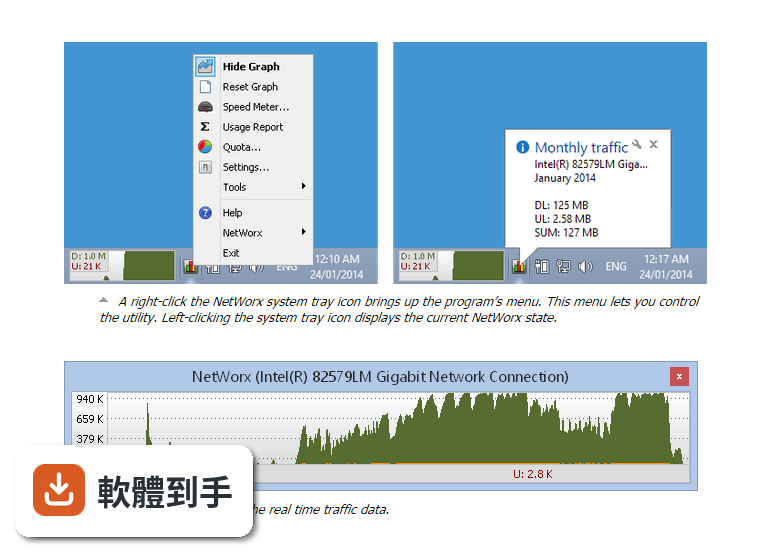
它是一套裝在 Windows 電腦上的網路流量監控工具,主要功能包含即時顯示目前的上傳和下載速度、記錄每天每週每月的流量總量、設定流量上限並在超過時跳出通知,另外還附帶 ping、traceroute 和測速工具。安裝後它會自動偵測你電腦上的網路介面,選定要監控的對象就開始記錄,不需要額外設定。
02它可以同時監控 Wi-Fi 和有線網路嗎?
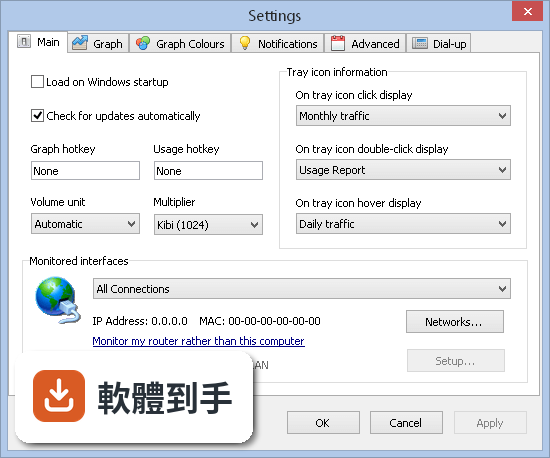
可以。它支援同時監控多個網路介面,也就是說如果你的電腦同時接了 Wi-Fi 和乙太網路線,它可以分別記錄兩邊的流量,不會混在一起算。你可以在設定中勾選要監控哪些介面,沒勾到的就不會納入統計。這對同時使用多種網路連線的人來說滿方便的。
03流量超過上限時,它會怎麼通知我?
它提供可自訂的警示功能,你可以設定一個流量額度,例如每月 100GB,當累計用量接近或超過這個數字時,它會跳出通知提醒你。通知的觸發條件可以依照你的需求調整,像是達到額度的 80% 就先警告一次,100% 再警告一次。這個功能對有限量方案的人特別實用。
04它能不能匯出流量報表?
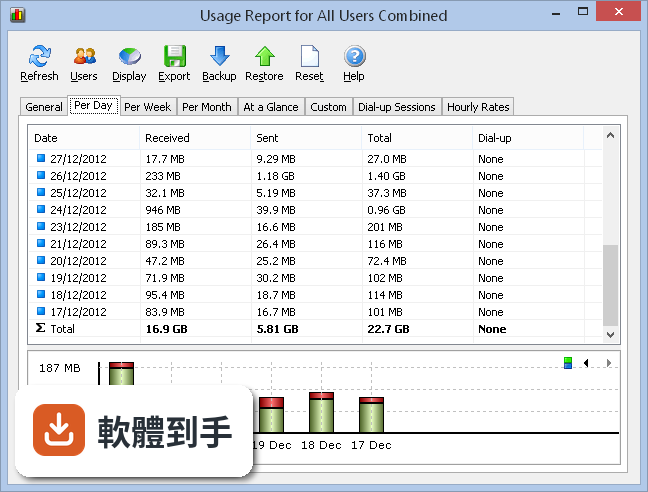
可以。它會自動產生每日、每週、每月的流量報表,而且這些報表可以匯出成 CSV 或 HTML 格式。匯出後你可以用 Excel 打開 CSV 檔做進一步分析,或把 HTML 報表留著當記錄。如果你需要把流量數據交給別人看,例如跟家人解釋誰用了多少流量,匯出功能就派得上用場。
05它會拖慢我的網路或電腦效能嗎?
根據官方說明,它執行時消耗的系統資源很少,會在背景默默運作,不會明顯影響網路速度。安裝需求方面,記憶體最低 1GB、硬碟空間 10MB,以現代電腦的規格來說算是非常輕量。不過實際效能表現還是會因電腦硬體而異,如果你用的是很舊的機器,建議安裝後觀察一下。
06我只是一般家庭用戶,不是 IT 人員,會很難上手嗎?
它的介面設計算是直觀,主畫面會顯示即時網路活動,包含上傳下載速度和總流量,圖表和設定選單也整理得滿清楚。安裝過程簡單,啟動後它會自動偵測網路介面並開始監控,不需要寫任何設定檔或指令。對一般使用者來說,安裝完就能看到流量數據,門檻不高。
07它適合小公司或工作室使用嗎?
官方說明中有提到它適合個人和小型企業使用,主要用途是追蹤網路使用量、排除網路問題、管理頻寬分配。如果你的工作室只有幾台電腦,想在每台機器上裝一套來統計各自流量,它是可以做到的。但要注意它不支援遠端集中管理,每台電腦都要個別安裝和設定,電腦數量多的話會比較麻煩。
08它的免費版夠用嗎?
它提供 30 天試用期,試用期過後需要付費購買授權才能繼續使用。官方說明中明確提到免費版功能有限,但沒有具體列出試用版和付費版的差異。如果你只是短期需要監控流量,30 天試用期或許夠用;如果要長期使用,就得考慮購買授權,單人授權價格約 29 美元起。
09它有沒有中文介面?
沒有。官方資料顯示它的介面語言只有英文,沒有繁體中文或簡體中文選項。這表示所有選單、設定項目、報表內容都會以英文呈現。如果你對英文介面不熟悉,操作上可能會需要花時間摸索,或者考慮找其他有中文介面的替代軟體。
10它能監控我手機或其他裝置的流量嗎?
不行。它只能監控安裝了這套軟體的電腦本身的網路流量,無法直接追蹤手機、平板或其他連到同一台分享器的裝置。官方說明中提到它支援多個網路介面,但不會追蹤遠端裝置,除非你在那些裝置上也個別安裝並設定。如果你想知道手機用了多少流量,這套軟體幫不上忙。
11我用了 VPN,它還測得準嗎?
官方說明指出它可以在 VPN 環境下運作,但監控的準確度取決於 VPN 的設定方式。因為 VPN 會加密和重新導向網路流量,有些流量可能不會被正確辨識或計入。如果你很依賴 VPN 且需要精確的流量數據,可能需要先測試看看它的統計結果是否符合預期,或者考慮其他方案。
12它跟 GlassWire 比起來,哪個比較多人用?
以評分人數來看,NetWorx 有 291 人評分,GlassWire 有 157 人評分,NetWorx 的評分人數較多,評分也略高(9.42 對比 GlassWire 的數據)。但 GlassWire 在官方說明中被列為替代方案,主打網路安全和防火牆功能。如果你需要的是防火牆相關的防護功能,GlassWire 可能是更合適的選擇;如果只是要流量監控和報表,NetWorx 的評分和評價人數都顯示它有一定的使用者基礎。
下載與官方連結
networx_setup.exe · 連結指向軟體原廠
版本紀錄
- 2026-10-27 NetWorx 26.10 9.7 MB
- 2026-05-07 NetWorx 26.5 14.4 MB
- 2024-02-14 NetWorx 7.1.5
再看 5 筆
- 2022-12-06 NetWorx 7.1.1
- 2022-08-29 NetWorx 7.0.3
- 2022-05-17 NetWorx 7.0.1
- 2022-05-04 NetWorx 7.0.0
- 2020-03-16 NetWorx 6.2.8 10.8 MB
這一版改了什麼
What's new in this version:
NetWorx 6.1
- Added docking of the graph to top or bottom of desktop in a reserved space
- Added a setting to specify sender e-mail address for outgoing e-mails
- Added scheduled speed testing to measure connection's speed regularly
- Added history of measurements to the Speed Meter and an easy to read chart
- Showing vertical axis at the beginning of the graph rather than the end of it
NetWorx 6.0.4
- Change log not available for this version
NetWorx 6.0.3
- Added a hidden setting for tray graph activity threshold
- Added treating zero allowance under Quota as Unlimited
- Added saving bar chart height in per day, week, month and custom reports
- Added new graph type: average columns calculated over 5 seconds by default
NetWorx 6.0.2
- More accurate readings when using the Ignore LAN traffic mode
- Added a notification when report fails to run or sending email notification fails
- Added country flags from IP addresses in ping, trace route, netstat and web-site report
- Added environment variable support in CSV graph data file and custom database location
NetWorx 6.0.1
- Added writing to the Windows event log when connection goes off-line and back on-line
- Added high-resolution icons sized 64x64, 128x128 and 256x256 for high DPI screens
- Added ignoring LAN traffic in kernel when using NetFilter for faster LAN transfers
- Added text format in the automatic reports and a button to select target file
- Added per web-site report to track what Internet hosts used most data
- Fixed a painting issue with icons in Netstat and per application report
- Fixed a crash in per application report on certain 64-bit systems
NetWorx 6.0.0
- NetWorx is now commercial software. To facilitate its further development, we introduced a licence fee
- Added remembering height and width of the usage window
- Added attaching usage report when sending e-mail quota notifications
- Fixed several memory leaks in connection monitor and NetStat
- Fixed a few issues with high DPI systems
NetWorx 5.5.5
- Fixed showing messages about blocked Internet repeatedly
- Apps in automatic reports are sorted by usage rather than name
- Added graph time stamps displayed when minute ticks are enabled
- Portable versions are restricted to one instance from one location
- Minor UI enhancements, updated traffic filtering drivers and DB engine
NetWorx 5.5.4
- Added Reset Session command to reset the numbers recorded since boot
- Added drawing the graph's background bitmap in the desk band graph as well
- Fixed an uninstallation issue on Windows 10 where the driver was not removed
- Fixed a few minor UI issues when exploring past graph readings with arrow keys
NetWorx 5.5.3
- Added a workaround for picking-up UPnP devices whose UDN changes after a reboot
- Added per-application output in automatic HTML reports when Ignore LAN traffic is on
- Added showing average and maximum speeds together in the Speed Meter
- Added a hidden setting to write graph data to a CSV file for further analysis
NetWorx 5.5.2
- Fixed converting per application usage records from older databases
- Fixed doubling entries stored as a list when a backup was restored
- Fixed updating the options UI dialog when a backup was restored
- Added new Speed Meter with active connection throughput testing
NetWorx 5.5.1
- Fixed an error in UPnP router detection when malformed XML was received
- Fixed polling some routers whose UPnP module didn't support HTTP/1.0
- Fixed flicker when Session Usage Summary was shown on the graph
- Fixed recording apps usage during the hours marked as Unmetered
NetWorx 5.5.0
- Added graph smoothing with a moving average for a prettier graph
- Added a custom UPnP implementation that supports more routers
- Fixed an error message shown when Windows ran out of TEMP space
- Fixed sending sync broadcasts on PCs with more than one network card
- Fixed a few issues with exporting reports to a file from Usage Reports
- Updated SNMP implementation to minimise the number of requests
- Updated third-party TDI and WFP drivers to the latest version
NetWorx 5.4.2
- Added filter by date in Applications report and showing application names rather than paths
- Changed usage backup from XML to SQLite DB file and it now also includes program settings
- Changed the Netstat tool to a connection tree to enable real-time application monitoring
- Fixed monitoring apps that were monitored even if the selected network was unavailable
- Fixed a memory leak in connection tracking when the Ignore LAN option was used
- Fixed closing CSV and HTML files that stayed open when exporting a report
- Updated LAN traffic filtering drivers with latest compatibility fixes
NetWorx 5.4.1
- Added rounding to good-looking values in the usage report barchart
- Added hidden settings to show/hide dial-up and on/off-peak features
- Added a warning if DB is not writable or can't be created on disk
- Added dialog to allow to reset to a set value other than zero
- Minor bug fixes and improved Windows 10 compatibility
NetWorx 5.4.0
- Added Y-axis labels rounding to good-looking values on the graph, e.g. 10K, 20K, 30K, 40K, 50K
- Added logarithmic scale on the graph to enable showing very small and very large values together
- Added a monthly total in daily auto reports and HTML reports are sent inline, not as attachment
- Added SNMPv3 support for monitoring the router (see the hidden settings)
NetWorx 5.3.5
- Fixed text overlapping in the bar chart and use the thousand separator by default
- Fixed initialisation of the UPnP router monitoring if it wasn't ready on startup
- Added automatic reports saved to a file or sent by e-mail
NetWorx 5.3.4
- Added a hidden setting for virtual adapters monitoring ignored by default
- Fixed firing off-peak notifications as they were sometimes not processed
- Fixed graph disappearance when clicking the desktop in Hide Graph on Full Screen
- Added Properties and Open File Location menu options in the application view
- Added experimental workaround for routers with incorrect UPnP implementation
- Added getting process name from the kernel for reliable application names reporting
- Updated languages, filter drivers, done numerous minor fixes and improvements
NetWorx 5.3.3
- Added graph line width setting in the hidden settings
- Fixed black rectangle artefacts in the application view
- Fixed the drop-down interface boxes in router setup
- Fixed the re-opening WinPCap when there is a capture issue
- Fixed the monitoring of all virtual network adapters
NetWorx 5.3.2
- Fixed disabling Teredo where it was unnecessary for the TDI driver
- Fixed quota settings they are now protected too when a password is set
- Fixed quota and usage computations when a custom Time Zone Offset was used
- Added connection monitor Timeout and Retries variables to the hidden settings
- Added showing hints for hotkeys where long hotkey combinations did not fit
- Added computer name in subject and body of e-mails for easier identification
NetWorx 5.3.1
- Added a hidden setting to disable TCP/UDP tracking in the Ignore LAN mode
- Added Mobile Broadband support for monitoring as all available connections
- Added showing units on the graph (configurable in the hidden settings)
- Added email notifications for short-term conditions
- Fixed crashing if UPnP was not ready at startup
NetWorx 5.3
- Added application usage data in netstat showing each process actvity
- Added view scroll bar and a way to reset the connection uptime log
- Added e-mail notifications and blocking Internet access in the quota
- Added Windows high DPI awareness for high-resolution displays
NetWorx 5.2.12
- Fixed doubling dial-up sessions and applications when two users were logged on
- Added driver hash sum verification upon installation to avoid unnecessary reboots
- Fixed dynamic bars to be relative to a maximum in the last 5 secs rather than session
- Added displaying dial-up volume in the At a Glance report in addition to its duration
- Added environment variable NOTIFY when launching a program in the notifications
- Added UPnP router monitoring for routers that do not support SNMP (experimental)
NetWorx 5.2.11
- Added showing usage in terabytes for large numbers over 1000 GB
- Added SNMPv1 and SNMPv2 support for router monitoring via SNMP
- Fixed an issue with garbled or incorrect application names recorded
- Allowed users to choose which implementation of driver to install (WFP/TDI)
- Added automatic firewall rule creation/removal for usage synchronisation
- Updated LAN traffic filtering drivers and improved Windows 8.1 compatibility
NetWorx 5.2.10
- Added a hidden setting to suppress the graph on full-screen apps
- Added highlighting changed hidden options in bold
- Added totals to the dial-up log and a session filter
- Added sorting by application in the application view
- Added a more stable version of the WFP driver for LAN traffic filtering
- Fixed showing popup menu on the graph on left-positioned secondary display
NetWorx 5.2.9
- More reliable uninstallation process to ensure no orphan files are left
- Added a workaround to obtain application names that were previously recorded as unknown
- Added deleting past records for applications from the Applications view
- Expanded the default multicast IP address range to avoid recording multicast traffic as non-local
- Updated LAN traffic filtering driver (now uses Windows Filtering Platform on Windows 7 and above)
NetWorx 5.2.7
- Added a built-in network driver for LAN traffic filtering similar to that in v5.1.7 to v5.2.0. It should be more stable now.
- Fixed repositioning the graph after PC resume as sometimes it could have been unnecessarily reset
- Hidden settings are made easier to use with boolean options toggled with a double click
NetWorx 5.2.4
- Fixed recording and displaying heavy transfers over 500 MB/s
- Added showing MAC addresses for WinPCap adapters
- Redesigned Speed Meter also displays total traffic volume
- Currently logged user highlighted in the list of users in totals
- Added subheadings at the General tab showing actual periods
- Notification area icon's status and position are remembered correctly on Windows 7
- Fixed a possible crash in the traceroute code
- Improved compatibility with NetBalancer
NetWorx 5.2.2
- Fixed launching applications with a space in their name in notifications
- Fixed painting legend for hourly graph in left to right mode
- Fixed numeric desk band disappearance upon locking/unlocking the task bar
- Added a few hidden settings: fixed rate unit, router community string, quota dialog instead of usage on hotkey
- Added displaying time and sorting in dial-up session view
- Reopening WinPCap adapter after resuming from stand by and hibernation
- Added opening netstat on tray icon double click and opening usage report at single click
- Added highlighting items exceeding quota for daily, weekly and monthly reports when appropriate quota is set
- Fixed writing XLS files, now writing numbers as numbers, not as strings
NetWorx 5.2.1
- Fixed establishing/dropping dial-up connection on 64-bit systems
- Made several optimisations to display usage reports faster
- Added NetWorx popup menu to the desk band as well
- Fixed sorting weekly, monthly, dial and hourly reports when ascending sort was set
- Using WinPCap instead of custom network driver for ignoring local traffic
NetWorx 5.1.7
- Improved compatibility with systems with VirtualBox installed
- Rarely used settings "Snap to desktop edges" and "Smooth spikes" moved to hidden settings
- Added an option to show/hide animated usage bars
- Added an option to choose appearance of the tray icon
- Using a new network driver to filter out LAN traffic. If it works okay, NetWorx will soon be able to track usage per application
NetWorx 5.1.4
- Fixed double-click mode that could not be set
- Quota overuse notification no longer closes automatically
- Removed workaround added in the previous version as in some cases it failed to detect real network adapters
- Improved compatibility with ESet Smart Security and NetLimiter
- Added the Arabic language and a few others updated
NetWorx 5.1.2
- Dial-up application launch list is made editable and accepts command-line parameters to be passed to applications
- Added all-time/on-peak/off-peak as an extra condition in notifications
- Currently active hour is now shown in the hour selection matrix
- Added a workaround to prevent incorrect readings when installed with NetLimiter 3
- Changed notification processing: if actions include dropping dial-up connections, the timer is reset when a new connection is dialed. Otherwise it caused premature occurrence of the event
- Added import of IP address to be ignored (formats understood are IP address range, CIDR and individual IP addresses)
- Bandwidth rates shown under the graph are made monochrome (this can be reverted via a hidden setting)
- Added a hidden setting allowing to relocate the database to another folder
- Updated language files and minor user interface tweaks
- Added more shutdown options: power off, stand by, hibernate and restart
NetWorx 5.1.1
- Added dial-up connection name and speed shown in the tray icon tooltip
- Implemented correct usage recording when multiple users were logged on at once (fast user switching)
- Fixed excessive reading from the disk when showing daily/weekly/monthly usage on hovering tray icon was enabled (now updated once a minute)
- Updated language files and other minor tweaks
NetWorx 5.1.0
- Fixed a desk band issue that caused a crash on Windows 7 in certain circumstances
- Fixed graph shown off-screen if the monitor where it had been displayed became unavailable
- Fixed showing 'unavailable' in the graph title when the chosen adapter was not available at startup and became available later
- Added password check when accessing quota settings when the password protection is enabled
- Added network manager allowing to exclude certain networks from monitoring
- Fixed an error in computations of monthly periods when the month started 29th, 30th or 31st
NetWorx 5.0.9
- Fixed doubling outgoing traffic records on Vista/Seven with mobile broadband and "dial-up" ADSL
- Fixed graph shown in taskbar when Frameless Graph Window in the hidden options was turned on
- Added Portuguese (Portugal) language
NetWorx 5.0.8
- Fixed a memory leak on Vista and Seven in early downloads of version 5.0.7
- Fixed displaying month names when usage chart was in the non-stacked bars mode
- Any broadcast traffic is ignored in the Ignore LAN traffic mode
- Added Windows 7 locale bug workaround where the US date format was used instead of the one chosen in standards and formats
- Added Norwegian, Slovak and Turkish languages
NetWorx 5.0.7
- Added 'All wireless connections' monitoring option (Vista and higher)
- Fixed inability to select some network connections on Windows Vista and Seven
- Added graph fading out when the mouse is hovering and the click-through mode is turned on
- Added a few new preferences in the hidden settings (press Ctrl + O in the settings window)
NetWorx 5.0.3
- Added drop-down month list in custom reports to quickly access monthly usage
- Added import of DU Meter Backup files (*.sqbackup) and NetMeter files (*.csv) under the Restore button in the usage report
- Added IP address manager to exclude custom networks as local traffic
- Short-term notifications now can apply in a wider range. Now 'more' conditions trigger even if they occur before time elapses
- Playing a windows sound when quota overused message shown
- Some fixes related to sleep and hibernation issues when the Ignore LAN option was turned on
- Volume unit multiplier made customisable (1000 or 1024 bytes per KB)
NetWorx 5.0.1
- Added a language selector shown upon first launch
- Fixed Explorer crash on Vista/Windows 7 when desk band is turned on
- Added Chinese, German, Polish languages
NetWorx 4.9.4
- Graph labels are now compactly formatted (K/M)
- Added purely numeric graph display
- Hourly report made sortable
- Tray icon now has got static title if 'Hide inactive icons' Windows option is on
- Quota now shows allowance left in addition to used and total
- Added 'Enable Graph Click-Through' menu item (visible only if graph is being displayed and is semi-transparent)
- Graph color selectors now offer a better choice of colors
- Added option to automatically bring up the graph when a certain condition is met
NetWorx 4.9.3
- Added option to display either a polyline or a histogram in the real-time graph
- Added 'remind me in' option in message about overused quota to make it less annoying
NetWorx 4.9.2
- Quota settings are now saved when window closed
- Fixed the hourly report when last hour of the day might have been shown wrongly
- The hourly report highlights on/off-peak hours
NetWorx 4.9.1
- Fixed quota and weekly/monthly report computations
- Days 29, 30 and 31 are now allowed again as the first day of the month
- A number of minor improvements: graph opacity can be adjusted with +/- numpad keys; fixed the remaining days counter in the quota; fixed a problem with hourly report (not all hours were displayed)
NetWorx 4.8
- In the desk band placed on a vertical taskbar numbers are shown underneath. In the deskband placed on a horizontal taskbar numbers are shown at the left as before.
- Usage data stored on a per-hour basis. On-peak and off-peak hours can be configured for an accurate account.
- Beginning of the month and beginning of the week can be customized if it is needed.
- Added a hourly bandwidth rate report. You can see your average data transfer rate in recent days and hours.
NetWorx 4.7.4
- Fixed possible crash if NetWorx was started automatically before the Windows shell was fully initialized
- Added 'Apply settings' button
- Redesigned desk band made tidy and compact
NetWorx 4.7.3
- Fixed a race condition that might have caused the application to lock up on startup
- Cosmetic enhancements to the usage chart showing daily, weekly and monthly usage reports
NetWorx 4.6.2
- Fixed a sudden reporting jump that could occur if a network adapter becomes temporarily unavailable when the system enters a new power state
- Added a shell extension known as 'desk band'. It integrates with your taskbar and provides a handy tool to keep an eye on bandwidth usage. This extension is currently available on 32-bit editions of Windows only.