
這是歷史版本頁面 — 看 Notezilla 最新版本
Windows桌面便簽工具Notezilla能取代傳統便利貼嗎
 Notezilla 8.0.30
資料更新 2017-11-22
閱讀約 6 分鐘
你桌上是不是貼滿了黃色便利貼,上面寫著待辦事項、網址、客戶電話,結果風一吹就掉,或是根本找不到當初貼在哪裡。你只是想記住一些事,卻發現紙條越貼越多,桌面越來越亂,該提醒的時候沒提醒,要找的時候找不到。你需要的不是更多便利貼,而是一個能乖乖待在螢幕上、時間到了會自己跳出來提醒你的數位便條。
系統內建的便利貼或記事本只能打字,不能設提醒、不能同步、不能把便條釘在特定網頁或檔案上。你真正需要的是一個能貼在桌面、能設定時間彈出提醒、能在不同裝置間同步、還能分類搜尋的便籤工具。這類工具的做法,就是把實體便利貼的「貼」和「提醒」兩個動作數位化,讓便條不只是便條,而是你工作流程的一部分。
01Notezilla跟Windows內建便籤有什麼差別?
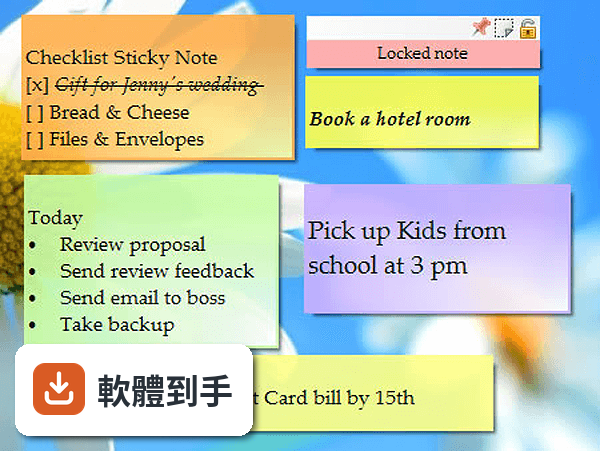
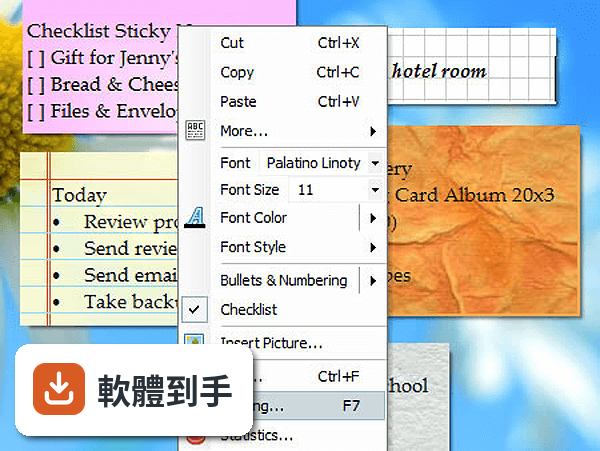
Windows內建便籤只能做最基本的文字記錄,沒有雲端同步、沒有提醒功能、不能把便條釘在特定網頁或檔案上。Notezilla提供字型調整、項目符號、超連結等格式設定,可以設提醒時間,也能把便條拖曳到網站、資料夾或文件上,讓便條跟著內容走。如果你只是偶爾記個電話號碼,內建的就夠用;但如果你需要便條主動提醒你事情,Notezilla才有這類功能。
02它可以把手機上的便條同步到電腦嗎?
可以。官方說明指出,登入帳號並開啟同步後,便條可以在Windows、Android、iOS裝置之間同步。也就是說,你在手機上記的內容,回到電腦前打開Notezilla就會出現。要注意的是,同步功能需要網路連線,而且免費試用版不包含完整的雲端同步,需要付費授權才能使用這項功能。
03沒有網路的時候還能用嗎?
可以。建立和管理便條不需要網路,離線狀態下照樣能打字、設提醒、釘便條。只有雲端同步和分享功能需要連上網路才能運作。如果你只是把Notezilla當作單機便籤工具,離線使用完全沒問題;但如果你依賴多裝置同步,沒網路時就無法更新其他裝置上的便條。
04便條可以設定時間提醒嗎?
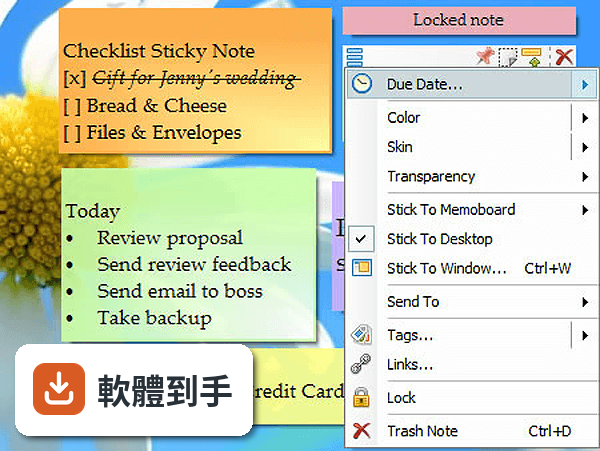
可以。在便條上按右鍵選擇Reminder,就能設定日期和時間,時間到了便條會自動彈出提醒你。這對需要定時處理的事項很有用,例如繳費截止日、會議時間、服藥時間等。提醒功能是Notezilla的核心功能之一,不需要另外安裝其他工具。
05能把便條釘在特定網頁或文件上嗎?
可以。直接把便條拖曳到網站、資料夾或文件上,便條就會跟那個項目綁在一起。例如你把便條拖到某個Excel檔案上,之後開啟那個檔案時便條就會出現。這比單純貼在桌面更有針對性,適合需要針對特定文件或網站做註記的工作情境。
06這套軟體適合什麼樣的人用?
適合需要大量記錄零散資訊、又希望這些資訊能同步到手機的人。例如業務人員記客戶需求、學生記作業截止日、專案經理記各項任務進度。也適合習慣把便條貼在螢幕上、但受不了紙張便利貼容易掉的人。如果你只是偶爾記個購物清單,用內建記事本就好,不需要付費買這套。
07可以跟同事分享便條嗎?
可以。官方說明提到,可以透過電子郵件或雲端分享便條給其他Notezilla使用者。這對團隊協作有幫助,例如把會議結論或待辦事項直接分享給相關成員。不過對方也需要有Notezilla才能接收你分享的便條,如果對方沒裝這套軟體,就無法用這個方式分享。
08我習慣用Evernote,還需要Notezilla嗎?
兩者的定位不同。Evernote是完整的筆記軟體,適合寫長篇筆記、存文件、做知識管理;Notezilla是桌面便籤,強調快速記錄、釘在特定位置、時間提醒。如果你只需要在桌面上貼幾張提醒便條,Notezilla比較輕量;如果你需要整理大量筆記和文件,Evernote那類工具更合適。兩者也可以並用,不衝突。
09這套軟體有Mac版嗎?
沒有。官方說明明確指出,Notezilla主要設計給Windows使用,沒有Mac版。不過它有網頁版和行動裝置App,可以讓Windows以外的裝置存取便條內容。如果你主要使用Mac,這套軟體不適合你,可以考慮其他跨平台便籤工具。
10免費版跟付費版差在哪裡?
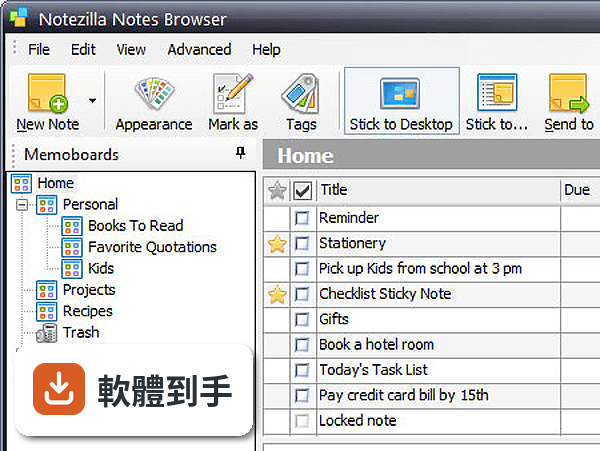
官方提供30天試用版,試用期內可以使用大部分功能。試用期過後需要付費才能繼續使用完整功能,特別是雲端同步。付費方案是每個使用者29.95美元,終身使用,另外雲端同步服務還有額外的訂閱費用。如果你只是單機使用、不需要同步,免費試用版可能夠用,但長期使用還是需要付費。
11這套軟體更新頻繁嗎?
根據收錄的版本紀錄,從2017年到現在共收錄20個版本,近12個月更新2次,近24個月也是2次。更新頻率不算高,但也不是完全停滯。如果你很在意軟體是否持續維護,可以到官方網站查看最新的更新日誌,確認開發商是否還在積極維護。
12評分人數只有34人,這套軟體可靠嗎?
目前收錄的評分是6.64/10,共34人評分。樣本數不多,代表使用者的回饋有限,分數的參考價值也有限。建議你下載試用版實際操作看看,確認介面順不順手、功能是否符合需求。另外也可以到官方網站或軟體下載站看更多使用者評論,了解其他人遇到的問題。
下載與官方連結
NoteZillaSetup.exe · 連結指向軟體原廠
版本紀錄
- 2026-08-28 Notezilla 9.0.43 32 MB
- 2026-05-25 Notezilla 9.0.42 31.5 MB
- 2022-08-25 Notezilla 9.0.27
再看 5 筆
- 2022-04-09 Notezilla 9.0.23
- 2022-04-03 Notezilla 9.0.22
- 2021-08-26 Notezilla 9.0.9
- 2021-08-12 Notezilla 9.0.6
- 2021-08-09 Notezilla 9.0.5
這一版改了什麼
What's new in this version:
Notezilla 8.0.30
- Fixed: Notezilla prevented system shutdown after installing latest Windows Fall Creators Update
Notezilla 8.0.29
- It is now very easy to reply to the sender of a sticky note from the toolbar just above the sticky note
- Sender name can be identified by moving the mouse pointer over the toolbar icon
Notezilla 8.0.28
- Sync is tried again automatically if another device is already syncing
Notezilla 8.0.27
- Change log not available for this version
Notezilla 8.0.26
- Now Notezilla syncs more often (every minute) if any note is modified
- Sync experience improved
- Account creation simplified
- Sign out option added to account settings
Notezilla 8.0.25
- Made Notezilla DPI-aware. So the sticky notes appear correctly on 4k display resolution
Notezilla 8.0.24
- Couldn't correctly import and export CSV & Tab delimited files. This has been fixed
- Sometimes Notezilla crashed when rearranging notes on desktop at startup. This has been fixed
Notezilla 8.0.23
- Added ability to delete Notezilla.Net account directly from the Windows app.
- Maximum sticky note size increased from 400x400 to 600x600. This was needed on 4K displays.
- On Windows 10, Notezilla crashed sometimes when clicking on the sticky note toolbar while editing the note title. This has been fixed.
- In certain cases, syncing failed permanently after deleting a memoboard. This has been fixed.
Notezilla 8.0.22
- Notezilla conflicted with games that used a different display resolution. This has been fixed.
- It is now easier to use sticky notes on 4k display monitors and on Surface tablets. The skins have been modified to achieve this. Download new versions of the skins from here. This feature still needs improvement. Future updates will behave better on 4k monitors & Surface tablets.
- Notezilla sometimes crashed after signing into Notezilla.Net for the first time in Windows. This has been fixed.
- Repeat alarm for every x months did not accurately set the right repeat date. This has been fixed.
- Ctrl+N shortcut key from within a desktop sticky note would create a new sticky note.
- It took several steps to view a particular desktop note from Notes Browser. Now, it is possible to view the desktop note with just one click using a toolbar button in Notes Browser.
- Made 'Set Due Date' feature more intuitive.
- By default incoming sticky notes (from another computer or contact) are stuck to Windows desktop.
- When a note is moved to another memoboard, the user is now asked if the note needs to be removed from the desktop.
- It is now possible to reset the master password if it is forgotten.
- Finding note using the quick find (top right in Notes Browser) was little quirky. This has been improved.
- When a sticky note is kept "always on top", the spelling window is overlapped by the sticky note itself, making it very hard or impossible to use. This has been fixed.
- Double clicking on an already selected note in notes list did not select the note in the bottom sticky notes view. This has been fixed.
- Going back to the same memoboard or filter did not retain the selection of the sticky note. This has been fixed.
- Sometimes, when syncing, the title of a sticky note wasn't updated. This has been fixed.
- The sticky notes view was scrolled back to top when switching between memoboards causing annoyance. This has been fixed.
- When a sticky note is hidden on one desktop, after sync, the sticky note was made visible on another desktop. This has been fixed.
- When sticking a note to desktop from Notes Browser, the note size changed to defaults. This has been fixed.
Notezilla 8.0.21
- It was not possible to arrange desktop notes (since last update). This has been fixed.
Notezilla 8.0.20
- Now it is possible to insert .png files inside sticky notes.
- The previous update introduced a bug. A random desktop sticky note would popup when accessing another app, dismissing a reminder or deleting a sticky note. This has been fixed.
- When Notezilla is configured to create sticky notes directly inside a memoboard instead of Windows desktop, single/double mouse click option to create new note did not work. This has been fixed.
- In rare circumstances, duplicate instances of Notezilla would run whenever a display monitor is attached/detached. This has been fixed.