
這是歷史版本頁面 — 看 PDFCreator 最新版本
文件轉 PDF 老是跑版?PDFCreator 能幫什麼忙
 PDFCreator 3.1.0
資料更新 2017-12-20
閱讀約 6 分鐘
打開電腦,準備把一份重要的 Word 報告、Excel 報表或網頁內容轉成 PDF 寄給客戶或主管。按下列印,選了「Microsoft Print to PDF」,結果版面跑掉、字型變形,或是圖片位置亂跳,當下只能反覆調整格式再重印一次,浪費時間又破壞心情。這種「明明只是轉個檔,為什麼這麼麻煩」的狀況,正是虛擬 PDF 印表機工具要解決的問題。
一般人習慣用線上轉檔網站,但把文件丟上網總有隱私顧慮,而且大檔案上傳下載也慢。另一種做法是裝完整版 PDF 編輯軟體,但功能太多、價格太高,只為了轉檔根本不划算。這類工具的切入點是:安裝後變成一台「虛擬印表機」,任何能列印的程式,選它當印表機,輸出就是 PDF 檔,不用開瀏覽器、不用上傳檔案,轉檔過程就在自己電腦上完成。
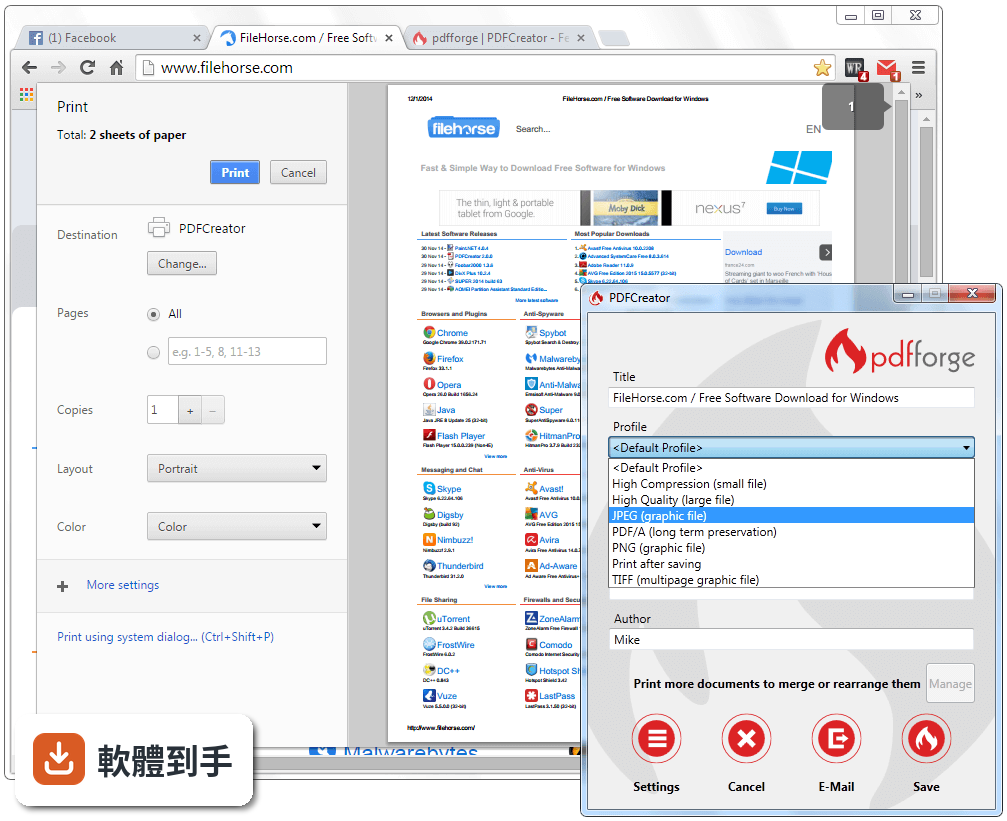
01PDFCreator 跟一般直接另存新檔成 PDF 有什麼不同?
一般另存新檔是程式內建的功能,不是每個軟體都有,而且格式選項少。PDFCreator 安裝後會新增一台虛擬印表機,任何有列印功能的程式,包含老舊或特殊的商用軟體,都能選它當印表機輸出成 PDF。它另外提供合併檔案、加密、自動儲存等功能,等於把「列印」這動作變成一個可控制的轉檔流程。
02這套軟體除了轉 PDF,還能做哪些事?
除了 PDF,它也能輸出成 PNG、JPEG、TIFF 等圖片格式。轉檔時可以設定密碼和最高 256 位元 AES 加密,防止文件被開啟或修改。需要長期保存的文件可以輸出成 PDF/A 格式,確保多年後打開格式不會跑掉。也能把多份文件合併成單一 PDF,或調整頁面順序,這些在轉檔前後都能處理。
03合併多個檔案成一份 PDF 的步驟會很複雜嗎?
不會。把要合併的檔案逐一用 PDFCreator 虛擬印表機「列印」,印完後在佇列視窗中可以看到所有等待輸出的工作,直接拖曳調整順序,再一起儲存成一個 PDF 檔。如果檔案已經各自是 PDF,也可以直接從檔案總管把檔案拖進 PDFCreator 主視窗進行合併,不需要先轉一次。
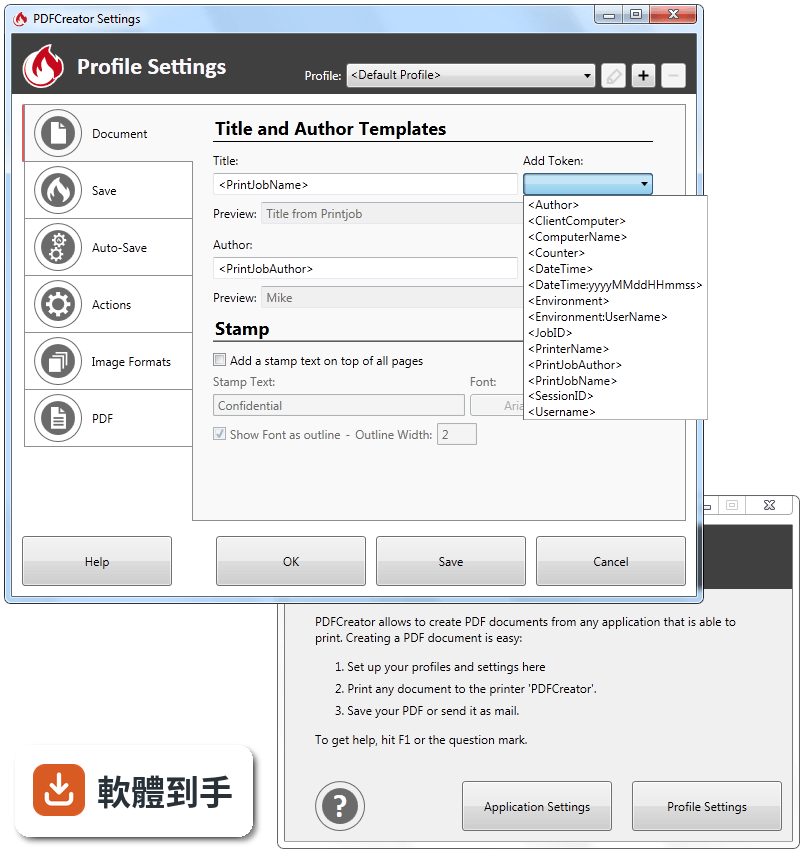
04設定密碼和加密的選項在哪裡?
在按下「儲存」之前,會跳出設定視窗,裡面有「安全性」或「加密」的頁籤,可以勾選要求輸入密碼才能開啟檔案,也能限制列印、複製內容或修改文件。加密強度最高支援 256 位元 AES,這是目前常見的加密標準。設定完成後,之後每次轉檔都會套用相同規則,除非你手動更改。
05它說的「自動儲存」和「設定檔」實際上是怎麼運作的?
你可以建立多個設定檔,例如「客戶報價單」和「內部備忘錄」,每個設定檔各自指定輸出資料夾、檔案格式、是否加密、檔名規則。之後選了某個設定檔再列印,檔案會自動存到指定位置,不用每次手動選資料夾。檔名可以用「令牌」自動帶入日期、使用者名稱或流水號,例如「報價單_20260701_001.pdf」。
06什麼樣的人會需要用到它的自動化功能?
每天要處理大量文件、且輸出規則固定的人,例如會計部門每月產出報表、行政人員批量轉換掃描檔、或需要把系統產出的文件自動轉成 PDF 並分類存放。它的「動作」功能可以在轉檔完成後自動加上封面頁、上傳到 FTP、寄 email 或執行自訂指令,這些對個人用戶可能用不上,但對需要批次作業的辦公室環境能省下不少重複操作。
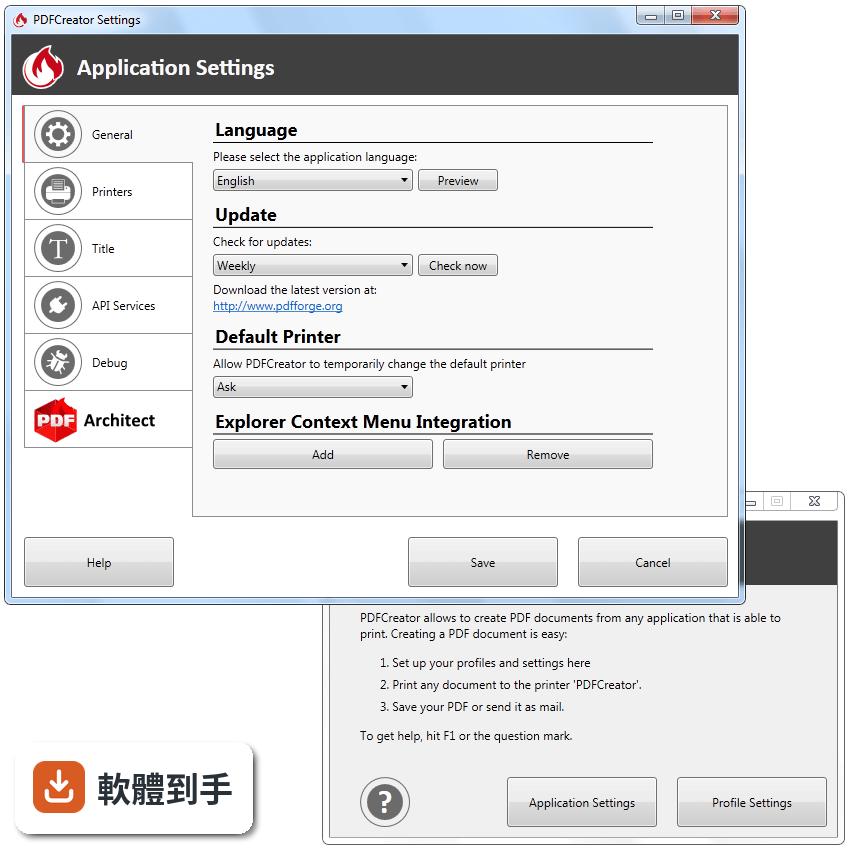
07這套軟體有中文介面嗎?
官方資料顯示它支援超過 35 種語言,包含繁體中文,但介面語系欄位標示為 English,實際安裝時可以選擇語言,或安裝後在設定中切換。如果安裝時沒看到中文選項,可能需要到官方網站下載對應的語言包,這部分要自行確認。
08免費版跟付費版差在哪裡?
官方說明指出免費版包含基本轉檔功能,付費版提供進階功能,例如優先技術支援。另外免費版使用時會顯示廣告,付費版則沒有。具體哪些功能被歸類為「進階」、付費版的價格,官方資料沒有細列,需要到官網查詢或實際安裝免費版後,看功能選單中哪些項目被鎖定。
09這套軟體適合完全不熟電腦的人用嗎?
基本操作算簡單:安裝後,在文件裡按列印,選 PDFCreator 當印表機,再按儲存就完成。但它的進階功能,例如設定檔、令牌、動作、CS-Script 整合,需要花時間理解,對只想要「按一下就轉檔」的人來說,這些選項反而可能造成干擾。如果只是偶爾轉個檔,可以只用基本功能,忽略其他設定。
10什麼情況下不建議用這套軟體?
如果你需要的是「編輯」PDF,例如修改文字、調整圖片、刪除頁面,這套軟體幫不上忙,它主要負責「產生」PDF,編輯能力很有限。另外它只支援 Windows 系統,Mac 或 Linux 用戶無法安裝。如果你需要的是免安裝的綠色軟體,它需要安裝並註冊虛擬印表機,不符合這個需求。
11它跟其他免費 PDF 印表機比起來,有什麼需要考慮的點?
同類軟體中,CutePDF Writer 和 doPDF 的評分人數分別是 60 人和 131 人,PDFCreator 有 136 人評分,樣本數差異不大。PDFCreator 的優勢是功能較多,但相對的安裝過程和設定也較複雜。如果你只需要單純轉檔、不想看到廣告或研究設定,doPDF 或 CutePDF Writer 可能更輕量。另外,PDFCreator 的授權是 Open Source,但官方同時提供付費版本,這點在商業環境使用時需要留意。
12它的更新頻率如何?會不會裝了之後沒人維護?
根據收錄的版本紀錄,從 2017 年到現在共收錄 46 個版本,近 12 個月更新 4 次,近 24 個月更新 9 次,代表開發團隊持續在維護。以開源軟體來說,更新算穩定。如果你在意長期維護,這點可以放心,但實際使用上仍建議定期到官網確認是否有新版本。
下載與官方連結
PDFCreator-3_1_0-Setup.exe · 連結指向軟體原廠
版本紀錄
- 2026-09-10 PDFCreator 6.3.1 147.17 MB
- 2026-07-01 PDFCreator 6.3.0 147.12 MB
- 2026-03-11 PDFCreator 6.2.2 102.15 MB
再看 5 筆
- 2025-12-13 PDFCreator 6.2.1 102.17 MB
- 2025-11-29 PDFCreator 6.2.0 102.14 MB
- 2025-07-02 PDFCreator 6.1.0 103.72 MB
- 2025-04-28 PDFCreator 6.0.1 101 MB
- 2025-04-10 PDFCreator 6.0.0 100.98 MB
這一版改了什麼
What's new in this version:
PDFCreator 3.1.0
- Change log not available for this version
PDFCreator 3.0.3
- Change log not available for this version
PDFCreator 3.0.2
- Change log not available for this version
PDFCreator 3.0.1
- Change log not available for this version
PDFCreator 3.0.0
- Logo
- The first essential change is that the official PDFCreator logo has been modified. This is a big step since the logo is well-known all over the world. That's why we did not fully discard the logo - the typical PDFCreator flame keeps being integrated. Nonetheless, the new logo shows even better that PDFCreator is made for digital documents
- Another benefit is that now it's easier to distinguish between the different PDFCreator editions. The related version is clearly outlined by being labeled right aside the logo. By the way, the new logo is the result of an official design competition
UX:
- The outstanding innovation of PDFCreator 3.0 is a better User Experience: The user interface as a whole has been designed with the intention that the user can reach the desired result in as few steps as possible
- Both the private end user and the professional business user can easily perform the relevant steps they specifically want to take in order to perform the conversion process - regardless of whether this is a simple conversion or an automatic workflow including profound settings
New Navigation:
- The Home screen has got a completely new interface. We improved the structure and re-arranged tabs with the objective to ensure a user-friendly interaction and help you to get started as quickly as possible
- To more experienced users it may sound strange, but a common question was: I have installed PDFCreator, what should I do now? Simply Drag and Drop any file onto the Home screen will quickly start the conversion process. By the way: The preferred way is to print to the PDFCreator printer from any application that is capable of printing
- Where in the past the devision in "Application Settings" and "Profile Settings" might have been confusing for some users, now there is a clear horizontal navigation bar which is composed of the most important options such as Home, Profiles, Printers, Accounts as well as Application Settings and Help. We wanted to bring the settings that might to be changed regularly to your attention. We have also realized, that many users did not know about a lot of features that existed. Most features are placed more prominent. The settings button now only contains settings, that you seldom or hopefully never have to access (i.e. language, debug settings etc.)
Profile Settings:
- The Profile section is designed to define specific settings as a profile. The settings are now grouped by meaning (i.e. Convert, Modify, Send) to be aligned with the way PDFCreator is processing the document. The settings of the former „Actions“ tab are integrated there as well. The new arrangement allows the user to make the desired settings in the most useful and logical order. For example Auto-Save and interactive conversion are now defined as first thing when configuring a profile, as they define the behaviour of the whole profile. Settings that exclude each other are hidden or disabled.
Accounts:
- The main navigation includes a new Accounts option. It's the central place for accounts (SMTP, Dropbox, FTP, HTTP, Time Server). Once an account is configured it is available for all workflows. Retyping account information somewhere else is not necessary anymore. This is very helpful for users who regularly use automation and multiple printers. But you do not have to configure the accountshere. If you are configuring a profile and i.e. want to add a Dropbox upload, you can add the account directly from the profile
- PDFCReator Accounts Screen
- All in all, the new structure guides the user in an intuitive manner to make the settings. Important options are presented more clearly. The new interface now comes with large areas, icons and buttons indicating that something can happen at these points
- If you have any suggestions in regards to the usability we invite you to submit your feedback. Please participate in our PDFCreator Redesign survey
More Improvements :
- The merge window has been redesigned to provide more information on the documents in the queue
- The title replacements are now easier to configure. The logic also has slightly changed, as most users just used it to remove things from the print document titles. If you want to actually replace it with another value, you have to use regular expressions now
- Wherever Tokens are supported, there is a token button now to give access to the tokens available
- A new send action has been added to send the converted files via HTTP to a web hook
- Triple-clicking a text box will now select the whole text, even if it contains multiple words
- The defaults for the settings were reconsidered. We now use the strongest available encryption for PDF files by default and also have reasonable security settings. When a PDF is protected, the default is now to allow to open and print the document, but not to allow any modification
- PDFCreator 3.0 is available in 29 languages now. We would like to take the opportunity to thank all translators and to welcome the new translations Estonian, Hungarian and Romanian
PDFCreator 2.5.3
- Change log not available for this version
PDFCreator 2.5.2
- Change log not available for this version
PDFCreator 2.5.1
- Change log not available for this version
PDFCreator 2.5.0
Increased Safety Level:
- A higher safety level is now available in PDFCreator Plus and all Business editions. We are very happy to provide 256 Bit AES encryption
- This is possible because PDFCreator is now including PDF Tools libraries. The Swiss company PDF Tools is member of the PDF association and provides the highly valued PDF Online Validator pdf-online.com. As Switzerland is world-wide known for best security levels, we believe there's no better way to rely on additional security tools being provided by Swiss companies. Using PDF Tools for signing, encryption and PDF/A conversion ensures the highest quality standards
More Improvements:
- Dropbox share link is shown after conversion
- Single share link (folder) for Dropbox allows upload of multiple files
- Translations are improved for faster loading, correct plural forms for languages with more than one plural and improved translation experience for our translators (link: translate.pdfforge.org)
- E-Mail Client Action keeps Outlook font settings (with enabled HTML)
- HTML support for e-mails via SMTP
- The PrinterHelper has been enhanced for a more stable installation, removing and repairing of printers
Bugs fixed:
- Better detection of Print/PrintTo associations for Windows 8 and above. This unfortunately was changed by Microsoft in an undocumented and incompatible way
- Refuse encryption of PDF/A and PDF/X (comply with standard)
- Use PDF Version 1.7 for PDF/A-2b (comply with standard)
- Thanks to your error reports, we could fix some unexpected exceptions
PDFCreator 2.4.1
- Change log not available for this version
PDFCreator 2.4.0
Breaking changes:
- The COM interface has been moved to the file PDFCreator.COM.dll. If you are referencing the PDFCreator.exe, you now have to reference the PDFCreator.COM.dll. If you are using the object name, no changes will be required. The interface itself did not change.
Improvements:
- Dropbox integration allows to upload files to Dropbox and add shared links to your mails
- Default metadata: You can now define templates for all metadata fields including subject and keywords
- Business: PDFCreator can now extract user tokens from the source document and use them for the conversion. See User Tokens.
- Terminal Server: The licenses on a Terminal Server are now managed per machine to allow users to float between servers in a server farm
- We did a major architectural redesign, which will allow us to change this faster in future and also greatly increases the application performance
- Updated to Ghostscript 9.19, which seems to be the most stable version available at the moment
- When inserting a new license key, you can now optionally transfer it to all other users on the machine
Bugs fixed:
- Only certain characters are allowed in the Stamp feature. PDFCreator will now filter invalid characters.
- Sometimes a DirectoryNotFoundException occurred when converting a file. This should be fixed now.
- Title replacements were broken for the InputFilename token
- PDF/A files became very large and couldn’t use RGB colors. This was fixed by the Ghostscript update
- The COM method SetProfileByGuid did not work
- PDFCreator could not be run from a guest account
- The tokens NumberOfPages and NumberOfCopies could contain wrong values
- When settings were set in HKU.Default, PDFCreator would not initialize the profiles
- PDF Architect was always installed in silent mode
- There was a bug that caused the license check to fail on Turkish machines
- When converting jobs with mixed page sizes and orientations, they did not always persist. This was fixed by the Ghostscript update.
- Plus the usual round of small fixes
PDFCreator 2.3.2
- Fixed a bug with providing defaults for all users. If a few settings were present in HKU.DEFAULT, PDFCreator would initialize the user settings without profiles except the default profile
PDFCreator 2.3.1
- Change log not available for this version
PDFCreator 2.3.0
New product range:
- We have added exclusive features for PDFCreator Plus and PDFCreator Business users, but we have also experienced that the licensing could be a problem on Terminal Servers, as the licensing was performed on a per-user basis
- Starting with PDFCreator 2.3, the licensing on Terminal Servers has been optimized and you are only required to purchase one license per Terminal Server that is valid for an unlimited number of users
New License Tab:
- If you have purchased PDFCreator Plus or one of the business editions, you can see license details on the new license tab in the application settings. There you can also change the license key if required.
- You can also open the license server website from the tab, where you can manage your machines, i.e. when you have moved to a new computer, and renew your license or purchase additional users for your business license.
Improved Drag and Drop:
- The drag and drop functionality has been enhanced. It has already been possible to drag any files on a PDFCreator window to print and convert them. Now you can also drag the files on the PDFCreator desktop shortcut to convert files. If you want to add PDF files to your current conversion file list, you can simply drag them on a window as well, it is no longer needed to print them to a PDFCreator printer.
New HotFolder:
- PDFCreator Plus, PDFCreator Business and PDFCreator Terminal Server also include the latest version of HotFolder. It allows the creation of special folders on any computer, files added to these folders are automatically converted to PDF or image files using PDFCreator.
- The new version comes with a wizard that makes it much easier to configure a folder and will also configure PDFCreator if desired. Formerly, you can to do a part of the configuration in HotFolder and then move to PDFCreator to create the printer and define the auto save profile that will be used. This is now done inside the configuration wizard. HotFolder now also supports to exclude certain file types from being converted or to restrict conversion to certain files types only.
Better context menu integration:
- PDFCreator now integrates much better with the Windows Explorer. We have created a dynamic integration (a so-called shell extension), which analyzes the selected files and if there are printable files among them, offers to convert them with PDFCreator
- The old explorer integration was installed during the setup and determined the file types that were printable at that time. As this may change after ther PDFCreator setup, there might be file types that were not detected as printable or were still offered to convert after the application to print them was uninstalled
- The new shell extension detects this correctly. You will also be notified if there are a few non-convertible files among a large amount of files
Enhanced title replacements:
- We want to give you more control on how the title replacement is performed by PDFCreator. Therefore, you can now select how the replacement should be done. You can choose to replace all occurances of a given string (the old behaviour), only remove a given string from the start or the end of the title.
- For example the print job names of office products look like “Microsoft Word - Original Document Title.doc”. You can now remove “Microsoft Word -“ at the beginning and “.doc” at the end of your title. If you would have converted a document "my.document.doc" in the past, the title would be modified to "myument", as any occurance of ".doc" was removed.
- If this still is not powerful enough, you can also apply a regular expression. With regular expressions, you can do very powerful replacements, once you got used to the syntax.
- One user was facing a problem where he would have very long file names when printing images from zip files. The zip application extracted the files to a temporary folder, which led to very long file names as they contained the temporary path, the name of the zip file and the name of the image that was converted.
- You can find the solution to this problem in the user guide, together with an in-depth explanation of how the regular expressions work.
- Service to collect error reports
- To be able to contiously enhance PDFCreator, we have set up a service to collect error reports. Whenever a error should occur, you have the possibility to report the issue online. As we respect your privacy, you can review the information that is transferred before it is sent and it will only be sent if you give your consent to do so.
Other Improvements
- We added the total number of pages to the merge window to give you a better overview when merging print jobs
- If you are converting a file and cannot overwrite an existing file (most likely because it is opened by another application), PDFCreator requests a new filename instead of determining one with a number appended, which was our former solution
- Most printing applications do not provide the original filename (the original file path respectively). In this case the Token remained empty. Now we provide the original document title instead
- We employed a new designer who beside other things created a fresh new setup image