
這是歷史版本頁面 — 看 Process Monitor 最新版本
Windows 卡頓又找不到元兇?Process Monitor 能幫你盯緊一切
 Process Monitor 12.3.0.24 (32-bit)
資料更新 2023-06-08
閱讀約 6 分鐘
開場第一段:你的 Windows 電腦最近老是卡卡的,硬碟燈莫名閃個不停,某個程式動不動就無回應。你想知道到底是哪個程式在背後搞鬼,開了工作管理員,只看得到 CPU 和記憶體使用率,但看不出哪個程式正在偷偷讀寫硬碟、改了登錄檔,或是叫醒了某個不該啟動的服務。你需要的不是更快的硬體,而是看清楚系統底層到底發生了什麼事。
開場第二段:一般人遇到這種狀況,頂多就是一個一個關掉常駐程式試試看,或者直接重開機,但這樣只能治標,而且很花時間。更麻煩的是,很多問題是偶發的,你根本不知道它什麼時候會再出現。這類工具的切入點,是讓你把系統活動變成一份可以暫停、可以倒帶、可以過濾的紀錄——先錄下來,再慢慢找線索,而不是靠運氣去猜。它能回答「剛剛那幾秒鐘,系統裡到底發生了哪些事」這個問題。
01Process Monitor 到底是做什麼用的?
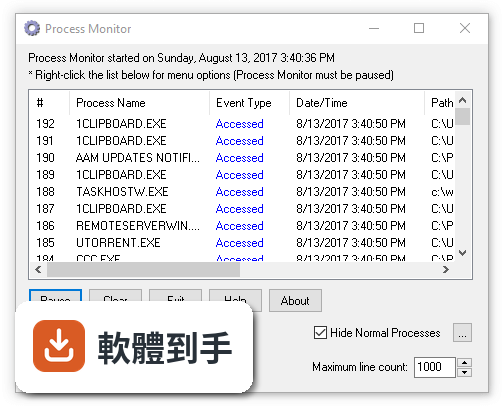
它是微軟 Sysinternals 工具組裡的一套即時監控軟體,專門記錄 Windows 底層的活動,包括檔案系統的讀寫、登錄檔的存取,以及程式和執行緒的啟動與結束。它把這些事件一條一條列出來,每一條都附帶程式名稱、操作類型、路徑、結果等細節,讓你可以回頭檢視某個時間點系統裡發生過什麼事。
02它能抓到是哪個程式在偷偷讀寫硬碟嗎?
可以。它會即時列出所有檔案存取事件,每一筆都會顯示是哪個程式(process)發起的、存取的是哪個檔案或資料夾、做了什麼操作(讀取、寫入、刪除等),以及結果是成功還是被拒絕。你只要在事件列表上點一下,就能看到完整的程式路徑和命令列參數,不需要另外開工具去對照。
03我懷疑某個軟體一直在改登錄檔,這套軟體看得到嗎?
看得到。它對登錄檔的監控和檔案系統一樣詳細,會記錄登錄檔路徑、操作類型(開啟、寫入、刪除等)、以及是哪個程式動手的。如果你發現某個程式在安裝後或執行中頻繁寫入登錄檔,就可以用它的過濾功能,只顯示該程式的登錄檔活動,慢慢找出它到底改了哪些機碼。
04它能不能把錄下來的資料存起來,之後再慢慢看?
可以。它支援把監控到的所有事件儲存成原生紀錄檔,之後隨時可以重新開啟檢視,也可以匯出成 CSV 格式,用 Excel 或其他工具做進一步分析。這對處理「問題發生在半夜,你不在電腦前」的狀況特別有用,你可以設定好開機自動記錄,隔天再回來看紀錄。
05它會影響電腦效能嗎?
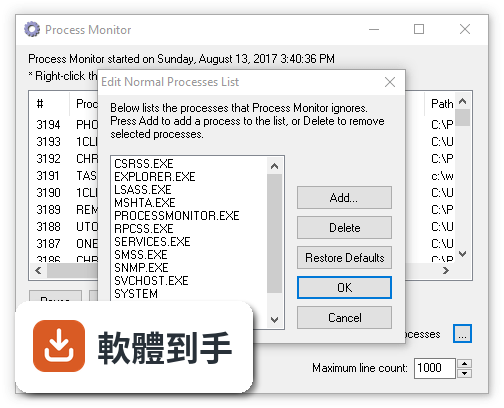
會,這是它明確的取捨。它預設是即時監控所有事件,在系統活動頻繁的時候,資料量會很大,也會佔用一些 CPU 和記憶體資源。官方說明提到,你可以調整錄製設定來減少對效能的影響,例如只監控特定程式或特定類型的活動,而不是全部事件都錄。
06這套軟體適合什麼樣的人用?
適合已經有基本 Windows 概念、遇到問題時願意花時間追根究底的人。例如你裝了某個軟體之後系統開始不穩,你想確認它到底動了哪些檔案和登錄檔;或者你懷疑有程式在背景偷偷做事情,想抓出它的行為。它需要你對程式、檔案路徑、登錄檔這些名詞有基本認識,否則會看不懂它在列什麼。
07我只是一般使用者,電腦壞了只會重開機,適合用嗎?
不適合。它的介面是英文,而且功能非常複雜,官方自己都說新手需要花時間熟悉。它列出來的事件數量非常龐大,如果沒有明確的目標,很容易迷失在幾十萬筆資料裡。一般使用者遇到問題,直接找廠商或請懂的人幫忙,會比花幾個小時研究這套軟體來得實際。
08它跟工作管理員有什麼不同?我已經有工作管理員了,還需要它嗎?
工作管理員看的是「當下」的狀態,例如哪個程式佔用 CPU 或記憶體最多,但它不會告訴你這個程式正在存取哪些檔案、改了哪些登錄檔。這套軟體看的是「過程」——它記錄每一個事件的發生順序和細節,讓你可以回放整個系統活動。如果你只是想知道哪個程式吃記憶體,工作管理員就夠了;但如果你想知道「這個程式為什麼會這樣做」,就需要它。
09它能監控網路連線嗎?
官方資料提到它會捕捉網路活動,但它的核心強項在檔案系統、登錄檔和程式/執行緒活動。如果你主要想監控網路連線,它可能不是最合適的工具,因為這方面的功能不是它的主打。建議你針對網路監控的需求,另外找專門的軟體來用。
10它需要安裝嗎?還是下載就能用?
它是一個獨立的執行檔,不需要安裝,下載後直接執行就可以使用。這點對不想在系統裡多裝東西的人來說很方便,也適合放在隨身碟裡帶著走。不過要注意,它需要系統管理員權限才能完整監控所有活動,所以執行的時候會跳出權限確認的提示。
11它的介面是中文的嗎?
不是,介面是英文。雖然操作邏輯不算太複雜,但所有選單、按鈕、說明文件都是英文。如果你對英文介面不熟悉,使用上會有一些門檻,需要花時間對照功能說明。目前官方沒有提供中文介面的選項。
12這套軟體還有人在維護嗎?
有。它的版本紀錄顯示近期仍有更新,最近一次更新在 2026 年 8 月,過去兩年內有兩次更新,表示開發團隊還在持續維護。它由微軟的 Sysinternals 團隊開發,是免費工具,可以直接從微軟官方網站下載,不用擔心來源不明的問題。
下載與官方連結
processlassosetup32.exe · 連結指向軟體原廠
版本紀錄
- 2026-10-16 Process Monitor 4.12 3.1 MB
- 2026-09-11 Process Monitor 4.11 3.1 MB
- 2026-08-20 Process Monitor 4.1 3 MB
再看 5 筆
- 2026-08-13 Process Monitor 4.05 3 MB
- 2023-09-30 Process Monitor 3.96
- 2023-06-28 Process Monitor 3.95
- 2023-06-08 Process Lasso 12.3.0.24 (32-bit)
- 2023-06-08 Process Lasso 12.3.0.24 (64-bit)
這一版改了什麼
What's new in this version:
Process Lasso 12.3.0.24 (32-bit)
- GUI: Process status column 'Running' state is now implicit if no other notable state
- GUI: Include Efficiency Mode in process status column
- Core/GUI: Add Efficiency Mode rules
- GUI: Improve tab ordering in ProBalance advanced options dialog
- Core/GUI: Add ProBalance option to use Efficiency Mode during restraints
- GUI: Functional improvements to ProBalance advanced options dialog regarding dynamically enabled/disabled suboptions
- GUI: Make persistance of custom System Timer Resolution a Pro feature
- GUI: Don't show 'Balanced' power plan in 'Start Process Lasso with power plan' submenu on power mode systems (only the overlays)
- GUI: Expand width of match phrase edit controls in Watchdog and Disallowed Processes dialogs
- GUI: Add double-click to remove item and populate edit box in Disallowed Processes dialog
- GUI: Add 'Access denied' messagebox if changing current priority class by context menu fails
- GUI: Change affinity set error to 'Access denied' to match priority change error
- GUI: Swap default column positions of 'Status' and 'ProBalance time'
- GUI: Change IdleSaver exclusion rule symbol from 'e' to 'f'
- GUI: Set Efficiency Mode ON and OFF rule symbols to 'E' and 'e', respectively
- InstallHelper: Make CoInitializeSecurity failure a non-critical error
Process Lasso 12.2.0.16 (32-bit)
GUI:
- Add tool to set and persist System Timer Resolution up to 0.5ms, at 'Tools / System Timer Resolution'
- When IdleSaver default timeout filled in config dialog, use minutes if evenly divisible
- When IdleSaver enabled for the first time via tray menu, inducing the config dialog, don't enable if dialog is aborted
- When IdleSaver enabled for the first time via tray menu, inducing the config dialog, set default timeout appropriately
- On 'File / Import Configuration', show distinct error if the INI file selected is the one that is currently in use
- On 'File / Import Configuration', don't set the initial browse directory to the current INI path
Process Lasso 12.1.0.26 (32-bit)
- GUI: Prohibit automated update when device is in fullscreen mode, and fallback to notification
- GUI: Fix an issue in Watchdog dialog where added rules could disappear under certain scenarios
- GUI: Make CPU Sets feature free in beta builds
- GUI.ProcessContextMenu: Change case of 'Select CPU Affinity'
- GUI.ProcessContextMenu: Reorder 'More' submenu
- GUI.ProcessContextMenu: Move 'Trim Memory' to top-level
- GUI.ProcessContextMenu: Move 'Processor Group Extender' to More submenu
- GUI.ProcessContextMenu: Add new 'Copy' (to clipboard) submenu
- GUI: Fix an issue where paint artifacts may be seen in Active Processes listview when it refreshes
Process Lasso 12.0.4.4 (32-bit)
- GUI: Fix an issue in shell32.ExtractAssociatedIcon call that could cause a crash when processes are running from remote paths
- GUI: Translation updates
- All: Renewed code signing certificate
Process Lasso 12.0.3.16 (32-bit)
- Installer: Improve EULA formatting
GUI:
- Improve German splash screen text
- Show notification when Process Lasso starts with Keep Awake Indefinite still active
- GUI/Core: Allow Keep Awake Indefinite setting to persist across reboots
- Add registry option to disable Keep Awake Indefinite from persisting across reboots, HKLMSoftwareProcessLasso:KeepAwakeResetOnReboot (dword bool)
- Cosmetic to 'Main / Keep Awake' submenu
- Allow exit from beta channel while using a beta version, occurring upon the next update to a release version
- Translation updates
- Expand caption control widths (for longer languages) in dialogs: CPU Priorities, CPU Affinities, I/O Priorities, CPU Sets
Process Lasso 12.0.2.18 (32-bit)
GUI:
- Improve control alignment in IdleSaver config dialog
- Suppress INI parsing error messageboxes from Governor when running as a service
- Show precise error message if Workstation key used on Server Edition
- Build: Minor maintenance to build scripts
- Add /activateonly command line parameter to ProcessLasso.exe to perform any deferred license activation from installer, then exit
- Standardize /no_raise_existing command line parameter to /NoRaiseExisting
- GUI/LogViewer: Replace filter edit control search and clear icons with shell stock icons
- Refresh filtered view when process rules change
- Expand width of edit controls in CPU affinity and CPU Sets dialogs
- Right-align captions on edit controls in CPU Sets rules dialog
- Change copyright years to 2023
Process Lasso 12.0.1.6 (32-bit)
GUI:
- Fix graph tooltip was vertically clipped with some system font scalings
- Fix tray icon wouldn't properly reflect CPU Utility % values exceeding 100%
- Add product version to user-agent string
Process Lasso 12.0.0.24 (32-bit)
- Support for Power Modes (overlays)
- Switch to CPU Utility %
- Support 3995WX CPU topology
- Other fixes and enhancements
Process Lasso 11.1.1.26 (32-bit)
- Installer: Enable Spanish language selection
- GUI: Improvements to product activator
- GUI: When filter edit controls have focus, TAB can escape to their respective listview
- GUI: Add dark mode to some frequently seen dialogs
- Core/GUI: Default core parking adjustment log entries to ON (when done by ProBalance, if option set)
- Core: Fix an issue where some log entry types could continue to be emitted despite logging disabled
- GUI: Add menu items to toggle logging of CPU Sets and Group Extender rules
- Core: Adapt ProBalance option 'Disable CPU Core Parking during action' to Intel 12th Gen
- Core: Change failsafe recovery core parking options from HKCU to HKLM (used after improper Governor shutdown if ProBalance option 'Disable CPU Core Parking during action' was used)
- GUI: Fix an issue where clearing the log while it is updating could deadlock
- Core: Fix an issue where a Watchdog rule that restarts a service may fail to do so
- GUI/LogViewer: Minor improvements to log monitoring thread
- GUI/LogViewer: Use filesystem change notifications on UNC paths when available
- GUI.WatchdogRulesDialog: Fix an issue where emptying the rule list completely using the Remove button would not be immediately committed to the INI on save
- LogViewer: Add CTRL+X accelerator to clear log
- GUI.PriorityClassRulesDialog: Expanded width and other cosmetic
- GUI.ProBalanceExclusionsDialog: Fix handling of match strings with embedded commas
- GUI/Core: Refactor priority class rules, now supporting Regular Expressions
- GUI.ProBalanceExclusionsDialog: Cosmetic
- GUI: Add dark mode support to activation dialog
Process Lasso 11.0.0.34 (32-bit)
- Processes tree view
- More useful graph tooltips
Process Lasso 10.4.8.8 (32-bit)
- Core/GUI: Improvements to service management code
- GUI: Fix service tracking for process associations (name appendages) could become stale
- All: Update to VS 2022 17.2.3
- GUI: Language updates
Process Lasso 10.4.7.22 (32-bit)
- Core: Change method of finding processor efficiency classes
- Core/GUI: Add support for as yet undeployed minidump upload tool
- Core/GUI: Improvements to base process enumeration and tracking code
GUI:
- Add 'Options / General / Experimental' submenu
- Add 'Options / General / Experimental / Generate Crash Dump'
- CPU core graphs: Don't treat error getting core parking status (broken performance counter) as parked
- Add 'Options / Tools / Repair [System] Performance Counters'
- If system performance counter(s) appear damaged, ask user then attempt repair with "lodctr.exe /R", et. al (beta builds only)
- Remove 'frequent updates' warning when 'Include Betas' is checked
- Enforce depth limit of ProBalance event timestamp history used by graph tooltips
- Minidump generation: A second messagebox asking if user wants to submit now; opens submission URL
- When IdleSaver enabled by menu, only open options dialog when enabled for first time
- Make log size limit edit control numeric only
Process Lasso 10.4.6.20 (32-bit)
- Support processor groups of unequal size (rare)
- Improvements to Instance Balancer, including multi-group support
- Minor fixes and enhancements
Process Lasso 10.4.5.28 (32-bit)
GUI:
- Remove some deprecated code
- Fix 'Switch to GaaP' syslink not hidden on Keep Running rules dialog when already GaaP
- Instance Balancer Dialog, improve behavior when user toggles from static to dynamic algorithm and then adds rule with artifact of a non-zero static core count
- Instance Balancer Dialog, rename algorithms to 'Dynamic core count (spread evenly)' and 'Static core count'
Core:
- Fix a memory leak when SmartTrim is enabled and a trim working sets action occurs (free RAM was less than threshold)
- General code maintenance
- Improved method of ensuring handle cache coherency, fixing a handle leak
- GUI: Fix filtered listviews weren't immediately adopting user customizations to column orders and widths
- Fix default value for SmartTrim Clear Standby List 'only when free RAM less than' on new installs
- Change new process log events to use lowercase basenames for consistency
- Fix an issue where Group Extender could consume excess compute when multiple group extensions are active simultaneously
- Core/GUI: Change Instance Balancer boolean option 'Only include instances with CPU use' to floating point 'CPU use threshold'
- Installer: Fix an issue with deferred activation code on command line using /key parameter
Process Lasso 10.4.4.20 (32-bit)
- Minor fixes and enhancements
Process Lasso 10.4.3.24 (32-bit)
- Adjustment to BHP for Alder Lake on Win10 (specifically)
- Refinement of memory priority feature
- Minor fixes and enhancements
Process Lasso 10.4.2.16 (32-bit)
- Core: Minor adjustment to Windows Error Reporting (WER) snapshot process handling
- GUI: Add CTRL+SPACE keyboard accelerator to pause GUI display updates
- GUI/Core: When no power profile rules are in effect, return to set 'Start Process Lasso with Power Profile'
- GUI: Add message when user attempts manual switch of active power profile when 'start with' (base) power profile is set
- GUI: Don't remove processes from listview while in the context menu. Fixes crash seen when process removed while taking action on it via context menu.
- GUI: Remove 'Help / Change License Code' menu item when not activated
- GUI: Fix activation code change wouldn't refresh licensee name on graph until app restart
- All: (c) 2021 to 2022
- GUI: Add menu item to toggle ProBalance option to lower to Idle instead of Below Normal
- GUI: Add submenu 'View / Reset'
- GUI: Add menu item 'View / Reset / Reset ProBalance Counters'
- GUI: Move process context menu item 'Keep Running' to 'More' submenu
- GUI: Improve consistency of process context menu items for Hard Throttling
- All: Minor code maintenance
Process Lasso 10.4.1.18 (32-bit)
GUI:
- Add up/down buttons to CPU Sets Rules List Dialog
- Fix to multi-select process context menu item 'I/O Priority / Always / None'
- Improve RAM Load display painting
- Fix incorrect physical core count in status bar on Alder Lake
- Cosmetic tweaks to some rule config dialogs
- Change all 'Remove selected' buttons to 'Remove'
- Fix handling of rare scenario when process module enumeration initially fails due to first module (the EXE) not yet loaded, previously resulting in a missing path and icon in listview (impacted GUI only)
- Minor code maintenance
- Fix 'No update available' message could be unnecessarily shown on app start after a successful manual update under some circumstances
Core:
- Refactor process pathname retrieval code
- Remove process pathnames from 'More info' field of process launched log events, since it is also included in the 'Path' field
Process Lasso 10.4.0.38 (32-bit)
- Add CPU Sets, a softer form of CPU Affinities
- Adler Lake (Intel 12th Gen) support
- Streamlined install
Process Lasso 10.3.1.10 (32-bit)
- Core: Fix an issue in prior release where Performance Mode may not be induced per rule when process path is unavailable due to anti-cheat systems
- Core/GUI: Add Instance Balancer option to reserve n system CPU cores
- Core/GUI: Add Instance Balancer option to only include process instances with CPU use
- GUI: Minor string and cosmetic adjustments
Process Lasso 10.3.0.50 (32-bit)
- New Config Profile Switcher feature
- Add special ProBalance handling for searchindexer.exe
- Other fixes and enhancements
Process Lasso 10.2.0.40 (32-bit)
- Improvement to ProBalance
- Refactored Foreground Boosting
- Add Internet Explorer Restriction feature
- Deploy Bitsum Session Agent for GaaP installs too
- Windows 11 support
- Other fixes and enhancements
Process Lasso 10.1.0.42 (32-bit)
- Dark mode for CPU core graphs, statusbar, and menubar
- Improved tab control appearance in light mode
- Minor fixes and enhancements
Process Lasso 10.0.3.6 (32-bit)
- Update several languages
- Minor fixes and enhancements
Process Lasso 10.0.2.24 (32-bit)
- Update several languages
- Minor fixes and enhancements
Process Lasso 10.0.1.16 (32-bit)
- Update several languages
- Minor fixes and enhancements
Process Lasso 10.0.0.164 (32-bit)
- Refactored log system with CSV as primary
- Ordered CPU affinity and priority rules
- Periodic process sampling (snapshots)
- GUI improvements
- CrowdIn integration for translations
- Numerous fixes and enhancements
Process Lasso 9.8.7.18 (32-bit)
- GUI: Improve performance of filters
- Install: Speed Governor service installation
- Assorted fixes and enhancements
Process Lasso 9.8.6.16 (32-bit)
- Default Governor deployment type to system service
- Further work on limited user contexts
- Performance improvements to GUI
- Other fixes and enhancements
Process Lasso 9.8.5.37 (32-bit)
- Allow Governor to be deployed as system service in the free edition
- Default deployment type to Governor-as-Service for Server Edition
- Support named config profiles with Governor-as-Service
- Add function ‘Options / Memory / Purge standby list now’
Process Lasso 9.8.4.2 (32-bit)
- Show WSL and protected processes
- Assorted fixes and enhancements
Process Lasso 9.8.2.2 (32-bit)
- Add option to switch power profile when Process Lasso starts
- Keep Running and Watchdog launch actions now always launch unelevated (HKLM override available)
- Suppress Dark Mode compatibility warning on older Windows 10/2016 builds
Process Lasso 9.8.1.16 (32-bit)
- Improve support for exotic CPU topologies
- Fix graph presentation on systems with unequal size NUMA nodes
- Fix an issue with the Processor Group Extender that could result in incomplete thread distribution
- Other fixes and enhancements
Process Lasso 9.8.0.54 (32-bit)
- Refactored CPU core graphs; split into NUMA nodes, supporting multiple processor groups [screenshot]
- Improve foreground process awareness with Governor-As-Service (GaaS)
- Make ProBalance option ‘Ignore children of foreground’ default to on
- Add ‘Always on top’ option
- Add parked core count to status bar
- Add option to hide CPU core graphs
- Other fixes and enhancements
Process Lasso 9.7.6.26 (32-bit)
- New load balance algorithm for the Group Extender feature
- Make effort to enforce CPU affinities on multi-group processes by moving existing threads
- Tune default ProBalance timing
- Fix menu-induced config profile switching
- Assorted fixes and enhancements
Process Lasso 9.7.5.44 (32-bit)
- GUI: Fix 'Main / Keep awake' submenu in 9.7.5.42 when GUI running as admin
Process Lasso 9.7.5.42 (32-bit)
- Add processor group support to CPU affinity settings
- Add ability to move a running process to a different processor group
- Add Regular Expression support to Persistent CPU Affinities
- Fixes and enhancements
Process Lasso 9.7.0.48 (32-bit)
GUI:
- Create distinct process context menu items for Suspend and Resume process
- Improve reliability of process suspension (note that it may take a few seconds for a process state to change)
- Active Processes tab: Improve sort behavior
- Active Processes tab: Use process enumeration data from primary view
- Remove an unecessary warning messagebox on process suspension
- Add option to disable listview process tooltips
- Minor text changes
- Fix listview sort issue where some rule strings were being misinterpreted as integers
- Small optimizations to listview sort compare function
- Don't pause process listview updates when in filtered view
All:
- Optimizations to thread enumeration
- Change 'hide suspended processes' value name to force reset to new default (false)
- Fix product version format in version info resource
ThreadRacer:
- Replace OK/Cancel buttons with single Exit button
LogViewer:
- Cosmetic work to About Dialog
Build:
- Adjust debug information for Server Edition
Core:
- Migrate ProBalance exclude foreground processes setting to new key name, or default to off for Server Edition
CPUEater:
- Adjust default thread count
Process Lasso 9.7.0.16 (32-bit)
Core:
- Fix issue where leaving rule-induced Performance Mode when it had been previously manually engaged could cause inappropriate reversion to prior power plan
- Add distinct log entry description when Performance Mode manually induced
- Add distinct log entry for continuing performance mode after process ends because Perf Mode had been manually induced
GUI:
- Fix manual Performance Mode not persisting when Process Lasso restarted
- Fix Active Processes tab rules column not clearing when last rule removed
- CPU Limiter configuration dialog - On listview row double-click, populate all controls with removed item
Process Lasso 9.7.0.2 (32-bit)
- Add new Processor Group Extender feature
- Fixes and enhancements
Process Lasso 9.6.0.68 (32-bit)
- Add per-session agent to facilitate some features with governor-as-service
- Numerous improvements and fixes to limited user environments, especially when combined with governor-as-service
- IdleSaver now available with governor-as-service
- Improvements to IdleSaver configuration, allowing broader range of settings
- Add back Spanish, Italian, Polish, and French languages
- Considerable other product refinement
Process Lasso 9.5.1.0 (32-bit)
- Allow hundredths precision in Watchdog (advanced rules)
- Fixes and improvements to Watchdog
- Expanded new Regular Expressions to ProBalance Exclusions
- GUI.Watchdog: Improve config dialog up/down button behavior
- Core: Populate command line field to watchdog log type action events
- CPUEater: Fix status bar overlap with 'just took action' static control
- Change copyright years to 2020
- Language updates
- GUI: Remove checkbox on 'Uninstall BHP' menu item
- Core.Watchdog: Improve handling of redundant log entries
- Core.Watchdog: Log actions even if no setting change was necessary (process already at target)
- Core.Watchdog: Other fixes and enhancements
- Core.Watchdog: Minor optimizations
- GUI: Update Slovenian
- GUI: Restore primary listview filter update on items add/removed
- Core: Support RegEx in ProBalance exclusions
- GUI: Add process match help to ProBalance exclusion dialog
- GUI.ActionsLog: Fix to context menu items and auto-select of any matching running process
- GUI: Change to 'process match' listview column headers in config dialogs
- GUI: Add tooltip to Watchdog 'Divide CPU % by total core count' option
- Uninstall: Delete desktop shortcut
- Core/GUI.Watchdog: CPU and memory thresholds now allow precision in hundredths
- GUI: Update Russian
Process Lasso 9.5.0.40 (32-bit)
- Added Regular Expression matching to multiple fields for Instance Balancer, Watchdog, and CPU Limiter rules. See documentation on process matching
- Optimizations to GUI
- Improvements to Active Processes tab
Fixes and enhancements:
- GUI: Restore average CPU utilization to active processes tab
- GUI: Watchdog dialog: Replace CPU % threshold drop-down with edit box
- GUI: Watchdog dialog: Round CPU % given in decimal to nearest integer pending Watchdog support for such
- GUI: Bring existing instance of Insights to foreground if already running
- Core: Fix issue with traditional rules when user is appended after single character process match (e.g. *:jerem)
- Insights: Added menu item for Advanced ProBalance Options dialog
- Insights: Fix some settings could revert when changed from Advanced ProBalance Options dialog
- GUI: Make Process Lasso info (e.g. config path) selectable in About Dialog for copy/paste
- GUI: Instance Balancer dialog: Show error when user tries to add static core count rule with 0 cores specified
- GUI: Assortment of small cosmetic and internal improvements
- GUI: Optimizations
- GUI: Fix a filter issue with mixed case in some fields
- GUI: Rewrote process icon management
- GUI: Some refactoring of Active Processes tab code
- Core: Add RegEx (and multi-field) support to CPU Limiter, Watchdog, and Instance Balancer
- GUI: Add 'help' buttons beside process match strings for Instance Balancer, CPULimiter, and Watchdog
- Core: Fix Instance Balancer issue when total logical cores is not evenly divisible by per-instance core count
- GUI: Add Windows 10/2019 build number to status bar
- GUI: Support Dark Mode up to Win10 build 19536
- GUI: Add 'View / Colors / Always allow Dark Mode' for user over-ride on untested new Win10 builds
- GUI: Change priority adjusted log action text to remove colon
- GUI: Fix a reported GUI crash
- GUI: Add dynamic (updating) RAM stats to SmartTrim dialog
- GUI: Remove cache size from status bar RAM part
- Core.InstanceBalancer: Allow 'childof:' prefix to be any character case
- GUI: Fix Show/hide graph button one pixel too wide in Active Processes view
- GUI: Show icons in Active Processes tab
- Language updates
Process Lasso 9.4.0.70 (32-bit)
- GUI: Active Processes: Add sensitivity adjustment slider shown above list
- GUI: Fix to ‘File / Choose alternate log folder’
- GUI: Dark Mode support for Windows 10 19025
- GUI: Several other small and cosmetic enhancements
- Log: Standardize CSV output, adding headers, quotes and removing BOM
- Log: LogViewer: Add full history CSV export in addition to current view export
- Log: Fix main GUI ‘File / Export log to CSV’ would not export full history
- Core: Improved process suspend function, now compatible with Resource Monitor
- Core: Improved legacy hard throttle function
Process Lasso 9.4.0.46 (32-bit)
- Minor fixes and enhancements
- Update Chinese and Slovenian
Process Lasso 9.4.0.28 (32-bit)
- GUI: Support Windows 10 Dark Mode and interface with OS setting
- GUI: Dark Mode improvements
- GUI: Add tooltips to CPU utilization graphs
- GUI: Show active config profile on graph, if used
- GUI: Self-restart now opens with main window visible
- GUI: Fix governor could be inappropriately stopped by GUI on session exit
- Core: Fix use of Performance Mode when Governor running as service
- Core: Fix ‘Hide Suspended Processes’ was defaulting to true
- TweakScheduler: Zero ratio bits when fixed length quanta used
- InstallHelper: Preserve character case of global config path
- InstallHelper: New modern browse dialogs for global log and config folders
- All: Many other optimizations, fixes and enhancements
Process Lasso 9.3.0.74 (32-bit)
- GUI: Fix an issue with wildcard matching for persistent I/O priority classes
- GUI: Fix formatting in status bar when system RAM GB is more than 2 digits (>99GB)
- GUI: Update Chinese, Russian, Slovenian
- Core: Default ‘also check rules for path matches’ to true
- Licensing: Allow Performance Mode process list to be edited in free edition
- Licensing: Allow use of ProBalance advanced option ‘Restrain by CPU Affinity’ in free edition
- All: Other additions, fixes and enhancements
Process Lasso 9.3.0.64 (32-bit)
- GUI: Add CPU bitmask edit control to CPU Affinity selection dialog
- GUI/Core: Add selection for power plan to use with Performance Mode, in case user desires something other than BHP (e.g. AMD Ryzen High Performance)
- GUI: Add license name graph overlay in lower-left region
- GUI: Fix crash seen after selecting process context menu items after target process had terminated
- GUI: Add warning about use of multiple configuration profiles while governor as service
- GUI: Speed process icon population
- GUI: Update PTBR
- Settings: Change default ‘hide suspended processes’ to OFF
- All: Other additions, fixes and enhancements
Process Lasso 9.3.0.44 (32-bit)
- Core: Allow duration of 0 to indicate indefinite period in CPU Limiter rules
- Core: Allow larger max integer values in CPU Limiter rules
- GUI: Expand edit control widths on CPU Limiter dialog
- Core: Remove some deprecated code from governor
- Core Exclude vmmem from ProBalance actions by default
- InstallHelper: Fix to startup type management legacy code
- Updater: Fix quickupgrade could fail to be replaced on update in last final
- All: Compiler optimization setting adjustments
- All: Update Chinese, German, Russian
- Other minor
Process Lasso 9.3.0.30 (32-bit)
- GUI: Standardize fonts for filter edit controls
- GUI: Adopt Explorer style listviews in normal theme
- GUI: For dark mode, add dark scrollbars on listviews
- GUI: Update Chinese Simplified and Traditional, Slovenian
- Other minor changes
Process Lasso 9.3.0.22 (32-bit)
- New CPU Limiter algorithm to dynamically reduce a process’s CPU use
- Per-process CPU utilization precision now in hundredths
- Refactored SmartTrim, added ability to Purge Stand-by List
- Improved and more standard update notifications
- Arranged Options menu into categories
- Retarget all projects to VS2019 platform toolset
- Large number of other enhancements
Process Lasso 9.2.0.32 (32-bit)
- GUI: UX refactoring and tuning (details below)
- GUI: Change font of controls on main window
- GUI: Change order of rotation through color schemes when clicking on graph
- GUI: Change color of graph grid, now less prominent
- GUI: Reduce main window margins by half
- GUI: Reduce RAM load graph width
- GUI: Fix core graphs display issue when odd size logical CPU cores
- GUI: Enable core graphs display for single CPU core systems
- GUI: Improve appearance of core graphs
- GUI: Sizer (divider) control apperance improvement
- GUI: Switch to shortened Uptime format
- GUI: Fix RAM load graph could get mispositioned after manual sizing
- GUI: Improve flicker of CPU utilization and RAM load graphs on sizer control
- GUI: Move Lasso versions to right-most status bar component
- GUI: Strip embedded tabs in processor name string
- GUI: Change ‘RAM Load’ caption to ‘% RAM’
- GUI: Default panel size adjustments
- GUI: Change the methodology for panel size adjustments with main window resize
- GUI: Improve graph legend ellipsis
- GUI: Rename ‘automatic updates’ to ‘update without prompt’
- GUI: Add registry option ‘nographgrid’ to hide graph grid
- GUI: Update German and Slovenian
- GUI: Other misc changes
- Core: Change module description in version block
Process Lasso 9.2.0.14 (32-bit)
- GUI: Added Dark Mode
- GUI: Expanded custom color selections
- GUI: Improved filter edit control appearance and function, add ‘X’ clear button when populated
- GUI: Window painting and sizing optimizations
- GUI: Change default graph color
- GUI: Improved display of many message boxes
- GUI: Large number of cosmetic and control enhancements
- Assortment of fixes and enhancements
Process Lasso 9.1.0.68 (32-bit)
- GUI: If system only has a single CPU group: For default process columns, hide ‘CPU group’, Set CPU utilization bars caption to ‘CPU %’ instead of ‘CPU Group 0’
- GUI: Improvements to graph components and sizing, especially for non-English languages
- GUI: Restore ‘Governor Not Running’ warning graph overlay
- GUI: Text, menu item, and dialog cleanup and consistency improvements
- GUI: Fix issue where previously used config profile couldn’t be deleted until governor restarted
- GUI: Show automatic gaming mode in rules column
- GUI: Restore color theme when GUI launched
- GUI: Invalidate target windows after theme change
- GUI: Status bar – Remove ‘cores /’ prefix on queue length per core
- GUI: Improve process tooltip formatting, especially for non-English
- GUI: Continued prep for full dark mode
- GUI: Add Slovenian
- GUI: Other code improvements
- Core: Allow auto-detected games to be children of framework (e.g. Steam) at any level, not only immediate child
- Misc other
Process Lasso 9.1.0.42 (32-bit)
- Core: Refactored the Instance Balancer: allow for wildcards, allow for childof: to balance all children, e.g. ‘childof: boinc.exe’, re-balance if any PID in set changes, rather than net instance count change
- Core: Default to disabled process creation and termination log events
- GUI: Disable listview gridlines by default
- GUI: Add ‘View / Show gridlines’ option
- GUI: Don’t show ProBalance stats on graph if ProBalance is disabled
- GUI: Change graph overlay ‘ProBalance restraints’ to ‘ProBalance events’
- GUI: Add color selections for listview background and foreground
- GUI: Invert dark/light theme selections in preparation for dark mode
- Additional fixes and enhancements
Process Lasso 9.1.0.28 (32-bit)
- GUI: Add Processor Utility % to status bar (see this page for info)
- GUI: Add CPU Queue Length and Load Ratio to status bar (queue_length / core_count)
- GUI: Add Process Lasso version to status bar
- GUI: CTRL+C copy to clipboard support of selected rows in primary listviews (including filtered views and logviewer)
- GUI: Fix a small memory leak seen under some conditions
- GUI: Minor other improvements
- LogViewer: Persist window size and position
- LogViewer: Expand right-most log column to horizontal size of window if it would otherwise be initialized to a lesser width
- LogViewer: Move log listview column persistance to HKCU
- LogViewer: CTRL+A select all support
- Expand maximum command line length in places where an older Windows constant was used
- Migrate to VS2019
Process Lasso 9.1.0.6 (32-bit)
- Add Instance Balancer feature that assigns CPU cores to multiple instances of an application based on a specified algorithm
- Refactor Keep Awake timer functionality
- Refactor persistence of Keep Awake timer and manually induced Performance Mode when Process Lasso is restarted
- Use performance counter for total CPU utilization instead of calculation
- Change CPU topology status bar format
- Maintenance to updater for server edition
- GUI Rules column now also shows ProBalance exclusions matched by path
- Improvements to session (user) name resolution
- Fix a painting issue with actions log listview header
- Add last metric (CPU use, responsiveness, memory load.) readings to graph legend
- Add background to graph legend to enhance visibility
- Add custom color selection for graph legend background
- Change order of graph color scheme rotation on click (black, white, custom)
- Make listview painting smoother during frequent updates
- Remove a deprecated registry key in server edition
- Persistent CPU affinities configuration dialog improvements
- Pre-order status bar parts to put dynamic columns first
- Defaults: Turn on process icons in Server Edition, turn on process creation/termination logging in Workstation Edition
- Misc cosmetic work and enhancements
- Update Chinese (simplified and traditional), German, Finnish, Russian languages
Process Lasso 9.0.0.582 (32-bit)
- Default to more appropriate default log path when governor configured as a service
- Fix a rare crash seen in processlasso.exe
- Allow GUI to display more complex persistent process setting rules (pathname, command line) in listview
- Allow for smaller main window sizes to be remembered
- Minor other
Process Lasso 9.0.0.574 (32-bit)
- Dynamically size status bar parts
- Improvements to watchdog configuration dialog (confirm close without save, formatting, text)
- Restore confirmation on cancel w/o save to all configuration dialogs
- Remove minimum window height and width during resize
- Always use OS default size and width for main window, first run
Process Lasso 9.0.0.568 (32-bit)
- Add CPU type to status bar
- Make CPU topology distinct status bar item
- Continued work to processor group support
- Single-selection process context menu: Move memory priority to ‘More’ submenu
- Add processor group to CPU utilization and parking graphs caption
- Import sort behavior of listviews
- Add sort direction indicators to listview headers
- Save column states on mimimize of main window (instead of only on exit)
- Improved main window resizing
- Minor fixes and enhancements
- Assorted cosmetic and string changes
- Update Russian
Process Lasso 9.0.0.558 (32-bit)
- Add processor group (‘CPU groups’) display to indicate processor group(s) a process’s threads are running on – info
- Change to CPU core graph ordering to adhere better to NUMA node grouping
- Change to default listview ordering - NOTE: These changes will cause saved listview column ordering and sizes to be reset once
- Show ‘KB’ instead of ‘K’ in I/O Delta
- Show blank instead of 0 KB in I/O Delta
- Fix installer unicode (Chinese, Russian)
- Update to NSIS 3.04
Process Lasso 9.0.0.552 (32-bit)
- Fix issue with Hyper-Threaded/SMT avoidance current CPU affinity selection
- Fix a cosmetic resource issue in process context menu on Intel platforms
- Fix an issue where some process information could be blank
- Core process enumeration and management code maintenance
- Update copyright year
- Minor other
Process Lasso 9.0.0.548 (32-bit)
- Fix exception in 546 when a secondary instance of ProcessLasso.exe is launched directly w/o using ProcessLassoLauncher.exe
- Minor cosmetic improvement to ProBalance advanced options dialog
- Update Finnish and German languages
Process Lasso 9.0.0.546 (32-bit)
- Change log not available for this version
Process Lasso 9.0.0.538 (32-bit)
- Change log not available for this version
Process Lasso 9.0.0.526 (32-bit)
- Fix to ‘Induce Performance Mode’ (formerly ‘Classify as a High Performance’) process context menu item
- Fix digital signing of some modules in 32-bit distributions
- Minor adjustment to inter-process communication queue management
Process Lasso 9.0.0.522 (32-bit)
- Add NUMA node selections to all CPU affinity selection dialogs
- Organizational changes to process context menu
- Assortment of string, message box, and dialog improvements
- Improvements to watchdog advanced rules dialog
- Change ‘Disable SMT’ to ‘Disable Hyperthreading’ for Intel CPUs
- Change first-time minimization to system tray notification text
- Include ThreadRacer in Lasso distribution and add to Tools menu
- Add CPUEater and TestLasso support for 64-bit CPU affinities
- Fix CPUeater and TestLasso support for greater than 64 threads
- Fix Del and CTRL+A keys in filter edit box
- Increase load rate of process icons
- Remove some languages not up to date
Process Lasso 9.0.0.502 (32-bit)
- UX fixes for the 2990wx and other systems with groups of >32 cores
- Additional UX fixes and string changes
- Update DE, RU, PT-BR
Process Lasso 9.0.0.498 (32-bit)
- Some UX fixes for the 2990wx and other systems with groups of 64 cores
- Fix 2x restraint total count can occur in Insights UX
- Fix post-update revision history may on system tray icon click after notification balloon disappeared
- Update RU, PTBR, FI languages
Process Lasso 9.0.0.492 (32-bit)
- Add menu item under ‘Options / Performance Mode settings’ to uninstall/reinstall Bitsum Highest Performance power plan
- Improve watchdog dialog initial appearance
- Fix Watchdog issue with CPU affinity bitmasks > 32
- Licensing: Unbind CPU core count from unique machine ID. Requires re-activation to unbind
- Improve terminate process functionality in filtered view
- Other small fixes and enhancements
Process Lasso 9.0.0.478 (32-bit)
- Change log not available for this version
Process Lasso 9.0.0.470 (32-bit)
- Fix a GUI crash seen by a small number of users
Process Lasso 9.0.0.466 (32-bit)
- Show message box on restart after ‘Reconfigure the way Process Lasso starts’
- Restore listview header right-click to select visible columns (in addition to right-click on tab)
- Add last four digits of activation code to About Box
- Show Status column by default in All Processes view
- Fill app name and desc with process base name if can’t be retrieved
- Fix filtered processes view didn’t adopt customized columns from All Processes view
- Fixes to column setting persistence
- Fix extreme date change could cause days installed to roll over
- Fix to CPU time sort
- Fix Dark / white graph theme menu item check inversion
- Change to default column ordering in all processes listview
- Enable minidumps
Process Lasso 9.0.0.464 (32-bit)
- Show message box on restart after ‘Reconfigure the way Process Lasso starts’
- Restore listview header right-click to select visible columns (in addition to right-click on tab)
- Add last four digits of activation code to About Box
- Show Status column by default in All Processes view
- Fill app name and desc with process base name if can’t be retrieved
- Fix filtered processes view didn’t adopt customized columns from All Processes view
- Fixes to column setting persistence
- Fix extreme date change could cause days installed to roll over
- Fix to CPU time sort
- Fix Dark / white graph theme menu item check inversion
- Change to default column ordering in all processes listview
Process Lasso 9.0.0.456 (32-bit)
- Change log not available for this version
Process Lasso 9.0.0.452 (32-bit)
- GUI now allows protected processes like Easy Anti-Cheat clients to be configured for Performance Mode by adding their basename to the list, instead of throwing an error when pathname resolution fails.
- Allow process basenames to be specified (w/o wildcards) in the Performance Mode list
- Add optional command line matching to Default CPU Affinities
- Fix to governor refresh rate slider in Insights dialog
Process Lasso 9.0.0.442 (32-bit)
- Divide CPU core utilization graphs into 2 vertical stacks for additional display room
- Add some special purpose debug logging related to configuration file load disposition
- Update PTBR, Russian
Process Lasso 9.0.0.426 (32-bit)
- Fix 5 second refresh interval configuration persistence
- Update German and Chinese translations
- Other minor fixes and adjustments
Process Lasso 9.0.0.420 (32-bit)
- Fix dysfunctional ‘Notify of power plan changes’ menu item
- Hide Insights ‘Since …’ if no start time-stamp is available
- Add additional retries and increase time-out for UNC backed configuration files – to prevent their reset to default for failure to load
- Fix ‘Pro – Balance’ on advanced ProBalance dialog options
- Change name of ‘default’ profile to ‘My Default Profile’ so it is not confused with program defaults
- Import newer Italian, Polish, Russian, Finnish, Chinese Traditional, and Chinese Simplified