
這是歷史版本頁面 — 看 Rambox 最新版本
訊息軟體太多開到眼花?Rambox 能幫你收在一個視窗嗎
 Rambox 2.2.1
資料更新 2023-10-27
閱讀約 5 分鐘
工作用的 Slack、WhatsApp 網頁版、兩個 Gmail 信箱,加上私人用的 Messenger,瀏覽器開了一排分頁,哪個視窗跳出紅點就得切過去回。每天光是切換視窗、找通知就耗掉不少時間,更別提電腦記憶體被一堆網頁分頁吃光,整台機器越用越慢。你只是想找一個方式,把這些通通收在同一個地方,不用再被分頁綁架。
一般人的直覺是「多開幾個瀏覽器視窗」或「把常用的釘選在分頁列」,但分頁一多照樣亂,通知照樣分散,關掉瀏覽器就全部斷線。另一種做法是裝各家桌面版軟體,但每個軟體都有自己的視窗和更新通知,裝越多越佔資源。這類工具的做法是:把各服務的網頁版包進同一個應用程式裡,用一個視窗管理所有帳號,統一收通知、統一搜尋,讓「切換服務」變成點一下分頁的事。
01Rambox 到底能拿來做什麼?
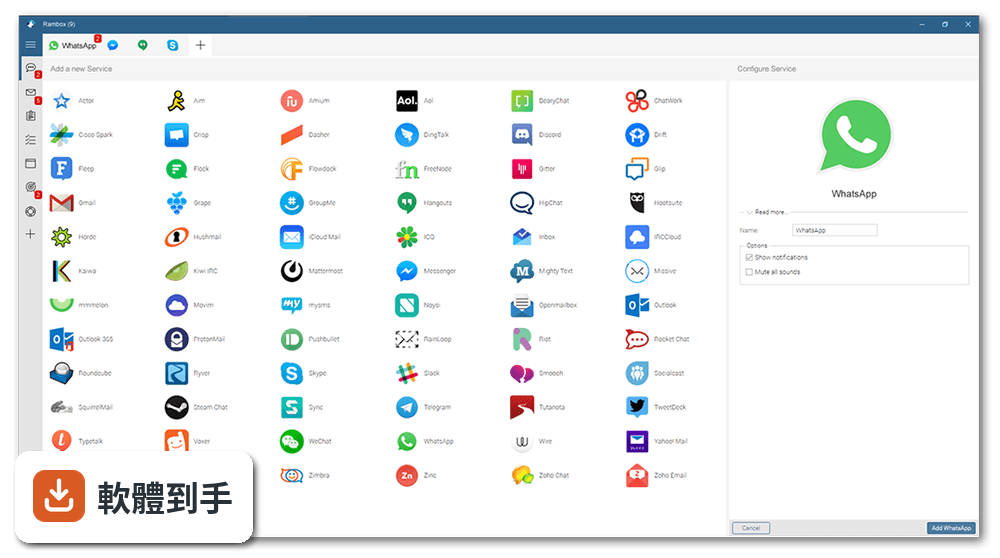
它把常用的網路服務整合在一個視窗裡,例如 WhatsApp、Slack、Messenger、Gmail 等,不用開瀏覽器分頁。同一個服務可以加很多次,比如兩個 WhatsApp 帳號、三個 Gmail,各自獨立登入。每個服務會顯示未讀徽章,點分頁就能切換,適合同時管理多個通訊和郵件帳號的人。
02它可以同時登入同一個服務的多個帳號嗎?
可以。官方說明明確提到「可以多次加入常用服務」,例如同時登入兩個 WhatsApp 或三個 Gmail,每個實例獨立運作、各自保持登入狀態。這對同時管理工作和私人帳號的人來說很實用,不用為了切換帳號一直登出登入。
03通知和訊息搜尋是怎麼運作的?
有未讀訊息時,分頁和工具列圖示會顯示徽章。內建全域搜尋功能,可以一次搜尋所有帳號裡的通話和郵件,不用逐個服務點進去找。另外有勿擾模式,可以關掉所有聲音和通知,專心做事時不會一直被干擾。
04介面和設定可以調整嗎?
可以。每個服務能獨立設定主題、通知方式,懂 CSS 的人還能注入自訂程式碼改變外觀。服務分頁可以重新排序、分成左右兩組。也支援代理伺服器設定,如果你的網路環境擋掉某些服務,可以透過代理連線。
05它有哪些安全或隱私相關的功能?
提供主密碼,每次開啟程式時要求輸入密碼;也有鎖定功能,離開座位時可以手動鎖住應用程式。官方強調重視隱私,但沒有提供端對端加密的細節,所以敏感性對話還是要留意。另外,工作階段會持續保留,直到你手動移除服務為止。
06什麼樣的人適合用這套軟體?
每天要同時處理多個通訊和郵件帳號的人,例如自由工作者同時接案、業務需要同時盯好幾個客戶群組、或一個人管理公司多個社群帳號。它把網頁版服務集中管理,省去開一堆瀏覽器分頁的麻煩,適合「帳號很多、切換很煩」的使用情境。
07免費版和付費版差在哪裡?
官方資料顯示免費版包含 700 多個應用程式、即時同步、通知管理、快速搜尋、休眠和專注模式。付費版(每月 4.37 美元)多了最多 3 台電腦同步、擴充功能、可自訂工作區、工作階段管理、拼字檢查和優先支援。企業版則有團隊管理和 Active Directory/SAML 整合。
08這套軟體適合當作團隊共用的通訊工具嗎?
要看需求。免費版沒有團隊管理功能,付費的企業版才有團隊管理、自訂品牌、集中帳單和 Active Directory/SAML 整合。如果只是團隊成員各自整合自己的通訊軟體,免費版就夠用;但若要統一管理成員的帳號和權限,就要考慮企業版。
09什麼情況不該選它?
如果你只需要整合一兩個服務,用瀏覽器分頁就夠了,不需要多裝一個軟體。另外它的介面只有英文,不習慣英文介面的人會覺得吃力。還有,它的使用者評分只有 7.46 分(28 人評分),樣本數不多,代表實際使用經驗可能因人而異,建議先試用免費版再決定。
10它的更新頻率會不會影響使用?
官方版本紀錄顯示近 12 個月只更新 1 次,近 24 個月也只更新 1 次,更新步調偏慢。如果你依賴的某個通訊服務改版導致 Rambox 無法正常運作,可能要等一段時間才會修正。在意穩定性和即時相容性的話,這點需要列入考量。
11它和 Franz、Shift 這些類似軟體有什麼不同?
三者都是整合多種通訊服務的工具,但定位略有不同。Shift 比較偏向商業用途,整合郵件、行事曆和 Slack、Trello 等生產力工具;Trillian 是傳統的即時通訊軟體;Rambox 則強調開源免費、可自行加入任何自訂服務。評分人數都不多(Franz 28 人、Trillian 46 人、Shift 36 人),實際體驗建議自己裝來比較。
12它支援哪些作業系統?
官方資料顯示支援 Windows 7 到 Windows 11、macOS 和 Linux,是跨平台的解決方案。也就是說,你在不同電腦上可以安裝同一套軟體,並透過同步功能讓設定和帳號保持一致。不過介面只有英文,這點不分平台都一樣。
下載與官方連結
Rambox-2.2.1-win-x64.exe · 連結指向軟體原廠
版本紀錄
- 2026-10-08 Rambox 3.1.0 104 MB
- 2026-07-21 Rambox 2.7.0 105 MB
- 2024-02-21 Rambox 2.3.0
再看 5 筆
- 2023-11-29 Rambox 2.2.2
- 2023-10-27 Rambox 2.2.1
- 2023-10-27 Select Version
- 2022-04-22 Rambox 0.8.0 (64-bit)
- 2022-04-22 Rambox 0.8.0 (32-bit)
這一版改了什麼
What's new in this version:
Rambox 2.2.1
Fixed:
- macOS: Edit shortcuts acting strange in Google Chat and pop-ups
- "Show System Tray indicator on unread messages" setting not working
- Cloudflare validation failing in some apps
- Sometimes Google SSO fails on apps with a custom user agent
Rambox 2.2.0
Improved:
- Upgrade to Electron 22.3.25 (Chromium 108.0.5359.215)
- Change hibernation leaf indicator
Rambox 2.1.5
Fixed:
- "Reload", "Search" & "Zoom" shortcuts not working on apps within workspaces using a tiles layout.
- Double-click on app's title bar in Tiles layout doesn't maximize tile.
- Profile picture: Now also accepts JPEG format and sets a 512Kb file size limit for the upload image.
- URL validation fails on certain apps when adding them.
- Facebook Messenger: Screen sharing not working.
- Linux: once selected the beta channel, can't go back to the stable one.
Improvements:
- Show Notification & an indicator icon in the app tab to advise the user that the app needs attention.
- New troubleshooting tool, made to diagnose connectivity issues, check available memory, HDD space and peripherals connection.
Rambox 2.1.4
Fixed:
- Tray icon shows red dot when Rambox initiates despite not having unread counters
- Sort issues in the root workspace when "Apps positions" is set to bottom
- Hibernated app crashes at loading when clicking on the "don't hibernate this app" switch
- Settings: Wrong form validation when saving changes and the Master Password option is already enabled, obligating the user to disable this option or set a new password
- Fails to focus on "Wake Up" button when accessing a hibernated app through the Quick Search
Improved:
- Move apps between workspaces ????
- Provide Geolocation for the apps
- Focus mode: Remember the user's last pomodoro time setting and use it as default for the next time
- Increase the "Focus Mode" maximum pomodoro timer from 120 to 720 minutes (12hs)
- Restore Proxies HTTPs support
- Overhaul of the add section, new layout and improved performance
Rambox 2.1.3
Fixed
- No persistent badge in the task bar on window restore.
- Ask for the Master Password or YubiKey when Rambox is activated in a machine.
- Windows 11 machines are labeled as Windows 10 in the Profile section.
- Basic users: Missing 'Copy current URL' option in the context menu.
Improvements
- Add a confirmation dialog to prevent accidental quitting when using Ctrl/Cmd + Q.
- Use the mouse wheel to navigate in the tab bar.
- Add apps section: Adds a tooltip with description & website when hover an app.
- Open Quick Search with Ctrl/Cmd + Shift + Space.
- Zoom apps with Ctrl + Mouse Wheel.
- Consumption notifications: Adds a new hibernate button and the possibility to dismiss them for an app.
- App Metrics: New hibernate button for apps.
- New implementation to ensure the code injection in the apps.
Rambox 2.1.2
Fixed
- Auto-Update: Fix Windows & macOS devices gets "Update now!" new version message that points to the updated Linux snap package.
Rambox 2.1.1
Fixed
- Restore functionality: Double-click on title bar to maximize window on Mac.
- Beta version doesn't update to the upper stable version.
- Browser verification fails in GitLab.
- Fixes "You were kicked out because there is something wrong with your license." when using an unstable internet connection.
- Some popup windows can't be closed using the close button.
- Extensions: Shows the correct URL for the selected app in the extension popup.
- Extensions: Fixes wrong position of the extension popups when the app bar position is other than "Left".
- Back & Forward buttons not working on apps in workspaces with tiles layout.
- Prevent navigation shortcuts when the focus is on a text area.
- Minor fixes.
Improvements
- Some security improvements.
- Enhanced stability loading apps.
- Support Wayland screen share.
- Prevent errors while using App Metrics.
- Context menu: Show spellchecker suggestions first.
- New app's advanced setting: "Use compatibility mode" (disables features that can cause compatibility issues with some apps).
- Complete overhaul of the proxy feature, now more stable, faster and more reliable.
- Proxy: adds "Use system proxy settings" option to general Settings.
- Extensions: overhaul internal implementation.
- Adds "dismiss" button for beta warning to stop showing it until you install a new beta.
- Adds a button to get the favicon from the Custom Apps URL and set it as a logo.
Rambox 2.1.0
Fixed
- Make changes to support Snapchat in Rambox.
- Update dependencies to keep supporting Slack.
- Enterprise: Only show Payment Failed to admin users.
- Prevent showing the "license expired" dialog after several failed attempts to validate the license.
- Support screen share in Google Meet.
Improvements
- Upgrade to Electron 21.4.0 (Chromium 106.0.5249.199).
- New context menu implementation.
- Several security improvements.
- New shortcut to jump between workspaces:
- Windows & Linux Shift + Alt + PgUp/PgDown
- macOS Cmd + Alt + PgUp/PgDown.
- Restore the app from the system tray on single click instead of double click.
- Show a banner in beta versions that reminds the user that could include some issues, with a button to access the support portal.
Rambox 2.0.10
Fixed
- F5 and Ctrl+R shortcuts now reloads the app in the current URL instead of loading the home URL.
Improvements
- License validation improvements.
- Prevent logging the user out after several errors while attempting to reach our servers.
- Add Emoji panel to the context menu (where available).
Rambox 2.0.9
Fixed
- Linux: Issues while trying to get logged in the app using Google.
- Linux: AppImage package crashing in some Linux distributions.