
這是歷史版本頁面 — 看 Recuva 最新版本
誤刪檔案救得回來嗎?Recuva 能做什麼
 Recuva 1.53.1087
資料更新 2016-06-08
閱讀約 6 分鐘
整理資料夾的時候手滑把整個專案資料夾丟進回收站,當下心想「等等再清就好」,結果過兩天要用的時候才發現回收站早就被清空了。或者更慘,記憶卡插進相機跳出「需要格式化」的提示,幾百張照片看起來全部沒救。這種時候第一個念頭就是上網找救援軟體,但又怕下載到來路不明的東西,更怕掃了半天什麼都找不到。
一般人習慣的做法是先翻回收站,找不到就認命。但檔案被清出回收站、磁碟被格式化、或是系統崩潰之後,檔案其實沒有真正消失,只是被標記成「可以覆寫」的空間。這類救援工具的切入點就是掃描磁碟上殘留的檔案痕跡,趁新資料還沒覆蓋上去之前把它們撈回來。能不能成功,取決於刪除之後你對那顆磁碟做了多少事。
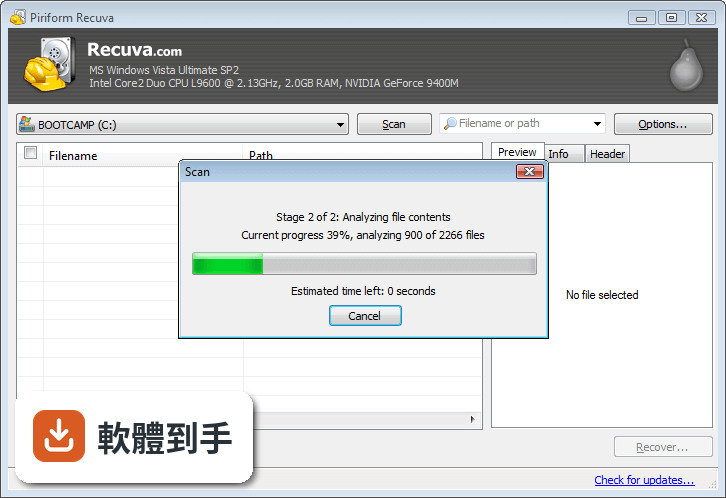
01Recuva 可以救回哪些類型的檔案?
根據官方說明,它涵蓋文件、圖片、音樂、影片、電子郵件和壓縮檔等常見類型。操作時可以指定要找的檔案種類,也可以直接選「所有檔案」讓它全部掃。要注意的是,能不能救回來還是要看檔案被刪除後有沒有被新資料覆蓋,這套軟體無法保證每筆資料都完整還原。
02從回收站清空的檔案還有機會救回來嗎?
可以。官方功能說明明確提到,它能恢復從回收站清空的檔案,以及因系統崩潰或故障而遺失的資料。掃描時可以指定「回收站」作為搜尋位置,也可以直接選原本存放的資料夾。建議刪除後就不要再對那顆磁碟寫入新資料,覆蓋越少,救回機率越高。
03格式化過的硬碟或記憶卡,這套軟體掃得到嗎?
官方說明指出,它能從損壞或剛格式化的磁碟中恢復檔案,並建議使用深度掃描模式提高成功率。格式化會重建檔案系統,但底層資料不一定立刻消失。掃描時間會比一般模式長很多,如果格式化後又寫入大量新資料,能撈回來的東西就會變少。
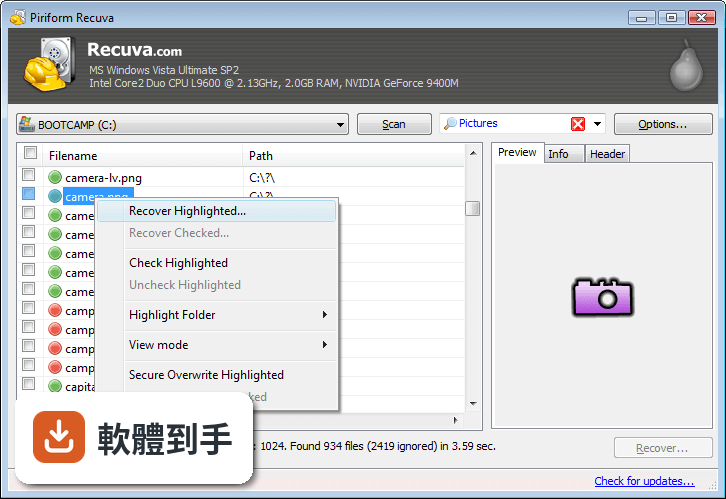
04深度掃描跟一般掃描差在哪裡?
一般掃描只找檔案系統裡還留有紀錄的刪除檔案,速度快但容易漏掉。深度掃描會逐一比對磁碟上的原始資料區塊,找出更深層的殘留痕跡,適合一般掃描找不到東西的時候使用。代價是掃描時間會拉長很多,官方說明形容它「徹底搜尋磁碟」,實際跑起來可能要幾個小時。
05恢復之前可以先確認檔案內容嗎?
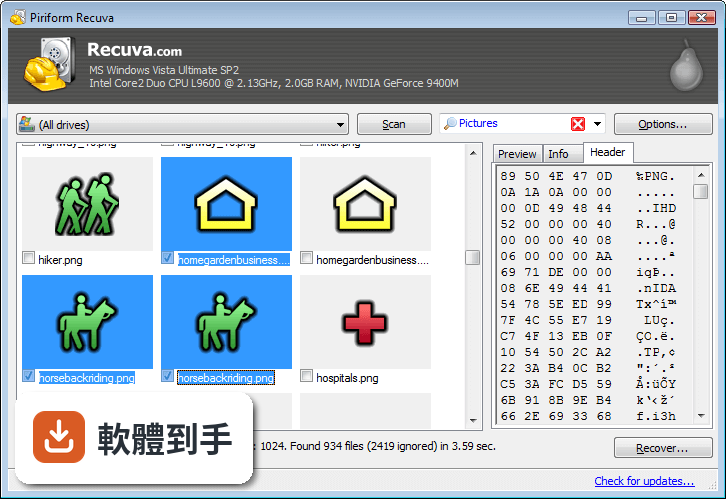
可以。官方功能列表中有「檔案預覽」這一項,讓你在執行恢復前先看檔案內容,確認是不是你要的那一份。這對照片、文件這類需要辨識內容的檔案特別實用,避免一口氣恢復幾百個檔案才發現救錯東西。
06不太懂電腦的人用這套軟體會很難上手嗎?
官方說明強調它的介面設計對初學者友善,啟動後會有一個精靈逐步引導,先選檔案類型、再選原本的位置,最後按開始掃描。進階使用者也可以切換到詳細檢視手動調整參數。不過介面語言只有英文,對不習慣英文操作介面的人來說,就算流程簡單還是會多一層障礙。
07這套軟體適合拿來處理公司或學校的重要檔案嗎?
它支援 Windows 7 到 Windows 11,也涵蓋 USB 隨身碟、記憶卡、外接硬碟等可重寫媒體,一般辦公環境的誤刪狀況都在適用範圍內。但要注意它只有英文介面,且官方沒有提到任何企業級支援或技術服務。如果是關鍵系統的資料遺失,建議先確認自己能否獨立完成操作流程。
08這套軟體只有英文介面,看不懂英文的人適合用嗎?
官方資料顯示介面語系只有 English,沒有中文選項。操作流程雖然有精靈引導,但每個步驟的說明、按鈕、錯誤訊息都是英文。如果對英文不熟悉,建議先找一台不重要的電腦試跑一遍流程,確認自己看得懂每個選項再做實際救援,避免在緊要關頭卡在介面上。
09除了 Windows,Mac 或手機也能用這套軟體嗎?
官方支援系統只列出 Windows 7、8、10、11,沒有提到 macOS、Android 或 iOS 版本。如果你需要在其他平台上救援檔案,這套軟體幫不上忙。手機或 Mac 的使用者要另外找支援自己平台的工具,不要預設這套軟體可以跨系統使用。
10這套軟體跟其他免費救援工具比起來,用的人多嗎?
在提供的比較名單中,Recuva 有 114 人評分,Wise Data Recovery 有 128 人,DiskDigger 有 80 人,Auslogics File Recovery 有 46 人。以評分人數來看,它和 Wise Data Recovery 是名單中最多人用過的兩款,但差距不大。評分人數只反映樣本規模,不代表實際下載量或成功率。
11硬碟已經壞到開不了機,這套軟體還有用嗎?
官方說明提到它能從「損壞的磁碟」恢復檔案,但指的是系統還能辨識到這顆磁碟的狀況。如果硬碟完全無法被 Windows 讀取、有異音或完全不過電,這屬於硬體故障,軟體層面的救援工具幫不上忙。這種情況要考慮送專業資料救援,而不是繼續嘗試軟體掃描。
12這套軟體可以拿來徹底刪除機密檔案嗎?
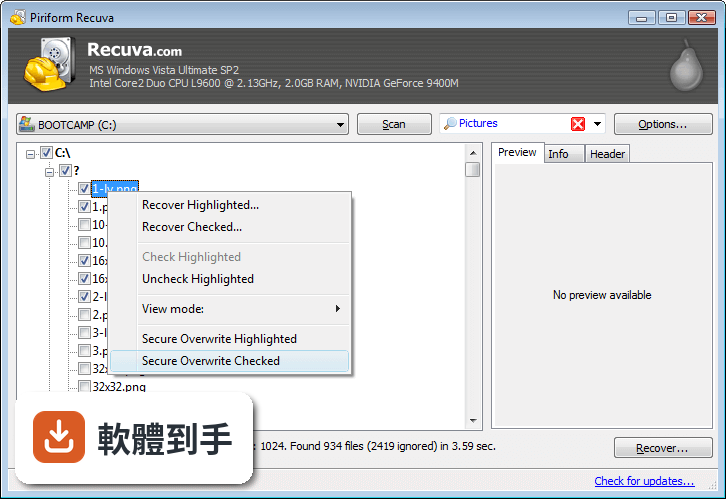
可以。官方功能說明中有「安全覆寫」功能,用業界與軍事標準的刪除技術覆寫資料,讓檔案無法被救援。這對處理含機密資訊的檔案很有用,等於一套軟體同時做到「救回誤刪檔案」和「徹底抹除不要的檔案」兩種相反用途。
下載與官方連結
rcsetup152.exe · 連結指向軟體原廠
版本紀錄
- 2026-06-23 Recuva 1.55.133 24.5 MB
- 2023-06-14 Recuva 1.53.2096
- 2023-05-25 Recuva 1.53.2095
再看 5 筆
- 2022-07-21 Recuva 1.53.2078
- 2022-07-21 Grids 8.1 (64-bit)
- 2022-06-30 Grids 8.0.6 (64-bit)
- 2022-05-30 Grids 8.0.5 (64-bit)
- 2022-05-19 Grids 8.0.3 (64-bit)
這一版改了什麼
What's new in this version:
Recuva 1.53.1087
- Improved Ext4 and Ext3 file system support.
- Improved Fat32 partition file scanning.
- Optimized Secure Overwrite on Windows 10.
- Enhanced drive and partition detection.
- Improved keyboard navigation.
- Minor GUI improvements.
- Minor bug fixes.
Recuva 1.52.1086
- Added Ext4 file system support.
- Improved NTFS Deep Scan.
- Improved accuracy of scan statistics.
- Improved VHD Image loading. (Recuva Professional only).
- Improved localization and language support.
- Minor GUI improvements.
- Minor tweaks and fixes.
Recuva 1.51.1063
- Added Ext2 and Ext3 file system support.
- Added recovery from volumes without GUID.
- Improved SSD detection and support.
- Improved Secure Overwrite on Windows XP.
- Optimized FAT32 volume deep scan algorithm.
- Improved partition detection on VHD images. (Recuva Professional only).
- Improved Show drives options.
- Minor GUI improvements.
- Minor bug fixes.
Recuva 1.50.1036
- Added ISO9660 file system support.
- Added recovery from unmounted drives.
- Improved duplicated file name recovery.
- Added Junction Point recovery support.
- Improved optical drive detection and recovery.
- Improved scan statistics accuracy.
- Minor GUI improvements.
- Minor tweaks and fixes.
Recuva 1.49.1019
- Added multi-session UDF support.
- Added Unicode character handling to file list export.
- Improved FAT partition file scanning.
- Enhanced detection of drives with mounted junction points.
- Improved email filter and added .pst file detection.
- Improved keyboard navigation on scan results list.
- Minor bug fixes and GUI improvements.
Recuva 1.48.982
- Added UDF drive support.
- Added user choice for recovery involving long path names.
- New options for recovering to drives with insufficient space.
- Enhanced file detection for small-capacity drives.
- Improved options for context menus.
- Minor GUI improvements.
- Minor tweaks and fixes.
Recuva 1.47.948
- Added file type filtering to Deep Scan.
- Improved detection of removable storage devices.
- Optimized memory usage.
- Improved VHD Image creation.
- Reorganized context menu items.
- Added Thai language support.
- Minor bug fixes and GUI improvements.
Recuva 1.46.919
- Improved Deep Scan for exFAT and FAT.
- Added folder scan to Windows Explorer context menus.
- Added new file extensions to filters.
- Improved accuracy of scan statistics.
- Improved usability of folder browser.
- Improved uninstallation of menu items.
- Fixed minor bug in secure overwrite on exFAT file systems.
- Minor improvements to the recovery wizard.
- Minor GUI improvements.
Recuva 1.45.858
- Added support for 3TB external drives.
- Added support for hard disks with 4 KB sectors.
- Improved secure overwrite performance.
- Improved NTFS deep scan recovery reliability.
- Added VHD drive image creation for system drives (Pro Version).
- Fixed a minor bug with opening VHD images in Windows.
- Minor GUI improvements.
Recuva 1.44.778
- Improved recovery for files larger than 1 GB.
- Faster scrolling when >1 million files in the file list.
- Improved Outlook Express data file recovery.
- Added Recover menu option to the Recycle Bin.
- Added support for mini-SD cards.
- Added VHD drive image creation. (Pro Version)
- exFAT drive labels are now correctly detected.
- Improved support for files with Alternate Data Streams.
- Added support for USB drives mounted as the A: drive.
- Added Indonesian and Serbian Latin languages.
- Minor GUI improvements.
Recuva 1.43.623
- Added recovery of Alternate Data Streams.
- Improved support for files larger than 4GB.
- Filters are now applied dynamically with significant improvement in memory usage.
- Filters added to "Save as file list" feature.
- NTFS permissions are now reported correctly.
- Improved reporting for failed zero byte files.
- Improved accuracy of recovery potential for JPEGs.
- Improved handling of free space during recovery.
- Improved support for multiple monitors.
- Minor GUI improvements.
Recuva 1.42.544
- Re-architected deep scan algorithm for JPGs and PNGs.
- Improved file searching on Windows 2008 R2.
- Improved support for Windows 8.
- Added Export file list feature.
- Improved keyboard navigation support.
- Fixed rare crash on XP during FAT scan.
- Improved memory usage for high volume drives.
- Minor bug fixes.
Recuva 1.41.537
- Added content searching for specific text in deleted files.
- Added regular expression matching to the filter.
- Added preliminary support for Windows 8.
- Improved support for BartPE (added new folder creation).
- Fixed filter drop down highlight issue.
- Improved recovery of compressed files from drives with non-standard cluster size.
- Many minor UI improvements.
- Latvian language added.
Recuva 1.40.525
- Added support for Windows 7 SP1.
- Added support for BartPE recovery CD.
- Improved file recovery from Apple iPods.
- Improved error handling on drives >1TB.
- More efficient memory usage when >1M files are found.
- Better handling of files that have lost file type.
- Added support for Kurdish language.
- Minor bug fixes.
Recuva 1.39.509
- Fixed bug that caused "Unable to read MFT" error.
- Improved support for exFAT drives.
- Improved support for Windows 7.
- Added mnemonics to the Wizard.
- Extended logging for Windows 7 64-bit.
- Added link to Online Help.
- Fixed bug that could cause analysis fail on U3 drives.
- Minor bug fixes.
Recuva 1.38.504
- Added ability to restore images to the clipboard.
- Improved Windows 7 support.
- Improved stability of background checking.
- Updated all internal URL references to piriform.com.
- Improved support for PDFs in deep scan.
- Updated setup routine to install for all users.
- Updated and simplified the installer.
Recuva 1.37.488
- Improved support for scrolling context menu.
- Improved language support.
- Improved context menu in info panel.
- Minor changes to recovery algorithms.
- Minor UI changes.
Recuva 1.36.479
- Improved reliability of FAT32 disk scanning.
- Improved 64-bit EXE memory usage.
- Improved screen resize to avoid hiding controls.
- Improved use of mnemonics in Wizard screen.
- Better support for accessibility users.
- Minor tweaks and fixes.
Recuva 1.35.472
- Improved NTFS scanning algorithm.
- Startup time improved with better memory management.
- Added Compressed file type to Wizard.
- Up and down keys now working correctly in the filter control.
- GUI text changes.
Recuva 1.34.460
- Files can now be recovered without requiring the scan to complete.
- Improvements to Thunderbird email recovery.
- Fixed bug with "Check for Updates" link.
- Fixed bug with tab stop not working after canceling scan.
- Fixed wizard options bug, which affected some languages.
- Minor bugs fixes and performance improvements.
Recuva 1.33.451
- Added support for non-standard sector size in Windows 7.
- 25% improvement in deep scan speed.
- Fixed bug when multi-selecting items in thumbnail view.
- Fixed repaint problem with thumbnail view.
- Fixed problem with file list view not display icons correctly.
- Added translator information to About Screen.
- Added Georgian translation.
Recuva 1.32.444
- Improved analysis of exFAT drives.
- Added U3 portable installer.
- GUI fixes for non-standard DPI (large fonts).
- Improved error messages for files that cannot be overwritten.
- Dropped support for Windows 98 to improve performance.
- Fixed bug in language selection.
- Minor bug fixes.
Recuva 1.31.437
- Added email recovery to Wizard.
- Improvements to Thunderbird email recovery.
- Improved handling of very large exFAT drives.
- Various stability fixes in 64-bit version.
- Updated installer to allow Recuva to run at the end.
- Added Estonian language support.
Recuva 1.30.435
- Added recovery of emails from Outlook Express.
- Added recover of emails from Windows Mail.
- Added 'Email' filter.
- Fixed bug that could cause secure delete to fail in list view.
- Various bug fixes.
Recuva 1.29.429
- Added recovery of deleted Thunderbird emails.
- Added support for Nikon RAW in Deep Scan.
- Improved support of exFAT drives.
- Improved recovery of JPG images from NTFS drives.
- Various minor tweaks.
Recuva 1.28.424
- Added native 64-bit support.
- Added support for exFAT drives.
- Improved Windows 7 support.
- Fixed browse issue with the Wizard in Win98.
- Fixed a few other Win98 issues.
- Minor UI tweaks.
Recuva 1.27.419
- Improvements to Wizard browse dialog.
- Complete rewrite of PDF and RTF deep scan detection methods.
- Fixed display bug for status icons in low-color.
- Scan speed optimizations.
- Various UI tweaks.
Recuva 1.26.416
- Added 'Time remaining' indication to the progress dialog.
- Added support for CRW (Canon RAW) files to the deep scan.
- Fixed issue that could cause some FAT 32 files to not be securely deleted.
- Improved error handling.
- Various UI changes.
Recuva 1.25.409
- iPod track names are now restored.
- Improved UI stability when working with very large files.
- Improved handling of floppies on early Windows OSs.
- Various tweaks to UI for non-English languages.
- Scan optimizations.
- Various minor tweaks.
Recuva 1.24.399
- Added iPod support to the wizard.
- Extra files removed when cancelling recovery from iPod.
- Added support for recovery from the logfile in Deep Scan.
- .DMP files are now only created in debug mode or for unsigned exes.
- Secure Delete feature renamed to Secure Overwrite.
- Improved error messages when attempting to scan removable drives.
- Improved support of virtual machines in Deep Scan.
- Various text changes.
Recuva 1.23.389
- Added support for iPods.
- Fixed rare crash that could happen on certain JPGs in deep scan.
- Language DLLs are now stored in /lang folder.
- Fixed minor resizing issue with Launch wizard button.
- Added .m4a files to Audio filter.
- Scan engine optimizations.
- Various minor tweaks.
Recuva 1.22.384
- Improved messages when cancelling large file recovery.
- Secure delete is now greyed for non-deleted files.
- Improved recovery of .TIF files from FAT32 drives.
- Filter category text now updates dynamically when changing languages.
- Fixed 'Check for updates' position in Vista.
- Various minor tweaks and improvements.
Recuva 1.21.373
- Improved recovery of orphaned JPG images in FAT32.
- Launch wizard button now working properly in all cases.
- Improved scan canceling on large files.
- Fixed bug that caused Wizard icons to not be displayed in 16 bit color.
- Check for updates now included in tab-stop.
- Added Czech translation.
- Various minor UI tweaks.
Recuva 1.20.361
- Improved detection of encypted files.
- Optimized Windows 2008 Server deep scan routines.
- Added 'Run wizard' button to Options dialog.
- Scanning engine improvements.
- Minor bug fixes.
Recuva 1.19.350
- Redesigned the Options window.
- Fixed bug related to Insufficient resources error.
- Improved handling of invalid file records.
- Various UI tweaks.
- Minor bug fixes.
Recuva 1.18.344
- Duplicate files are now numbered sequentially.
- Added sort arrows to list view.
- Added Croatian translation.
- Minor updates to translations.
- Improvements to FAT32 routines.
- Various UI tweaks.
Recuva 1.17.339
- Reduced memory usage by 10%.
- Added Office 2007 doc types to 'Documents' filter.
- Added .cab and .url to deep scan.
- Files with no name found during deep scan are now named using meta data. Works for the following file types: mp3, wma, wmv, rtf, url, doc, xls, ppt, vsd, tiff, jpg and png.
- Added support for USB drives with a sector size of 2048 bytes.
- Improvements to system info status.
- Minor bug fixes.
Recuva 1.16.333
- Added ability to search for non-deleted files (for recovery from damaged or reformatted disks only).
- Added support for .rtf, .pdf, .mp3 and .tif files to deep scan.
- Fixed bug that would limit file size of .avi files to 1GB after deep scan.
- Various UI tweaks.
- Performance improvements.
Recuva 1.15.327
- Fixed bizarre crash in filter box (if you press F4 twice).
- Fixed memory leak on FAT32 drives with large numbers of files.
- Fixed rare crash in secure deletion.
- Minor UI tweaks.
Recuva 1.14.321
- Added support for video, audio, and compressed files in deep scan. Formats: .wma .ogg .wav .mov .mpg .mp4 .3gp .flv .wmv .avi .rar .zip
- Added 'Compressed' option to the filter.
- Fixed bug that could cause crash during deep scan, caused by corrupt image files.
- Added support for Microsoft Office tmp files. Allows recovery of files lost if Office crashes.
- Various small UI tweaks.
- Added Ukrainian translation.
Recuva 1.13.304
- Added Deep Scan. Recuva can now search for files lost by the file system, which will work for reformatted and repartitioned drives.
- Improved speed and stability for image preview in Windows 2k/98.
- Several performance tweaks.
- Various UI tweaks and improvements.
Recuva 1.12.291
- New Wizard to make recovery easier.
- New Thumbnails view.
- Added Scan All Drives feature.
- Fixed 'Cannot find path' issue.
- Fixed rare crash during scan in XP/2000.
- Optimized treeview speed with large numbers of files.
- Minor UI changes.
- Minor bug fixes and improvements.
Recuva 1.11.257
- New file contents analysis.
- Tweaks to secure delete feature.
- Added filter by file type.
- Added status icon to the list view.
- Improved progress indication on large files.
- Several performance improvements.
- Minor tweaks and changes.
Recuva 1.10.223
- Added Secure Deletion option (Win2k and newer).
- Added option to save settings to an INI file.
- Optimized error logging.
- Improved recovery of sparse files.
- Performance improvements.
- Various UI tweaks.
- Minor tweaks and changes.
Recuva 1.09.194
- Fixed bug with fragmented MFT tables.
Recuva 1.09.190
- Added Piriform styling to main dialog banner.
- App now automatically checks for updates.
- Incorporated scanning of $LogFile to NTFS scan.
- Dynamic changing of language.
- UI tweaks and improvements.
- Minor bugs fixes.
Recuva 1.08.174
- Added image preview feature.
- Redesigned find box.
- Fixed sorting by state issue.
- Better handling of the cluster array (bad allocation issue).
- Fixed error during data processing (could freeze at 99%).
- Improved support of sparse files.
- Minor tweaks and fixes.
Recuva 1.07.138
- Fully Unicode (requires unicows.dll with Windows 98/ME).
- Improved restoration of file names when restoring from the Recycle Bin.
- Better feedback for files that fail to be recovered.
- Threading issue fixed (affected removable FAT32 drives).
- Minor UI changes.
- Added Simplified Chinese.
- Minor tweaks and fixes.
Recuva 1.06.132
- Improvements to NTFS recovery.
- Improved handling of fragmented MFT.
- Fixed rare crash when using the filter.
- Improved accuracy of status information.
- Stability improvements.
- Various UI tweaks.
- Added Catalan and Norwegian translations.
- Localization fixes.
Recuva 1.05.118
- 22 language translations added.
- Added support for Windows 98.
- Fixed cleartype font support.
- Tweaks to data run types (improves recovery rate for NTFS).
- Better handling of large numbers of files in list view.
- Stores users settings in the registry.
- Minor tweaks and fixes.
Recuva 1.04.104
- Fixed issue that stopped Recuva working from a USB drive under XP64.
- Fixed highlighted items bug when sorting by columns.
- Fixed tree view tooltips in Win2000.
- Speedier recovery from thumbdrives under USB 1.1.
- Updated installer engine and detection routines.
- Several minor UI changes.
- Minor tweaks and fixes.
Recuva 1.03.100
- Sorting is much faster with a large numbers of files.
- Fixed unhandled exception when closing in debug mode.
- Added handling of super short zero byte files that could cause the scan to hang.
- Filter text is now a whizzy grey color, when not in use.
- Removed previous selected item from group when drag selecting.
- Improved find rate in FAT32 system drives.
- Super duper optimized for NTFS system drives.
- Added full size Vista icon.
- Fixed issue that could delay selection rectangle redraw in themed Win2k3.
- Added 'Highlight Folder' option to right click menu in list view.
- Fixed banner icon drawing issue in 2000.
- Minor tweaks and fixes.