
這是歷史版本頁面 — 看 RoboForm 最新版本
密碼太多記不住,RoboForm 能幫你自動登入嗎
 RoboForm 8.4.6.6
資料更新 2018-01-03
閱讀約 5 分鐘
每天打開瀏覽器要登入的網站隨便數都超過十個:電子郵件、網路銀行、購物平台、公司系統、社群媒體。每個網站當初註冊時都設了不同的密碼,有些還要求大小寫加數字,久了之後根本記不住哪個帳號配哪組密碼。每次要登入就開始翻筆記本、試各種組合,試到被鎖定帳號,最後只好按「忘記密碼」重新設定,然後過兩個禮拜又忘記一次。
很多人習慣把密碼統一成同一組,或是寫在記事本、Excel 裡,圖個方便。但這樣等於一個密碼被偷走,所有帳號一起淪陷;寫在文件裡又怕檔案遺失或被別人看到。這類工具的切入點是:你只需要記住一組主密碼,其餘的帳號密碼全部交給軟體加密儲存,登入時由它自動幫你填寫帳號密碼並送出登入。這樣一來,每個網站都可以用不同的複雜密碼,不用再靠大腦硬記。
01RoboForm 是拿來做什麼的?
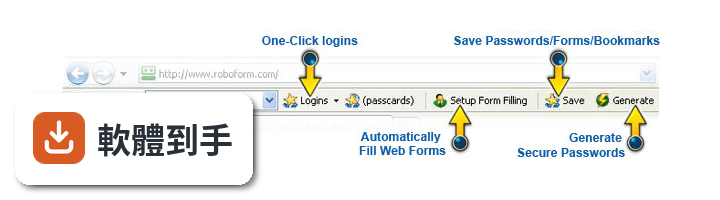
它是一套密碼管理軟體,主要功能是幫你記住各網站的帳號密碼。第一次登入某個網站時,它會詢問是否儲存這組登入資訊;之後再回到同一個網站,點一下就能自動帶入帳號密碼並完成登入。另外也能儲存姓名、地址、信用卡等個人資料,填寫註冊表單或結帳頁面時一鍵自動填入。
02它自動登入的流程是怎麼運作的?
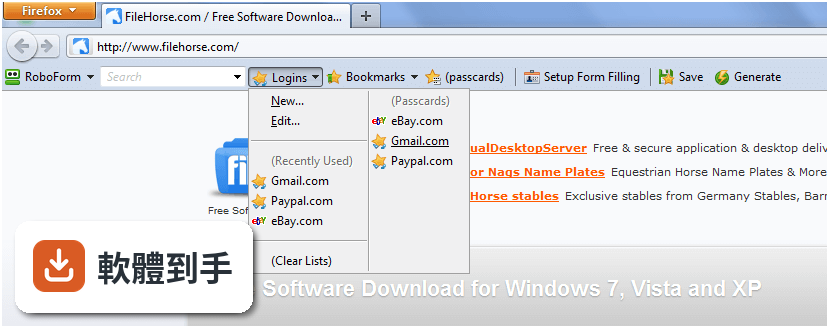
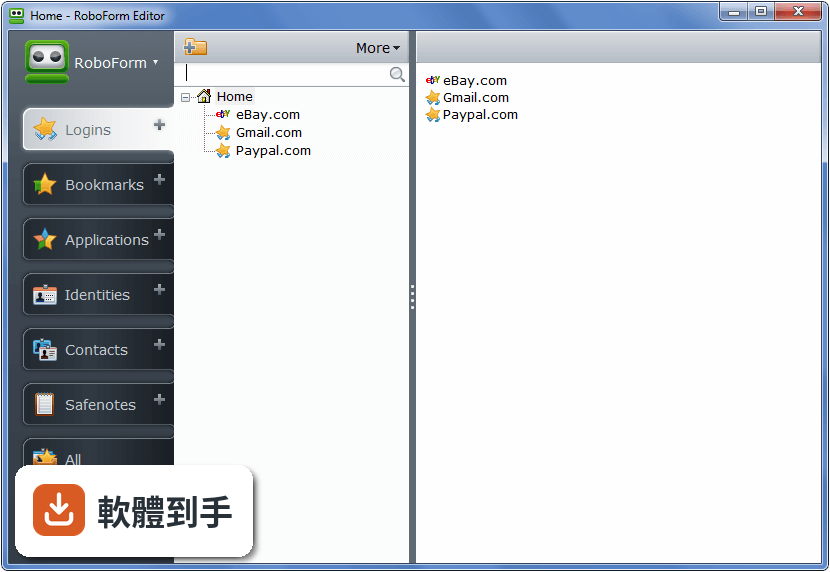
當你第一次在某個網站輸入帳號密碼並登入時,軟體會自動跳出詢問是否記住這組登入資訊。儲存之後,下次造訪同一個網站,只要點一下該筆登入紀錄,它就會自動開啟網站、填入帳號密碼、按下送出按鈕,整個過程不需要手動輸入任何東西。
03除了登入網站,它還能處理什麼表單?
它有一個 Identity 功能,可以把你的姓名、地址、電話、電子郵件、信用卡等資料分門別類儲存起來。遇到要填寫長長的註冊表單或購物結帳頁面時,點一下對應的 Identity,整張表單就會自動填好,省去逐欄輸入的時間。
04密碼都交給它保管,安全性怎麼處理?
所有資料是用你自己設定的主密碼加密,採用 AES 加密演算法。加密過程是在你的裝置上完成,開發商表示他們採用零知識架構,也就是說伺服器端沒有你的主密碼,也無法讀取你儲存的資料。你只需要記住這一組主密碼,其他密碼可以放心交給它管理。
05它能不能幫我產生不容易被破解的密碼?
可以。因為你不需要再自己記住或輸入密碼,所以可以放心使用它產生的強密碼。每個網站可以設定不同的複雜密碼,由軟體自動產生並儲存,登入時自動填入,不需要擔心記不住。
06這套軟體適合什麼樣的人用?
適合網站帳號很多、常常忘記密碼的人,尤其是那些每個網站都用不同密碼、但記不住所以老是按「忘記密碼」的人。也適合不想在填表單時浪費時間逐欄輸入個人資料的人。如果你只有兩三個網站帳號且密碼都記得起來,它的幫助就沒那麼明顯。
07我有多台電腦和手機,它能同步嗎?
官方說明指出它支援 Windows、Mac、Linux,也有 iOS、Android 等行動平台版本,並提供雲端同步服務,可以把登入資料和身分資料同步到所有裝置上。不過免費方案只限一台裝置使用,要在多台裝置間同步需要付費訂閱。
08它支援 Windows 哪些版本?
官方列出的系統需求是 Windows 7、Windows 8、Windows 10、Windows 11。介面語言只有英文,沒有繁體中文介面。如果你對英文介面不熟悉,操作上可能會需要一些時間適應。
09它的免費版和付費版差在哪裡?
官方說明提到免費版可以在 1 台裝置上使用,包含一鍵登入、表單填寫、密碼產生器、驗證碼功能、受損密碼掃描和雲端備份。付費版則開放所有裝置使用,並增加網頁版存取、安全資料夾分享、緊急存取等功能。另外有提供 30 天試用版,但功能有限制。
10這套軟體適合當作團隊或公司的密碼管理工具嗎?
官方有提供 Business Plan,包含每位員工的密碼保險庫、集中管理後台、安全密碼分享、單一登入整合、角色權限控制等功能。如果你的需求是團隊共用密碼或管理多個員工的存取權限,可以參考這個方案,但具體價格和功能細節需要自行向官方確認。
11它的更新頻率如何?會不會很久沒更新?
根據收錄的版本紀錄,這套軟體從 2004 年就開始持續發布新版本,最近一年內仍有更新,但更新次數不多。如果你很在意軟體是否頻繁修正問題,可以參考這個更新頻率來判斷。另外它的使用者評分是 6.4/10,共 117 人評分,評分人數不算多。
12我英文不好,用這套軟體會很吃力嗎?
會比較吃力,因為介面語系只有英文,沒有中文介面。選單、設定、提示訊息都是英文,如果對英文不熟悉,在設定主密碼、管理登入資料、調整同步選項時可能會卡關。這種情況下可以考慮其他有中文介面的密碼管理軟體,例如 LastPass 或 KeePass Password Safe,兩者的評分人數都比它多。
下載與官方連結
RoboForm-Setup.exe · 連結指向軟體原廠
版本紀錄
- 2026-05-26 RoboForm 9.9.4 49.7 MB
- 2023-11-06 RoboForm 9.5.4
- 2023-07-09 RoboForm 9.4.9
再看 5 筆
- 2023-03-01 RoboForm 9.4.2
- 2023-01-14 RoboForm 9.4.1
- 2022-07-09 RoboForm 9.3.3
- 2022-05-09 RoboForm 9.2.7
- 2022-01-20 RoboForm 9.2.4
這一版改了什麼
What's new in this version:
RoboForm 8.4.6.6
- Fixed freezes in Chrome and Internet Explorer
RoboForm 8.4.5.5
- Start Page: Better navigation and filtering in Start Page
- Start Page: better search bar appearance and auto-complete
- Start Page: new communication scheme with RF and extensions, makes it faster
- Better integration with RoboForm extension for Microsoft Edge browser (needs new Edge ext)
- New design for lower toolbar in Firefox and Chrome
- Allow user to enroll a device just for 15 minutes in One Time Password dialog
- Localization: update Chinese, Dutch, Japanese, Korean, Serbian, Spanish, Swedish
- Bug fixes and performance improvements in RoboForm Editor, Sharing and Emergency Access
RoboForm 8.4.3.4
- Change log not available for this version
RoboForm 8.4.3.3
- Detect RoboForm 7 data that was added/changed after the account was migrated and offer to import it
- Firefox integration: Changed Firefox add-on install to use listed Roboform Firefox AddOn
- Import: Added import from KeePass XML, 1Password CSV
- Localization: updated German, Japanese, Korean, Swedish, Serbian
- Miscellaneous fixes in RoboForm Editor, Sharing and Emergency Access
RoboForm 8.4.1.1
- Options: sync portable user options during RoboForm data sync
- Import: Added import from Keeper, Enpass, PasswordBoss, Zoho, TrueKey and StickyPassword
- Check data for duplicates after user changed RoboForm data
- Form Filler: fixed it for sso.godaddy.com and biglietteriamusei.vatican.va
- Menus: improved and rationalized RoboForm menus
- Miscellaneous small fixes
RoboForm 8.3.9.5
- Fix incorrect handling of RDC Login window in Windows 10
- Fix wrong positioning of RF toolbar on high DPI screen in Chrome and Opera browsers
- Fix problem with wrong RF filling of Basic Auth window in IE
- Fix Clear Search history command of RF toolbar does not work in Firefox
- Fix RF Fill Forms command may crash IE in some rare cases
- Fix Chrome may ask to restore tabs after wrong termination by RF installer in some rare cases
- Fix installing RF extension into Firefox-based browsers when official Firefox is not installed
- Fix RF Auto Save is not offered on sites instagram.com, wordpress.com
- Fix RF shows wrong UI and asks wrong questions when Master Password is changed from another device
- Fix Sync command does not show Sync progress window when automatic sync is already running in background
- Add a command into RoboForm Options dialog to reset all suppressed warnings
- Rename "Weak" tab in Security Center to "All"
- Fix several bugs in UI
RoboForm 8.3.7.7
- Firefox: Switch to new Firefox extension based on WebExtensions API
- Firefox: New extension is Chrome style, so it does NOT have RF toolbar
- Firefox: New extension may work without Desktop RoboForm installed, such as on Linux
- Bug fixes and speed improvements
RoboForm 8.3.5.5
- New design for RoboForm Start Page
- Installer: Use '%localappdata%RoboFormProfilesDefault Profile' as RoboForm data folder for new users
- Installer: fix closing applications during RoboForm installation/uninstallation
- Licenses: update design of license notifications and conditions when they should be shown
- Toolbar Menu: fix a bug with RoboForm toolbar menu appearance on tablets
- Localization: add Portuguese, update German, Spanish, French, Japanese, Korean, Russian, Serbian, Swedish
- Backup/Restore: implement common dialog for Backup and Restore operations
- Import: add support for more columns of 1Password and LastPass
- Password Generator: add password strength indicator
- Firefox Integration: do not inject RoboForm DLL into Firefox as Firefox will not allow it soon
- Miscellaneous fixes in RoboForm Editor, Sharing and Emergency Access
RoboForm 8.3.3.3
- Fixed bugs and crashes
RoboForm 8.3.2.3
- Turn On new Ver 8 license enforcement
- Now Everywhere license is required for Sync only, with 30 day trial period
- Show 'Buy' and 'Renew' items in RoboForm 8 Help menu
- Make Emergency Access UI officially available in RF ver 8
- Fix bugs in RF 8 licensing on client side
- Fix bugs in sharing User Interface
RoboForm 8.3.1.1
- Do not create 'RoboForm Online Account' passcard for new users
- Chrome: better design for vertical toolbar
- Logins menu: do not show a Login twice in 'Most Popular' section
- Form Filling: fix form filling on some banking sites such as capitalone.com.
- Import/Export: misc fixes in import and export procedure
RoboForm 8.3.0.0
- Installer: misc fixes in RoboForm Installer
- Installer: fixes in upgrading from RoboForm 7 to RoboForm 8
- Installer: move licensing agreement and privacy policy to the first screen
- Sync: detect when RoboForm account is deleted and offer to user to create an account
- Search Box: show RF Search Box when user moves mouse over the RoboForm Task Bar Icon
- Desktop Shortcuts: fix RoboForm files desktop shortcuts
- Menu: add 'Set Reminder' command to RoboForm Login's context menu
- Editor and Sharing: misc fixes in RoboForm Editor and Sharing
- Security Center: fix Sort Order in RoboForm Security Center
- Language Editor: fix working on High DPI displays
- Firefox: new signed XPI
RoboForm 8.2.9.5
- Search: change default search engine from Bing to Yahoo, user still can use any search
- Installer: improve upgrade RoboForm 7 to RoboForm 8 sequence
- Firefox: new signed XPI for Windows and Mac
- Editor: misc fixes in RoboForm Editor
- Form Filling: misc fixes in form filling
- Login UI: rework RoboForm Login (Master Password) dialog, using new design
- Export/Import: improve CVS export format
RoboForm 8.2.8.8
- Editor: fix crashes caused by reading grayscale icons with alpha channel
- Replace http:// with https:// in all roboform.com URLs that RoboForm opens
- Update German and Polish localization
- Fix auto-login problems caused by earlier Wells Fargo fix
RoboForm 8.2.7.7
- Fix RoboForm Downloader GUI can hang up when Internet connection is very fast
- AutoUpdate Install: make installer ask no questions on version update
- Fix Japanese localization
- Setup: Fix RoboForm setup has wrong layout when user changed MP on RFO and RF detected this during Sync
- Start Page: Newer RoboForm versions are allowed both HTTP:// and HTTPS:// prefix for start.roboform.com
- Start Page: RoboForm Start Page JS now redirects HTTP:// to HTTPS:// for newer RF versions
- Start Page: set Bing as default web search on the RoboForm Start Page
- Start Page: Search for RoboForm data names appears above web search
RoboForm 8.2.6.6
- Setup: fix crash when user upgrading from RF 7 to RF 8
- Setup; fix crash when user changes Master Password and checks 'I forgot' checkbox
- Editor: fix Deleted item remains in tree if it was the last item in folder
- Editor: fix Folders in tree require two clicks to expand if editor was started while not logged in
RoboForm 8.2.5
- First production (non-beta) release of RoboForm ver 8
- Increase max number of charatcers in Master Password to 80.
- Fix a rare crash in RoboForm Setup dialog.
- Periodically check with RFO server, to check fore received files, invitations, etc.
- Change version check URL for AutoUpdate
- AutoUpdate: make it easier and more automatic
- Start Page: use https://start.roboform.com as RF Start Page URL instead of http://start.roboform.com
- Editor starts with Home item closed if there is no recently viewed items.
- Editor: change passcard title view, so that site icon is shown in one row with URL
- Security Center: misc fixes
- Import and Export: misc fixes
RoboForm 7.9.25.5
- Chrome, Firefox: fix RF does not login to https://www.wellsfargo.com
- Chrome: fix AutoFill dialog remains visible after switching to another tab
- Firefox: Login using the wrong passcard, not the one that was clicked
- Firefox: fix AutoFill dialog sometimes remains visible after navigating to another page
- Editor: fix context menu in folder tree does not opened after pressing VK_APPS key
- Fix auto-update issues related to Download.com
- Fix saving Login to a specific folder saves to Home folder instead
- Password Generator: fix clicking on disabled Generate button clears password list
- RF2Go, Firefox: let it attach to Firefox 50, drop support for Firefox 40
- Localization: Update German, Danish, sb-Serbian, sc-Serbian
RoboForm 7.9.24.4
- Fix RoboForm for Windows sometimes does not accept One Time Password
- Opera: Fix high CPU usage by Opera/rf-chrome-nm-host.exe processes
- Editor: fix wrong window position after restoring from maximized state
RoboForm 7.9.23.3
- Chrome: fix SearchBox dropdown jumps to top left screen corner while typing into SearchBox
- Chrome, Firefox: Fix SearchBox issues, with pasting, etc
- Chrome: fix RF does not work on some sites with IFRAME
- Chrome, Firefox: fix filling from Identity is too slow on some sites
- Chrome: Fix RF toolbar ignores 'Enable popup RoboForm toolbar' setting if started while not logged in
- Firefox: fix keyboard shortcuts for opening menus from toolbar do not work
- Firefox: fix RoboForm toolbar appears even if unchecked in Firefox
- Firefox: fix RoboForm toolbar appears but does not work in private browsing mode
- Firefox: fix RoboForm does not attach to Firefox in some cases
- Firefox: fix RoboForm does not show AutoFill window on Firefox Sync Sign In page
- Firefox: Fix AutoSave with AutoSave-bar sometimes prevents navigation from happening
- Fix RoboForm does not match Logins for sites with the name that starts with 'cgi' or 'www'
- Fix filling of visible elements whose parents are invisible
- Fix form filling when frames with aborted loading appear, such as in MetLife
- Fix not filling form at https://idp.onregional.ca and other sites that reset password on focus
- Fix form filling on https://login.verizonwireless.com
- Fix RF menu popups and BA toolbar are positioned incorrectly on systems with high DPI
- Fix some rules in form filling from Identity
RoboForm 7.9.22.2
- Firefox: Fixed RoboForm toolbar does not work in Private browsing mode
- Firefox: Fixed RoboForm toolbar appears even if unchecked in Firefox
- Firefox: Fixed JavaScript exception is shown in error log when disabling RF extension
- Firefox: Fixed RF extension sometimes does not load in browser startup
- Chrome, Firefox: Fixed background activity in a not shown tab may not be handled by RF
- Firefox: new signed XPI for Windows and Mac, version 7-9-21-5
RoboForm 7.9.21.5
- Form Filler: throw more JS events, to better emulate user form filling in IE, Chrome, Firefox
- Form Filler: the above fixes form filling at Microsoft account, Apple, Wells Fargo
- Firefox, Chrome: make RoboForm filler work in Strict JS mode
- Internet Explrer, Windows 10 Anniversary: make RF fill the new Basic Authentication dialog
- Firefox: Fix a rare crash during JS callback
- Firefox: Fix RF extension does not work if Multiprocess mode (aka Electrolysis)
- Firefox: Fix RF saves wrong URL on youtube.com
- Firefox: Fix RoboForm does not fill local file pages in Firefox
- Firefox: Fix RoboForm add-on for FF does not load in Pale Moon
- RoboForm2Go + Firefox: make it work in Firefox ver 43
- Login menus: fix incorrect layout in toolbar menus
RoboForm 7.9.20.5
- Improve Internet Explorer form filling for placeholders
- Firefox: fix some rare crashes
- Firefox: Add support for Firefox 47 to RoboForm2Go
- Improve Site Icon management
- Improve Spanish localization
- Login Menu: fix sub-menu disappearance when moving mouse close to display edge