
這是歷史版本頁面 — 看 RoboForm 最新版本
密碼太多記不住,RoboForm 能幫你自動登入嗎
 RoboForm 7.1.0
資料更新 2010-12-07
閱讀約 5 分鐘
每天打開瀏覽器要登入的網站隨便數都超過十個:電子郵件、網路銀行、購物平台、公司系統、社群媒體。每個網站當初註冊時都設了不同的密碼,有些還要求大小寫加數字,久了之後根本記不住哪個帳號配哪組密碼。每次要登入就開始翻筆記本、試各種組合,試到被鎖定帳號,最後只好按「忘記密碼」重新設定,然後過兩個禮拜又忘記一次。
很多人習慣把密碼統一成同一組,或是寫在記事本、Excel 裡,圖個方便。但這樣等於一個密碼被偷走,所有帳號一起淪陷;寫在文件裡又怕檔案遺失或被別人看到。這類工具的切入點是:你只需要記住一組主密碼,其餘的帳號密碼全部交給軟體加密儲存,登入時由它自動幫你填寫帳號密碼並送出登入。這樣一來,每個網站都可以用不同的複雜密碼,不用再靠大腦硬記。
01RoboForm 是拿來做什麼的?
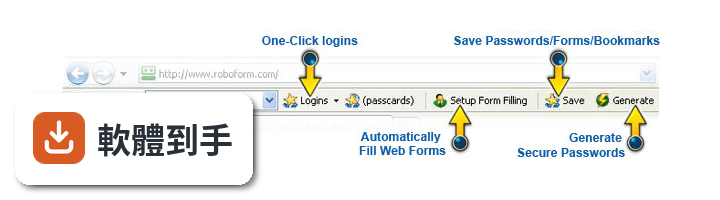
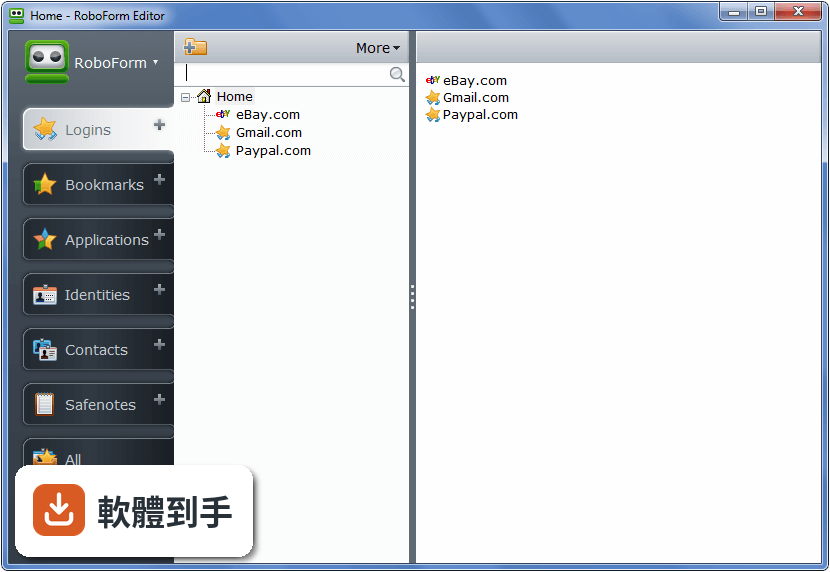
它是一套密碼管理軟體,主要功能是幫你記住各網站的帳號密碼。第一次登入某個網站時,它會詢問是否儲存這組登入資訊;之後再回到同一個網站,點一下就能自動帶入帳號密碼並完成登入。另外也能儲存姓名、地址、信用卡等個人資料,填寫註冊表單或結帳頁面時一鍵自動填入。
02它自動登入的流程是怎麼運作的?
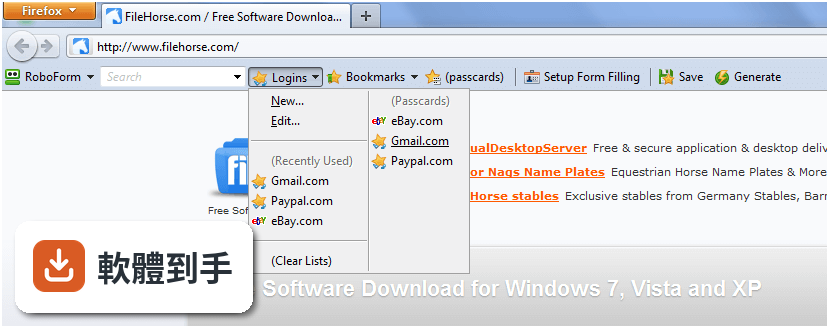
當你第一次在某個網站輸入帳號密碼並登入時,軟體會自動跳出詢問是否記住這組登入資訊。儲存之後,下次造訪同一個網站,只要點一下該筆登入紀錄,它就會自動開啟網站、填入帳號密碼、按下送出按鈕,整個過程不需要手動輸入任何東西。
03除了登入網站,它還能處理什麼表單?
它有一個 Identity 功能,可以把你的姓名、地址、電話、電子郵件、信用卡等資料分門別類儲存起來。遇到要填寫長長的註冊表單或購物結帳頁面時,點一下對應的 Identity,整張表單就會自動填好,省去逐欄輸入的時間。
04密碼都交給它保管,安全性怎麼處理?
所有資料是用你自己設定的主密碼加密,採用 AES 加密演算法。加密過程是在你的裝置上完成,開發商表示他們採用零知識架構,也就是說伺服器端沒有你的主密碼,也無法讀取你儲存的資料。你只需要記住這一組主密碼,其他密碼可以放心交給它管理。
05它能不能幫我產生不容易被破解的密碼?
可以。因為你不需要再自己記住或輸入密碼,所以可以放心使用它產生的強密碼。每個網站可以設定不同的複雜密碼,由軟體自動產生並儲存,登入時自動填入,不需要擔心記不住。
06這套軟體適合什麼樣的人用?
適合網站帳號很多、常常忘記密碼的人,尤其是那些每個網站都用不同密碼、但記不住所以老是按「忘記密碼」的人。也適合不想在填表單時浪費時間逐欄輸入個人資料的人。如果你只有兩三個網站帳號且密碼都記得起來,它的幫助就沒那麼明顯。
07我有多台電腦和手機,它能同步嗎?
官方說明指出它支援 Windows、Mac、Linux,也有 iOS、Android 等行動平台版本,並提供雲端同步服務,可以把登入資料和身分資料同步到所有裝置上。不過免費方案只限一台裝置使用,要在多台裝置間同步需要付費訂閱。
08它支援 Windows 哪些版本?
官方列出的系統需求是 Windows 7、Windows 8、Windows 10、Windows 11。介面語言只有英文,沒有繁體中文介面。如果你對英文介面不熟悉,操作上可能會需要一些時間適應。
09它的免費版和付費版差在哪裡?
官方說明提到免費版可以在 1 台裝置上使用,包含一鍵登入、表單填寫、密碼產生器、驗證碼功能、受損密碼掃描和雲端備份。付費版則開放所有裝置使用,並增加網頁版存取、安全資料夾分享、緊急存取等功能。另外有提供 30 天試用版,但功能有限制。
10這套軟體適合當作團隊或公司的密碼管理工具嗎?
官方有提供 Business Plan,包含每位員工的密碼保險庫、集中管理後台、安全密碼分享、單一登入整合、角色權限控制等功能。如果你的需求是團隊共用密碼或管理多個員工的存取權限,可以參考這個方案,但具體價格和功能細節需要自行向官方確認。
11它的更新頻率如何?會不會很久沒更新?
根據收錄的版本紀錄,這套軟體從 2004 年就開始持續發布新版本,最近一年內仍有更新,但更新次數不多。如果你很在意軟體是否頻繁修正問題,可以參考這個更新頻率來判斷。另外它的使用者評分是 6.4/10,共 117 人評分,評分人數不算多。
12我英文不好,用這套軟體會很吃力嗎?
會比較吃力,因為介面語系只有英文,沒有中文介面。選單、設定、提示訊息都是英文,如果對英文不熟悉,在設定主密碼、管理登入資料、調整同步選項時可能會卡關。這種情況下可以考慮其他有中文介面的密碼管理軟體,例如 LastPass 或 KeePass Password Safe,兩者的評分人數都比它多。
下載與官方連結
AiRoboForm.exe · 5.62 MB · 連結指向軟體原廠
版本紀錄
- 2026-05-26 RoboForm 9.9.4 49.7 MB
- 2023-11-06 RoboForm 9.5.4
- 2023-07-09 RoboForm 9.4.9
再看 5 筆
- 2023-03-01 RoboForm 9.4.2
- 2023-01-14 RoboForm 9.4.1
- 2022-07-09 RoboForm 9.3.3
- 2022-05-09 RoboForm 9.2.7
- 2022-01-20 RoboForm 9.2.4
這一版改了什麼
What's new in this version:
A Fresh New Look:
- We've updated our look. Not only is RoboForm easier on the eyes, we've reorganized and streamlined our menu files, updated our icons, and improved our process flow. All the design enhancements were done to make RoboForm easier and more enjoyable to use. See more details below.
RoboForm is Everywhere:
- We've expanded into new browsers like Google Chrome, Safari for Windows. We've made RoboForm available on most mobile devices such as iPhone/iPod Touch, Google's Android, Blackberry , Windows Mobile, Palm and Symbian. And of course you can still use RoboForm2Go on all USB flash drives.
Keep Your Passwords In Sync:
- With the introduction of RoboForm Everywhere, you can now keep your Logins, Identities, Bookmarks and other information seamlessly in sync between all of your computers and devices.
Improved Password Capture:
- We've made it easier for you to view, capture and store your passwords as you login to websites. Our new Information Bar will suggest a Login name based on the site name, but you can easily customize the name and storage location. If for some reason you don't want RoboForm to save passwords for a particular site, just choose Don't Save/Never for the Site and RoboForm will no longer offer to save your login information.
Online and Offline Options:
- For the traditionalists we still offer single RoboForm Pro licenses per computer. For those of you who are looking for more flexibility we added a RoboForm Everywhere license that allows you to put RoboForm on as many computers and devices as you like, then link them to a RoboForm Online account to keep all your passwords and other RoboForm data in sync.
New Multiple Login Feature:
- Do you find yourself logging into the same 3-5 websites each morning. We've created a Mega Passcard feature making it even easier for you. Now you can login to several websites with just one click. Simply combine a few of your Logins into one Mega Login and login to all those site simultaneously.
Improved Bookmarks:
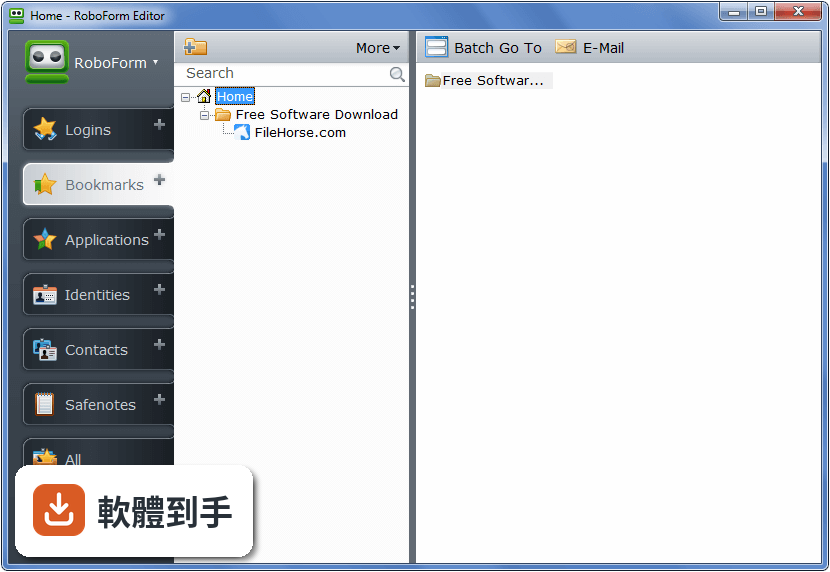
- RoboForm is more than just a password manager. In addition to making it easier for you to login to your favorite websites, we made it easier to visit your favorite websites with our improved Bookmark features. You can import your existing bookmarks from all your browsers, drag-and-drop them to organize them, and best of all you can keep them in sync between all your computers and mobile devices.
It All Works Faster:
- We've completely reworked the RoboForm architecture making RoboForm faster and more flexible so that we can implement future changes quicker. You may not be able to see it...but it's in there!
Better Organized Menus:
- We've made our more popular features easier to find and moved our less popular features to sub menus making RoboForm even more user friendly than before.
Most Popular Logins:
- In addition to Recently Used, we now display your Most Popular Logins.
Site Icons:
- Your Logins have never looked better. We added site icons next to the list of Logins making it easier for you to identify and login to your favorite sites.
Better Language Support:
- RoboForm is available in 30 languages. We now fully support Unicode which improves overall language support, including the ability to do multi-lingual RoboForm searches.