
這是歷史版本頁面 — 看 RocketDock 最新版本
桌面捷徑亂到找不到檔案?RocketDock 幫你整理
 RocketDock 1.3.1
資料更新 2007-03-19
閱讀約 5 分鐘
你打開電腦,桌面堆滿了捷徑,想開個程式得先在一堆圖示裡找半天。工作列也擠成一排,開幾個視窗就分不清哪個是哪個。你只是想快速打開常用的東西,不想每次都在混亂中浪費時間。
有人會把捷徑收進資料夾,但多一層點擊反而更慢;有人把工作列釘滿,但空間有限,而且視窗一多還是亂。這類工具的切入點是:把常用程式、檔案、資料夾集中到一條可自訂的長條上,用圖示呈現,點一下就能開,讓桌面保持乾淨,也讓開啟動作變直覺。
01RocketDock 到底能做什麼?
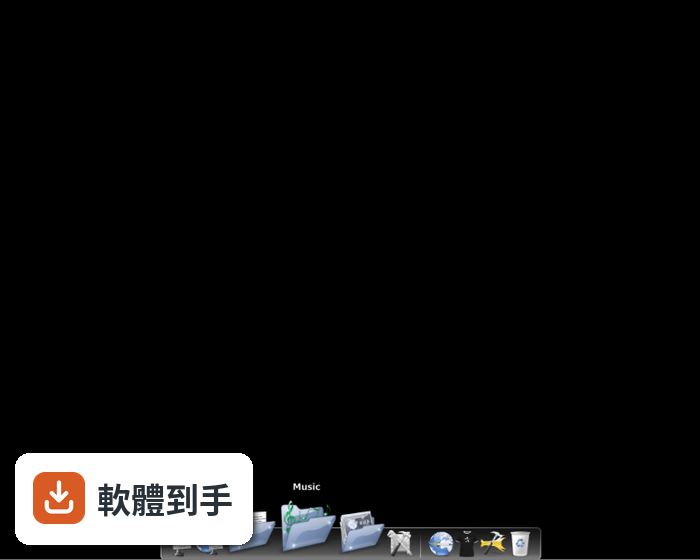
它是一條放在桌面邊緣的啟動列,外觀類似 macOS 的 Dock。你可以把常用的程式、檔案、資料夾用拖曳方式丟上去,之後點一下圖示就能開啟。它會顯示正在執行的應用程式,也能把視窗最小化到這條 Dock 上,減少工作列的負擔。圖示在滑鼠移過時會有放大動畫,整體操作很直覺。
02怎麼把東西加到這條 Dock 上?
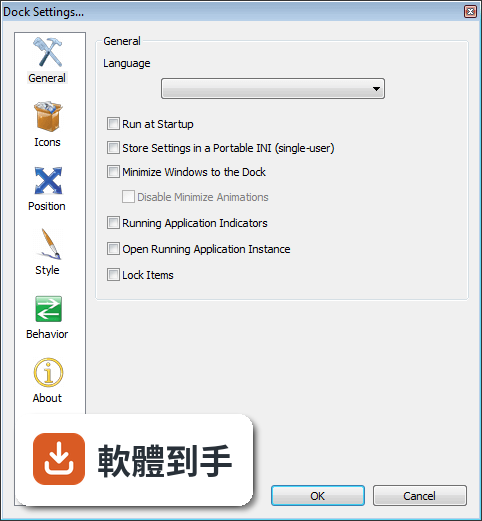
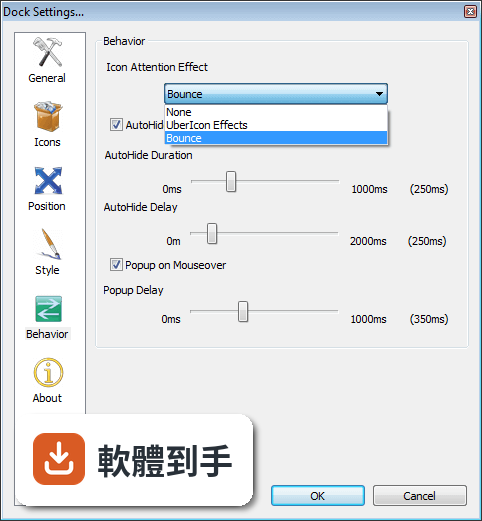
直接把桌面或檔案總管裡的捷徑、檔案、資料夾拖到 Dock 上放開,就會新增一個圖示。想移除就把圖示拖離 Dock。要調整位置,也是在 Dock 上拖動圖示到想要的地方。右鍵點 Dock 空白處可以開設定,調整圖示大小、動畫效果、自動隱藏等行為。
03它能不能換外觀或改圖示?
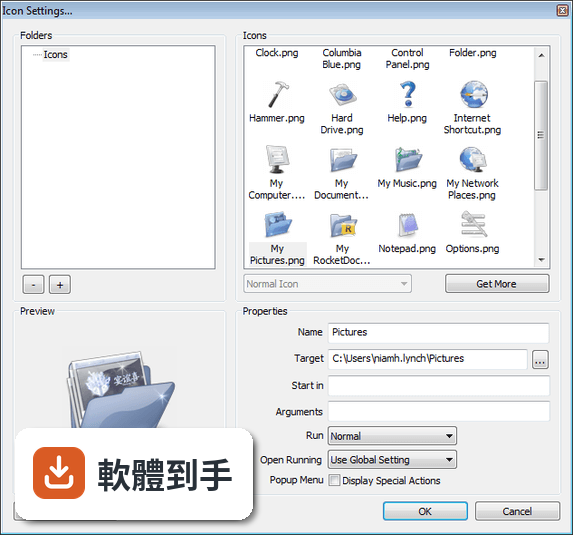
可以。右鍵點 Dock 上的圖示,選 Icon Settings 就能換成自訂的圖片,支援 PNG 和 ICO 格式。Dock 本身也有佈景主題可以更換,整體外觀、動畫、位置、圖示大小都能調整。它還相容 MobyDock、ObjectDock、RK Launcher、Y'z Dock 的 skin,想換風格可以從這些來源找。
04它支援多螢幕嗎?
官方功能說明有提到支援多顯示器,可以指定 Dock 顯示在哪個螢幕上。如果你工作時會接第二顆螢幕,這條 Dock 可以放在你主要使用的那一側,不用跨螢幕去點捷徑。不過實際多螢幕的細部設定方式,官方說明沒有寫得很詳細,需要自己安裝後試試看。
05它會很吃資源嗎?
官方說明強調它很輕量,在舊電腦上也能順暢執行,最低需求是 512MB 記憶體和 20MB 磁碟空間。它本身是常駐程式,會佔用一點記憶體,但以啟動列工具來說算是負擔小的。如果你電腦記憶體只有 512MB 或更低,裝了之後還是建議觀察一下實際使用狀況。
06我電腦是 Windows 11,這套軟體還能用嗎?
官方 FAQ 表示相容於 Windows 11、10 以及更早的版本。但要注意,這套軟體已經停止開發,最後一次更新是在多年前,官方也提醒可能無法正常運作。在 Windows 11 上能不能穩定跑,官方說法與實際情況可能有落差,建議先裝來測試,不行就找其他替代方案。
07介面是英文的,我英文不好會很難用嗎?
介面語系是英文,但操作很簡單,主要就是拖曳和右鍵選單。右鍵選單的項目不多,常用的就幾個:Dock Settings、Add/Remove Icons、Icon Settings。官方說明提到它支援多國語言、可以翻譯,但沒有內建中文,所以你需要自己找翻譯檔或直接適應英文介面。
08跟工作列比起來,用這個有什麼差?
工作列是 Windows 內建的,固定顯示在下方,空間有限,而且會跟開啟中的視窗混在一起。RocketDock 可以放在螢幕任何一邊,圖示可以放大縮小,只放你常用的東西,不會被視窗佔據。它也能把視窗最小化到 Dock 上,讓工作列保持乾淨。如果你覺得工作列不夠用,可以試試看。
09這套軟體已經不更新了,還值得用嗎?
它最後一次更新是多年前,官方也明確說不再開發。這代表新的 Windows 版本如果改了介面或行為,它可能不會跟著修正。如果你只是想要一條簡單的啟動列,而且你的 Windows 版本跑得起來,那它還是能用。但如果你想要持續維護、有新功能的工具,就要考慮其他選擇。
10跟 Rainmeter 比起來,哪個比較適合我?
Rainmeter 的定位不同,它不只是 Dock,而是整個桌面的自訂工具,可以放時鐘、系統監控、天氣等各種小工具,自訂程度很高,但學習成本也比較高。RocketDock 就只是啟動列,裝好就能用。如果你只想整理捷徑,RocketDock 比較直接;如果你想改造整個桌面,Rainmeter 的彈性更大。
11我該不該選這套,還是直接找別的 Dock 軟體?
如果你用的是 Windows 7 或更舊的系統,RocketDock 可以正常運作,而且免費、輕量,值得一試。但如果你用的是 Windows 10 或 11,它已經停止開發,可能會有相容性問題。Winstep Nexus 是功能相近的替代品,評分人數也比較多,更新較頻繁,可以優先考慮。
下載與官方連結
RocketDock-v1.3.1.exe · 6.19 MB · 連結指向軟體原廠
版本紀錄
- 2007-09-03 RocketDock 1.3.5
- 2007-08-22 RocketDock 1.3.3 6.16 MB
- 2007-08-20 RocketDock 1.3.2 6.21 MB
再看 5 筆
- 2007-03-19 RocketDock 1.3.1 6.19 MB
- 2007-03-05 RocketDock 1.3.1 Beta 1 6.47 MB
- 2007-01-29 RocketDock 1.3 6.48 MB
- 2007-01-18 RocketDock 1.3 Beta 7 3.52 MB
- 2007-01-16 RocketDock 1.3 Beta 6 3.52 MB
這一版改了什麼
What's new in this version:
- Improved Running Indicators to be more efficient and not require a timer
- Added a new "Warnings" tab in Dock Settings that will appear if known and solvable problems exist
- Added "Debug.exe" to assist in debugging Mods (and for our internal use in debugging RD). It also will show the contents of any generated "Debug Info" files for our more paranoid users.
- Moved "LanguageID Finder.exe" to the Tools directory.
- Changed docklet handling of OnConfigure() and other events so that docklets now have a normal right-click menu. "Icon Settings" will configure the docklet
- Fixed problem where docklets (iCal) could change the Current Directory and cause problems
- Changed the "hot" area of the dock to only extended to the edge of your monitor if any of the following are true: AutoHide is enabled, Popup on Mouseover is enabled, or the Edge Offset is greater than zero
- Changed to better clean up "ghost" settings from deleted icons/filters
- Added TinyCC as an embedded compiler for our upcomming "Mod" system
- Fixed minor defect in detecting the mouse being in/out of the dock
- Fixed Vista problems with RocketDock.dll and RocketClock.dll using the wrong Code Generation type
- Changed Popup on Mouseover to only steal focus in "Normal" layering mode
- Added per-icon "Open Running Applicaiton Instance" options
- Changed "Find Target" into a "..." button
- Fixed OD Docklet bug that would crash docklets that browsed for icons durring OnCreate()
- Fixed RocketDock.dll crashing on Vista
- Fixed AutoHide+Minimize jumping
- Fixed crashing when restoring multiple windows (by unchecking "Minimize Windows to the Dock")
- Fixed visual glitches when minimizing windows
- Added Window Filtering (hold Control+Alt+Shift when minimizing to create/delete filters)
- Rewrote thread synchronization.
- Added "Disable Minimize Animations" option
- Fixed OD Docklet API DockletGetLabel(). It now returns the char count
- Fixed ini quote limitation
- Added a "Debug Info" button to save useful bug report information
- Fixed Calendar Docklet images being cut off or scaled incorrectly
- Fixed Flickering/Popping Down after a display change (or playing a game)
- Fixed random crashing when right-clicking on icons
- Fixed Volume Docklet "popup menu" bug
- Fixed problem with some TrueType fonts displaying improperly
- Fixed crashing on 1-bit icons by not reading them with Gdiplus (which apparently can't handle them)
- Fixed skin appearing in upper-left momentarily on startup
- Updated the installer
- Many tiny internal changes