
這是歷史版本頁面 — 看 Screenpresso 最新版本
Windows 截圖錄影工具 Screenpresso 能做什麼
 Screenpresso 1.10.7
資料更新 2022-01-02
閱讀約 7 分鐘
開場第一段:你正在做一份教學文件或回報一個軟體錯誤,需要把螢幕上的操作過程完整記錄下來。你按下 Print Screen 貼到小畫家,發現只能截當下畫面,長網頁得分段截圖再慢慢拼接;想錄一段操作影片,系統內建工具又只能錄全螢幕,不能只錄某個視窗。你開始找一個能同時搞定截圖、錄影、編輯的工具,但免費的怕功能太陽春,付費的又怕太貴。
開場第二段:一般人習慣先試 Windows 內建的剪取工具,但它沒有滾動截圖,也無法錄影;裝瀏覽器擴充功能只能截網頁,不能截桌面程式。於是有人轉向找獨立開發的截圖軟體,這類工具的切入點是把「截圖、錄影、編輯、分享」整合在一條流程裡,讓你不用在好幾個軟體之間切換。重點不是功能越多越好,而是你常用的那幾件事——截長圖、錄操作步驟、在圖片上標註——能不能順手完成。
01Screenpresso 是什麼工具?
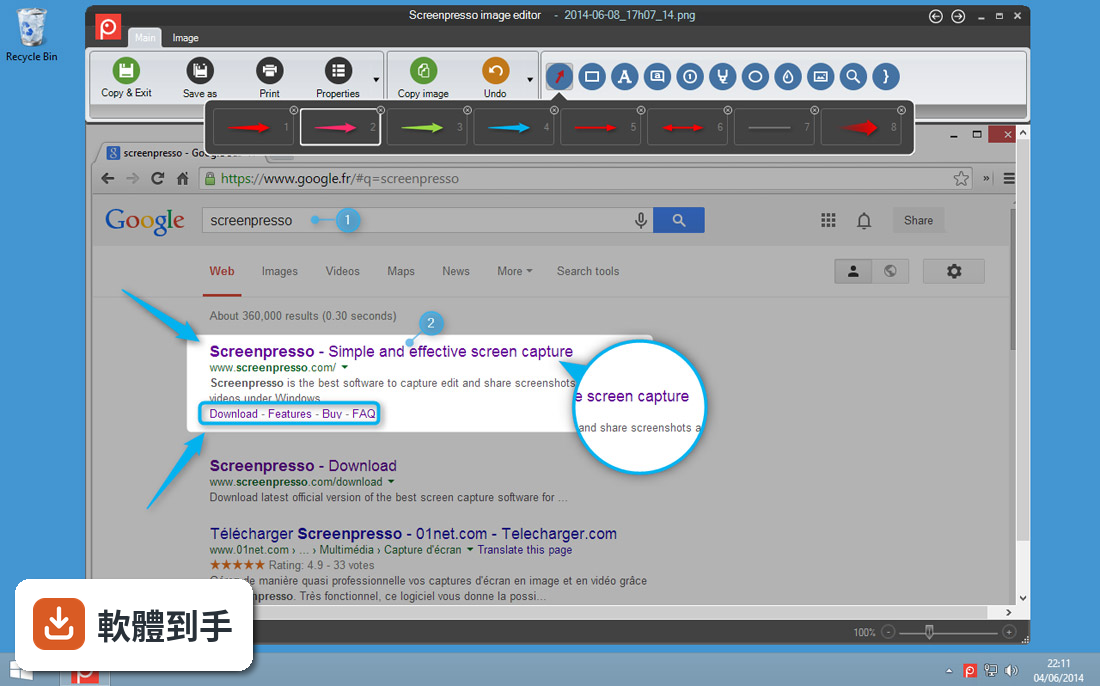
它是一套 Windows 專用的螢幕截圖與錄影軟體,可以擷取全螢幕、指定區域或單一視窗,也能錄製 HD 畫質的螢幕影片並包含音訊與視訊鏡頭。內建圖片編輯器可加註解和特效,還有文件產生器能把截圖輸出成 PDF 或 Word 檔。官方說明指出它主打輕量、操作直覺,適合需要快速截圖並整理分享的使用者。
02這套軟體能不能截取長網頁或長文件?
可以。它支援滾動截圖(scrolling capture),能一次抓取超出螢幕可視範圍的內容,例如長網頁或多頁文件。使用時選取滾動截圖模式,它會自動捲動頁面並拼接成完整圖片。這功能對製作教學文件或保存網頁內容很實用,也是它與系統內建截圖工具的主要差異之一。
03錄製螢幕影片時,可以同時錄到自己的臉嗎?
可以,但僅限 Pro 版本。官方說明提到 Pro 版支援同時錄製螢幕與視訊鏡頭(webcam),適合需要錄製教學課程或示範操作並同步顯示講者畫面的情境。免費版則沒有這項功能。如果你只需要錄螢幕不錄鏡頭,免費版就能做到,但影片會加上浮水印。
04錄下來的影片存成什麼格式?
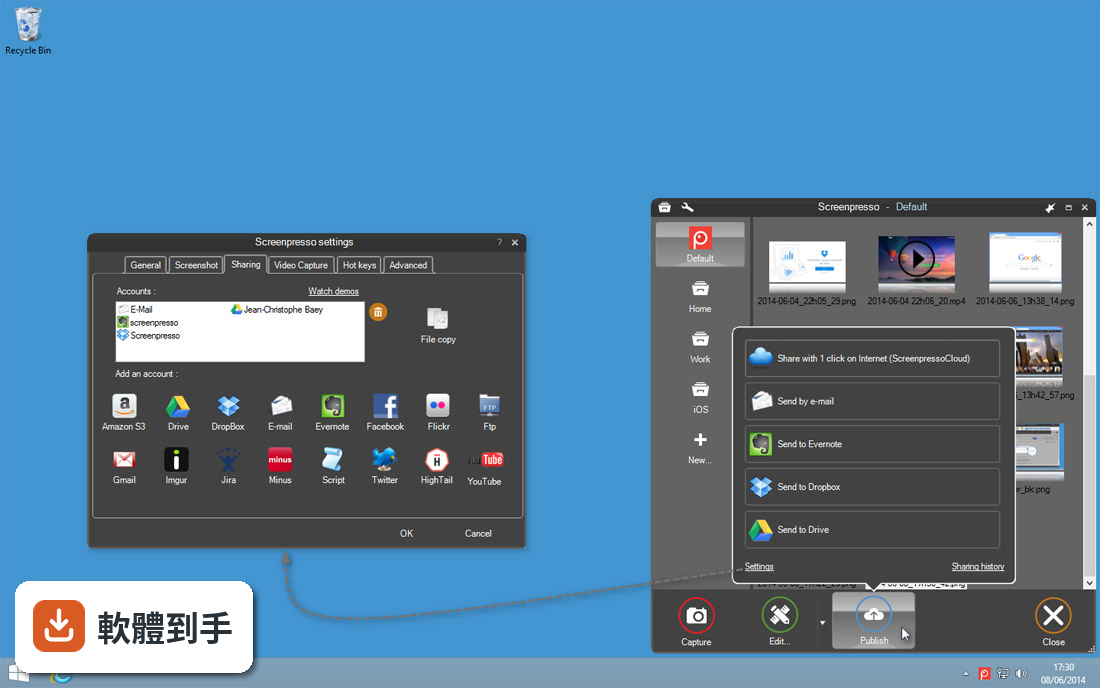
預設輸出為 MP4 格式,這是目前相容性最高的影片格式之一。官方說明也提到可以轉換成 WMV、OGG 或 WebM,但這項轉換功能在免費版中可能受限。如果你後續要上傳到 YouTube 或傳給別人看,MP4 通常是最穩妥的選擇;若需要其他格式,建議先確認你的版本是否支援轉檔。
05免費版和付費版差在哪裡?
免費版提供基本截圖與錄影功能,但錄製的影片會加上浮水印,且部分進階功能無法使用。Pro 版為一次性付費,官方定價是 29.99 美元,可移除浮水印並解鎖完整功能,例如同時錄製視訊鏡頭、更多匯出格式等。如果你只是偶爾截圖,免費版可能夠用;若需要頻繁錄影並用於工作簡報,浮水印會是主要考量。
06這套軟體適合什麼樣的人用?
根據官方說明,它適合專業人士、教育工作者、開發者,以及任何需要高品質截圖或錄製螢幕活動的人。具體來說,如果你常做教學簡報、寫軟體操作文件、回報程式錯誤(bug report),或需要把操作步驟記錄下來給同事看,它的截圖編輯與錄影功能會比系統內建工具更完整。但介面是英文,不熟悉英文操作環境的人需要先適應。
07我常常在不同電腦間移動,這套軟體方便嗎?
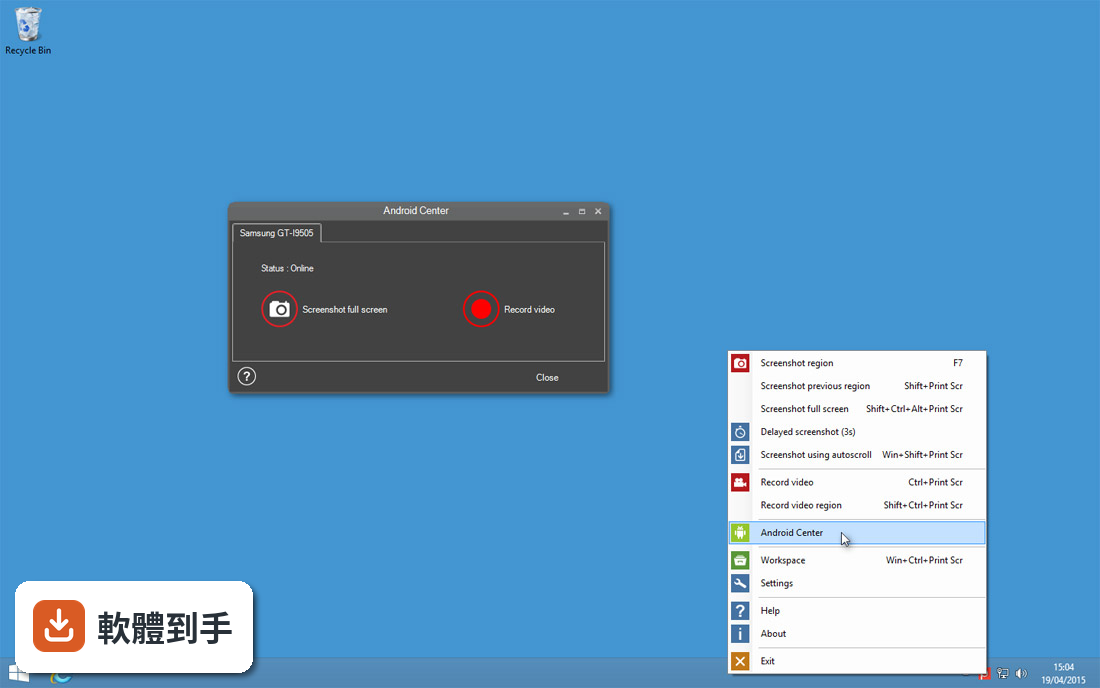
它提供免安裝的攜帶版(portable version),不需要安裝就能直接執行,適合放在隨身碟或雲端硬碟裡,在不同機器上使用。官方說明指出這對多台電腦的使用情境很方便。不過要注意,攜帶版同樣需要系統已安裝 .NET Framework 4.0 以上版本才能運作,且設定檔可能不會同步,換電腦後可能需要重新調整偏好設定。
08這套軟體有中文介面嗎?
沒有。官方資料顯示介面語言僅有英文,沒有提供繁體中文或其他語系。如果你不習慣英文介面,操作按鈕和選單名稱可能需要花時間對照,尤其編輯器內的工具名稱。若英文介面會造成使用障礙,可以考慮其他有中文介面的截圖工具,例如 Greenshot 或 ShareX,但功能細節需自行比較。
09我需要錄製很長的教學影片,這套軟體適合嗎?
免費版錄影會加上浮水印,且官方說明未提及錄影時間長度限制,但免費版功能較精簡。若你錄製的影片要公開分享或用於商業用途,浮水印會影響專業觀感,此時需要升級 Pro 版。另外,它錄影預設輸出 MP4,後製剪輯時需確認你的剪輯軟體支援此格式。若只是錄製短暫操作步驟,免費版尚可應付。
10它和 Greenshot、ShareX 比起來,我該選哪個?
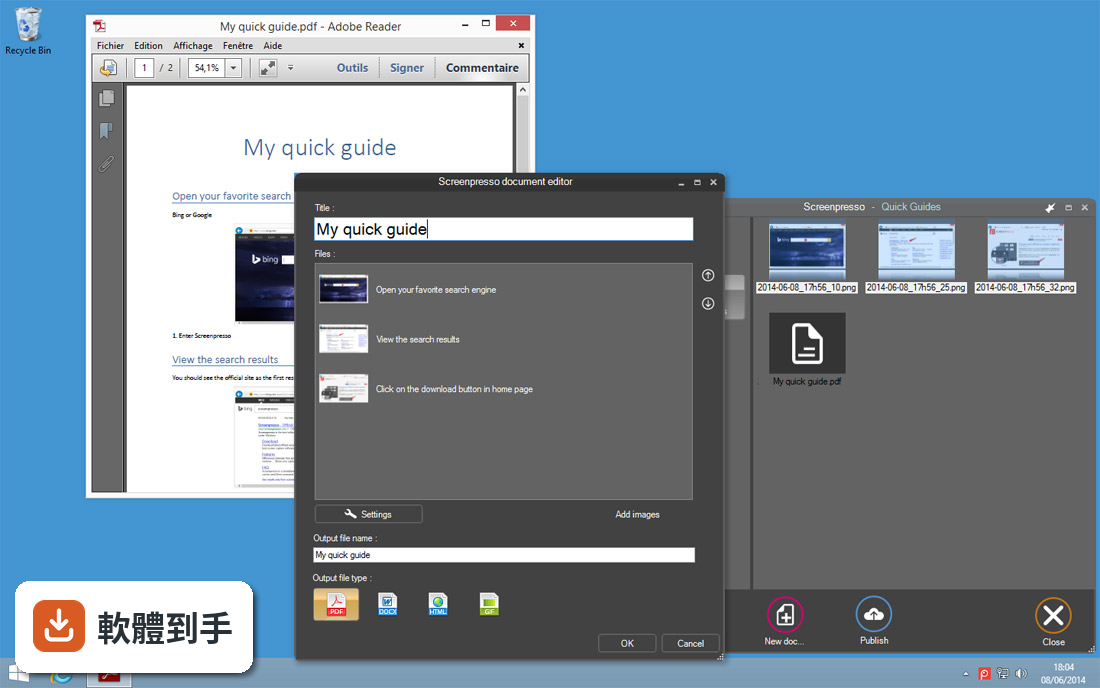
這三套都是 Windows 截圖工具,但定位不同。Screenpresso 整合了錄影與編輯功能,操作介面較現代;Greenshot 是輕量免費、編輯工具較少;ShareX 是開源軟體,具備自動化與進階擷取功能。使用者評分方面,Screenpresso 在收錄資料中為 6.8 分(35 人評),ShareX 為 45 人評、Greenshot 為 47 人評,評分人數都不多,參考性有限。如果你需要錄影與截圖一體,Screenpresso 較合適;若只要免費截圖,Greenshot 或 ShareX 可能更輕量。
11這套軟體在什麼情況下不該選?
有三種情況建議考慮其他工具:第一,你需要 Mac 版,官方明確表示沒有 macOS 版本;第二,你無法接受英文介面,它沒有中文語系;第三,你希望免費錄影且不要浮水印,免費版錄影會強制加上浮水印,需付費才能移除。此外,系統需求需 .NET Framework 4.0 以上,若你的 Windows 環境較老舊,需先確認能否安裝。
12它的更新頻率如何?會不會買了之後就沒人維護?
根據收錄的版本紀錄,它從 2017 年開始持續有版本更新,最近一次更新在 2026 年,近 12 個月更新 1 次、近 24 個月也是 1 次,屬於穩定但不算頻繁的更新節奏。開發商是 LEARNPULSE SAS,持續有在維護。但使用者評分僅 6.8 分且只有 35 人評分,樣本數不多,長期維護狀況仍須自行觀察官方後續動態。
下載與官方連結
Screenpresso.exe · 連結指向軟體原廠
版本紀錄
- 2026-10-20 Screenpresso 2.3.10 124 MB
- 2026-10-05 Screenpresso 2.3.7 50.9 MB
- 2026-06-13 Screenpresso 2.2.13 45.9 MB
再看 5 筆
- 2024-02-14 Screenpresso 2.1.23
- 2023-11-24 Screenpresso 2.1.16
- 2023-10-08 Screenpresso 2.1.15
- 2022-09-20 Screenpresso 2.1.6
- 2022-08-21 Screenpresso 2.1.5
這一版改了什麼
What's new in this version:
Screenpresso 1.10.7
- Added a setting to the magnifying glass to draw the zoomed image using wether a crisp or smooth algorithm
- Improved undo/redo commands of the built-in image editor
- Fixed long video recording that was not working anymore when 'Direct mp4 recording' option was unchecked
- Fixed video speed setting that was causing an issue (this feature is available in beta releases only)
- FFmpeg.exe and Tesseract dependencies used by Screenpresso are now digitaly signed by Learnpulse company to avoid "Access denied" to some particular files when using an antivirus
- Fixed alignment display of one setting in French
- Fixed an issue in one Arabic sentence
- Updated Japanese translations
- Updates the Google Chrome extension to support the latest manifest v3 published by Google
Screenpresso 1.10.6
- Fixed license being sometimes lost
- Editor: fixed display on a high DPI screen of number items when using a big font
- Sharing: updated all used SDKs to their latest version
- Video: updated FFmpeg to version 4.4.1 and libvlc to version 3.0.16
- Video: restored 'Restart' video recording menu item
- Improved commandline's 'video' verb for video recording
- Embedded HTML is now displayed using Microsoft Edge instead of Internet Explorer when available
Screenpresso 1.10.5
- Added 'Import an exiting folder..." menu item to the workspaces manager to make it more friendly than just drag and drop behavior
- Reverted the MSI to autostart Screenpresso via the registry HKLM instead of HKCU
- Updated Tesseract OCR to the new version released on august 2021
- Improved the behavior of 'EditorAlwaysMaximize' advanced setting
- Updated the commandline documentation
- Updated sample admx and adml files
Screenpresso 1.10.4
- Video recording is now gracefuly stopped, without loosing the recording, when Windows is shutdown
- It is now possible to easily retrieve the path of the working folder of each workspaces
- Fixed wrong copy to clipboard behaviors from the workspace
- In the workspace's context menu, saveas '.presso' is now always available for images, even if it was never edited using the built-in editor
- Fixed the issue in the workspaces manager when the thumbnail image of a workspace does not exist anymore
- The built-in image editor window is now still visible when the 'EditorSavePosition' advanced setting is enabled and the last windows' position was on a screen that is currently disabled
- Fixed filename not displayed when printing an image. Added a setting to print it or not
- Added a 'Contact support' button to the NetworkError form
- For the IT, the 'NoLicenseManagement' policy key now also disable access to the activation key from the about box dialog
Screenpresso 1.10.3
- Fixed an infinite loop with animated gif files. Screenpresso could not start anymore and was automatically killed by Windows
Screenpresso 1.10.2
- The workspace now detects the file system's changes to automatically refresh itself
- Fixed issue with edited gif images
- Fixed Twitter sharing issue due to breaking changes in Twitter API
- Added 'NoLicenseManagement' policy for the IT to be able to disable the display of the 'License management' menu item to the users
Screenpresso 1.10.1
- Better support for readonly folders and antivirus
- If you have an antivirus (e.g. Avast), please add Screenpresso.exe to its whitelist
Screenpresso 1.10.0
- Added 'EditorItemRatio' advanced settings. Drawing a new rectangle while holding the Shift key in the built-in image editor now forces the height to be equal to the width according to the given ratio
- Long video recording is more stable
- Fixed "AccessDenied" error message during video recording when the user's windows session is locked for more than one minute
- On error 'Merge images' feature now returns all images in one instead of nothing
- Added a new tab for settings specific to the workspace
- Changed behavior with the Windows' UAC
- Updated translations
Screenpresso 1.9.10
- Added 'EditorItemRatio' advanced settings. Drawing a new rectangle while holding the Shift key in the built-in image editor now forces the height to be equal to the width according to the given ratio
- Long video recording is more stable
- Fixed "AccessDenied" error message during video recording when the user's windows session is locked for more than one minute
- On error 'Merge images' feature now returns all images in one instead of nothing
- Added a new tab for settings specific to the workspace
- Changed behavior with the Windows' UAC
- Updated translations
Screenpresso 1.9.9
- Commandline: changed 'install' verb to 'deploy' verb
- Fixed a compatibility issue with settings
- Fixed issue with Win key not working after a screenshot in beta releases
- Uninstall: no error message is displayed anymore even if wscript is not available
Screenpresso 1.9.8
- Policies now also work with already existing settings
- Workspace: changed CopyImageToClipboard and CopyFilePathToClipboard context menu items
- Fixed Chocolatey package
Screenpresso 1.9.7
- Fully changed the command line arguments. Run Screenpresso.exe --help for more information
- Fixed the issue "ValueTuple.dll is missing" on some computers, when playing a video
- Fixed the issue "Could not load type 'System.Runtime.CompilerServices.IsReadOnlyAttribute'" on some computers
- The exit code of the application is now always 0 when no error occured. Before it was sometimes a positive value
- Chocolatey is now officially supported
Screenpresso 1.9.6
- Change log not available for this version
Screenpresso 1.9.5
Video improvements:
- Fixed random crash when recording a video with system sound (what I hear)
- Fixed manual selection of audio source adapter. Previously, it was not taken into account
- Fixed the issue "ValueTuple.dll is missing" on some computers, when playing a video
- Fixed the issue when playing an avi file, it was sometimes not possible to replay it
- Fixed "AccessDenied" error message during video recording when the user's windows session is locked for more than one minute
- Disabled hardware acceleration to avoid a black display on the computers that don't support this feature
Editor reworking:
- Reworked stamps. Now there are nice even on high definition screens. We also added some new stamps
Publish reworking:
- The windows are not displayed within the workspace anymore
- Fixed generated YouTube URLs
- Fixed Evernote
Screenpresso 1.9.4
- bug fixes
Screenpresso 1.9.1
- Improved video player stability
- Workspace: Ctrl+Num and Ctrl+Alt+Num shortcut is now 1 based and not 0 based anymore (e.g. press Ctrl+Alt+1 to publish selected media to Screenpress Cloud instead of Ctrl+Alt+0)
- Improved cross-process synchronization when running Screenpresso.exe multiple times at once
- Fixed a VBScript error message that occured sometimes when uninstalling Screenpresso
Screenpresso 1.9.0
- Install the latest version of the .NET Framework on your computer using this Microsoft link if you are not using Windows 10
- Fixed a critical bug that prevents item edition on the built-in image editor. The bug was introduced with the new auto-save feature and impacted only the old image editor interface. The workaround was to turn-off the auto-save feature by setting the advanced settings flag called "EditorAutoSave" to False
Screenpresso 1.8.5
New video player engine:
- The video player used in the preview window (shown after a recording) has been completly reworked
- The new player is faster, more stable and uses less CPU resources
Bug-fix:
- Improved the startup stability (fix "XML" issue on loading)
- Improved the general stability (fix interprocess issues)
- Fixed OCR issue on Japanese language
- Fixed the image copy/paste issue from Outlook to Screenpresso
Minor look change:
- The Screenpresso windows are not round anymore but a little more square to follow Windows 10 aesthetics
Screenpresso 1.8.4
- Bug fixes
Screenpresso 1.8.3
- Capture: fixed clipboard issue
- Video: improved video recording stability
- What's new window: removed the display of JS errors when the release note is loaded and the embedded browser lacks some JS capabilities
- Update hotkey engine for users that install Screenpresso in Program Files folder (.NET 2.0 apis are not used anymore)
Screenpresso 1.8.2
- Capture: fixed delay screenshot feature
- OCR: updated engine and added support for Portuguese and Brazilian
- Added 'EditorSavePosition' advanced setting
- Fixed crashed during update
Screenpresso 1.8.1
- Added "NoOcr" policy
- Added "MergeVideos" command line
- Color picker: removed the '#' character in the captured color value
- Capture: fixed ScreenshotDelay feature
- Workspace: added a tooltip to explain how to organize up or down the workspaces
- Editor: fixed the canvas when cropping outside the original content
- Editor: fixed an issue with the zoom
- Editor: fixed a crash when deleting all numbered items
- Video: fixed error message when the disk is full
- Workspace: the window is not topmost anymore
- Sharing: fixed an issue with Evernote
- Changed default value of advanced setting named "SnappingDepth" from 1 to 2
- Added NoErrorReportingEmail policy
- Improved the clipboard
- Improved Live Update engine
- Improved FIPS support
- Restored version to Windows' field named "ProductInfo"
- Updated to the latest version of NAudio library for better sound recording
Screenpresso 1.8.0
- Improved custom filename
- The configuration of a custom filename for screenshots is enhanced, and more options are available.
- Choose "User-defined" and click on the configure button
- Define your filename pattern with predefined placeholders
- The 2 minutes limit length for animated gif is removed
- Animated GIFs should be short and lightweight. That's why we recommend keeping GIFs video under 2 minutes length. However, Screenpresso does not hard limit it anymore.
- New "VideoPauseBeforeStop" advanced settings
- You can resume the video recording when you stop it. The stop button acts as a pause button, and a second confirmation is needed to finalize the video
- New "SnappingDepth" advanced settings
- When you start a capture, moving the mouse over a window selects it. If you set the depth value to 1 you can select the child window of this root window by moving the mouse over it. If you set a value to 2, you can select a child window of this child window, and so on... The default value is 1 but to capture only root windows in one click, you might prefer to set it to 0.
- A new What's new? dialog has been added
- When a new version is available, the release note is now shown directly in Screenpresso
Updated third parties components:
- The OCR is now based on Tesseract 5-alpha
- The Google SDK v3 is now used for Google drive and Youtube integration
- Bug fixes
- Due to instabilities on Windows APIs, the Direct MP4 recording option is not supported anymore over Windows 8
- Improved the clipboard engine. Sometimes the content was not set resulting to an empty clipboard
- The "Reset all settings" button was not workink propertly (sharing settings were not resetted)
- The video recorder was sometimes crashing due to audio issues
- A display issue has been fixed when printing from the workspace
- The Check for Update window size has been fixed for windows users with font size greater than 100%
Screenpresso 1.7.16.0
- Editor: update OCR Tesserac to version 5-alpha
- New display for release notes
- Added 'OpenFileExplorerAfterProcessing' advanced setting
- Fixed an issue with latest security Microsoft patch for Windows 7
- Fixed gif video issue when video clipping was applied at the same time
- Fixed Android video recording occuring with some mobile phones
Screenpresso 1.7.15.0
- Improved memory usage (some bitmaps are freed more quickly) Fixed wrong Fmpeg version in MSI install
Screenpresso 1.7.14.0
- Fixed a bug with policies and pro license
- Removed support for Hightail sharing service since they don't provide an API anymore
- Release notes is now displayed in Screenpresso when a new official release is available
Screenpresso 1.7.13.0
- Screen resolution (DPI) is now set into the captured image file
- Screen resolution (DPI) is now taken into account when drawing mouse cursor
- When FFmpeg must be re-installed, now a message explains why
- Fixed policies not applied at startup
- Fixed app not starting with Windows on some computers
Screenpresso 1.7.12.0
- Fixed issue with settings Fixed display of tools in built-in image editor Restaured "Check for beta update" checkbox visibility in AboutBox
Screenpresso 1.7.11.1
- Fix the startup issue when no settings.xml exist
Screenpresso 1.7.11.0
- Fix the startup issue when no settings.xml exist
Screenpresso 1.7.10.0
- Fix a set of minor bugs
Screenpresso 1.7.9.0
Capture:
- Fixed lag at video recording's startup
- When "Direct MP4 recording" option is checked, there was a lag during about 0.3 seconds at the very beginning of the record.
- Fixed issue with automatic merge at the end of video recording
- A new feature of the previous release is for Screenpresso to merge automatically multiple AVI files when Direct MP4 recording option is not checked and a long video recording ends. This new feature introduced a bug preventing the video preview from being displayed.
Editor:
- Added dash-dot line style
- For lines, circles, rectangles and polygons, it is possible to set a plain or a dash line style. Now we added the dash-dot line style.
- Added Ctrl+C shortcut
- Ctrl+C now copies to clipboard selected item or the whole image.
Sharing:
- Fixed Google Drive public permission
- When you upload a media to Google Drive thanks to Screenpresso's build-in publish feature, you can request it to be publicly available. This feature was not working properly and is now fixed.
- Removed ScreenpressoCloud banner (pro)
- If you are a Screenpresso PRO user and publish a media to ScreenpressoCloud, the hosting Web page won't display a banner advertising Screenpresso anymore.
- Upgraded ScreenpressoCloud max file size
- The maximum file size has been changed from 20MB to 50MB
Settings:
- Smaller settings.xml file
- Now the settings.xml file storing all your settings is much smaller because it does not contain default values anymore (settings that you haven't changed are not saved to the file anymore).
- Fixed proxy error message
- When a proxy setting does not work, there is now a better error message.
- About box saves previous choices
- About box window now remembers whether you checked Check for beta option or not. Previously this setting was always checked when you opened the window.
Others:
- Fixed German and Dutch translations
Screenpresso 1.7.8.0
Capture: automatic merge of mp4 files when multiple files have been generated during video recording:
- If "Direct MP4 recording" option is not checked, Screenpresso records video using AVI file format. Because this format is limited to 2GB for max file size, Screenpresso may generates multiple AVI files. At the end of the recording, Screenpresso automatically converts these AVI files to MP4 files but the results was multiple MP4 files. Now it adds one more processing steps that merges all these files in one
Capture: generating an animated gif video is now much faster, fix ghosting with animated gif, removed dependency on ImageMagik:
- When a video recording was finished and saved to animated gif, processing was very long and quality was not very good. Now because Screenpresso uses a whole new processing engine, animated gif generation is much faster and with better quality. By the way we removed the dependency to ImageMagic third party software to reduce possible security holes.
Capture: upgraded to FFmpeg and ADB:
- Screenpresso uses FFmpeg for video convertion and more. We updated to version 4.1.4 of FFmpeg for internal improvements
- To record videos or take screenshots of Android devices, Screenpresso now uses version 1.0.41 of Android Debug Bridge (ADB) to communicate with latest versions of Android devices
AboutBox: 'Check for update' button now has an option to choose between official or debug releases:
- Clicking on "Check for update" button in About Box is optional since Screenpresso already features an automatic live update engine for official release (you can disable it via settings). Click this button only if you want to get latest beta updates for testing purposes, including some features preview of the future realease v2.
- The date for the future v2 major version is not yet planned. We just start thinking about it.
Editor: numbering items can now be displayed in Roman (before it was possible to display only in number or letter):
- You can add numbering items to your screen captures. Now it support numbers (1, 2, 3, 4...), letters (A, B, C, D...) and romans (I, II, III, IV...).
Editor: added EditorSingleInstance, WorkspaceCloseOnEdit and ScreenshotHideCursor advanced settings
- If you set EditorSingleInstance to True then when you double-click multiple images in Screenpresso workspace, it will always open them in the same instance of the image editor instead of opening multiple windows.
- If you set WorkspaceCloseOnEdit to False then the workspace window will remain opened when you double-click a media to open it (a media is an image, a video, or a document).
- If you set ScreenshotHideCursor to False then when you perform a screen capture, the standard mouse cursor remains visible. Default behavior of Screenpress is to hide it and show a cross instead.
Policies: administrators can now fine tune which sharing features are available or disabled:
- Now IT can for instance disable Google Drive and Evernote sharing features but keep OneDrive and OneNote sharing features available. Refer to the user manual (press F1 key from Screenpresso to open it) or run "Screenpresso.exe /policies" to generate a sample registry file.
All Web calls are based on TLSv1.2 protocol to improve security
- If your operating system supports the latest version of HTTPS protocol then Screenpresso will use it
Screenpresso 1.7.7.0
- Fixed German translationsFixed issue when generating an animated gif document
Screenpresso 1.7.6.0
- Change log not available for this version
Screenpresso 1.7.5.0
- Fix instabilities in the image editor
Screenpresso 1.7.4.0
- Change log not available for this version
Screenpresso 1.7.3.0
- Added custom time configuration for delayed capture
- Added an action setting to allow automatic printing after every capture
- Added Sweden and Czech translations
- Direct MP4 recording is now the default setting
- Improve hotkey handling (print screen key)
- Removed Facebook sharing feature
- Upgraded FFmpeg to version 4.0.2
- Fixed video preview: video ratio was sometimes incorrect
- Fixed editor: drawing of a line or a polygon while shift key was pressed
- Fixed workspace: display issue with scrollbars when changing workspaces order
Screenpresso 1.7.2.0
- Editor: improved image editor’s automatic window’s sizing when an image is opened
- Editor: better suport for RightToLeft text edition
- Editor: increased max font size
- Multiple minor bug fixes
Screenpresso 1.7.1.0
- Capture: WebCam’s window size and location is now saved. It is also possible to open WebCam’s driver settings
- Capture: after a capture, Screenpresso can now ask in which workspace the file must be saved if ‘WorkspacesAlwaysAsk’ advanced setting is set to True
- Editor: holding Control key when clicking “Send backward” now brings selected item to back instead of just one step backward
- Editor: screen used to display the window is now persisted
- Editor: improved border effects window and added a drop shadow preset
- Sharing: it is now possible to disable URL shortener when uploading to Google Drive
Screenpresso 1.7.0.0
- Better support for high resolution monitors
- Reworked user interface
- Fixed breaking change in Facebook API
- Removed support for Flickr
- Added SupportEmail policy
- Microsoft Windows’ setting named “WindowArrangementActive” is now supported
Screenpresso 1.6.8.0
- Editor: added a context menu command to delete all items
- Capture: fixed zoom issue during video recording
- Capture: fixed crash during video recording with system sound enabled when locking user session
- It is now possible to both install and activate Screenpresso via a single command line call
Screenpresso 1.6.7.0
- Added a new quick view border less and top most window. Select a capture then press ‘Space’ key
- In built-in image iditor, it is now possible to use mouse wheel to change value of a numeric item
- It is now possible activate Screenpresso PRO via command line
Screenpresso 1.6.6.0
- It is now possible to manualy merge videos (PRO)
- We added quick search to the workspace. Press a key to select next corresponding file
- Images are now copied to clipboard with support of transparency
- (e.g. now you can directly paste a transparent image to PowerPoint)
- Full support of Dropbox API version 2
- Improved Evernote sharing to support video and documents, not just images
- Video encoder is now 64 bits
Others:
- Capture: fixed display of watermark setting during capture
- Capture: center grip is not displayed anymore before video capture when capturing full screen
- Capture: fixed systray icon not blinking anymore after restarting video recording
- Document: fixed text no being deleted from generated document after deleting a bullet point
- Workspace: deleting a HTML file now also deletes “_files” sub-folder
- Workspace: fixed Screenpresso display at very first startup
- Screenpresso now generates ADMX file instead of ADM file for GPO
- All Screenpresso URLs are now HTTPS instead of HTTP
Screenpresso 1.6.5.0
- Added per monitor DPI support under Windows 10
- Added “NoLoop” setting for animated GIF generation from video recording
- FileCopy sharing feature can now create an archive of files in destination folder
- “SaveAs HTML” feature in workspace now encodes the image as base64
- Fixed crash in Windows’ DLLHost.exe rarely occuring on 64 bits operating system only
- Fixed issue with Google translate without an Internet connection
Screenpresso 1.6.4.0
- Fixed shortcuts engine issue
- Fixed animated GIF issue
Screenpresso 1.6.3.0
- New shortcuts engine
- Support for Windows 10 virtual desktops
- Added a shortcut setting for delayed capture
- Custom colors are now persisted
- Added Ctrl+MouseWheel shortcut to workspace for changing thumbnails size
Screenpresso 1.6.2.0
- Capture: quick capture form is now hidden from ALT+TAB
- Capture: OCR now supports Japanese
- Capture: added a button in OCR window to be able to remove lines feed
- Capture: clicking the systray balloon when it is displayed now opens workspace
- Editor: it is now possible to move to next or previous image using PageUp and PageDown keys
- Editor: document’s name is now displayed in Windows’ spool window when printing
- Editor: it is now possible to copy an item and paste it in another application
- Sharing: improved Imgur sharing
- New code signing certificate using sha256, according to Microsoft’s rules for 2016
Screenpresso 1.6.1.0
- Screenpresso is now 64 bits
- New workflow to capture whole screen
- Systray icon now blinks with different colors during video recording
- Reworked Imgur sharing to support new v3 API
Screenpresso 1.6.0.0
- Windows 10 fully compatible
- Video capture: system sound can now be recorded in screencast
- Video clipping: you can now modify the start and end time
- New quick capture window always visible on your desktop
- 2 way synchronizations with Microsoft OneDrive and Google drive
- Editor enhancement: new polygon drawing tools, most of the drawing items can now be rotated
- Screenpresso hot keys now work within applications with administrator privileges
- Video capture: watermark your videos
- New color picker
- Even more new features