
這是歷史版本頁面 — 看 Sibelius 最新版本
打譜排版老是手動調到崩潰?Sibelius 能幫你什麼
 Sibelius 8.3.0
資料更新 2016-05-05
閱讀約 6 分鐘
寫譜寫到一半,最煩的不是音符本身,而是版面。明明只是把總譜交給團員,分譜卻要一份一份重新整理;好不容易排好一頁,加個表情記號整個版面又跑掉。你只是想讓樂譜看起來專業、乾淨,不要每次都在手動對齊和調整間距上耗掉整個晚上。
免費的陽春打譜軟體或文書軟體不是不能用,但當樂曲編制一複雜、符桿方向要改、連音線要拉、分譜要印,那些工具就開始處處卡手。這類專業打譜軟體的切入點,是把你從「排版工人」的角色裡解放出來,讓版面配置、分譜抽取、播放聆聽這些事自動化,你只需要專注在音樂本身。
01Sibelius 到底能拿來做什麼?
它是一套專業打譜軟體,主要工作是建立、編輯和輸出高品質的樂譜。你可以用它從空白譜面開始寫總譜,輸入音符後自動產生整齊的排版,也能直接播放聆聽編曲成果。輸出方面支援 PDF、MusicXML、MIDI、MP3 和 WAV,方便你把譜面交給團員或匯入其他音樂軟體繼續處理。
02我沒有 MIDI 鍵盤,用滑鼠和電腦鍵盤輸入音符會不會很慢?
官方說明指出,除了 MIDI 鍵盤,你也可以用電腦鍵盤或滑鼠點擊譜面輸入音符。鍵盤輸入通常會比滑鼠快,因為可以透過快捷鍵指定音高和時值;滑鼠則適合偶爾修改單一音符。沒有 MIDI 裝置不會卡關,只是輸入速度會因個人熟練度而有差異。
03總譜寫完要印分譜,它會自動處理嗎?
可以。它的 Dynamic Parts 功能會在你編輯總譜時,自動同步更新個別樂器分譜。也就是說,你改總譜的任何一個音符,對應的分譜會跟著變,不需要手動一份一份重新整理。這對樂團或合奏編制來說,能省下大量重複作業的時間。
04譜面排版能不能自動調整,還是都要自己拉?
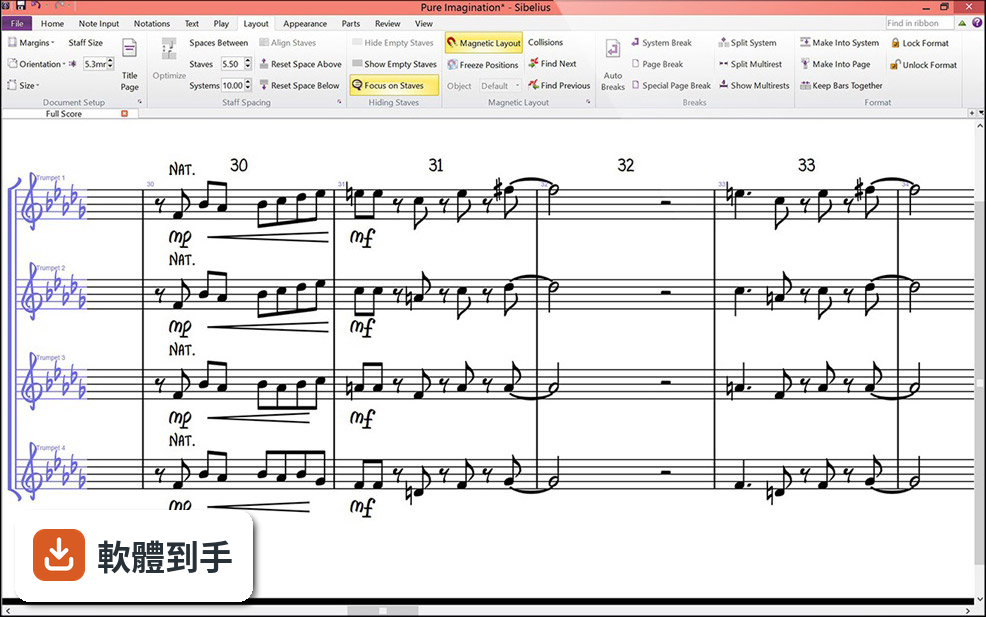
它內建 Magnetic Layout 功能,會自動對齊譜面上的元素,減少手動調整的次數。例如表情記號、力度標記、文字說明的擺放位置,系統會依預設規則幫你排好,讓版面維持專業外觀。不過複雜的樂段或特殊排版需求,還是可能需要手動微調。
05寫完的譜可以聽起來像真實樂器嗎?
它內建 Sibelius Sounds 音色庫,提供接近真實樂器的播放效果,也支援第三方虛擬樂器。你可以在寫譜過程中隨時播放聆聽,檢查和聲、配器和聲部進行是否如預期。音質會比一般電腦內建音效好很多,但和專業 DAW 的混音成果仍有差距。
06這套軟體適合初學者嗎?
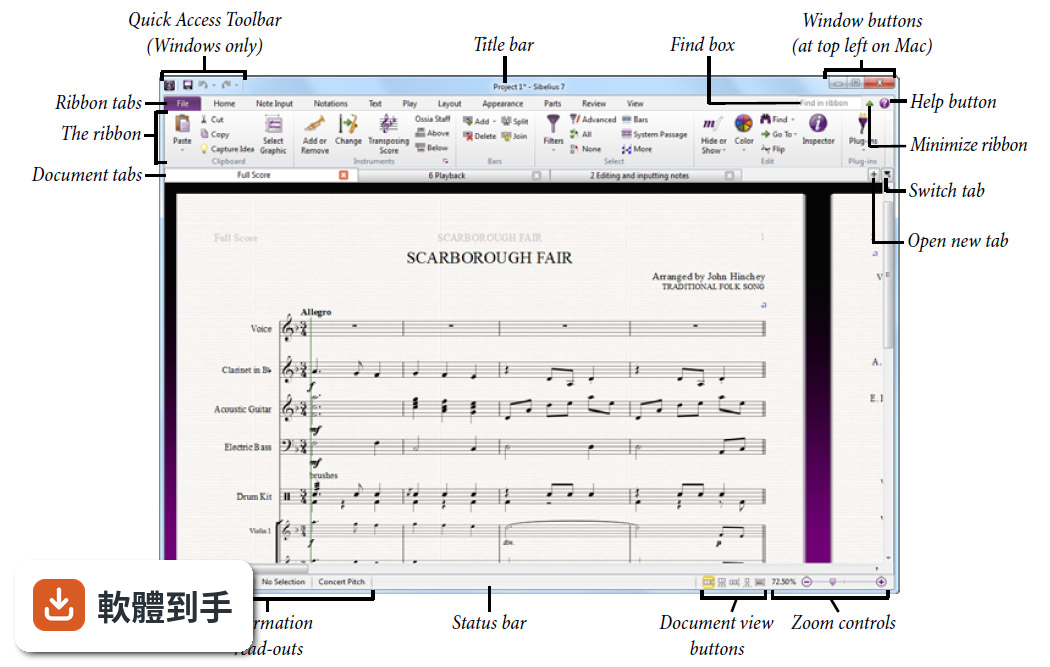
官方說明提到它提供預設範本,涵蓋多種曲風和編制,也有引導式設定精靈協助第一次使用的使用者。介面採用類似 Office 的 Ribbon 選單,工具都有標籤說明。不過整體功能龐大,初學者需要花時間熟悉操作邏輯,建議先從範本改寫開始,再逐步嘗試進階功能。
07我是專業作曲者,主要寫影視配樂,它夠用嗎?
它支援影片同步和時間碼,也提供完整的製譜功能,適合需要為影像配樂的作曲家。官方說明中明確列出 Video sync & timecode support 是 Ultimate 版本的功能,如果你需要這類工作流程,可以考慮訂閱 Ultimate 方案。另外 Arrange 工具能快速改編和聲與結構,對配樂工作有幫助。
08預算有限的話,有免費方案可以用嗎?
vid 提供 Sibelius First 免費版,包含基本打譜功能,但有限制。官方說明指出免費版在功能上比付費版精簡,例如小節數、樂器數和雲端分享數量都有上限。如果你只是寫簡單的單旋律或小型編制,免費版可以入門;但編制一大或需要進階排版,就會遇到限制。
09我習慣用 MuseScore,有必要換到這套嗎?
MuseScore 是免費開源軟體,功能也相當完整,社群活躍。Sibelius 的優勢在於 Dynamic Parts 和 Magnetic Layout 這類自動化排版功能,以及更成熟的製譜流程。如果你目前用 MuseScore 沒有遇到瓶頸,不一定需要換;但若常被分譜整理或版面調整困擾,可以試用看看再決定。
10介面只有英文,我看不懂怎麼辦?
這套軟體的介面語系是英文,沒有官方繁體中文介面。如果你對英文介面不熟悉,操作上會需要額外適應,建議先到官方網站觀看教學影片或查閱說明文件。另外,也可以考慮功能相近且支援中文的替代軟體,例如 MuseScore 有社群中文化,門檻會低一些。
11訂閱制划得來嗎?還是買斷比較好?
它提供訂閱和永久買斷兩種授權方式。訂閱方案分 Artist 和 Ultimate 兩級,Artist 每年 99 歐元,Ultimate 每年 133 歐元;永久買斷的 Ultimate Perpetual Bundle 則是一次性 533 歐元。如果你長期使用且需要完整功能,買斷可能比較划算;若只是短期專案或想先試水溫,可以按月訂閱。
12這套軟體更新頻率高嗎?會不會買了沒多久就過時?
根據現有資訊,這套軟體近 24 個月只更新了 1 次,更新頻率不算高。官方說明提到新版改善了播放音質、記譜工具和與現代作業系統的相容性,但如果你期待頻繁的功能更新,這套軟體的節奏可能不符合預期。建議先確認你需要的功能是否已經具備,再決定是否投入。
下載與官方連結
Sibelius_8.3.0_Win.zip · 917 MB · 連結指向軟體原廠
版本紀錄
- 2026-07-31 Sibelius 2026.6
- 2022-12-16 Sibelius 2022.12
- 2022-11-23 Sibelius 2022.10
再看 5 筆
- 2020-01-13 Sibelius 2019.12 863 MB
- 2019-09-20 Sibelius 2019.9 983 MB
- 2019-05-17 Sibelius 2019.5 983 MB
- 2019-05-14 Sibelius 2019.4 983 MB
- 2017-11-18 Sibelius 8.7.2
這一版改了什麼
What's new in this version:
Colorful notes:
- We’ve added the ability to color notes independently in a chord. In earlier versions of Sibelius, the color applied to any note would affect the whole chord, but with Sibelius 8.3, the notes can be colored independently. This feature is useful not only for educators to help students learn music in more vibrant and engaging ways, but it’s just as useful in contemporary scores or even for simply marking up a score for editing.
- We’ve updated the ManuScript Plug-in language in Sibelius (the built-in scripting language for automating tasks in Sibelius) to take advantage of the new coloring features. As part of this, the Color Pitches and BoomWhacker plug-ins that ship with Sibelius have been updated to use these new methods as well.
- These changes have been added without any change to the file format version, so you can can open files saved in Sibelius 8.3, in 8.2 and 8.1. However, when opening scores in 8.2 and earlier, the colors you have applied to notes will be stripped out as those older versions won’t know how to handle the new coloring attributes.
Improvements to Note sliding:
- In Sibelius 8.2, we introduced an innovative feature to allow you to move notes left and right in the score with two simple keyboard shortcuts (Ctrl+Alt+Left and Right, and Cmd+Alt+Left and Right). This handy little feature speeds up editing and note entry and saves valuable time where preparing a score. With Sibelius 8.3, rests that are cerated and left behind by moving notes, are now cleaned up nicely, so you aren’t left with a trail of rests.
Miscellaneous improvements:
- To track down the problems some users have reported with scrolling and zooming on Macs when using a Magic Mouse, Magic Trackpad or a trackpad on a MacBook or MacBookPro, we’ve given the feature an overhaul to resolve these issues. As a result, you should find scrolling and zooming on Mac smoother and generally more responsive. Gestures with three-fingers are now better supported, allowing you to switch windows more easily, for example.
- A problem where Sibelius 8.2.0 could crash on quit after first launch on a clean system has been fixed
- Start and end repeat barlines would sometimes appear too thick when written together. These are now lined up correctly as before.
- Some users reported a problem where note input would stop working when switching scores. This has been fixed.
- The Sibelius License Server is now supported on Mac OS 10.11 El Capitan
- When using Reset Design in the score, it no longer affects accidentals in the part. This is a change in behavior from Sibelius 8.2 where resetting the design on a note or larger selection would reset the accidental in the parts too.