
這是歷史版本頁面 — 看 SlimCleaner Free 最新版本
老Windows電腦變慢,SlimCleaner Free清理優化還夠用嗎
 SlimCleaner Free 4.0.24141.51064
資料更新 2012-11-07
閱讀約 5 分鐘
電腦用久了,開機越來越慢,硬碟空間莫名其妙變少,連開個瀏覽器都要等好幾秒。你想把系統整理一下,卻發現網路上找到的清理工具不是要收費,就是安裝時偷渡一堆你不想要的工具列。你只是想讓電腦恢復剛買時的那種流暢感,不想為了這件事搞得自己像個資安專家。
一般人遇到這種狀況,第一個念頭是下載免費的清理軟體,但很多免費工具其實只做表面功夫,清完垃圾檔案沒什麼感覺,更別提那些藏在開機啟動項目裡拖慢速度的程式。這類工具的切入點,是同時處理「看得見的垃圾」和「看不見的拖累」——不只是刪暫存檔,還幫你判斷哪些開機程式可以關、哪些軟體可以移除,甚至連重複的檔案和硬碟碎片都一起處理。
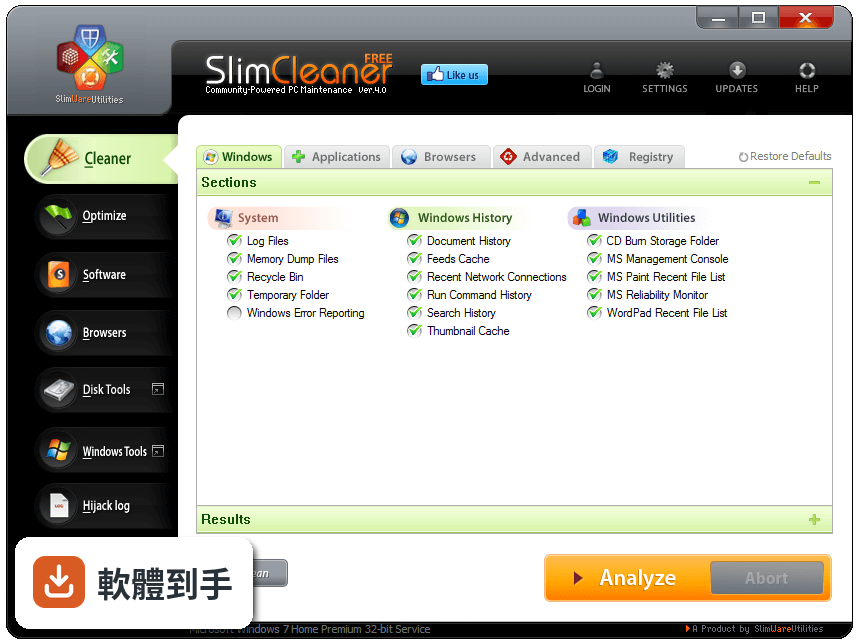
01SlimCleaner Free到底能幫我解決什麼問題?
它主要做四件事:清理系統垃圾檔案、調整開機啟動項目和服務、移除軟體、檢查軟體更新。另外還有硬碟重組、SSD最佳化、重複檔案尋找、Hijack Log掃描和系統工具整理。簡單說,從開機變慢、硬碟空間不足到不知道該不該刪某個程式,它都試圖給你一個答案。
02它的清理功能跟其他免費軟體比起來有什麼不一樣?
官方說法是它的清理引擎號稱「業界最快」,號稱一秒內能分析完整台電腦。但這只是官方數據,實際速度取決於你的硬碟大小和檔案數量。比較特別的是,它會把清理結果和社群回饋結合,也就是說,它不只是照表刪檔案,還會參考其他使用者對某些檔案或程式的評價來決定怎麼處理。
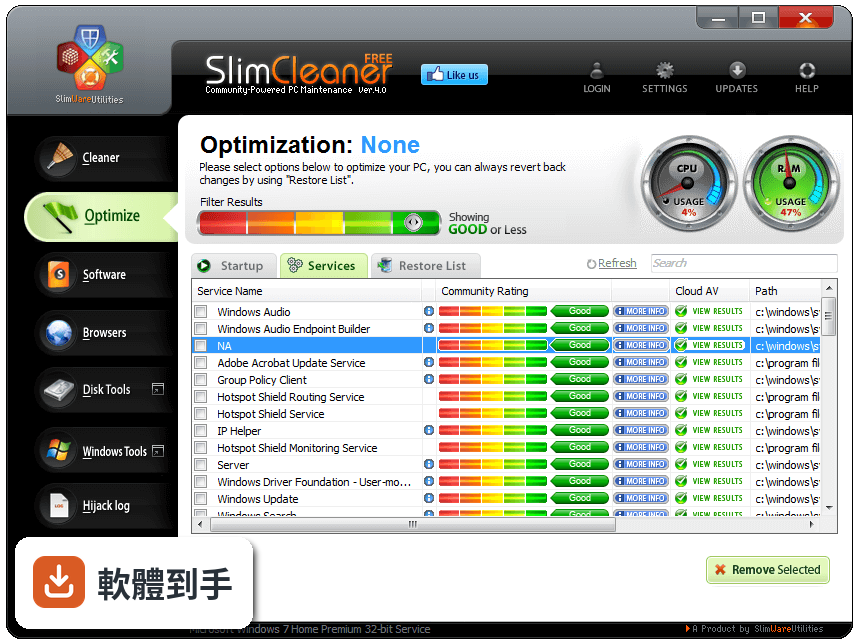
03開機速度變慢,它真的能改善嗎?
它可以調整開機時自動啟動的程式和服務,而且不是單純叫你關掉,而是參考雲端社群對每個程式的評價,告訴你哪些可以安全停用、哪些建議保留。如果你開機慢是因為太多不必要的程式在背景啟動,這功能確實有幫助。但如果是硬體太舊或系統本身已經損壞,它能做的就有限。
04它怎麼幫我決定要不要移除某個軟體?
它的移除工具會連到雲端,參考其他使用者對這個程式的評價和留言,再給你建議。這就像在移除前先問過一群有經驗的人「這東西到底值不值得留」。如果你電腦裡裝了一堆不知道幹嘛的軟體,它可以幫你判斷哪些是該丟的。
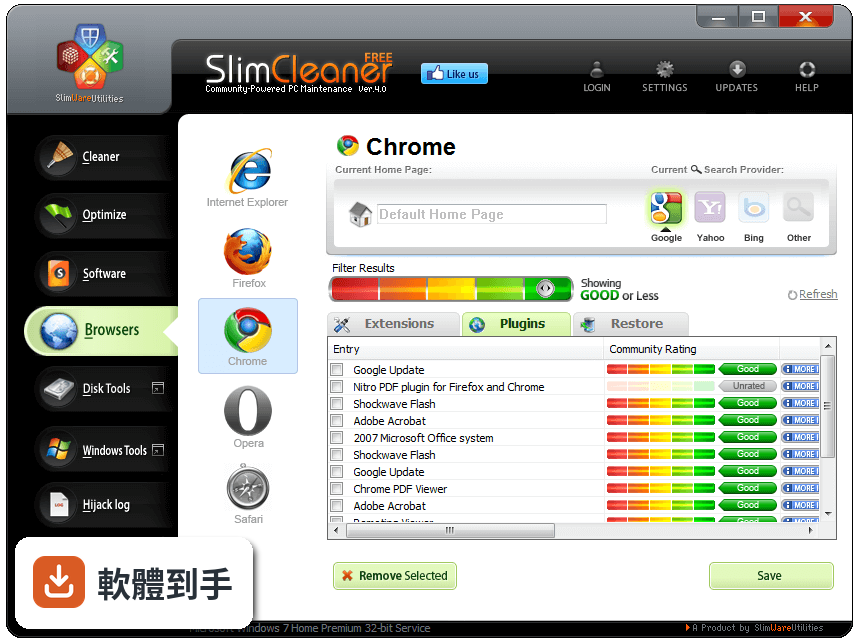
05軟體更新檢查是怎麼運作的?
它會掃描你電腦裡安裝的軟體,比對雲端資料庫,列出哪些有新版可用,然後直接從它的雲端下載更新檔。官方說支援數萬種常見軟體,而且下載的檔案會用多個防毒引擎掃描過。不過要注意,它只負責檢查和安裝,不保證每個軟體更新後都相容你的系統。
06這套軟體適合什麼樣的人用?
適合不想自己研究登錄檔、啟動項目、服務設定這些複雜東西的人。如果你只想按幾個按鈕,讓電腦乾淨一點、開機快一點,而且願意接受「社群建議」這種方式,那它算友善。它也適合電腦裝了很多來路不明軟體、想一次整理乾淨的人。
07它支援哪些Windows版本?
官方列出的支援系統是Windows XP、Vista、Windows 7和Windows 8。如果你還在用這些舊系統,它可以用;但如果你已經升級到Windows 10或Windows 11,官方沒有保證支援,可能需要自行測試,不建議直接裝在主力機上。
08這套軟體還有人在維護嗎?
從版本紀錄來看,它收錄的7個版本橫跨2012年到2018年,之後就沒有再更新。也就是說,這套軟體已經有好幾年沒有新版本了。如果你用的是舊版Windows,影響可能不大;但如果你期待它支援新系統或新軟體,它可能跟不上。
09為什麼它的評分人數這麼少?這樣的分數有參考價值嗎?
它的評分是7.24/10,但只有78個人評分。對比同類工具,有些有上百人評分,樣本數越多,分數越能反映真實狀況。78人的樣本不算大,分數只能當參考,不能當絕對依據。如果你很在意穩定性,可以多看看其他使用者的實際留言再決定。
10有沒有其他功能相近、更多人用的選擇?
資料中有列出幾個功能相近的軟體,例如WinPatrol(119人評分)、Junkware Removal Tool(28人評分)等。WinPatrol的評分人數比SlimCleaner Free多,但功能取向不太一樣,它比較偏防護而非清理。如果你想要的是純清理工具,可能需要再找找看其他主流選擇,這份資料沒有提供更詳細的比較。
下載與官方連結
SlimCleaner-setup.exe · 717.88 KB
版本紀錄
- 2018-12-12 SlimCleaner 4.1.0.0 1.14 MB
- 2014-07-11 SlimCleaner 4.0.30878.55015
- 2013-04-01 SlimCleaner 4.0.28412.44908 705.88 KB
再看 4 筆
- 2012-12-14 SlimCleaner 4.0.25845.499585 705.88 KB
- 2012-11-08 SlimCleaner 4.0.25002.3613 705.88 KB
- 2012-11-07 SlimCleaner 4.0.24141.51064 717.88 KB
- 2012-11-07 SlimCleaner 4.0.24980.17627 705.88 KB
這一版改了什麼
What's new in this version:
New Interface:
- Gives users greater control and a faster experience, thanks to numerous refinements in SlimCleaner’s interface. Enhancements are based on extensive studies of how users interact with the software.
Intelligent Defrag:
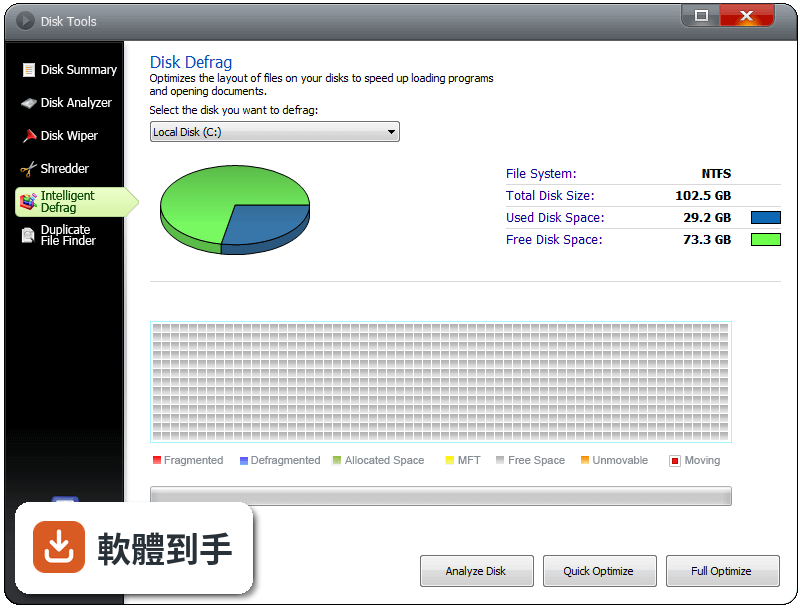
- Allows users to run a personalized defrag based on their specific PC hardware. SlimCleaner will identify a PC’s hardware configuration and allow users to start a defrag based on settings intelligently determined by SlimCleaner based on that individual PC.
Software Updater:
- Lets users check for updates to the software on their PC and install those updates directly from SlimCleaner. SlimCleaner checks and installs updates for tens of thousands of commonly used software programs. Software updates are downloaded from SlimWare Utilities’ cloud, and all updates are scanned for viruses using CloudScan technology, SlimWare Utilities’ proprietary system of scanning files with multiple antivirus engines.
Solid-State Drive Optimization:
- Allows users to optimize the layout of files on their solid-state drives to speed-up loading programs and opening documents. The intelligent defrag system works with solid state drives by organizing files into logically sequential sectors while minimizing wear on the drive.
- SSD Optimization means logically defragging the hard drive, so that to Windows, files are stored in logically sequential sectors. This process gets rid of the overhead Windows incurs when files are stored in non-logically-sequential sectors, and makes it easier and faster for the machine to load programs and open documents. Improvements in solid-state drive write cycles and endurance makes SSD optimization a good way to enhance solid state performance.
Duplicate Finder:
- Provides users with a quick, automated way to find and eliminate unnecessary duplicate files that can clutter and slow down a hard drive. The duplicate file finder wipes out extra or unneeded copies of files -- including text files, videos, music files, etc. -- that can take up space. The feature includes settings to allow for different levels of analysis.
- The duplicate finder feature includes the company’s new “IntelliMatch Scan” engine, which uses SlimWare Utilities' IntelliMatch technology to identify all duplicates. The engine works similar to a high-end anti-virus to read the various parameters of each file and accurately identify all duplicates across an unlimited amount of drives.