
這是歷史版本頁面 — 看 Smadav Antivirus 最新版本
隨身碟一直中毒?Smadav 這套輔助防毒到底在做什麼
 Smadav Antivirus 2017 Rev 11.7
資料更新 2017-11-17
閱讀約 5 分鐘
你剛從學校或公司的影印機把隨身碟拔下來,插回自己電腦,防毒軟體立刻跳出警告,說抓到一隻 Autorun 病毒。你心想:不是才剛掃過嗎?怎麼又來了。更煩的是,那支隨身碟裡還有你趕到半夜的報告,現在資料夾全部變成捷徑,真正的檔案好像被藏起來了。你當下只想把檔案救回來,順便讓這種事不要再發生。
一般人遇到這種狀況,第一個念頭是再裝一套防毒軟體來掃。但問題是,市面上多數防毒軟體彼此衝突,裝了第二套,系統反而變慢,甚至兩套互相打架,連開機都卡住。而且你原本那套主防毒其實已經有基本防護,你缺的不是「更強的主防毒」,而是專門處理隨身碟這種頻繁插拔、容易帶毒進來的管道。這類工具的做法是:不取代你原本的防毒,而是當第二層過濾,專門盯緊 USB 裝置,並把被病毒藏起來的檔案恢復原狀。
01Smadav 跟一般防毒軟體有什麼不一樣?
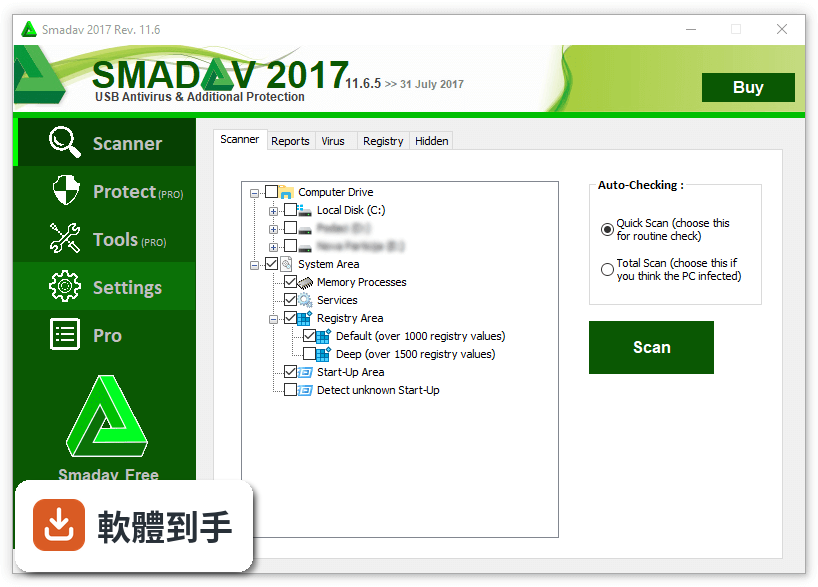
它定位是「輔助型」防毒,不是拿來取代你電腦上原本那套主防毒的。官方說明指出,它設計成可以和別的防毒軟體同時安裝、同時執行,用行為偵測、啟發式和白名單機制來補強防護。也就是說,你原本的防毒繼續負責主要防護,Smadav 在旁邊多盯一層,特別針對隨身碟和外部裝置。
02它對隨身碟的防護具體是怎麼運作的?
隨身碟一插進電腦,它就會自動掃描,而且官方強調,即使病毒不在資料庫裡,也能偵測到隨身碟上未知的新病毒。除了擋下病毒,它還能清理隨身碟,並把被病毒隱藏或感染的檔案恢復原狀。如果你常在校園、網咖、影印店這種公用電腦之間插隨身碟,這功能就是它的主要賣點。
03這套軟體會很佔系統資源嗎?
官方數據顯示,它大部分時間記憶體使用量低於 5 MB,CPU 使用率低於 1%。因為資源耗用極小,所以不會讓電腦變慢,也因為它本來就設計成跟其他防毒並存,不會像一般防毒軟體那樣互搶資源。不過這數字是官方提供的,實際狀況還是會因電腦環境而異。
04它有即時防護功能嗎?
有。它會持續監控系統的可疑活動,即時阻擋惡意軟體,防止感染發生。但要注意,這個即時防護是「輔助」性質,官方自己就說,如果你經常上網瀏覽或安裝新軟體,還是需要另一套提供完整防護的防毒軟體,Smadav 不提供總體防護。
05除了掃毒,它還有其他工具嗎?
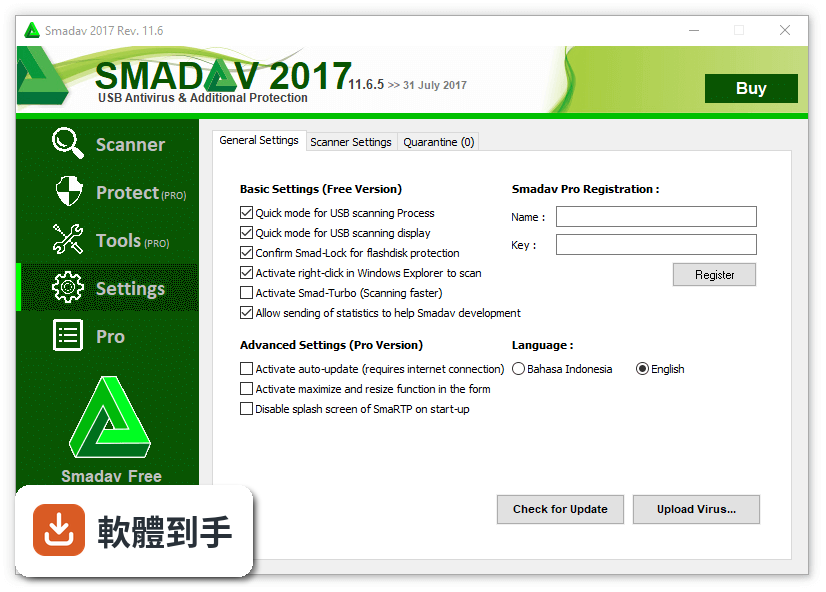
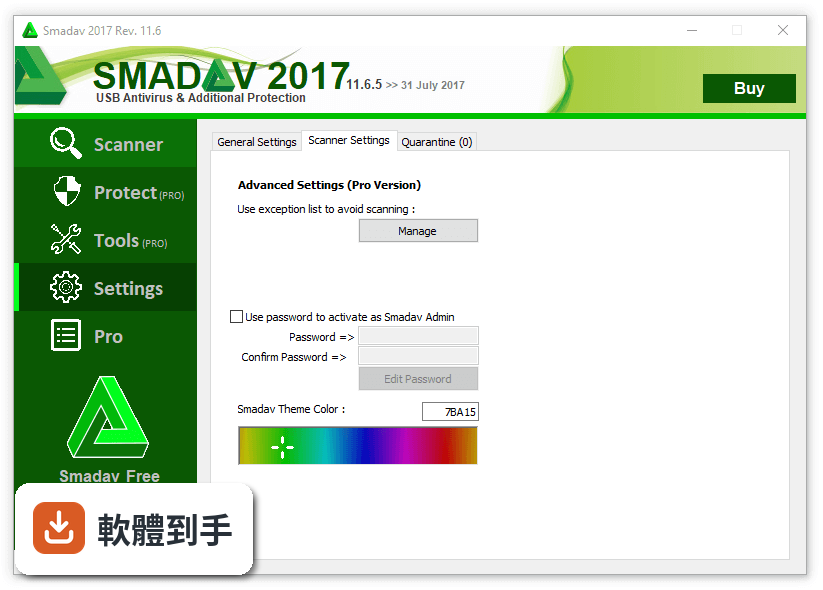
有。它可以清理已經感染電腦的病毒,並修復病毒造成的登錄檔變更。另外也提供系統優化工具,以及排除清單功能,讓你可以指定某些檔案、資料夾或程序不要被掃描,減少不必要的資源浪費,也能避免誤判。
06我電腦已經有防毒了,還需要裝它嗎?
如果你常常插隨身碟、外接硬碟,而且這些裝置會在公用電腦和自己的電腦之間輪流使用,那它就有它的價值。因為多數主防毒對隨身碟的掃描是「順便做」,而 Smadav 是「專門做」。但如果你只是在家上網、收信、看影片,隨身碟使用頻率很低,那加裝它的意義就不大。
07什麼樣的人適合用這套軟體?
適合隨身碟使用頻率高的人,例如學生交作業、業務跑客戶簡報、工程師帶程式碼回家、或常去影印店輸出的族群。另外,電腦效能較舊、跑不動大型防毒軟體的人,也可以考慮用它當輕量輔助,因為它資源耗用極小,不會讓老電腦更卡。
08它適合當作我唯一的防毒軟體嗎?
不適合。官方說明寫得很清楚,它主要功能是「額外保護」,尤其是隨身碟的總體防護,它本身不提供完整防護。如果你常瀏覽網路或安裝新軟體,官方建議還是要搭配其他提供總體防護的防毒產品。把它當唯一防線,風險會很高。
09它的介面是中文的嗎?
不是。介面語系是英文,對不習慣英文介面的人來說,操作上會多一層門檻。雖然防毒軟體的介面通常不複雜,但如果你完全看不懂英文,設定排除清單、調整掃描選項時可能會卡住。這點在安裝前要先想清楚。
10免費版跟付費版差在哪?
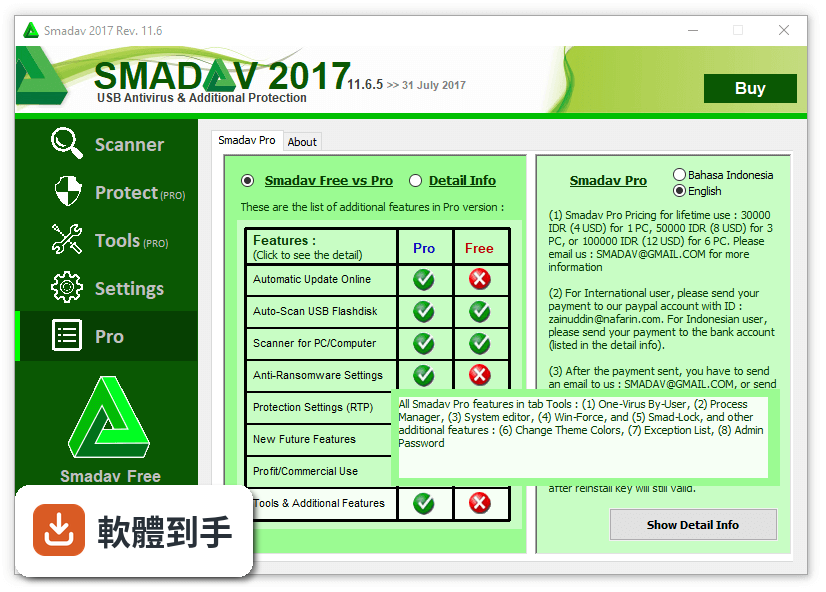
免費版每次啟動時會顯示升級到 Pro 版的廣告訊息。Pro 版則移除這個廣告,並多了工具區、額外保護設定、排除清單、主題顏色更換、管理員密碼,以及商業授權。也就是說,免費版能用核心的掃毒和 USB 防護,但一些進階設定和商用授權要付費才有。
11這套軟體還有在持續更新嗎?
根據收錄的版本紀錄,它近 12 個月更新了 2 次,近 24 個月也是 2 次,更新頻率不算高,但並非完全停擺。官方說明提到最新版本擴充了病毒資料庫,新增超過 66,000 個病毒特徵碼,並改善 AI 偵測以降低誤判。如果你在意更新頻率,這點可以納入考量。
12它跟其他免費防毒比起來,評價如何?
在收錄的評分中,它有 3,227 人評分,平均 8/10,樣本數明顯比同類軟體多。相比之下,Comodo Cloud Antivirus 只有 78 人評分,Kaspersky Virus Removal Tool 233 人,ClamWin 113 人。評分人數多代表使用者的回饋基礎較廣,但這不表示它一定適合你,還是要看你的使用情境。
下載與官方連結
smadav2017rev4.exe · 連結指向軟體原廠
版本紀錄
- 2026-10-25 Smadav Antivirus 2026 Rev 16.0 6.7 MB
- 2026-08-19 Smadav Antivirus 2026 Rev 15.9 6.6 MB
- 2026-02-21 Smadav Antivirus 2026 Rev 15.7 6.2 MB
再看 5 筆
- 2023-05-08 Smadav Antivirus 2022 Rev 15.0
- 2022-11-15 Smadav Antivirus 2022 Rev 14.9
- 2021-01-17 Smadav Antivirus 2021 Rev 14.6
- 2020-12-29 Smadav Antivirus 2020 Rev 14.5
- 2020-12-02 Smadav Antivirus 2020 Rev 14.4 5.8 MB
這一版改了什麼
What's new in this version:
Smadav Antivirus 2017 Rev 11.7
- The main detection technology now uses heuristic & whitelist (application reputation)
- Improved method of protection (anti-exe) on USB Flash disk
- Improved detection capabilities and cleaning of Ground / Paint viruses
- Improved method of sending statistical data for SmadAV development
Smadav Antivirus 2017 Rev 11.6
- Addition of 3064 virus database
- Increase the ability of detection and cleaning of viruses that are currently active in the computer
- Repair failed install on Windows XP / Vista and crash DEP on Windows Server
- Automatic quarantine feature addition and quarantine date
- Changes in terms of features SmadAV Free and Pro
Smadav Antivirus 2017 Rev 11.5
- Addition of 353 virus database
- Improved detection capabilities and cleaning of virus shortcuts (Bundpil)
- Delivery statistics on the user's computer for the development of SmadAV database
- Improved auto-update feature, installer and uninstaller SmadAV
- Repair program errors (bugs) and error detection
Smadav Antivirus 2017 Rev 11.4
- Addition of 404 virus database
- Improved Anti-Ransomware capability for Ransomware prevention (WannaCry 1 and Wanna-Cry 2.0)
- SmadAV 11.4 protection becomes lighter
- Repair program errors (bugs) and error detection
Smadav Antivirus 2017 Rev 11.3.5
- Repair program errors (bugs) and fault detection
Smadav 2017 Rev 11.3
- Penambahan database 1038 virus
- Peningkatan kecepatan scanning harddisk/USB Flashdisk
- Penambahan fitur pengaturan Anti-Ransomware untuk mencegah terinfeksi virus penyandera data
- Perbaikan pada tampilan dan bahasa Smadav 2017
Smadav 2017 Rev 11.2
- Completion and repair features SmadAV 2017
Smadav 2017 Rev 11.1
- Design new look SmadAV 2017
- Addition of a new virus database 1040
- Addition fast mode for automatic scans faster USB stick
- Addition protection technology to prevent Ransomware
- Completion and repair features other SmadAV
Smadav 2016 Rev 11.0.4
- Adding new 220 virus database
- Adding new feature (USB Anti-Exe) to block unknown programs in USB Flashdisk
- Improvement in protection to prevent Ransomware (especially Cerber 3 and Cerber 4)
- (Rev. 11.0.4) Faster startup and fixed explorer bug
- other enhancements
Smadav 2016 Rev 10
- Anti-Ransomware for preventing from Ransomware that encrypt files (Cerber, Locky, Teslacrypt, etc.)
- Adding new Total Scan feature to clean unknown virus
- Adding new feature to automatically unhide files in USB Flashdisk
- Improvement for USB and Web Protection
- Support for Windows 10 (Smadav can be used in Windows XP/Vista/7/8/10)
- many other enhancements