
這是歷史版本頁面 — 看 Snagit 最新版本
截圖後還要開別的軟體編輯?Snagit 能省下哪些事
 Snagit 18.0.2
資料更新 2017-12-19
閱讀約 6 分鐘
你正在跟同事或客戶說明一個操作流程,先按 PrintScreen 抓下畫面,貼到小畫家裁切,再開另一個軟體加箭頭、框重點,最後存檔寄出。光是做一張圖就切換了三個視窗,對方回信說看不懂,你又得重截一次。或者你想錄一段操作步驟給對方看,系統內建的錄影工具只能錄整個畫面,不能只錄某個視窗,錄完還要找地方上傳,網址又臭又長。
系統內建的截圖工具只能「抓畫面」,不能「把畫面變成說明」。你需要的其實是:抓圖、標註、錄影、分享,這幾件事能在同一個地方連續完成,不要一直切換軟體。這類工具把截圖、錄影、編輯、分享整合成一條流程,讓你從按下快捷鍵到把成果丟給對方,中間不用離開同一個視窗。以下用 Snagit 為例,回答幾個實際使用上會遇到的問題。
01Snagit 到底能幹嘛?
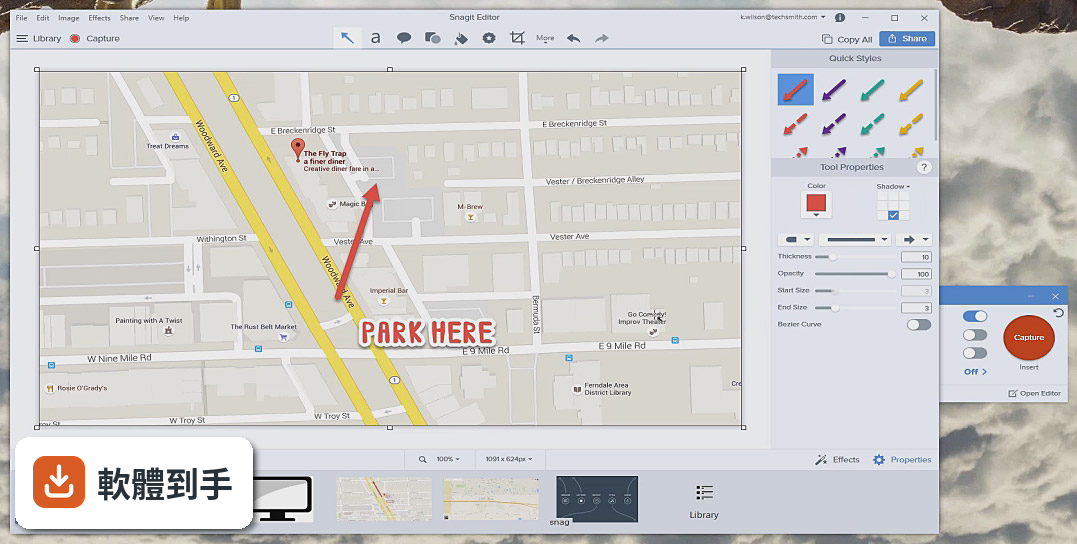
它是一套螢幕截圖與錄影工具,可以抓整個桌面、單一視窗、指定區域,也能捲動抓取整個網頁。抓下來的圖片可以直接進編輯器加文字框、箭頭、形狀、編號步驟,也可以錄製短影片,錄完馬上產生分享連結。官方說明強調它把截圖、錄影、編輯整合在一起,不用另外開其他軟體。
02它跟系統內建的截圖工具差在哪?
系統內建工具只能抓靜態畫面,抓完只能存檔,不能編輯。Snagit 抓完圖會直接進編輯器,你可以加文字、箭頭、高亮、編號,也能把多張截圖組合成一張長圖。另外它支援捲動截圖,可以抓整個網頁或長文件,這點內建工具做不到。錄影功能也是內建工具沒有的。
03錄影功能可以做到什麼程度?
可以錄製螢幕上的操作過程,包含滑鼠游標和你的聲音。官方說明提到,錄完的影片可以馬上產生分享連結,不用等上傳。它也能把一系列截圖加上旁白和繪圖,轉成教學影片或 GIF。不過要注意,官方資料沒有提到剪輯功能,如果你需要剪掉中間的錯誤片段,可能要另外用別的軟體。
04截圖之後能直接編輯嗎?
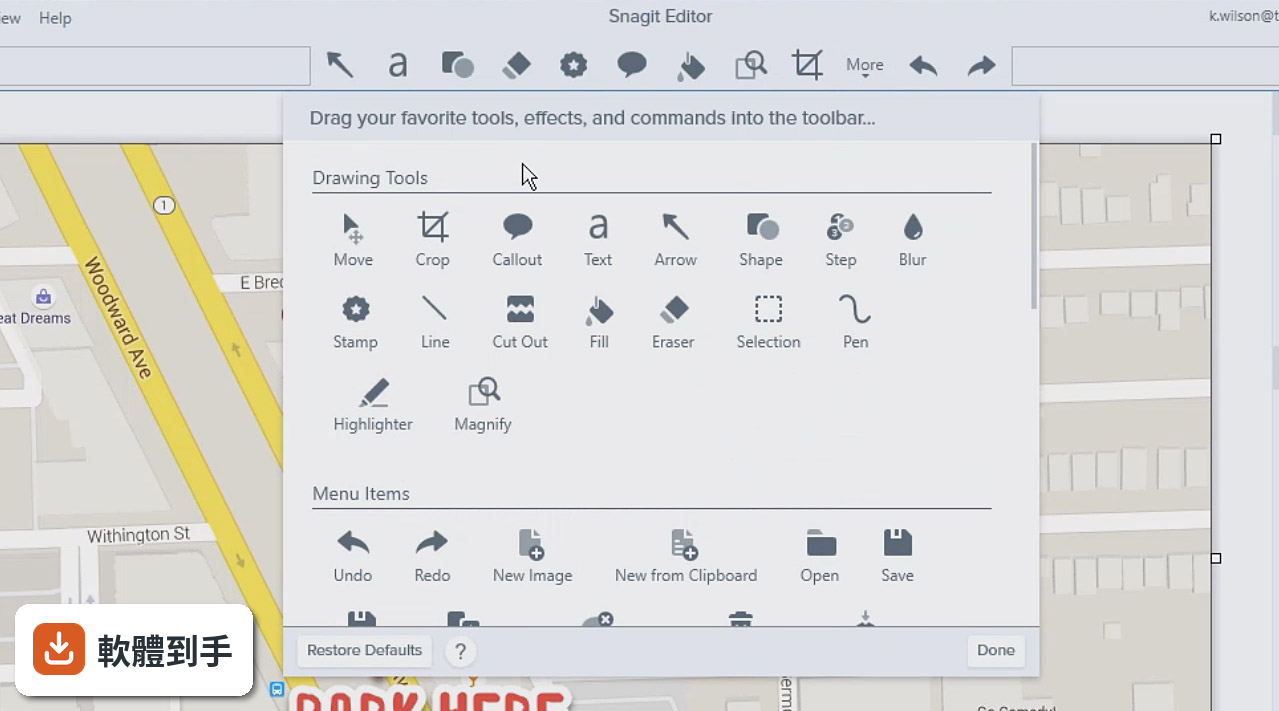
可以。這是它的主要賣點之一。抓下來的圖會自動載入編輯器,你可以加文字框、箭頭、形狀、高亮標記,也有「簡化工具」可以把截圖轉成簡化圖形。還有一個「步驟工具」,可以自動加上遞增的數字或字母,適合做操作步驟說明。工具列可以自訂,常用的工具可以固定在前方。
05可以抓取網頁長圖嗎?
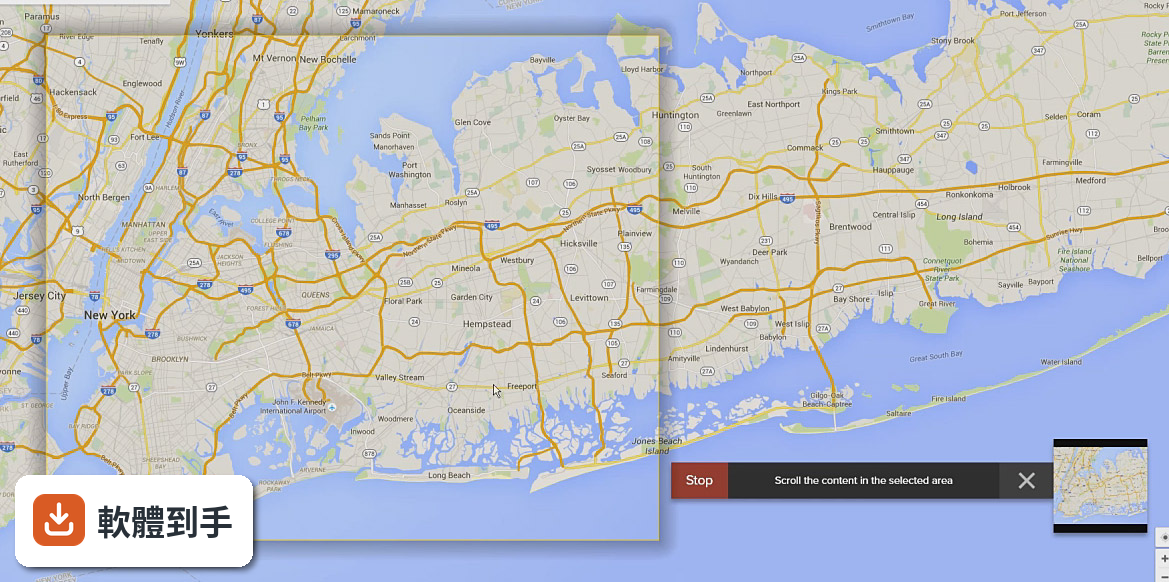
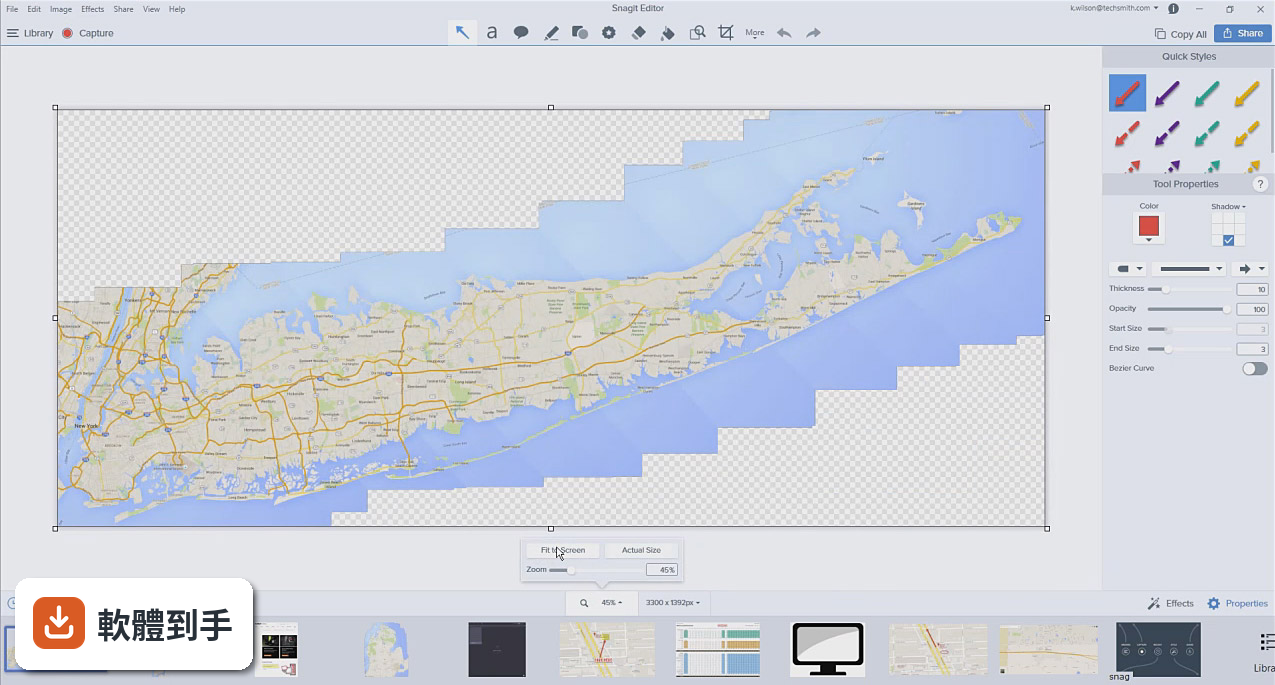
可以。官方功能說明中有「全景擷取」,可以抓取寬幅的水平捲動畫面、捲動網頁,以及介於兩者之間的內容。也就是說,一個長網頁不用分段截圖,它可以一次抓完整頁。這對做網頁設計、整理線上文章、留存網頁資料的人來說很實用。
06做教學文件或操作手冊的人適合嗎?
適合。官方說明中明確提到,可以用內建範本建立視覺化文件、教學手冊和訓練教材。做法是:截圖或錄影 → 加上文字說明 → 用範本排版 → 輸出成文件。它也有「從圖片建立影片」的功能,可以把一系列截圖加上旁白和繪圖,快速變成教學影片。這對常做 SOP 文件或教育訓練的人來說,流程是完整的。
07一般上班族拿來做工作回饋好用嗎?
如果你常需要對網頁、PDF、影片給意見,它比用文字描述快。官方說明舉例:與其用紅筆寫一堆註解,不如直接錄一段影片,邊講邊操作。錄完產生分享連結,對方點開就能看。這對遠端協作、跨部門溝通、跟客戶確認修改方向,都比來回寄信有效率。
08免費的截圖工具那麼多,為什麼要花錢買這個?
免費工具如 ShareX、LightShot 可以滿足基本截圖和簡單編輯,但 Snagit 的差異在於整合度:截圖、錄影、編輯、分享在同一條流程裡完成,不用切換軟體。官方資料顯示它沒有免費版,只有 15 天試用。如果你只是偶爾截個圖,免費工具就夠了;如果你每天都要做圖文說明或錄影教學,省下來的時間可能值得。
09我的電腦比較舊,跑得動嗎?
官方系統需求寫得很清楚:需要 Windows 10(1903 以上)或 Windows 11,4 GB 記憶體,1.6 GB 硬碟空間,處理器建議 Intel i3 以上;如果要錄影,建議 Intel i5 第六代以上。另外需要 .NET 4.7.2 和 WebView2 Runtime。如果你的電腦是 Windows 7 或 8,官方支援清單沒有列入,可能無法安裝。
10它只有英文介面,對中文使用者友善嗎?
官方資料顯示介面語系只有 English,沒有繁體中文。如果你不習慣英文介面,操作上會需要一些時間適應。不過截圖工具的操作邏輯相對直覺,常用功能就那幾個,英文介面的門檻不算太高。如果你完全無法接受英文介面,可以考慮其他有中文介面的截圖工具。
11如果只是偶爾截個圖,需要買這套嗎?
不需要。官方說明自己都提到,系統內建工具和免費工具(如 Greenshot、LightShot)就能滿足基本截圖需求。Snagit 的價值在於大量、頻繁的截圖與錄影工作,以及需要進階編輯功能的人。如果你一個月只截幾張圖,用內建工具或免費軟體就好,不需要付費買這套。
12它跟其他付費截圖軟體比起來,有什麼要注意的?
官方資料列出的替代方案包括 Greenshot、ShareX、Lightshot、PicPick、FastStone Capture,這些都是免費或較低價的選擇。Snagit 的優勢是整合度高、編輯功能完整,但它的錄影編輯功能有限,官方說明沒有提到剪輯能力。另外,它的評分人數只有 60 人,樣本數不多,參考價值有限。建議先下載 15 天試用版,實際跑過你的工作流程再決定。
下載與官方連結
snagit.exe · 連結指向軟體原廠
版本紀錄
- 2026-07-23 Snagit 2026.3.1 (64-bit)
- 2018-09-25 Snagit 2018.2.2 187 MB
- 2018-06-28 Snagit 2018.2.1 187 MB
再看 4 筆
- 2018-06-19 Snagit 2018.2.0 187 MB
- 2018-03-27 Snagit 18.1.1 209 MB
- 2018-02-06 Snagit 18.1.0 209 MB
- 2017-12-19 Snagit 18.0.2
這一版改了什麼
What's new in this version:
Snagit 18.0.2
- Fixed an issue where Snagit sometimes prevents Enterprise machines from creating User Profiles
- Added option to disable automatic crash dump generation for Enterprise users
- Updated all unlock buttons on trial countdown screens to say "Enter Software Key"
- Changed button text on initial screen to "Sign In to Start Trial" and "Enter Software Key"
- Fixed a crash on launch when Windows Media Feature Pack is not installed on Windows Server 2012 R2 or Windows N
- Fixed a crash in Snagit Editor when in-app messages are updated
- Fixed a crash on Windows 7 when processing video captures
- Updated Grab Text results window to support exiting via Esc key
- Fixed an issue that could cause Snagit to be slow and unresponsive at startup
Snagit 18.0.1
- Fixed issue where sometimes arrows had no arrowheads and would create a new Quick Style
- Fixed floating text properties so now they show font name consistently
- Fixed crash when canceling a video initialization
- Changes to German UI layout
- Fixed Copy All so it works when Cutout effect is selected
- Fixed photo quality auto-fill so it no longer ignores transparency
- Fixed crash that could prevent the Snagit Editor from launching
- Fixed crash that could occur when trying to sign into Snagit
- Fixed issue that could cause Snagit to prevent Windows from shutting down
- Fixed memory leak in the TechSmith updater
Snagit 18.0.0
- Change log not available for this version
Snagit 13.1.4
- Change log not available for this version
Snagit 13.1.3
- Updates to address potential security issues
- Fixed a bug that could cause the capture window to become unresponsive if the trial had expired
Snagit 13.1.2
- Logging into Snagit and the outputs for Google Drive, YouTube, Screencast, and Relay will now send you to your default browser instead of a sheet in Snagit
- Improved the Photo Quality Auto-Fill beta feature
- Can again deploy with custom presets and preferences
- With Always Shrink to Fit on, resizing Editor will adjust the zoom level. That setting will also be remembered between launches
- Fixed an issue that would result in an error when trying to record the screen on some Windows 7 machines
- Fixed an issue that would cause recording to stop after 10 minutes when controls were minimized
- Fixed an issue causing the login screen for Evernote to be blank
- Fixed a crash on startup that was related to tool themes
- Fixed an issue that would cause some settings to reset after rebooting
- Deleting the Snagit folder in My Documents will no longer prevent deleting auto-saved captures
- Can now update your translated files by re-importing a translated XLIFF file
- Fixed a crash for some users when exporting for translation
- Made the Snagit Updater more reliable
- Other bug fixes and performance improvements
Snagit 13.1.1 Build 7662
- Fixed an issue with QuickEffects not visible after updating
- Fixed an issue with Editor opening even if preview was turned off
- Improved Screencast.com upload speeds
- Fixed an issue with some full-screen capture situations
- Fixed an issue causing "OLE Initialization failed" errors in German locale versions
- Fixed issues with signing-in after updating
- Fixed a memory leak causing slow capture time
- Fixed a crash after the first All-in-one video recording
- Fixed a crash with default audio devices when deploying with AppV
- Fixed an issue with captures after completing a Fixed Window capture
- Fixed an issue causing crashes with magic wand selection
- Added a hotkey for Copy All
- Fixed an issue causing selection tool to freeze
- Fixed an issue causing Zoom and Resize windows not to close
- Fixed an issue preventing deployment of Editor Tool Themes when using a custom reg file
- Fixed an issue causing an error when switching webcam during recording
- Fixed an issue causing the Getting Started checklist not to update
- Fixed a crash when sharing to Google Drive
- Fixed an issue causing self-repair to be triggered in enterprise deployments
- Various other bug fixes and performance improvements
Snagit 13.1.0 Build 7494
- Panoramic capture now in the All-in-one workflow
- Performance enhancements
Shared Styles / Themes:
- Switch between sets of quick styles and colors in the color picker
- Define multiple sets of quick styles per tool and share those sets with other users within an organization
Background Auto-Fill:
- Updated selection tool to automatically fill the backgrounds after moving or deleting content from your captures
- Allows you to easily change around or remove objects from screenshots without having to recapture
Magic Wand:
- Select a point and adjust the tolerance to select like colors
- Works with Background Auto-fill
Translation Workflow:
- Extract text from callouts and text markup within Snagit and get the text translated by exchanging an XLIFF file
Capture Info:
- Take any capture and automatically add on the application name, version number, when it was captured and on what OS
Bug fixes:
- Supporting the latest changes Microsoft has been making to Windows 10
- Better selection areas with the capture crosshairs
- Touch improvements for multi-touch devices like Surfaces
Snagit 13.0.3 Build 7011
- Installation process improvements, including instances where .NET needs to be updated
- Improved detection of app windows, including Microsoft Office 2016 products
- Fixed crash that occurred when files open in the Editor were deleted from the hard drive
- Fixed crash that resulted when importing and using Arabic fonts Fixed issue where outputs were not installing if Snagit was running
- Fixed instance where Editor wasn't presenting after a capture
- Added graphic to OneClick toggle in Capture Preferences
- Improved process of manual Snagit key entry
- Various other bug fixes and performance improvements
Snagit 13.0.2
- Added a way for Snagit to take precedence of Print Screen and other hotkey
- Added labels to the Editor toolbar icons
- Added functionality to remember the last tool used when working with multiple captures
- Added ability to set a hotkey to stop video capture
- Fixed a crash from a conflict with third-party audio programs
- Fixed a crash when pressing the ESC key to exit the All-in-One and video recording toolbars
- Fixed a crash when right-clicking while editing callouts
- Fixed an issue where the highlighter tool was obscuring content
- Fixed an issue where Save As… preferences were not retained
- Fixed an issue where Presets were not sharing to selected printers
- Various other bug fixes and performance improvements
Snagit 13.0.1
- Added a link to TSC Privacy Policy to About Snagit area (located in Help file menu)
- Added ability to Share images, videos and GIFs to Twitter
- Fixed a crash when Snagit opens on systems with Jaksta installed
- Fixed a crash when a Video Selection capture area extends across multiple monitors
- Fixed a crash when Snagit opens on Windows 7 N edition
- Fixed an issue with Snagit not remembering last capture settings after shutdown
- Fixed an issue during installation that resulted in Snagit being set as the default printer
- Fixed an issue where exporting GIFs to Google Drive and Program outputs resulted in file being saved with incorrect extension (MP4)
- Fixed an issue with All-in-One capture preview not showing context menus (e.g. right click menus)
- Fixed an issue where trial users were not being routed to the correct sign-in window
- Fixed an issue where mouse could stick on capture HUD when using webcam
- Fixed an issue where an external webcam's mic could not be utilized
- Fixed an issue where AutoSave dialogue presented twice for unsaved files when closing Editor
- Fixed an issue with Quick Styles where scrolling became stuck at the bottom of the window
- Fixed an issue with access to Snagit when conditions arise that block access to signin.techsmith.com
- Various other bug fixes and performance improvements
Snagit 13.0.0
New design for capture:
- Updated ability to start a capture from within the editor
- New on-the-fly capture interface
Panoramic capture:
- Capture tall, wide or infinitely scrolling content using this innovative scrolling capture method
- New, streamlined capture preset creation and use
- Effects side panel with property drop downs
- Quick Styles are customizable – add, delete, reorder
Tools:
- New crop tool
- New text tool
- Color picker
- Auto-resizing canvas
- New magnify tool
Library/Tray:
- Removed Flags
- Make tray collapsible
General/Share:
- Launch a capture from within Editor
- Light and dark theme editor and capture window
- New Share History
- Ability to add share destinations to the toolbar
- Improve performance when dealing with images with 10 or more items on the canvas
- Eliminate crashes with large images - improved performance
- Multi-edit images can be edited with acceptable performance
- Outlined text
- New callout shapes
- New and updated stamps
Webcam:
- Ability to record webcam video while preserving Snagit’s real-time encoding
- Toggle between webcam and screen video during recording
- All built-in webcams and standard USB webcams will be supported
Animated GIF:
- Create a GIF from a video recording
- Presets and custom GIF settings available
- Option to "Fade to Black" on GIF start and end
- Option to "Dither" GIF colors
- Make GIF from a selection of a video
- Saving and sharing via outputs to any destination that supports animated GIF.
- Ability to capture fullscreen video at dimensions greater than 1080p
- Supports image capture on 5K monitors
- Higher frame rates for video capture
- Easier video editing
- Adjust DPE of capture before capturing