
這是歷史版本頁面 — 看 UltraISO 最新版本
ISO映像檔想改內容或做開機碟,UltraISO能做什麼
 UltraISO 11.2.0.102
資料更新 2022-07-01
閱讀約 6 分鐘
你手上有個ISO檔,可能是從網路下載的系統安裝碟,也可能是自己備份的光碟映像。你想把裡面某個檔案換掉、加入自己的驅動程式,或者把它做成一支可以開機的USB隨身碟,但偏偏不知道從哪裡下手。用系統內建的工具只能掛載或燒錄,想動裡面的內容根本沒辦法。
市面上免費的壓縮軟體雖然能解開ISO,但解出來之後要重新打包成可開機的ISO,步驟繁瑣又容易失敗。這類光碟映像工具就是專門處理這個問題的:直接開啟映像檔、增刪檔案、轉換格式、製作可開機碟,把原本需要多套軟體輪流處理的工作集中在一個介面裡完成。
01UltraISO到底能拿來做什麼?
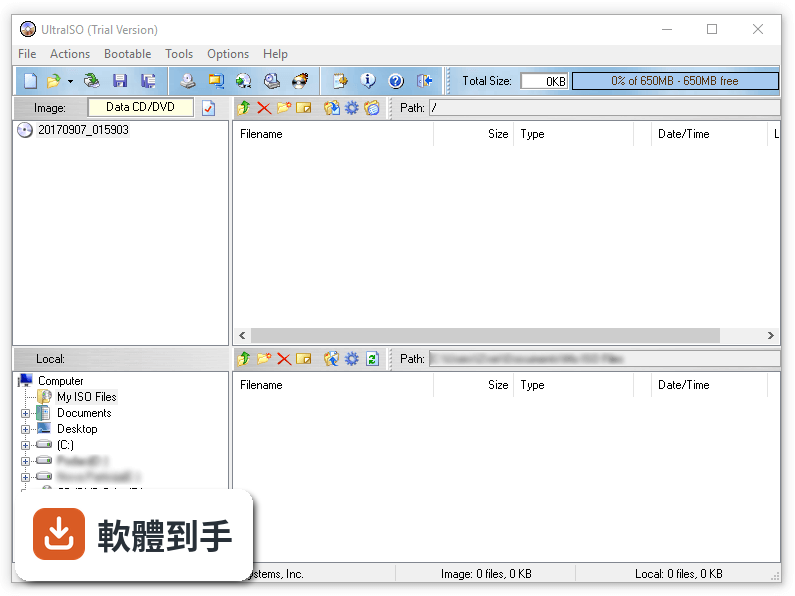
它能直接開啟ISO、BIN、CUE、NRG、MDF等常見光碟映像檔,看到裡面的完整檔案結構。你可以從映像檔中抽出單一檔案或整個資料夾,也可以把硬碟裡的檔案拖進去新增或刪除,改完再存檔。另外它也能把實體光碟或硬碟資料製作成ISO檔,並保留可開機資訊。
02想把下載的Windows ISO做成開機USB,這套軟體辦得到嗎?
可以。官方說明明確提到它能製作可開機的USB隨身碟,支援多種開機映像格式。做法是開啟ISO檔後,從工具選單選擇寫入硬碟映像,指定隨身碟代號後執行。要注意寫入會清空隨身碟上的所有資料,操作前記得先備份。
03它跟Windows內建的掛載功能有什麼不同?
Windows 8以後的系統可以直接雙擊ISO檔掛載成虛擬光碟機,但只能讀取不能修改內容。UltraISO除了掛載,還能編輯映像檔內的檔案、轉換格式、製作開機碟。如果你只是偶爾想看ISO裡有什麼,內建功能就夠了;需要動手改內容才需要這類工具。
04映像檔格式好多種,它都能處理嗎?
官方列出的支援格式包含ISO、BIN、CUE、NRG、MDF、IMG等,並宣稱幾乎能處理所有現存的映像檔類型。它可以把這些格式轉換成標準的ISO檔,方便其他軟體使用。不過實際相容性會因檔案來源而異,冷門格式建議先開一個測試檔確認。
05可以把多個資料夾打包成一個ISO檔嗎?
可以。建立新映像檔後,直接把檔案和資料夾拖進中央區域,排列好目錄結構,另存成ISO就行。它也能最佳化ISO的檔案結構來節省空間。如果你要打包的內容超過4GB,記得在存檔時選擇UDF格式,否則舊的ISO格式會有單一檔案大小限制。
06這套軟體適合什麼樣的人用?
適合需要經常製作或修改系統安裝碟的人,例如把驅動程式整合進Windows安裝ISO、製作Linux開機隨身碟、備份自己的音樂CD或資料光碟。也適合手上累積了大量不同格式映像檔、想統一轉成ISO管理的人。如果你只是偶爾掛載一次ISO,用免費的WinCDEmu或系統內建功能就夠了。
07它支援Windows 11嗎?
官方問答中明確表示這套軟體完全相容Windows 11和Windows 10,也支援更早的Windows版本。不過官方列出的系統需求只寫到Windows 11,實際在新系統上運作是否完全正常,建議安裝試用版先確認。介面是英文的,不習慣英文操作介面的使用者要考慮這點。
08這套軟體還在持續更新嗎?
根據收錄的版本紀錄,最近一次更新是2023年7月,之後就沒有新版本釋出。開發商似乎已經停止積極維護,這代表新出現的映像檔格式或作業系統相容性問題可能不會被修復。如果你依賴它處理最新的映像檔格式,這點需要列入考量。
09試用版跟付費版差在哪裡?
官方說明指出試用版功能有限,但沒有具體列出限制哪些功能。付費版分三種授權:單人授權29.95美元、家庭授權49.95美元可用5台電腦、網站授權99.95美元不限台數。如果你只是偶爾用一次,試用版可能夠用;要長期依賴就必須買授權。
10網路上有更便宜的替代方案嗎?
功能相近的軟體中,PowerISO有481人評分,比UltraISO的160人多出不少,可以參考其他使用者的經驗。免費的WinCDEmu雖然只有43人評分,但主打輕量掛載,如果不需要編輯功能可以考慮。InfraRecorder和ISO Workshop也有基本的光碟映像處理能力,但評分人數都不多。
11這套軟體跟PowerISO比起來如何?
兩者功能高度重疊,都支援ISO編輯、轉換、製作開機碟和虛擬光碟機。PowerISO的評分人數是481人,遠多於UltraISO的160人,樣本數較大。UltraISO的介面是英文的,PowerISO同樣也是英文介面。建議兩套都裝試用版實際操作看看,選擇介面順手的那套。
12什麼情況下不該選這套軟體?
如果你只需要掛載ISO,用免費的WinCDEmu或Windows內建功能就好,不需要付費。如果你需要頻繁處理冷門映像格式,這套軟體兩年沒更新,新格式支援可能跟不上。另外它只有英文介面,對英文不熟悉的人操作門檻較高。最後,如果你在意軟體維護狀況,可以考慮評分人數較多的PowerISO。
下載與官方連結
keyshot_win64_11.2.0.102.exe · 連結指向軟體原廠
版本紀錄
- 2023-07-08 KeyShot 12.1.0.103
- 2023-07-08 UltraISO PE 9.7.6.3860
- 2023-04-11 KeyShot 12.0.0.186
再看 5 筆
- 2022-12-06 KeyShot 11.3.1.1
- 2022-10-26 KeyShot 11.3.0.135
- 2022-07-01 KeyShot 11.2.0.102
- 2021-08-09 UltraISO PE 9.7.6.3829
- 2021-05-09 UltraISO PE 9.7.6.3812
這一版改了什麼
What's new in this version:
New Features:
- Added a scene name text field in the upload dialog for the KeyShot Web Viewer
- Added ability to render CMF documents using scripting
- Detect headless and GUI-only features used in Python scripts
- Added checkbox “Enable experimental features” to Preferences
- Improved quality when changing 3D paint texture resolution
- New Pantone 2022 colors
- MacOS app to optionally run KeyShot as arm64 arch
Improved:
- Improved performance when dragging and dropping materials onto objects in the realtime view
- Added support for retaining Normals after Mesh Simplification
- CATIA V5 3D Read: V5-6R2022 (R32); Parasolid 3D Read: V34.1; UG NX 3D Read: NX 2007, NX 2008, NX 2011, NX 201
- Added support for importing Maya 2023 files
- Upgraded to using Qt 6.2.4
- Improved JWT error
- Added a button to the Upload Dialog that links to your Cloud Page, and one that refreshes the display of your remaining Cloud Storage
- Added support for retaining UVs after Mesh Simplification
- Optimization: manipulation of keyframe animations is now faster and will not block the rendering in the real-time view
- Instead of having to package first, and then upload, the Upload Dialog now just requires a single Upload step
- Fixed an issue where bumps were not imported correctly when importing gltf/glb files
- Added support for embedded binary data in gltf files
- Localize Scene Contents will now ask for folder to use for resources
Fixed:
- Fixed a crash when creating new model sets in the Configurator
- Fixed an issue where light gizmos would not update when switching the material type
- Fixed an issue where KeyShot would crash when rendering a queue on MacOS
- Fixed an issue that caused GPU Geometry Setup to take longer than expected
- Fixed an issue where importing many materials at once would result in an invalid format error
- Added Textures folder in Preferences for FBX files importer
- Added folder for embedded textures when importing FBX files
- Fixed a crash when attempting to use Mesh Simplification on non-triangle mesh parts
- Fixed an issue where using the Re-tessellate tool would break .pvz models
- Fixed issue where thumbnails in the queue were not displayed correctly
- Clear coat AxF materials should now look more correct
- Users can cancel the process of closing holes in the Close Mesh tool
- Fixed a case where AxF textures would appear too dark
- Fixed an issue where the move tool could be drawn behind objects in the the scene
- Fixed an issue where the Geometry View would pan backwards while holding scroll wheel down
- Fixed a bug when subsequently sending a SolidWorks motion study into an existing scene
- lmborrow is now included again
- Fixed GPU issue for advanced materials with fresnel disabled
- Fixed GPU issue for direct lighting for rough materials using bump
- Fixed the issue where GPU crashes when using GPU mode while using measured materials
- Fixed the issue where the GPU mode is disabled after adding geometry to a scene with geometries included
- Fixed switching the rendering technique from interior mode to product mode, after importing a geometry for scenes with geometries
- Fixed an issue where the Reflection Render Passes in GPU mode give black output
- Fixed the issue where the Bump thumbnail wasn’t showing the uploaded texture map