
Windows 檔案總管不夠用?Unreal Commander 雙面板管理
 Unreal Commander 4.21 Build 1659
資料更新 2026-02-17
閱讀約 7 分鐘
你手上有一堆檔案要整理,從一個資料夾搬到另一個,開了三四個視窗切來切去,複製到一半還常常不知道檔案到底跑到哪裡。尤其是處理大量照片、文件或壓縮檔的時候,內建的檔案總管一次只能看一個資料夾,比對兩邊內容、批次改名、同步目錄這些事,做起來特別綁手綁腳。你只是想找個工具,讓這些日常的檔案操作順一點,不要每次都要繞遠路。
一般人遇到這種狀況,第一個念頭是「多開幾個視窗就好」,但視窗一多,桌面就亂,反而更難找。也有人會去裝號稱「加強版檔案總管」的工具,結果介面複雜到要重新學一套操作邏輯。這類工具的切入點其實很單純:用雙面板同時顯示兩個目錄,讓複製、移動、比對都在同一個畫面完成,再加上內建的壓縮、FTP、批次改名這些功能,把原本要分開處理的步驟收攏在一起。你要的只是「少開幾個視窗、少點幾下滑鼠」,而不是一個要花時間研究的龐大系統。
01Unreal Commander 這套軟體到底能拿來做什麼?
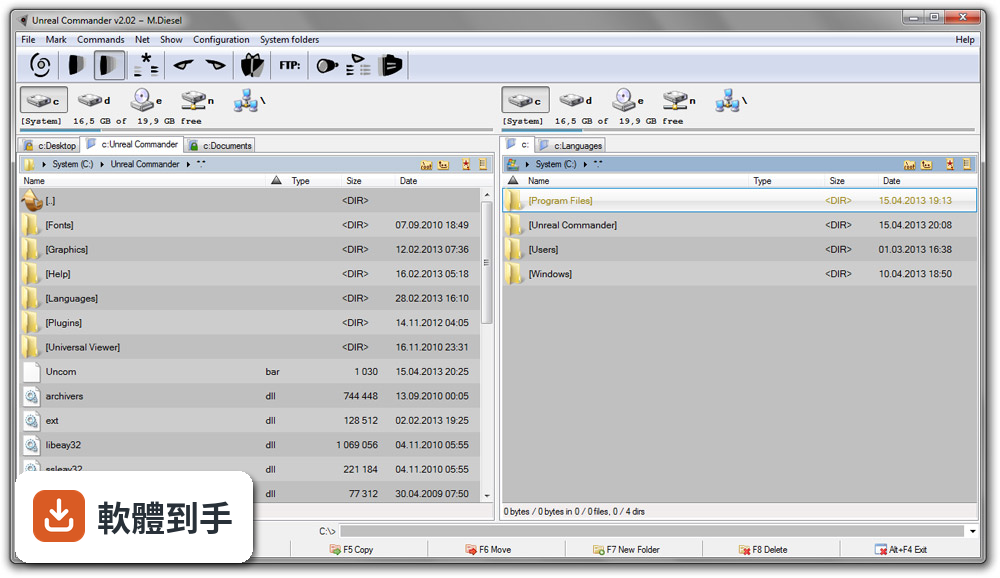
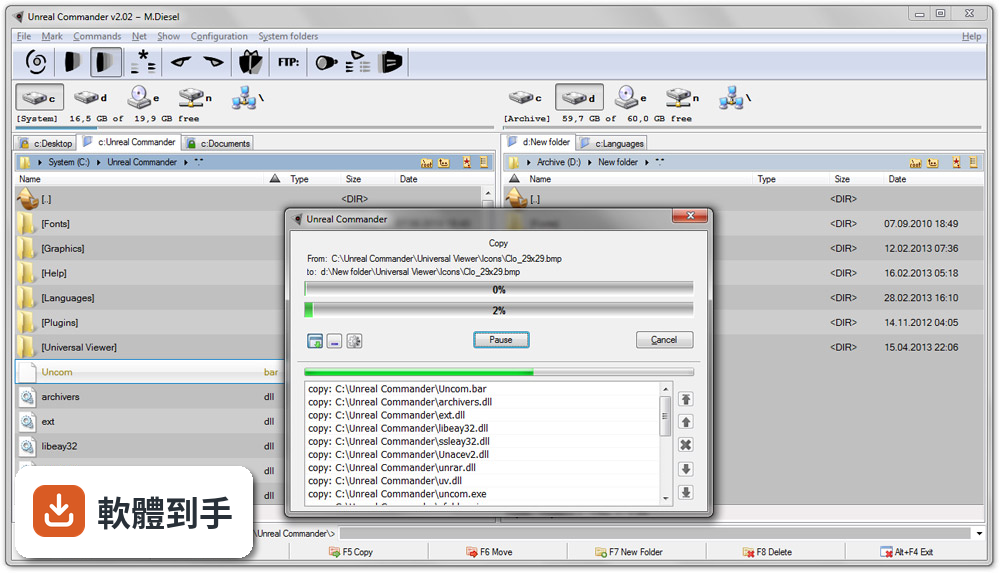
它是一套 Windows 的雙面板檔案管理工具,主要用途是取代內建檔案總管,讓你在同一個視窗裡同時看兩個資料夾,直接拖曳或按快捷鍵就能複製、移動檔案。另外它內建壓縮檔處理(ZIP、RAR、7Z 等格式)、FTP/SFTP 連線、檔案同步、批次改名、進階搜尋這些功能,等於把檔案管理常用的操作都包在一起,不用另外開其他工具。
02雙面板操作跟一般檔案總管差在哪裡?
一般檔案總管一次只能看一個資料夾,要複製檔案得開兩個視窗,來回對照。雙面板是左右各顯示一個目錄,左邊選來源、右邊選目的地,按 F5 複製、F6 移動,檔案就直接過去,不用切換視窗。要比較兩個資料夾的內容差異,或把 A 資料夾的檔案同步到 B 資料夾,在同一個畫面就能完成,省掉很多來回切換的時間。
03它支援哪些壓縮格式?可以直接開壓縮檔嗎?
官方列出的支援格式包含 ZIP、7Z、RAR、CAB、WIM、TAR、GZ、TGZ、BZ2、TBZ2、LHA、ARJ 等,可以直接在介面裡建立、解壓縮、管理壓縮檔,不需要另外安裝 WinRAR 或 7-Zip。不過要注意,RAR 格式的建立可能受限於外部程式,實際能建立哪些格式,建議安裝後自己測試確認。
04內建的 FTP 功能是怎麼用的?
從 FTP 選單選擇「Connect」,輸入伺服器位址、帳號、密碼就可以連線。連上之後,遠端伺服器的目錄結構會顯示在其中一個面板,你可以像操作本機檔案一樣上傳、下載、刪除、改名。它同時支援 FTP 和 SFTP,後者走加密連線,適合傳敏感資料。如果你只是偶爾傳幾個檔,這個功能夠用;但如果是重度 FTP 使用者,可能還是需要專門的 FTP 軟體。
05批次改名要怎麼操作?可以一次改很多檔案嗎?
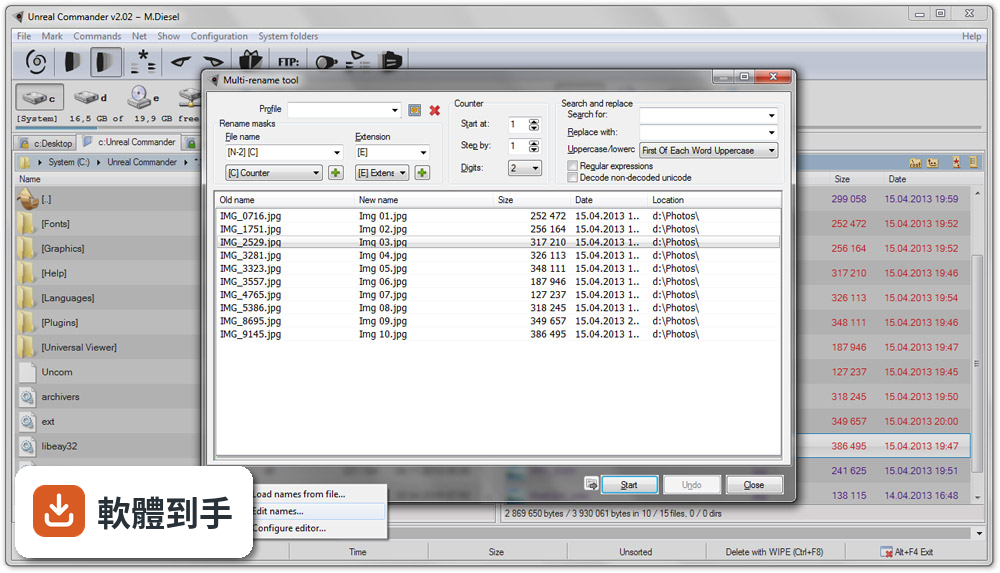
批次改名工具可以一次選取多個檔案,用自訂的範本和規則來重新命名,例如加上流水號、日期、固定前綴或後綴,也可以做搜尋取代。操作方式是先選取要改名的檔案,開啟批次改名功能,設定規則後預覽結果,確認沒問題再執行。這對整理大量照片或文件很有用,不用一個一個手動改。
06這套軟體適合什麼樣的人用?
適合每天要處理大量檔案的人,例如把照片從記憶卡歸檔到硬碟、把工作文件從下載資料夾分類到各專案資料夾、需要定期同步兩個目錄的內容。也適合習慣用鍵盤操作的人,它大部分操作都有快捷鍵,F5 複製、F6 移動,用熟了之後可以完全不碰滑鼠。如果你只是偶爾搬幾個檔案,內建檔案總管就夠了,不需要多裝一套工具。
07它跟 Total Commander 比起來怎麼樣?
Total Commander 是這個領域的老牌軟體,評分人數較多,功能也更豐富,但它是共享軟體,需要付費授權。Unreal Commander 是免費的,而且官方說它支援 Total Commander 的 WLX/WCX/WDX 外掛,等於可以沿用一部分 Total Commander 的生態系。如果你不想付費,又需要雙面板和進階功能,Unreal Commander 是其中一個選擇;但如果你需要的是最完整的生態系和最多的外掛資源,Total Commander 還是比較多人用。
08新手第一次用這種雙面板工具,會很難上手嗎?
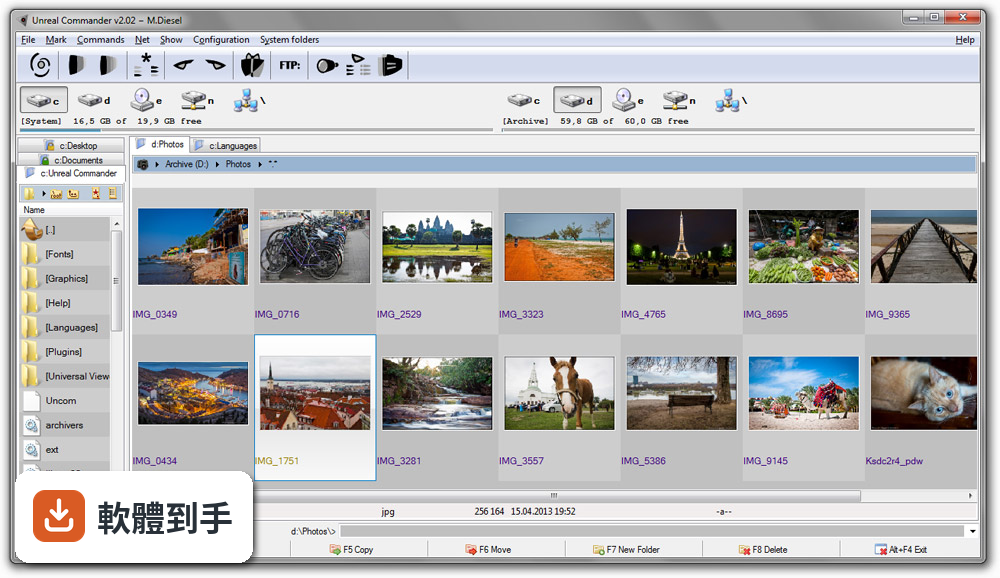
介面邏輯不難理解,就是左右兩個面板,左邊一個資料夾、右邊一個資料夾,點進去就顯示內容。預設設定對大多數人來說可以直接用,不用特別調整。比較需要花時間的是快捷鍵和進階功能,例如批次改名、同步、FTP 這些,但這些都是「需要的時候再學」就好,不會擋在基本操作前面。官方說明有提到介面可以自訂顏色、字型、工具列,但這些是進階選項,不急著設定。
09它只有英文介面,英文不好會不會用不起來?
介面確實只有英文,但檔案管理器的操作邏輯很直觀,主要按鈕就是複製、移動、刪除、重新整理這些,圖示也清楚,不太需要讀懂英文才能操作。比較麻煩的是進階功能,例如批次改名的規則設定、同步的選項,這些需要看說明或摸索一下。如果你完全無法接受英文介面,可以考慮其他有中文介面的免費檔案管理器,例如 Double Commander,它的評分人數也比較多。
10這套軟體很久才更新一次,會不會有相容性或安全性的問題?
它的更新頻率確實不高,近兩年只有一次更新。這代表新功能推出慢,遇到 Windows 大版本更新時,可能需要等一陣子才會有相容性修正。如果你用的是穩定的 Windows 版本,日常使用通常不會有問題;但如果你習慣搶先升級 Windows 測試版,或需要頻繁處理最新格式的檔案,更新慢可能會成為困擾。這點在安裝前要自己衡量。
11免費的雙面板檔案管理器有好多套,為什麼要選它而不是其他的?
免費的選擇確實不少,例如 Double Commander 評分人數最多、FreeCommander 和 Multi Commander 也各有支持者。Unreal Commander 的優勢是它支援 Total Commander 的外掛,如果你之前用過 Total Commander、有習慣的外掛,可以沿用。另外它提供免安裝的攜帶版,可以直接從 USB 隨身碟執行。但如果你沒有這些特定需求,建議把幾套都裝來試用看看,介面順不順手比功能列表更重要。
12我現在用的檔案總管雖然陽春,但堪用,換成這套真的會比較好嗎?
如果你只是偶爾複製幾個檔案、開個資料夾,那內建檔案總管確實夠用,不需要多裝軟體。但如果你常常需要同時處理兩個資料夾的內容、要解壓縮、要傳檔案到伺服器,這些動作在內建工具裡要分別開不同程式,在 Unreal Commander 裡是同一個介面完成。它不會讓你的檔案憑空消失或變快,但可以減少「開一堆視窗、切來切去」的麻煩。值不值得換,取決於你每天花多少時間在檔案管理上。
下載與官方連結
uncomsetup4.21beta20(build1659).msi · 41.83 MB · 連結指向軟體原廠
版本紀錄
- 2026-02-17 Unreal Commander 4.21 Build 1659 41.83 MB
- 2024-08-29 Unreal Commander 4.21 Build 1645 33.65 MB
- 2022-02-11 Unreal Commander 4.21 Build 1497 34.03 MB
再看 5 筆
- 2022-02-10 Unreal Commander 4.21 Build 1556 34.03 MB
- 2021-11-21 Unreal Commander 3.57 Build 1497
- 2021-08-29 Unreal Commander 3.57 Build 1496
- 2020-12-12 Unreal Commander 3.57 Build 1495 28.67 MB
- 2020-10-18 Unreal Commander 3.57 Build 1490 28.67 MB
這一版改了什麼
- Optimized compatibility for 4K displays
- Thumbnail view and other display modes now work within search results
- Support for filename templates in file and folder creation
- Enhanced free disk space reporting
- Added automatic numbering option in the rename dialog during copy operations
- Skins can now be switched instantly without a restart
- Optional display of the file system type alongside disk label and free space details
- Integrated Everything search engine support in the search window
- Enabled column-header sorting in the multi-rename tool
- Added copy/paste buttons to the toolbar
- Redesigned notification window
- Added configurable space handling in search (logical AND / OR interpretation)
- Hash verification tasks can now be assigned to a selected queue
- Ability to toggle copy/move mode directly within the transfer dialog
- Various UI refinements and minor visual improvements
Is Unreal Commander for PC completely free?
Yes, this program is 100% FREE to use. However, the developer accepts donations, which help support future development.
Can I customize the keyboard shortcuts?
Yes, it allows users to customize keyboard shortcuts to fit their workflow.
Does Unreal Commander support cloud storage services?
Natively, this app does not support cloud storage services, but you can use third-party plugins or map cloud drives as network drives to access them.
Is there a portable version of Unreal Commander?
Yes, it offers a portable version that can be run directly from a USB drive without installation.
Can I use Total Commander plugins with Unreal Commander?
Yes, this software is compatible with many Total Commander plugins, allowing users to extend its functionality.
Alternatives
Directory Opus - Directory Opus is a comprehensive file manager for Windows that offers tabbed browsing and many other advanced features.
Total Commander - Total Commander is a popular file manager for Windows that includes tabbed browsing and a wide range of customization options.
XYplorer - XYplorer is a feature-rich file manager for Windows with tabbed browsing and a customizable interface.
FreeCommander - Easy-to-use alternative to the standard Windows file manager.
Multi Commander - A multi-tabbed file manager that is an alternative to the standard Windows Explorer.
System Requirements
- Operating System: Windows 7, 8, 8.1, 10, 11
- Processor: 1 GHz or faster
- Memory: 512 MB RAM
- Hard Drive: 50 MB of available space
- Display: 800x600 resolution or higher
- Completely free to use
- Dual-pane interface enhances productivity
- Extensive archive and FTP support
- Customizable interface and keyboard shortcuts
- Compatible with Total Commander plugins
- Lacks native cloud storage integration
- Interface may feel outdated compared to more modern file managers
- It's been a long time since there was a stable version on the official website.
Unreal Commander by Max Diesel is a robust and feature-rich file manager that offers a compelling alternative to the standard Windows File Explorer. Its dual-pane interface, archive support, FTP client, and customizable features make it a versatile tool for both casual users and professionals.
While it may not have the most modern interface, its functionality and price (free!) make it a strong contender in the file management space.
Download Unreal Commander Latest Version Why is this app published on FileHorse? (More info)