
這是歷史版本頁面 — 看 UVK Ultra Virus Killer 最新版本
惡意軟體清不乾淨還要修系統,UVK Ultra Virus Killer 能包辦嗎
 UVK Ultra Virus Killer 10.10.3.0
資料更新 2019-01-31
閱讀約 6 分鐘
電腦中了惡意軟體,防毒軟體掃完說清掉了,但瀏覽器首頁還是被綁架、開機變慢、右鍵選單多出一堆看不懂的項目。你想把這些殘留清乾淨,卻發現手邊的工具各管一件事:有的專門殺廣告軟體、有的看開機啟動項、有的清登錄檔,東湊西湊才能勉強處理完,而且每一套都要重新學怎麼用。
更麻煩的是,有些惡意軟體會把系統檔案改壞、把登錄檔刪掉,光是把毒清掉還不夠,系統已經受傷了。一般人不會為了這件事去學手動修註冊表,也不想裝十幾個工具輪流試。這種時候需要的是單一工具,能同時處理「清除惡意軟體」和「修復系統損傷」兩件事,而且操作介面不能太技術門檻。
01UVK Ultra Virus Killer 到底能拿來做什麼?
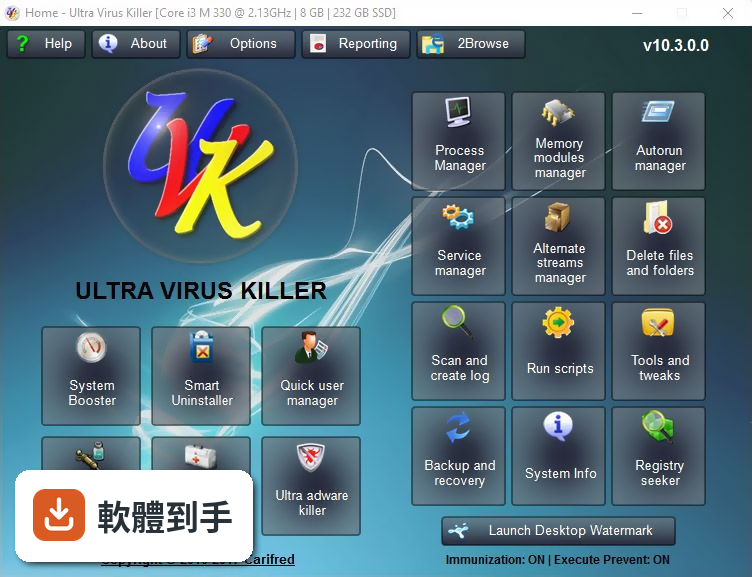
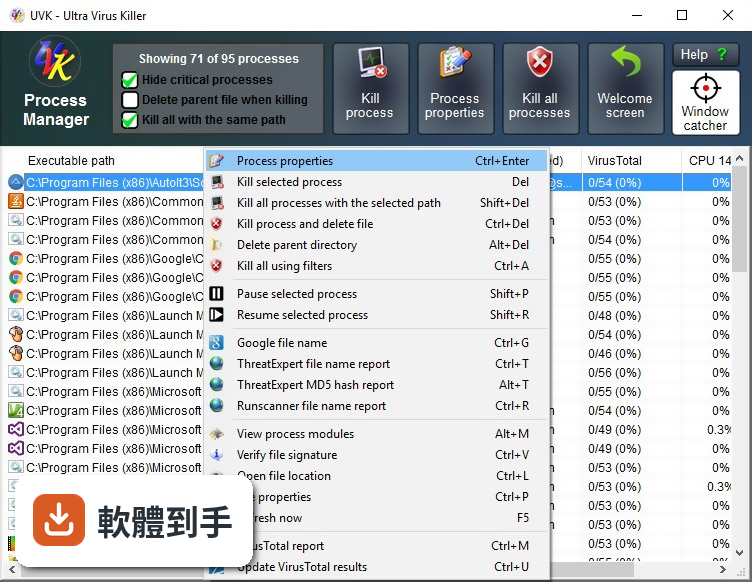
它是一套 Windows 用的多合一工具,主要分兩大塊:惡意軟體清除與系統修復。惡意軟體部分包含自動移除廣告軟體、管理處理程序、開機啟動項、Windows 服務與驅動程式、掃描並產生紀錄;系統修復部分則有 System Repair、System Booster 登錄檔清理、Smart Uninstaller 智慧移除、系統免疫等功能。簡單說,從掃毒到修系統,它想在同一支程式裡完成。
02它的系統修復功能跟一般登錄檔清理工具有什麼不同?
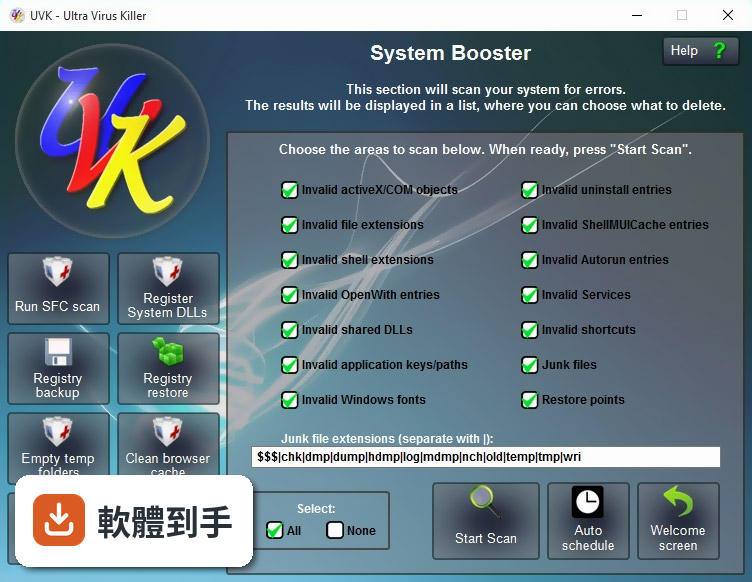
官方說明指出,System Booster 不是像典型登錄檔清潔器那樣只搜尋無效參照,而是逐一分析每個登錄檔機碼與值,檢查它們指向的檔案或登錄檔位置是否真的存在,確認無效後才加入清理清單。在 64 位元 Windows 上,它同時分析原生與 Wow64 登錄檔機碼,並提供偵測到的錯誤詳細資訊,而不是只丟出一個「找到 500 個問題」的數字。
03它能不能取代防毒軟體?
不行。官方問答明確表示,這套軟體不提供即時防護,主要功能是惡意軟體移除與系統最佳化,定位是防毒軟體之外的輔助工具。它內建的 System Immunization 功能可以保護最脆弱的登錄檔機碼與檔案,也能限制特定目錄中的檔案執行,但這只是輕量化的補充防禦,不是即時監控。電腦還是需要一套防毒軟體負責攔截,UVK 負責善後。
04它有所謂的「智慧移除」功能,那是做什麼的?
Smart Uninstaller 是完整的軟體移除工具,可以同時解除安裝多個程式,也支援無人值守模式,不需要使用者一一點擊確認。遇到移除不乾淨的頑固程式,它提供強制移除功能。這對處理那些解除安裝程式本身壞掉、或軟體殘留一堆登錄檔與檔案的狀況很有用,比從控制台一個一個慢慢移除省事。
05聽說它可以自動化執行一些操作,具體是怎麼運作?
它支援無人值守模式,可以在不需要使用者介入的情況下執行任務。另外,它內建一個專門的文字編輯器,用來分析 UVK 的紀錄檔與建立 UVK 腳本,可以將 cmd 批次指令整合進 UVK 腳本中。這表示你可以把一套固定的掃描、清理、修復流程寫成腳本,之後重複執行,不必每次手動點選相同選項。
06這套軟體適合什麼樣的人用?
適合兩種人:一種是電腦已經中毒、用防毒軟體掃過但系統還是怪怪的,想自己動手把殘留清乾淨的人;另一種是幫親友修電腦的進階使用者,因為它把處理程序、啟動項、服務、驅動程式管理、登錄檔清理、軟體移除都集中在一個介面,還能把掃描結果輸出成 HTML 報告,方便記錄或交給別人看。介面是英文的,需要基本英文閱讀能力。
07我對電腦不太熟,用這套軟體會不會太難?
官方強調它提供直覺化的使用者介面,設計目標是讓一般使用者也能操作。不過它的功能非常多,從處理程序管理到登錄檔編輯都有,對不熟悉系統底層的人來說,看到一堆工具可能會不知道從哪裡開始。建議先從自動廣告軟體移除和 System Repair 這類一鍵式功能用起,進階工具等有需要再研究。英文介面對不習慣的人來說是額外門檻。
08它跟其他類似的工具比起來,有什麼特別之處?
官方說法是,即使把 Process Explorer、Autoruns、HijackThis、OTL 這幾套知名工具加起來,還是缺少它具備的一些功能,例如自動廣告軟體移除、VirusTotal MD5 雜湊報告、一鍵跳轉到檔案或登錄檔位置、Windows 服務與驅動程式管理等。也就是說,它把多套單一功能工具的集合,整合成一套統一介面的軟體,不用在好幾個視窗之間切換。
09什麼情況下不該選這套軟體?
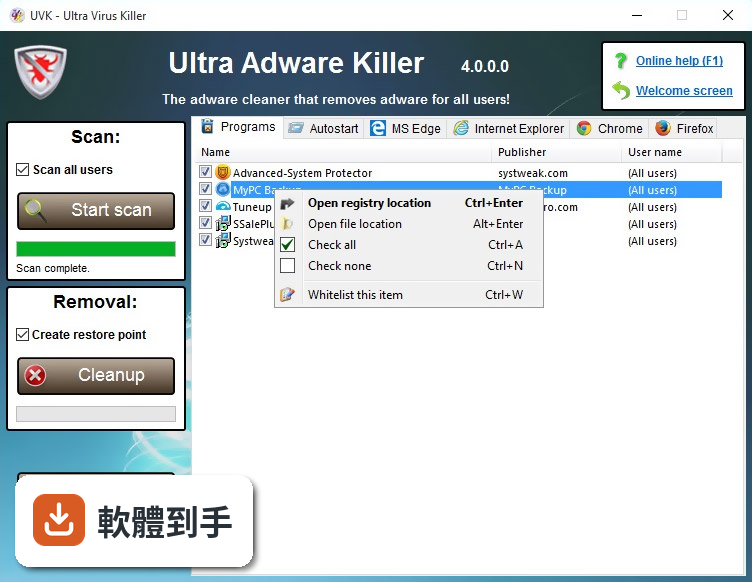
如果你要的是即時防護、會主動攔截惡意軟體的防毒軟體,它不適合,因為它沒有即時保護功能。另外,它只有英文介面,不熟悉英文操作介面的人會比較吃力。它的授權型式是 Trial,代表需要付費才能完整使用,預算有限的人要先確認試用版的功能限制。如果你只需要單純的廣告軟體清除,功能更單純的 Ultra Adware Killer 可能更輕量。
10它的更新頻率如何?會不會買了之後就沒在維護?
根據收錄的版本紀錄,這套軟體最早於 2017 年釋出,最近一次更新在 2026 年 8 月,但近 12 個月只更新 1 次,近 24 個月也只有 1 次。也就是說它仍然有在維護,但更新節奏不算頻繁。如果你在意的是惡意軟體定義檔是否即時更新,這點需要特別留意,因為清除工具的更新頻率會影響對新型惡意軟體的辨識能力。
11它的使用者評價如何?很多人用嗎?
目前收錄的評分是 6.66/10,共有 149 人評分,樣本數不算多。相較之下,功能相近的 Advanced Uninstaller PRO 有 131 人評分、Trojan Killer 有 83 人評分、GeekUninstaller 有 61 人評分。評分人數不多表示使用者的參考樣本有限,評價只能當作其中一個參考依據。實際使用體驗還是建議自己下載試用版跑一輪看看。
下載與官方連結
前往官方網站 下載 UVK Ultra Virus Killer
UVKSetup.exe · 14.1 MB · 連結指向軟體原廠
版本紀錄
- 2026-10-26 UVK Ultra Virus Killer 11.10.29.0 27.8 MB
- 2026-09-15 UVK Ultra Virus Killer 11.10.28.0 27.8 MB
- 2026-08-05 UVK Ultra Virus Killer 11.10.27.0 27.6 MB
再看 5 筆
- 2024-02-22 UVK Ultra Virus Killer 11.10.10.5
- 2024-02-20 UVK Ultra Virus Killer 11.10.10.4
- 2024-02-11 UVK Ultra Virus Killer 11.10.10.3
- 2023-09-11 UVK Ultra Virus Killer 11.10.8.2
- 2023-07-09 UVK Ultra Virus Killer 11.10.7.0
這一版改了什麼
What's new in this version:
UVK Ultra Virus Killer 10.10.3.0
- Updated Ultra Adware Killer with the latest version of the tool
- Minor bug fixes
UVK Ultra Virus Killer 10.10.2.0
- Fixed bug: CloudSync could not upload files on Windows 7 or lower machines
- Added a new option to the Options section, General tab: When closing the last instance of this application, prompt me to uninstall it. This new option controls whether to display a dialog box asking you if you want to uninstall UVK, when you close its last running instance. In previous versions, the dialog box was displayed when using the portable version
- Other minor bug fixes
UVK Ultra Virus Killer 10.10.1.0
- Fixed bug: The Open registry location feature was no longer working in Windows 10 version 1809. This bug affected several sections, including Ultra adware killer and Smart uninstaller
- Updated Ultra Adware Killer to version 7.5.4, which fixes the bug of the anti-malware scan taking too long to complete in some machines
- Other minor bug fixes
UVK Ultra Virus Killer 10.10.0.0
- General debugging and code optimization
- Updated Ultra Adware Killer to version 7.6
- Tools and tweaks section: The Enable and run well known tools now displays in icon view. Also added the following items to the list:
Add a device
Add network location
Date and time
Desktop icon settings
Display settings
Fonts
Forgotten password wizzard
Keyboard properties
Mouse properties
Network connections
Notification settings
Personalization
Power options
Printers
Programs and features
Region
Safely remove hardware
Security and maintenance
Set up backup
Sound control panel
Start menu settings
Taskbar settings
User accounts
Windows features
- System repair section: Added a new fix to the list. Uninstall RogueKiller
- System info section: The Operating system line now also shows the current Windows 10 release version
- All executables were signed with a new certificate, valid until December 07 2021
UVK Ultra Virus Killer 10.9.10.0
- General debugging and code optimization. This is mainly a bug fixing release
- Updated Ultra Adware Killer to version 7.5.2.1
UVK Ultra Virus Killer 10.9.9.0
- General debugging and code optimization. This is mainly a bug fixing release
- Updated the automation of the third party tools, in the System repair section
- Improved the Visual C++ runtime and .NET Framework updaters (System repair and UVK scripts)
UVK Ultra Virus Killer 10.9.8.0
- General debugging and code optimization
- New option: Hide UVK's installation in this computer. This new feature helps computer technicians to prevent their customers from using UVK, by hiding the installation folder, and also removing the application's desktop shortcut, context menu, uninstall entry and start menu folder. This option can be found in the Options section, Appearance tab
- New feature: when defragging the hard drives from UVK's System repair section, SSD disk volumes are trimmed (previously they were skipped)
UVK Ultra Virus Killer 10.9.7.1
- General debugging and code optimization
- System Repair fix: Fix this PC not visible in the network. This new fix configures and starts a few Windows services that are required for a computer to be visible in the network. NOTE: This fix does not enable network discovery or file sharing
- UVK script command: . This new command acts the same way as the Fix this PC not visible in the network System Repair fix above
- Updated the Log analyzer with support for the new command above
- Updated all the application links and URLs to use the HTTPS protocol when possible
UVK Ultra Virus Killer 10.9.7.0
- General debugging and code optimization
- New Quick User Manager feature: Move/Restore user personal folders. This new feature allows you to change the location of the following account personal folders: Desktop, Documents, Downloads, Music, Pictures and Video. You can use this feature to redirect those folders to a new directory of your choice, in the same drive or in a different one.
- Updated Quick User Mnager with the latest version of the application (1.7)
UVK Ultra Virus Killer 10.9.6.0
- General debugging and code optimization
- Added support for trial licenses. Any user can now get a free, fully functional 14-days trial license from this page
- Added support for Technician OEM licenses. Users who already own a PRO or branding license can now get OEM licenses fo only $15, which they can sell to their customers for the price of a regular OEM license. In addition, unlike regular OEM licenses, Tech OEM licenses allow the use of CloudSync, and Branding. In order to purchase Tech OEM licenses, create an account, or login, if you already have one, and then go to this page
- New feature: The System Info section now also shows the RAM module model, if available. This may not work in very old motherboards
UVK Ultra Virus Killer 10.9.5.0
- General debugging and code optimization
- Fixed bug: Some application names were not correct in the Windows Store apps uninstaller
- New feature: The System Info section now also shows the installed Windows Store apps
UVK Ultra Virus Killer 10.9.3.0
- General debugging and code optimization
- The Disable OneDrive registry tweak now also removes OneDrive from File Explorer's namespace tree. See the Tools and tweaks section (Registry tweaks tab)
- Added a new reset action to System repair's fixes list: Unpin all Start Menu tiles. This fix, only available on Windows 8 and above, will remove all the tiles from the Start Menu. New tiles can be added manually, afterwards
- Add new UVK script command . This new command, only available on Windows 8 and above, will remove all the tiles from the Start Menu. New tiles can be added manually, afterwards
- Updated the Log analyzer with support for the new command
Added the following tweaks to the Tools and tweaks section (Registry tweaks tab):
- Enable "This PC" icon in the Desktop
- Enable "Username" icon in the Desktop
- Enable "Network" icon in the Desktop
- Enable "Recycle bin" icon in the Desktop
- Enable "Control panel" icon in the Desktop
- Enable "OneDrive" icon in the Desktop
UVK Ultra Virus Killer 10.9.2.0
- General debugging and code optimization. This is mainly a bug fixing update
- Added support for more Tech Tool Store like options in System repair third party apps
UVK Ultra Virus Killer 10.9.1.0
- General debugging and code optimization. This is mainly a bug fixing update
UVK Ultra Virus Killer 10.9.0.0
- General debugging and code optimization
- Added a new tweak to the Tools and tweaks section (Registry tweaks tab): Enable right-to-left explorer menus
- Added a new tool to the Tools and tweaks section (Run/Open tab): Tablet PC settings
- The System info section now shows MAC address information, for network adapters, and Actual clock speed, in the Processosrs group
- To improve application quality and ease of use, we made some changes in the UI behavior, such as disabling controls that currently don't do anything
UVK Ultra Virus Killer 10.8.4.0
- General debugging and code optimization
- Fied bug: Some icons were not showing up properly in the Smart uninstaller
- Fied bug: Sometimes the dialog boes were showing up an invisible background
- Fied bug: The application was crashing in some computers, when emptying the temporary folders
- Fied bug: Sometimes, the application was not uploading unknown items to VirusTotal, even if that option was enabled
- New feature: Added support for etracting zip files with password protection in UVK scripts and custom third party apps
UVK Ultra Virus Killer 10.8.3.0
- General debugging and code optimization
- UI debugging: In some sections the Esc key was not working to go back to the Home section
- Updated Account Profile Fixer to the latest version
- Updated Multiple Reboot Scheduler to the latest version
- Updated the MBAM automation to the latest version of the application
- Improved the Smart Uninstaller's automation of the uninstall process, when Try unattended uninstall is checked
UVK Ultra Virus Killer 10.8.2.0
- Added a new tool: Account Profile Fixer. This new tool can be accessed in the Quick User Manager and System Repair sections
- Upgraded Quick User Manager to the latest version of the tool, which can now detect broken user profile registry keys
- Other improvements and bug fixes
UVK Ultra Virus Killer 10.8.1.0
- Change log not available for this version
UVK Ultra Virus Killer 10.8.0.0
- Added support for OEM licenses. This is a new, cheap license type that only works in one computer. End users can now enable all UVK features for a low price. Also, techs can now leave UVK installed in the customer machine by purchasing a OEM license for it. We're creating a partnership program where techs will have big discounts in OEM licenses for their customers
- The System Repair, Smart Uninstaller, Process Manager, Autorun Manager and Service Manager lists were improved. Checking/Selecting items in details view is now easier, and the text and icon visibility was also improved
- Added three registry tweaks in the Tools and tweaks section: Disable auto-install network devices, Disable auto-install device drivers and Disable driver updates from Windows update
- Added new maintenance action to the System repair list: Empty temporary folders. This fix works just like Empty all users temp folders, except it does not empty the recycle bin
- Added support for a new script command: This command will empty the temporary folders for all users. Unlike , the new command does not empty the recycle bin
- Updated the Log analyzer with support for the new command
- Updated Ultra Adware Killer to its latest version (7.2)
- Other improvements and bug fixes
UVK Ultra Virus Killer 10.7.9.1
- General debugging and optimization. This is mainly a bug fixing build
- We finally managed to detect and permanently fix the crashing bug when loading the Process Manager. Our apologies to all the concerned users for this issue.
UVK Ultra Virus Killer 10.7.9.0
- General debugging and optimization
- Fixed bug: The application was crashing in some machines, usually when loading the Process Manager
UVK Ultra Virus Killer 10.7.8.0
- General debugging and optimization
- New branding feature: UVK packages (UVKSetup.exe, UVKPortable.exe) now support an icon file named BrandIco.ico in the same directory. When present, this icon will be used as the icon for the desktop and start menu shortcuts, as well as the title bar and task bar icon of the application
- Example: To automatically activate a branding license, place UVKPortable.exe, your license file (key.uvk), your logo picture (ie. logo.png), and your custom icon (named BrandIco.ico) in the same folder. Then just run UVKPortable.exe. Your branding license is automatically activated, and your custom icon installed
- Updated Ultra Adware Killer to its latest version (7.1), which includes bug fixes and improvements
UVK Ultra Virus Killer 10.7.7.2
- General debugging and optimization
- Updated Quick User Manager to the latest version (1.4), which includes many improvements, including the ability to change the user profile picture on Windows 8, 8.1 and 10
- Other minor fixes
UVK Ultra Virus Killer 10.7.7.1
- General debugging and optimization
- Improved progress information for repair operations in the System repair section
- Improved progress information for script execution in the Run scripts section
UVK Ultra Virus Killer 10.7.7.0
- General debugging and optimization
- Improved progress information for repair operations in the System repair section
- Improved progress information for script execution in the Run scripts section
UVK Ultra Virus Killer 10.7.6.1
- Change log not available for this version
UVK Ultra Virus Killer 10.7.6.0
- General debugging and optimization
- Updated Ultra Adware Killer to the latest version (7.0)
UVK Ultra Virus Killer 10.7.5.1
- General debugging and optimization.This is mainly a bug fixing release
UVK Ultra Virus Killer 10.7.5.0
- General debugging and optimization
- Optimized the functionality of the Process manager
- Fixed: The Process manager was not updating the VirusTotal results for new processes
- Fixed: The Process manager was not updating the column based sorting for new processes
UVK Ultra Virus Killer 10.7.4.0
- General debugging and optimization. Fixed a few bugs reported in the forums
- Updated Ultra Adware Killer with the new version (6.1). This includes some new scan and remove options, deeper MS Edge scan and more reset options
UVK Ultra Virus Killer 10.7.3.0
- Fixed: Desktop Watermark was starting everytime you go to the home section
- Updated the URL strings and Ultra Adware Killer's database
- General debugging and optimization. This is mainly a bug fixing release
UVK Ultra Virus Killer 10.7.2.0
- New: UAK can be configured to automatically remove any threats found, when launched from the System Repair section. This setting can be found in the Options section, General tab. When this option is enabled, any detected and "checked" items are automatically removed, and UAK is closed after the removal. Note that this will not let you to check for false positives, so use this feature at your own risk
- New: The Help buttons in the main Window are now fully working even when you're working in a separate child dialog box, allowing you to go the the current section's help page without closing the window you're working on
- Fixed: The Un-immunize all areas System repair fix was not un-immunizing Chrome or Firefox related areas
UVK Ultra Virus Killer 10.7.1.0
- General debugging and optimization. This is mainly a bug fixing release
UVK Ultra Virus Killer 10.7.0.0
- Introducing a new feature: Multiple Reboot SchedulerThis new tool can optimize the Windows boot time, backup and restore the layout of the desktop icons, and also setup user auto-logon
- Added a new pre-repair action to the System repair list: Backup desktop icon layoutSometimes the custom layout of the desktop icons is lost when the computer rebootsThis new fix allows you to backup the icons' positions so they can be restored later
- Added a new post-repair action to the System repair list: Restore desktop icon layoutThis fix will restore the position of the desktop icons, as previously saved with the Backup desktop icon layout pre-repair acion
- Added a new post-repair action to the System repair list: Launch Multiple Reboot SchedulerThis fix runs our boot uptimizing tool (MRS), mentioned above
- Added support for a new script command: This new command allows you to backup the icons' positions so they can be restored later with the also new command
- Added support for a new script command: This new command restores the position of the desktop icons, as previously saved with the command
- Added support for a new script command: This new command runs our boot uptimizing tool (MRS), mentioned above
- Added support for a new script command: This new command allows to degar a specific partition
- Updated the Log analyzer with support for inserting the commands above,and also a few others that were missing
UVK Ultra Virus Killer 10.6.4.0
- Bug fixing release
- Major bug fix: The Prevent Shutdown feature was not working properly
- Major bug fix: Sometimes the encryption/decryption feature did not work properly
UVK Ultra Virus Killer 10.6.3.0
- Bug fixing release
- Major bug fix: The auto-update feature was not working if the install source package was located in the root of a drive
- Major bug fix: The application could not download files if to the root of a drive
UVK Ultra Virus Killer 10.6.2.0
- Bug fixing release
UVK Ultra Virus Killer 10.6.1.0
- General debugging and code optimization
- Fixed bug: Some file downloads were failing
- Fixed bug: Professional reports sent to Repairshopr were not showing up in the RS account pag
UVK Ultra Virus Killer 10.6.0.0
- General debugging and code optimization
- Added 2 new skins: Fantasy, and Nature. Fantasy is now the default skin
- Added new fix to System Repair's fixes list: Enable Windows Recovery Environment. This new fix enables the Windows Recovery Environment (WinRE), for the next time the computer boots up. This fix only works on Windows 8 or higher
- Added support for a new command for UVK scripts: . This new command enables the Windows Recovery Environment (WinRE), for the next time the computer boots up
- Updated the Log Analyzer to support the new command
- Added a new utility to the Utilities tab of the Options section: View last SFC logs. This utility allows you to quickly have a look at the details of the last System file checker (SFC) operations
- Added a new utility to the Utilities tab of the Options section: View last Dism logs. This utility allows you to quickly have a look at the details of the last Deployment Image Servicing and Management (DISM) operations
UVK Ultra Virus Killer 10.5.5.0
- General debugging and code optimization. This is mainly a bug fixing release
UVK Ultra Virus Killer 10.5.4.0
- Change log not available for this version
UVK Ultra Virus Killer 10.5.3.0
- General debugging and code optimization
- Updated Ultra Adware Killer with the latest version of the tool (5.9)
- Updated Stop Resetting My Apps with the latest version of the tool (1.3)
- Fixed bug: MalwareBytes Anti-malware could not be downloaded in some computers
UVK Ultra Virus Killer 10.5.2.0
- Change log not available for this version
UVK Ultra Virus Killer 10.5.1.0
- General debugging and code optimization
- Fixed bug: The Smart Uninstaller sometimes hunged while uninstalling some programs in forced uninstall mode
UVK Ultra Virus Killer 10.5.0.0
- General debugging and code optimization
- Added support for saving the selected custom third party app in several UVKSR files simmultaneously
- Restored missing post-repair action: Reboot in safe mode with network
Added support for more command tags for UVK scripts, namely:
- This command enables auto-logon for a user profile
- This command disables auto-logon, if it was previously enabled
- This command tries to prevent this PC from rebooting or shutting down until the current script is fully parsed
- This command enables the old legacy F8 boot menu on Windows 8 or higher
- Use this command if you previously used . It will restore the normal (standard) boot menu on Windows 8 and higher
- This command epair corrupted Internet Explorer's history
- This fix will cleanup references to recently accessed items, usually shown in the Quick Access and Jump Lists
- This fix will cleanup the tray icon cache for all users
- This fix will schedule memdiag to perform the memory diagnostics on the next system boot
- If you previously scheduled the memory diagnostics on reboot, this fix will cancel it
- This fix will download and execute the Start Menu Troubleshooter
- This fix will download and execute the Windows Store Apps Troubleshooter
- This fix will download and execute the Windows Update Troubleshooter
- This command uninstalls Malwarebytes AntiMalware, if it has been previously installed in this PC. Note: If MBAM has detected and removed any threats, you reboot your machine before running this command
- This command uninstalls Super AntiSpyware, if it has been previously installed in this PC. Note: If SAS has detected and removed any threats, you reboot your machine before running this command
UVK Ultra Virus Killer 10.4.5.0
- Improved Ultra Adware Killer's engine. Also updated UAK with the latest version of the tool (5.8), which now skips trusted Firefox extensions
- Added two new Post repair actions to System repair's fixes list: Uninstall Malwarebytes AntiMalware and Uninstall Super AntiSpyware. Those new actions allow you to easily remove MBAM and SAS after using them. But keep in mind that you may need to reboot the computer before uninstalling those tools, in case they have found and removed threats in your system
- New feature: UVK now prevents the computer from rebooting when an uninstall operation is running (Smart uninstaller), or when a System repair operation is running (System repair). A message will be displayed before shutting down, asking you to cancel shutdown until the operation is complete
- Minor bug fixes and optimizations
UVK Ultra Virus Killer 10.4.4.0
- Bug fixing release
UVK Ultra Virus Killer 10.4.3.0
- General debugging and optimization. This one is mainly a bug fixing release. Several minor bugs were fixed
- Increased the max zip file size to 15 MB, in the Reporting section
UVK Ultra Virus Killer 10.4.2.0
- General debugging and optimization
- Added drag & drop support for multiple files to the Reporting section's list of files in the ZIP
- Added drag & drop support for multiple files to the Smart uninstaller's list view, to create new uninstall entries
- Added drag & drop support for multiple files to the SFX creator's list of files to add to the SFX package
- Added option: Make the version text label in the Home section link to the Change log page
- Improved the json parsing functions
UVK Ultra Virus Killer 10.4.1.0
- Added a new item to the Registry tweaks list of the Tools and tweaks section: Disable require password on wake up. This new tweak disables requiring passwor on wake up for all users, and for both plugged-in and on-battery power schemes
- Updated the Stop resetting my apps utility to the latest version (1.2)
- General debugging and optimization
- Fixed: SXF packages created by the application were creating 2 desktop shortcuts, when using the branding version
- New feature: The Create SFX package utility can also brand the SFX package's icon
- New feature: The System Booster now has an Ignore list. Items can be set to never being listed again
- Added the following Windows utilities to the Enable and run list of the Tools and tweaks section: Magnifier, Math input panel, On-screen keyboard, Quick assist, Snipping tool, Task scheduler, Windows to-go creator, WordPad
UVK Ultra Virus Killer 10.4.0.0
- Change log not available for this version
UVK Ultra Virus Killer 10.3.11.0
- Change log not available for this version
UVK Ultra Virus Killer 10.3.10.0
- General debugging and optimization
- New System repair fix: Fix Wifi takes long to connect. Sometimes, after booting up, Windows may take long to automatically connect to a saved Wifi network. This new fix repairs that issue
UVK Ultra Virus Killer 10.3.9.0
- General debugging and optimization
- Bug fixing release
UVK Ultra Virus Killer 10.3.8.0
- Change log not available for this version
UVK Ultra Virus Killer 10.3.7.0
- General debugging and optimization
- New feature: Professional HTML reports created in the System Repair section can now be sent to RepairShopr. You just need to enter your RepairShopr sub-domain, API key and the ticket ID to associate with the report. These options are available when ticking the Create professional Report check box. There is an option to also send the System Info HTML report in the same request. The reports are automatically sent after the repair operation completes
- Updated Ultra Adware Killer with the latest version of the module (5.6), which includes bug fixes, detection of IPv6 DNS hijacks, definition updates and the removal of many false positives from the database
UVK Ultra Virus Killer 10.3.6.0
- General debugging and optimization
- New feature: CloudSync can now be set to ask before uploading files
UVK Ultra Virus Killer 10.3.5.0
- General debugging and optimization
- New feature: Auto-Logon can also be set for domain users
- New feature: Added a new fix to the System repair list: Clean up the WinSxS folder. This fix will free up HDD space by removing files from previous Windows versions and service packs. It may take long time to execute. Please note that, after that, you will no longer be able to downgrade to those previous Windows states.
- Updated Ultra Adware Killer to the latest version of the application (3.4), which includes improvements to the scan and bug fixes
- Improved the VirusTotal related functions
UVK Ultra Virus Killer 10.3.4.0
- General debugging and optimization
- Added 3 new tools to the Enable and run well known tools list: Security policy editor, which opens the security management snap-in (secpol.msc), SFX creator (IExpress.exe), which launches the Windows SFX creation wizzard (iexpress.exe), and Windows Firewall, which opens the Windows firewall interface
Added a new utility - Create SFX package:
- This new feature allows you to create a self installing package containing UVK's required files, your license activation files, settings, scripts and any other files you may need
- You can also choose not to include Ultra Adware Killer's definitions database in your package. In this case, the database will be automatically downloaded on runtime, but an active Internet connection is required
- You can add any files and folders you want to the package, but remember it may largely increase the size of your archive
- This feature is only available to registered users and can be found in the Options section, Utilities tab
UVK Ultra Virus Killer 10.3.2.0
- Change log not available for this version
UVK Ultra Virus Killer 10.3.1.0
- General debugging and optimization