
這是歷史版本頁面 — 看 Windscribe 最新版本
Windscribe VPN 免費版夠用嗎?翻牆、擋廣告一次看懂
 Windscribe 1.80
資料更新 2017-10-20
閱讀約 6 分鐘
你正在公共 Wi-Fi 上連網,或是想開個國外網站卻被擋在門外。你聽說 VPN 可以解決這些問題,但打開搜尋引擎,滿坑滿谷的 VPN 推薦文,每個都說自己最快最安全,你根本不知道從哪裡開始挑。你只想找一個簡單、免費、能馬上用的工具,不要一堆複雜設定,也不要裝完才發現要綁信用卡。
一般人的直覺是找免費 VPN,但免費的往往有流量限制、速度慢、甚至偷偷收集你的資料。另一條路是直接買付費 VPN,但一年幾千塊的訂閱費,對只是偶爾需要翻牆或保護隱私的人來說,確實有點重。這類工具的切入點,是提供一個「先試用再決定」的管道:用免費額度體驗核心功能,覺得夠用就繼續用,不夠再升級,而不是一開始就逼你掏錢。
01Windscribe 這套 VPN 到底能做什麼?
它主要做三件事:加密你的網路連線、偽裝你的所在位置、阻擋廣告和追蹤器。加密連線讓你在公共 Wi-Fi 上傳資料時不容易被攔截;偽裝位置讓你可以連到其他國家的伺服器,存取原本被擋的內容;內建的 R.O.B.E.R.T 功能則會過濾廣告、追蹤器和惡意軟體,減少瀏覽網頁時被干擾的機會。
02免費版和付費版差在哪裡?
根據官方說明,免費版每個月有 10GB 流量限制,而且只能連到部分伺服器,同時只允許 1 台裝置使用。付費版則有無限流量、可以解鎖全部伺服器(官方宣稱超過 69 個國家、112 個城市),並支援更多裝置同時連線。如果你只是偶爾用,免費版可能夠;但每天要看串流影片或大量下載,10GB 很快就會用完。
03它的連線安全嗎?會不會被駭客破解?
官方資料顯示它採用 AES-256 加密,這是目前業界常用的加密標準,理論上要暴力破解非常困難。另外它還有 Kill Switch 功能:如果 VPN 連線突然中斷,它會自動切斷你的網路,避免你的真實 IP 位址和資料在沒有保護的狀態下暴露出去。不過,任何軟體的安全性都不是絕對的,建議你還是要定期更新軟體版本。
04它會記錄我的瀏覽紀錄嗎?
官方宣稱採取嚴格的無日誌政策(No-Logs Policy),也就是說不會儲存你的線上活動紀錄。這代表即使有人要求他們交出資料,他們也沒有東西可以給。不過,這類宣稱通常難以由外部獨立驗證,如果你對隱私非常敏感,建議去查閱他們最新的隱私政策條款,確認細節。
05介面好操作嗎?我從來沒用過 VPN。
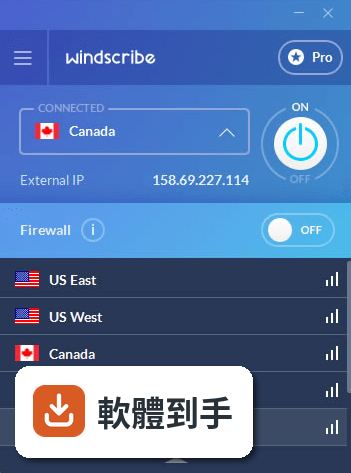
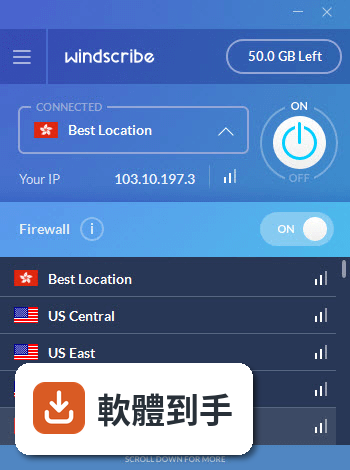
官方說明提到,主介面會顯示目前的連線狀態、選定的伺服器位置和資料使用量,而且操作流程很直觀:安裝後註冊帳號、登入、選一個伺服器、按連線,就完成了。對第一次用 VPN 的人來說,門檻不高。不過要注意,介面語言是英文,雖然按鈕不多,但如果你完全看不懂英文,還是會有一點障礙。
06這套軟體適合什麼樣的人用?
適合三種人:一是偶爾需要連公共 Wi-Fi 的人,像是常去咖啡廳或機場工作的人;二是想繞過地區限制、看其他國家串流內容的人;三是想要一個免費方案先試水溫、不確定自己是否需要付費 VPN 的人。它的免費方案有 10GB 月流量,對輕度使用者來說,是一個可以實際測試的起點。
07我只有一台電腦,用它夠嗎?
如果你的需求是「一台 Windows 電腦、偶爾連 VPN 保護隱私」,那免費版的 1 台裝置限制對你來說不是問題。但如果你同時有手機、平板、筆電,想要全部一起保護,免費版就無法滿足,需要升級到付費方案才能支援多裝置同時連線。下載前先想清楚你有哪些裝置要裝。
08什麼情況不該選這套軟體?
如果你需要的是「每天長時間、大量下載」的 VPN,免費版的 10GB 流量限制會讓你很痛苦,付費版雖然有無限流量,但月繳 9 美元、年繳 69 美元的價格,市場上有其他更便宜的選擇。另外,如果你看不懂英文介面,操作上會卡卡的,建議找有中文介面的 VPN。最後,如果你需要客服即時協助,它的支援管道是否完善,官方資料沒有詳細說明,這點要自行確認。
09它和市面上其他 VPN 比起來,算多人用嗎?
在功能相近的軟體中,它的使用者評分人數是 106 人,評分 8.02 分。對比同類軟體:VPN Unlimited 有 186 人評分、TunnelBear for Windows 有 134 人評分、Avira Phantom VPN 有 79 人評分、Hide.me VPN 有 78 人評分、SaferVPN 只有 14 人評分。以評分人數來看,它不算最熱門,但也不是冷門到沒人用,屬於中等偏上的能見度。
10它支援哪些 Windows 版本?我的舊電腦能用嗎?
官方列出的系統需求是 Windows 7、8、10,官方說明中也提到支援 Windows 11。硬體需求很低:處理器只要 Intel Pentium 4 或同等級,記憶體 1GB 以上,硬碟空間 50MB 就夠。所以即使是舊電腦,只要作業系統版本符合,跑起來應該不會太吃力。不過,官方說明中提到的 macOS、Linux、iOS、Android 版本,在 Windows 版的頁面上沒有詳細列出,如果你需要跨平台使用,建議去官網確認。
11它最近還有在更新嗎?會不會裝了之後沒人維護?
根據收錄的版本紀錄,它從 2017 年開始有版本紀錄,最近一次更新在 2026 年 9 月,近 12 個月更新了 2 次,近 24 個月也是 2 次。也就是說,它維持著一年約 1 到 2 次的更新頻率,不算頻繁,但至少不是長期放生的狀態。如果你很在意軟體是否持續維護,這個更新節奏可以參考,但建議安裝前到官網看最新的版本公告。
12它的免費方案會不會有隱藏限制?
官方資料明確指出,免費版(Demo 版)的流量限制是每月 10GB,而且只限 1 台裝置。另外,免費版能連的伺服器數量有限,不是所有國家都能選。這些限制在官方說明中都寫得很清楚,沒有提到其他隱藏條件。不過,免費方案是否會顯示廣告、速度是否會被刻意調慢,官方資料沒有說明,這部分需要你實際安裝後自行體驗。
下載與官方連結
Windscribe.exe · 連結指向軟體原廠
版本紀錄
- 2026-09-09 Windscribe 2.24.13 40.1 MB
- 2026-09-03 Windscribe 2.24.12 40.1 MB
- 2026-07-10 Windscribe 2.23.12 40 MB
再看 5 筆
- 2024-02-22 Windscribe 2.9.9
- 2023-11-04 Windscribe 2.7.14
- 2022-12-14 Windscribe 2.5.18
- 2022-06-17 Windscribe 2.4.10
- 2022-01-06 Windscribe 2.3.16
這一版改了什麼
What's new in this version:
Windscribe 1.80
New features:
- LAN proxy gateway
- Secure Hotspot (Experimental)
- Variable location drawer height
- Auto login after signup
- Ability to choose NDIS5 TAP driver
- Upgrade to OpenVPN 2.4.x with 2.3.x fallback
- Service notifications
- Show Pro data-centers to free users
- Location latency tool-tips added to signal bars
Fixed bugs:
- Always on firewall not working on OS boot on some machines
- Application crashes after connection attempts are exceeded with “minimize to tray” option checked
- Application freeze with firewall ON requires reboot
- API calls not made if app starts with no Internet connectivity
- Custom installation now allows for non-standard install path
- Auto-enable disabled TAP adapter
- 100% CPU when app starts with no Internet connectivity
- Don’t try UDP protocol if system proxy is configured
- Constant application window size on variable DPI screens
- Login form DPI bug
- On multi-screen computers, tool-tips show on primary monitor
Other Changes:
- Leave firewall ON if ran out of free bandwidth to prevent IP leak
- Increase reconnect timeout from 5 min to 1 hour
- Server list source changed
- Moved server location update process to separate thread
- Only do ping tests while disconnected
- Update available UI change
- Output installed anti-virus software into debug log for troubleshooting
- Open survey on application uninstall
- Installer command line arg support
- Black and white top bar icon on MacOS
- Ping nodes in batches instead of all at the same time
- Allow for verbose OpenVPN logging via Advanced Parameters screen
- When beta channel is selected, check for updates right away
To-do list for next version:
- IKEv2 protocol support
- Emergency Connect
- Firewall whitelisting overhaul
- Command line interface
- Wakeup from hibernation fix
- Add disconnecting state
- Async DNS resolver
Windscribe 1.70
- Added city level location selection
- Added Automatic Connection mode
- Added support for 22 languages
- Added custom TAP adapter
- Added “Ignore SSL Errors” option
- Added notifications when firewall is ON and application not connected
- Added “Advanced Parameters” screen
- Added EULA to the installer
- Added IPv6 connectivity disable button, to prevent WebRTC leaks over IPv6 in some situations
- Added Touch support
- Added Beta channel
- Fixed auto-start bug on some systems
- Fixed Internet connectivity check
- Fixed persistent session storage
- Fixed API connectivity on restrictive networks
- Fixed unquoted service path
- Fixed disappearing Best Location
- Fixed WSD port connectivity while firewall is ON
- Fixed PlayStation UPNP connectivity while firewall is ON
- Fixed reconnection bug on computer wake up on some systems
- Changed the Preferences screens
- Changed the connecting spinner animation
Windscribe 1.61
- Added ability to select connection port
- Added LAN proxy support
- Added speed ratings
- Added ability to add openvpn params externally
- Added using custom DNS while disconnected to prevent DNS poisoning
- Added custom API resolution field to combat advanced DNS poisoning
- Added “Best Location” to the location list
- Added connection testing after tunnel initiation
- Added tooltip for “no p2p” icon
- Fixed crashing in macOS Sierra
- Fixed LAN traffic bypass to work with UPnP devices
- Fixed debug log sender
- Fixed backup API usage logic
- Fixed CPU and energy usage
- Fixed multiple accounts info message
- Fixed multi-monitor menu placement in macOS
- Fixed Windows taskbar icon in collapsed mode
- Enable Base Filtering Engine if its disabled in Windows 7
- Changed openvpn config location to a permanent one
- Changed server list scrollbar to be more visible
- Changed XPC to sockets in macOS
- Changed TAP adapter metric on Windows 10
- Various stability fixes