
這是歷史版本頁面 — 看 Actual Transparent Window 最新版本
視窗疊太多切來切去好煩?Actual Transparent Window 讓視窗變透明
 Actual Transparent Window 8.14.2
資料更新 2019-10-29
閱讀約 5 分鐘
寫報告時開著 Word,旁邊瀏覽器要查資料,兩個視窗切換來切換去,沒幾分鐘就覺得煩。尤其螢幕不夠大,並排又嫌太窄,最小化再還原的動作重複幾十次,時間都耗在視窗管理上。你需要的不是再開一個視窗,而是讓暫時用不到的視窗「退到後面」——不是縮小,而是變透明,讓視線直接穿透它,看到底下的內容。
一般人習慣的做法是拼命切換視窗、調整排列位置,但這些動作本質上都是「把視窗移開」再「把視窗叫回來」,步驟多、中斷思路。這類工具的切入點是改變視窗本身的顯示狀態:把不用的視窗調成半透明,讓它留在原位但不擋視線,需要時再點一下恢復不透明。這樣一來,視窗不用移動,工作區也不用重新排列,眼睛直接看過去就好。
01Actual Transparent Window 到底能幹嘛?就是讓視窗變透明而已嗎?
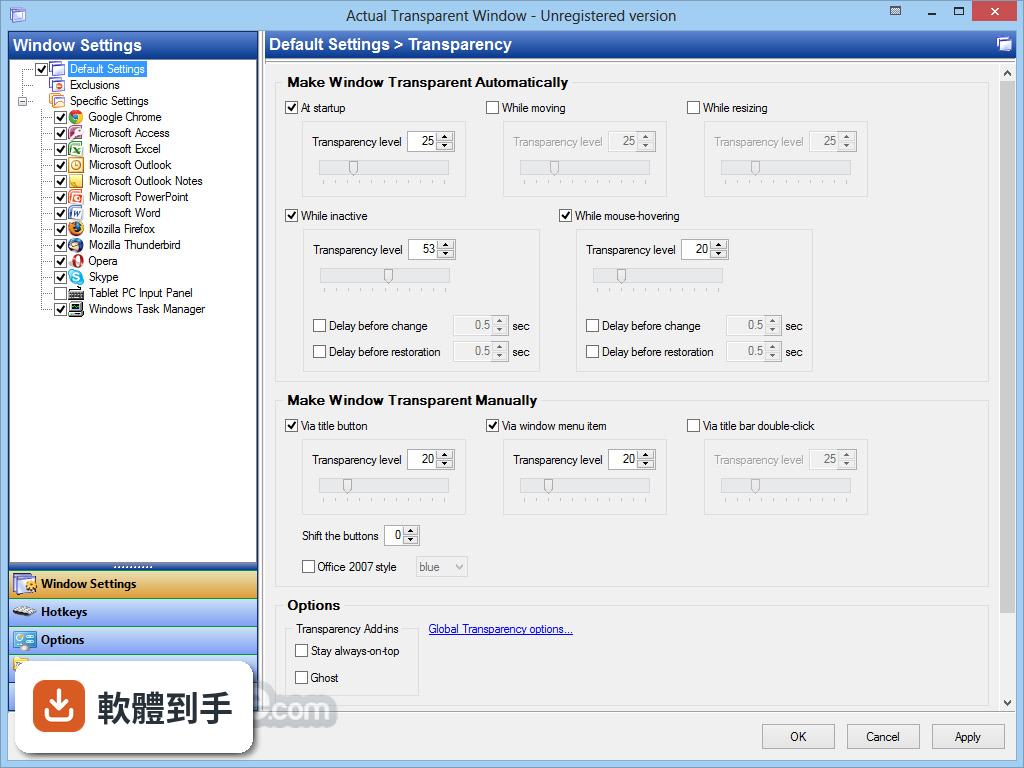
核心功能是讓任何視窗調整透明度,從 0%(完全不透明)到 100%(全透明)都可以設定,而且每個視窗可以單獨記住自己的透明度。除此之外,它還有非活動視窗透明、滑鼠穿透、拖曳時自動透明、雙擊標題列切換透明等功能,不是只有單純變透明而已。
02能不能只讓沒在用的視窗變透明,正在用的保持不透明?
可以。它有一個「非活動視窗透明」的功能,設定之後,只要視窗沒有被選取,就會自動變成半透明;當你點它一下、讓它變成使用中的視窗,就會恢復成完全不透明。這個功能對即時通訊軟體特別實用,掛在背景時不會擋住主要工作畫面。
03視窗變透明之後,滑鼠點下去會點到下面的視窗嗎?
一般情況下,透明視窗還是會擋住滑鼠點擊。但它有 Ghost Mode(幽靈模式),開啟之後,滑鼠的點擊和移動都會直接穿透透明視窗,點到底下的視窗。如果你需要一邊看著上層視窗的內容、一邊操作下層視窗,這個模式就是關鍵。
04拖動視窗的時候能不能自動變透明,放好就恢復?
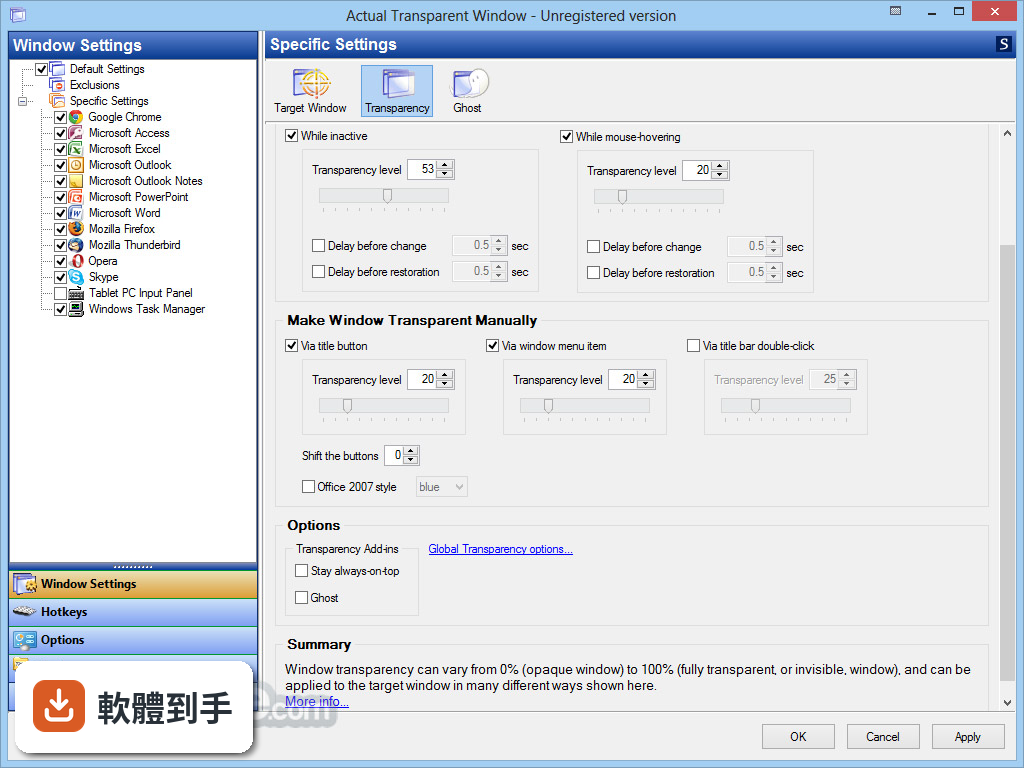
可以。它有一項功能是「拖曳或調整大小時才套用透明效果」,也就是說,視窗靜止時維持原本的不透明狀態,只有當你拖著它移動或拉動邊框調整大小時,才會變成半透明。這樣一來,拖視窗的時候不會完全遮住底下的內容,放好之後又恢復正常。
05怎麼快速切換透明和不透明?有沒有快捷鍵?
有幾種方式。可以按 Win+T 快速切換透明與不透明,也可以直接雙擊視窗的標題列來切換。另外,它可以在視窗上加入一個「Make Transparent」按鈕,點一下就能開啟透明設定,不用進選單慢慢調。
06我寫報告要一邊看網頁一邊打字,這種場景適合用嗎?
官方說明裡舉的例子就是這個情境:在 Word 打字時,需要參考瀏覽器裡的資料,按一下 Win+T 讓瀏覽器視窗變透明,就能直接看到後面的內容。如果你常常需要同時參考兩個視窗的內容,又不想一直切換,這個軟體的做法確實能減少切換次數。
07有人說半透明視窗對眼睛比較好,是真的嗎?
官方說明提到,使用半透明視窗可以減少對眼睛的負面影響。不過這是官方說法,沒有提供具體的研究數據或醫學依據。實際感受因人而異,有些人覺得半透明反而讓畫面更雜亂,建議先試用看看自己能不能適應。
08這軟體是免費的嗎?試用版有什麼限制?
它是 Trial 授權,提供 7 天試用。官方說明中有提到試用版功能有限,但沒有具體列出哪些功能被限制。如果你只是偶爾需要讓視窗變透明,可以先用試用版試試看;如果要長期使用,就需要購買授權。
09介面是中文的嗎?我英文不好能用嗎?
介面語系是英文。不過官方說明提到它支援多種語言,包括繁體中文和簡體中文,但這是指軟體本身有提供多語言選項,還是僅限官方文件翻譯,需要自行下載確認。如果英文介面會造成困擾,建議先裝試用版看看實際情況。
10我電腦比較舊,裝這個會不會拖慢速度?
官方說明中列出的缺點包含「潛在的效能影響」和「與某些應用程式的相容性問題」。它需要在背景常駐,並對每個視窗的顯示狀態進行處理,理論上會占用一些系統資源。舊電腦或配備較低的機器,建議先裝試用版實際跑看看,確認不會影響日常操作再決定。
11有沒有其他類似的軟體可以比較?
功能相近的軟體有 WindowFX,兩者的使用者評分人數都不多(Actual Transparent Window 有 57 人評分,WindowFX 有 58 人),分數也接近。不過 WindowFX 的功能範圍不同,建議先釐清你需要的到底是「視窗透明」這單一功能,還是更全面的視窗管理工具,再來選擇。
12這軟體更新頻繁嗎?會不會裝了之後沒人維護?
根據版本紀錄,它收錄了 24 個版本,最近一次更新在近期,過去 12 個月內有 1 次更新,過去 24 個月也是 1 次。也就是說,它仍然有在維護,但更新頻率不算高。如果你在意的是長期支援,這點可以納入考量。
下載與官方連結
前往官方網站 下載 Actual Transparent Window
ammsetup.exe · 10.5 MB · 連結指向軟體原廠
版本紀錄
- 2026-07-03 Actual Transparent Window 8.15.4 8.5 MB
- 2023-06-27 Actual Transparent Window 8.15.0
- 2022-06-23 Actual Window Manager 8.14.7
再看 5 筆
- 2022-06-23 Actual Transparent Window 8.14.7
- 2021-11-23 Actual Multiple Monitors 8.14.6
- 2021-11-23 Actual Window Manager 8.14.6
- 2021-11-23 Actual Transparent Window 8.14.6
- 2021-02-13 Actual Transparent Window 8.14.5
這一版改了什麼
What's new in this version:
Actual Multiple Monitors 8.14.2
- Numerous fixes of runtime internals to improve speed, robustness, and reliability.
- Ability to update an existing license key is added: see the "Enter new license key" item either in the "Tools - License" Configuration window panel or in the Actual Multiple Monitors notification area icon's context menu
- Title Buttons: Automatic placement of extra buttons is restored in Google Chrome 75+
- Per-application Audio Device Switcher: Sound switching is restored in Google Chrome 76+
- Window Layout: Speed and reliability of the "Bind layout to desktop geometry" facility is greatly improved
- Actual Taskbar: Action Center button in secondary taskbars did not work if the main system taskbar was hidden
Windows Monitoring Log: The following bugs are fixed:
- Dragging an excluded window filled the log quickly with duplicate "New window" events
- A "Caption changed" event was always followed by the duplicate "New window" event
- The Log window itself did not appear in the log
Actual Multiple Monitors 8.14.1
- Internal logic of global hook handlers is revised to improve the compatibility with the systems running on multi-core CPUs
- Title Buttons, Windows 10 build 18362+: Notepad got frozen when opened empty (i.e. with no document specified)
- Actual Taskbar, Windows 10: Action Center did not open by clicking its button in the Actual Taskbar if the "Replace the system taskbar" option was enabled
- Windows 10: Default icon was used for UWP apps right after their launch instead of their native icon
Actual Multiple Monitors 8.14.0
Important:
- Microsoft Office 2013+: Application windows got frozen for a long time (up to several minutes) after locking the user session and then unlocking it back
New:
- Mirroring: The long-awaited active mirroring is finally implemented. Active mirrors make the mirrored content available for mouse clicks, pen drawings, and touch gestures as if you would interact with the mirror's source itself. Note: Pen/touch support now reliably works in Windows 10 only
- Multi-monitor Background, Slideshow Screen Saver: The "shrink to fit" mode is added to the "Wallpaper position" option. For images larger than their host monitor, it works the same as the "proportional stretch" mode, whereas the images smaller than the host monitor are shown as is in the center of the monitor
- Window Actions: The ability is added to turn off automatic semi-transparency on deactivation or mouse hovering for a certain window (see the "Options - Transparency" submenu in window's context menu)
- Virtual Desktops: The ability is added to keep the Virtual Desktop Switcher's position while toggling it on/off via hotkey: turn off the newly added "Show the switcher near mouse pointer" option in the "Virtual Desktops" panel to make the switcher stop following the mouse and stay where you left it last time
Changed:
- Actual Taskbar, Windows 10: Compatibility is improved with newer builds (18885+)
- Actual Taskbar, Windows 10: Jump List support for UWP apps is finally implemented
- Actual Taskbar, Windows 10: Now taskbars look correct in the Light visual theme
- Actual Taskbar, Windows 10: Action Center, Sound Volume and Network windows now move to a monitor where a corresponding icon has been clicked
- Actual Taskbar, Windows 10: Action Center icon now displays the status of the "Focus assist" setting
- Actual Taskbar: Now you can cancel dragging a button in taskbar or notification area by pressing Esc
- Tabbed Explorer: Container windows now should correctly scale their content when dragging them between monitors with different DPI resolutions
Note: May not work in older Windows 10 builds (before 15063)
- Configuration: Now configuration windows and dialogs correctly scale their content to a current DPI resolution, including on-the-fly scaling when
dragging them between monitors with different DPI resolutions
Fixed:
- Mirroring, Windows 10: In some cases, hardware accelerated mirrors froze on a first frame and did not update
- Virtual Desktops: Microsoft Excel 2016/2019 lost its ribbon title bar after hiding/showing it by switching to another virtual desktop and back
- Virtual Desktops, Windows 8+: The following problems are fixed: some windows (Google Chrome, ThinkOrSwim) got redrawn very slow after
hiding/showing them by switching to another virtual desktop and back, thumbnail previews got empty for hidden windows (located on inactive
desktops)
- Actual Taskbar, Window Actions: Sometimes moving a maximized window between monitors using the Move to Monitor action made the window's task button
disappear from all taskbars forever (until you close the window and open it again)
- Actual Taskbar, Windows 10: UWP apps' icons did not update correctly in task buttons and Jump Lists when switching between Light and Dark visual
themes or changing the system accent color
- Actual Taskbar, Window 10: Fixed some issues with supporting high DPI resolutions: Start button's icon was too small, Touch Keyboard button displayed a wrong icon
- Actual Taskbar, Window 10: In some cases preview thumbnails might look incorrect
- Actual Taskbar, Windows 7: Horizontal taskbar painted incorrectly in the Classic visual theme
- Window Actions: Google Chrome window did not respect the Restrict Placement and Fix Minimal/Maximal Size actions when it was full screen or in kiosk
mode
- Multiple Monitors, Windows 10: On some hardware configurations, toggling secondary monitors via Actual Window Manager notification area icon's
context menu did not work
- Tabbed Explorer: The "Share" dialog could not be opened from within a container window
- Desktop Divider: Fixed some issues with supporting high DPI resolutions: active tile border did not scale properly, after putting a DPI-aware app's window into a tile, the window popped out of the tile, when dragging a not-DPI-aware app's window, highlighting an active tile did not correspond with a mouse pointer's position, tile layout preview looked wrong for Microsoft Outlook 2019 windows
- Desktop Profiles: Adding or removing a profile in a Configuration window did not update the list of profiles in Control Center context menus
- Title Buttons: Extra buttons covered the standard ones in Firefox Quantum windows maximized on a secondary monitor that was shifted up or down relative to a primary one
- Title Buttons: Main window of Microsoft Visual Studio 2010+ got hung after closing it via the "File - Exit" menu command or the Alt-F4 hotkey if the
Aero visual theme was active and any of extra buttons was added to that window's title bar
- Title Buttons: Extra buttons looked and placed wrong in Microsoft Office 2019 windows in high DPI resolutions
- Title Buttons: Extra buttons did not work in Sticky Notes windows
- Window Actions: Service windows, like "Change transparency", "Move to monitor", "Put into Divider tile", did not scale properly to a current DPI resolution
- Window Actions: Minimize-to-Screen floating icons placed at the right/bottom edge of a monitor might get out of sight after reducing the monitor's resolution
- Window Actions: After minimizing a window being snapped to left/right half of a monitor to notification area, the window lost its snapped state after restoration
- Configuration, Desktop Divider: When copying a tile layout in Tiles editor between monitors with different resolutions, tiles' relative sizes were not preserved
- Configuration: The "Copy settings from" command stopped working
Actual Multiple Monitors 8.13.3
- Windows 10 build 17763+: System SmartScreen process ate up to 100% CPU resources when Actual Multiple Monitors was running.
- Window Settings: Exclusions stopped working since the version 8.13.
- Configuration: Specific Settings editing windows now are truly independent of the main Configuration window: - clicking the Apply button in such window now immediately saves the changes (no need to click Apply in the main window as well) - after closing the main window these windows remain fully functional
- Actual Taskbar, Windows 10: In some cases, after changing the desktop geometry (i.e. positions/resolutions of secondary monitors) windows on secondary monitors got squeezed either vertically or horizontally.
- Actual Taskbar, Windows 10: In individual mode, after switching system virtual desktops task buttons of windows from inactive desktops on secondary monitors appeared in the system taskbar.
- Actual Taskbar: Icons on extra taskbar buttons (Search, Recycle Bin, Ink Workspace, Input Language Switch) flipped in systems with right-to-left writing languages (Arabic, Hebrew, etc.).
- Title Buttons, Windows 10: Glyphs on extra buttons flipped in systems with right-to-left writing languages (Arabic, Hebrew, etc.).
- Title Buttons: Extra buttons did not update properly after toggling any of them on/off in the Aero visual theme in systems with right-to-left writing languages (Arabic, Hebrew, etc.).
- Title Buttons, Windows 10 build 17763+: - extra buttons appeared in wrong place if any of secondary monitors was located in negative screen coordinates - extra buttons overlapped the system ones in maximized windows of Microsoft Office 2007 apps and might cause temporary hanging when moving the mouse over the overlapped Minimize button - glyphs on extra buttons blended with title bar in the Dark visual theme if the "Show color on title bar" system option was off
- Title Buttons, Windows 10 Insider build 18267+: - glyphs on extra buttons blended with title bar if the "Show color on title bar" system option was off - extra buttons did not react on changing the system accent color
- Title Buttons: Mozilla Firefox 50+/Quantum might hang when displaying content-rich pages.
Actual Multiple Monitors 8.13.2
- Windows Vista/7: Process dwm.exe crashed each time after unloading
- Actual Multiple Monitors Control Center.
- Title Buttons, Windows 10: Extra buttons automatic placement is improved in Google Chrome of version 66 and higher in non-standard DPI resolutions.
- Title Buttons: Extra buttons now work in such Chromium-based applications as Opera/Vivaldi/Yandex web browsers, Slack desktop client, Spotify UWP app.
- Mouse Actions: Invoking advanced window actions now work in such Chromium-based applications as Opera/Vivaldi/Yandex web browsers, Slack desktop client, Spotify UWP app.
- Desktop Divider: Placing a window into a tile now works in such Chromium-based applications as Opera/Vivaldi/Yandex web browsers, Slack desktop client, Spotify UWP app.
- Scroll Inactive Windows: If the feature was active, scrolling with the mouse wheel did not work in active windows of some applications (e.g. Mozilla
- Firefox and Google Chrome web browsers).
- Logon Screen Slideshow, Windows x64: The slideshow displayed the evaluation period reminder even in a registered copy of Actual Multiple Monitors.
- Configuration: In really high DPI resolutions (> 200%), caption of a first option in each group overlapped the group's title.
Actual Multiple Monitors 8.13.1
- Windows 10: In some cases the Task View window might get broken when Actual Window Manager was set to load at system startup.
- Desktop Divider: The ability is added to create custom Put into Divider Tile hotkey actions, mouse actions, and title button actions.
- Combo Action: The ability is added to insert the Put into Divider Tile action into combo sequences.
- Tabbed Explorer, Windows 10 Insider Preview: Tabbed container windows now support the Dark visual theme.
- Per-application Audio Device Switcher: Compatibility is improved with Sonic Suite 3 and Nahimic 2 audio software.
- Hotkeys: Custom "Start program" hotkeys now work disregarding what window is currently active.
- Windows 7+: Showing the notification area icons (e.g. Task Manager, Skype) for apps launched with different user credentials is restored.
- Configuration: Now all toobars respect the options of the "Toolbars" group in the "Options - User Interface" panel.
- Actual Taskbar: The MS Teams app button remained in a taskbar after minimizing its window to a notification area icon using its own means.
- Actual Taskbar, Windows 10: Balloon notifications for notification area icons of such programs as AVG and Avast kept popping up and could not be closed.
- Actual Taskbar: In some rare cases notification areas in secondary taskbars might remain empty.
- Actual Taskbar: Sometimes, after restoring a minimize window, its button might disappear from a taskbar if the animation effects for minimization/restoration were enabled.
- Actual Taskbar, Windows 7+: After clicking the Show Desktop button, the Aero
- Peek effect remained active until the mouse pointer was moved outside the button.
- Windows 10, Window Settings: Specific settings did not apply to UWP apps running full-screen (e.g. Groove, Solitaire Collection).
- Windows 10, Actual Taskbar: Task buttons did not show for UWP apps running full-screen.
- Windows 10, Title Buttons: After switching a UWP app from full-screen to windowed, the extra buttons did not show in its title bar.
- Windows 10, Quick Settings: Quick Settings dialog could not be invoked for a UWP app window by a click on its title bar.
- Window Settings: After applying the "At Window Startup - Lock Mouse" action to a window and then closing it, the mouse remained locked within the closed window's rectangle.
- Configuration: The "Global Options - Start Program" panel accidentally got broken in the previous version.