
這是歷史版本頁面 — 看 AOMEI Partition Assistant 最新版本
磁碟空間不夠用?AOMEI Partition Assistant 能做什麼
 AOMEI Partition Assistant Standard Edition 10.2.1
資料更新 2023-11-07
閱讀約 7 分鐘
你打開電腦,發現 C 槽又滿了。系統一直跳出紅色警告,偏偏 D 槽還有一大半空間閒著。你想把 D 槽的空間挪一些給 C 槽,打開 Windows 內建的「磁碟管理」卻發現「延伸磁碟區」是灰色的,按不下去。或者你換了一顆更大的硬碟,想把舊系統整個搬過去,卻不知道從哪裡開始。
這種時候,一般人會想到用內建工具硬擠,但內建工具的限制很多:不能合併不相鄰的分割區、不能調整系統槽的某些設定、搬移系統更是完全做不到。這類第三方磁碟管理工具切入的點,就是用圖形化介面把這些原本要下指令、要冒風險的操作,變成拖曳滑桿、點幾下確認就能完成的事。它們處理的是「分割區配置」這個 Windows 內建功能做不完整、做起來又很彆扭的領域。
01AOMEI Partition Assistant 到底能拿來做什麼?
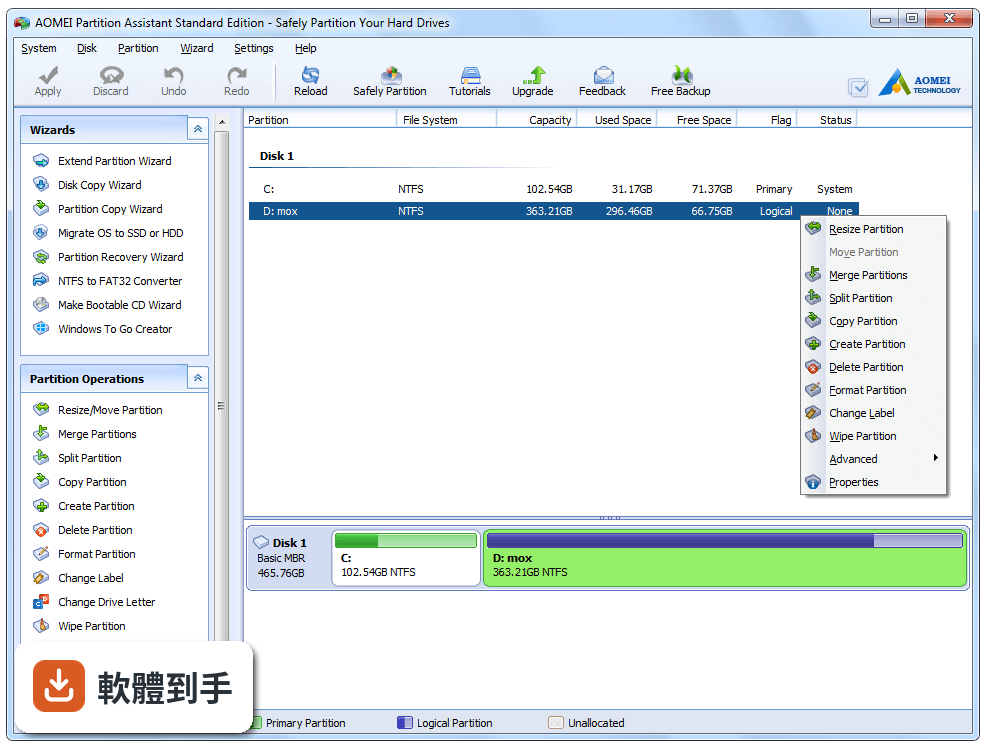
主要做磁碟分割區的管理。白話來說,你可以調整分割區大小(把 C 槽變大)、合併兩個相鄰的分割區、把一個大的分割區拆成兩個、刪除或格式化不要的分割區。另外它也能整顆硬碟複製到另一顆(俗稱克隆)、把系統從傳統硬碟搬到 SSD、在 MBR 和 GPT 兩種磁碟格式之間轉換,以及製作開機隨身碟來處理進不了系統的電腦。
02我 C 槽滿了,D 槽還有空間,用這套軟體能把 D 槽的空間分給 C 槽嗎?
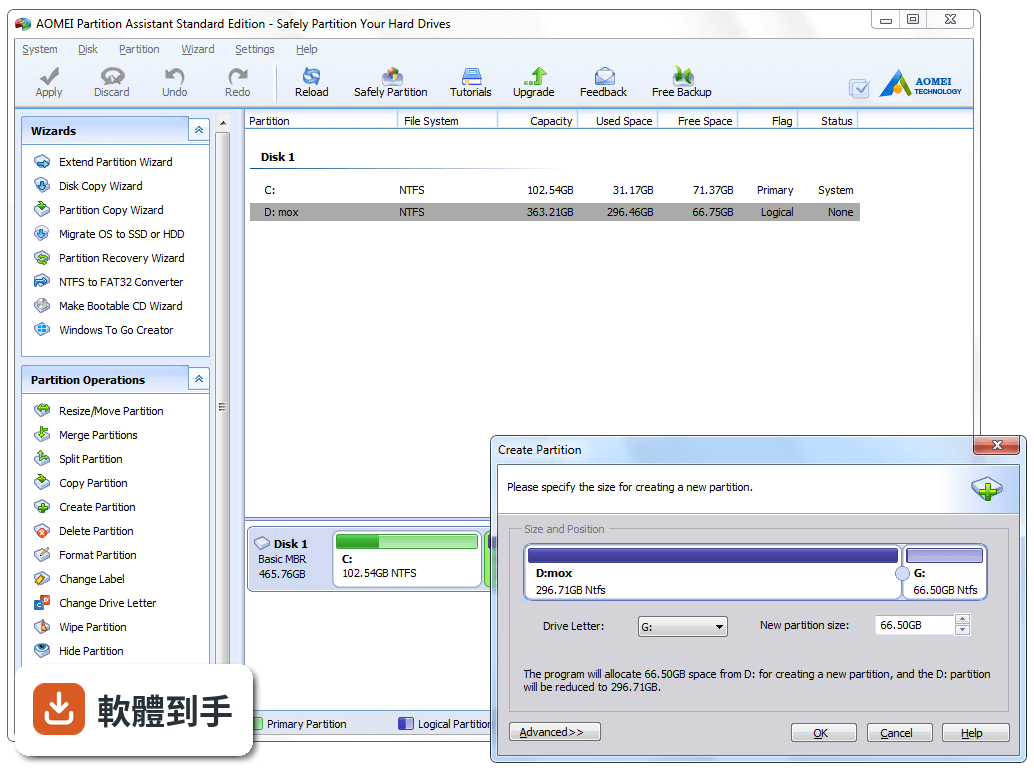
可以。它的「配置可用空間」功能就是做這件事:把某個分割區多餘的空間,重新分配給另一個分割區。操作上,選取 D 槽、指定要挪出多少空間,再選取 C 槽、把空間加進去,最後按套用。前提是兩個分割區在同一顆實體硬碟上,而且中間沒有被其他分割區擋住。如果 C 槽和 D 槽中間還有一個修復分割區,就得先處理那個分割區。
03調整分割區大小會不會把資料弄不見?
這套軟體標榜調整大小不會遺失資料,但這不代表零風險。任何分割區操作都有出錯的可能,尤其是碰到系統槽、電源不穩、或軟體在執行中當機。官方自己也建議在操作前先備份重要資料。如果你要調整的是裝著系統的 C 槽,建議先做一次系統備份或建立還原點,再開始動工。
04我想把舊硬碟的系統整個搬到新 SSD,這套軟體能處理嗎?
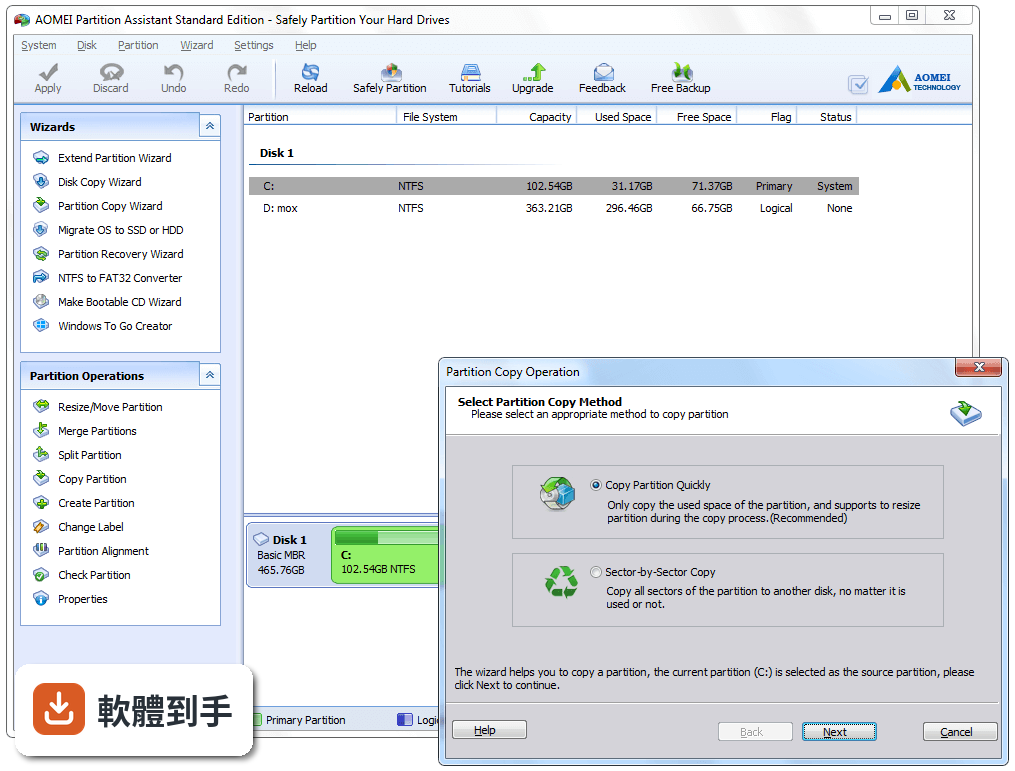
可以。它的「系統遷移」功能就是專門把作業系統從舊硬碟搬到 SSD 或另一顆硬碟,遷移後不需要重灌系統。操作流程大致是:接上新硬碟、在軟體裡選「系統遷移」、指定目標磁碟、確認後執行。要注意的是,免費版的功能說明裡有提到遷移系統,但官方文件同時也說部分進階功能(如動態磁碟完整支援)需要升級到付費版,建議先確認你的硬碟類型在免費版支援範圍內。
05它能把 MBR 磁碟轉成 GPT 嗎?轉了會不會開不了機?
可以轉換,而且官方強調不會遺失資料。MBR 轉 GPT 通常是為了突破 2TB 容量上限,或為了安裝新版 Windows 的某些功能。轉換本身有風險,如果轉換後無法開機,需要用可開機媒體修復。官方建議轉換前先備份重要資料。另外要注意,轉換後主機板必須支援 UEFI 開機模式,舊電腦的 BIOS 模式可能無法讀取 GPT 磁碟。
06這套軟體有中文介面嗎?
沒有。官方提供的介面語系只有英文。如果你的英文閱讀沒問題,操作上不會有太大障礙,因為它的按鈕和選單用字算直白;但如果你對英文介面不熟悉,操作分割區這種高風險動作時會比較吃力。這種情況下可以考慮其他有中文介面的同類軟體,或先看官方網站上的英文教學文件再動手。
07我是電腦新手,只會基本操作,適合用這套軟體嗎?
它的介面設計確實有考慮到一般使用者,主要功能都有精靈引導,照著步驟點下一步通常能完成。但分割區操作本身就不是新手等級的事,誤刪分割區、選錯磁碟、操作到一半中斷,都可能造成資料遺失。如果你是第一次碰分割區軟體,建議先在舊的、沒有重要資料的隨身碟或硬碟上練習一遍,熟悉流程後再動真正的磁碟。
08這套軟體支援哪些 Windows 版本?
官方列出的支援系統是 Windows 7 64 位元、Windows 8 64 位元、Windows 10 64 位元、Windows 11。它不支援 32 位元的 Windows。如果你的電腦是舊的 32 位元系統,這套軟體無法安裝使用。另外,它支援的磁碟類型包含傳統硬碟、SSD、USB 隨身碟和 SD 卡,一般常見的儲存裝置都在範圍內。
09它跟 Windows 內建的磁碟管理有什麼差?為什麼不直接用內建的就好?
內建磁碟管理能做基本的分割、格式化、變更磁碟機代號,但限制很多:不能合併分割區、不能調整不相鄰分割區的空間、系統槽的延伸常常被鎖住、沒有系統遷移功能。這套軟體補上的正是這些缺口——合併、拆分、空間重新分配、系統搬移、MBR/GPT 轉換。如果你的需求只是開一個新的分割區來放檔案,內建的就夠了,不需要裝第三方軟體。
10這套軟體是免費的嗎?有沒有什麼功能是免費版不能用的?
它是免費軟體,但免費的是「Standard」版本,僅供個人和家庭使用。官方資料顯示,付費的專業版才有動態磁碟完整管理、命令列操作、從一個分割區分配空間到另一個分割區等進階功能。免費版對動態磁碟的支援有限。如果你只是要調整一般分割區、合併、轉換格式,免費版通常夠用;但如果你有動態磁碟或商業用途需求,就要考慮付費版或其他方案。
11跟 MiniTool Partition Wizard Free 或 EaseUS Partition Master Free 比起來,這套有什麼明顯的弱點嗎?
以評分人數來看,MiniTool 有 361 人評分、EaseUS 有 244 人評分,AOMEI 是 214 人,三者差距不大,AOMEI 的評分(7.8/10)略低於前兩者。比較明顯的弱點是介面只有英文,而 MiniTool 和 EaseUS 都有中文介面,對台灣使用者來說親切度有差。另外,AOMEI 近兩年更新頻率偏低,官方資料顯示近 24 個月只有 1 次更新,如果你在意軟體維護積極度,這點需要考慮。
12這套軟體適合拿來處理開不了機的電腦嗎?
可以。它有「建立可開機媒體」的功能,可以製作 Windows PE 開機隨身碟,用來處理無法正常進入系統的電腦。操作方式是先在正常的電腦上把軟體裝好、製作開機隨身碟,再用那支隨身碟開機進入修復環境。官方說明提到這個功能支援 Windows 7、8、10、11 的主要版本。不過要注意,製作開機媒體需要另外準備一支容量夠大的隨身碟,而且步驟比一般分割區操作複雜一些。
下載與官方連結
前往官方網站 下載 AOMEI Partition Assistant
PAssistStd10.exe · 連結指向軟體原廠
版本紀錄
- 2026-10-20 AOMEI Partition Assistant Standard Edition 10.12.2 81.3 MB
- 2026-08-13 AOMEI Partition Assistant Standard Edition 10.12.0 81.3 MB
- 2023-11-07 AOMEI Partition Assistant Standard Edition 10.2.1
再看 5 筆
這一版改了什麼
What's new in this version:
AOMEI Partition Assistant Standard Edition 10.2.1
- Optimized “the display of Partition Assistant in high-DPI devices”: Now it is compatible well with high resolution and DPI monitor.
- Added new languages: Romanian and Swedish. Now Partition Assistant supports 21 languages.
AOMEI Partition Assistant Standard Edition 10.2.0
- Added:"Duplicate Files Finder": Fast find and remove duplicate files in Windows 7 and above to free up disk space and speed up your computer
Fixed:
- After opening the disk or partition properties, clicking the refresh button might cause the program to crash if there is a new device update
- Launching the PC Cleaner in individual environments causes the program to crash
- Fixed some known bugs of “Check Partition”
- Program activation failed in individual environments
AOMEI Partition Assistant Standard Edition 10.1.0
- Added:"UEFI BIOS Boot Options Manager": Easily and quickly change, delete, backup, restore, and refresh your EFI/UEFI BIOS Boot Options without manual entry into BIOS
AOMEI Partition Assistant Standard Edition 10.0.0
- Brand-new user interface: new version brings a more streamlined, modern and intuitive look and feel
- Added: support creating multiple partitions on a USB drive and assigning drive letters to each partition
- Fixed issue: program crashes when recovering lost or deleted partitions on a disk whose index number is larger than 10
AOMEI Partition Assistant Standard Edition 9.15.0
- Added "Reset Password": Remove or reset forgotten Windows password for your computer without logging in.
- Added "Recover Data": Quickly recover any lost, deleted, formatted data from HDD, SSD, USB drive, SD card, and more devices
- Fixed issue: Resizing partition under WinPE stuck at 80% in individual environments
AOMEI Partition Assistant Standard Edition 9.14.0
- Added "Using new mode to resize/move partition in the fastest and safest way" to Resize/Move Partition
- Enhanced "Dynamic Disk Manager": Now it allows to convert GPT disk from dynamic to basic
Fixed:
- Unable to adjust header separator bar on App Mover application list page when there is no application
- Unable to terminate the process of moving applications or folders in "App Mover"
- Computer cannot boot after converting its dual-boot system disk between MBR and GPT
AOMEI Partition Assistant Standard Edition 9.13.1
Fixed:
- Fixed issue: BCD failure occurred if partial operations of the program cannot obtain the system part GUID in individual environments
- Fixed some other known bugs
AOMEI Partition Assistant Standard Edition 9.13.0
Fixed:
- Failed to create bootable media on some Windows 11 systems
- Computer cannot boot from the bootable media created in some environments
- The error code 13 occurs when resizing/moving system partition under PreOS mode
- Greatly enhanced the stability of the system disk conversion between MBR and GPT
- Greatly enhanced the stability of OS migration and system disk clone
AOMEI Partition Assistant Standard Edition 9.12.0
- Added “Resize/Move BitLocker Partition”: Improved recognition of BitLocker encrypted partition; Support users to resize or move BitLocker encrypted NTFS partition.
Fixed:
- In some environments, BSoD occurred when Windows boot from the cloned system disk or partition
- Offline key is too long to activate AOMEI Partition Assistant
- Registration caused program to crash in some environments
AOMEI Partition Assistant Standard Edition 9.10.0
- Added"Delete Large Files": Delete large files by type to save more space on your computer
- Fixed some known bugs
AOMEI Partition Assistant Standard Edition 9.9.0
- Added"PC Cleaner": Remove all kinds of junk files from your computer to free up more space and improve computer performance
- Fixed issue: The text still shows "Hide Partition" when you want to unhide a hidden partition by right-click it
AOMEI Partition Assistant Standard Edition 9.8.1
- Fixed some known bugs
AOMEI Partition Assistant Standard Edition 9.8.0
- Enhanced "Migrate OS to SSD", "Disk Clone Wizard","Partition Clone Wizard": The built-in "Hot Clone" technique allows you to migrate OS, clone disk or partition while you keep working. In other words, you don't have to reboot your computer to run the cloning process.
- Fixed issue: AOMEI Windows 11 Update Checker in Standard Edition can't detect 12th Gen Intel® CPU
- Fixed some known bugs
AOMEI Partition Assistant Standard Edition 9.7.0
- Enhanced "App Mover": Now also allows users to move folders from one drive to another. For example, applications related Cache and Downloads folders, or large audio and video folders.
- Added "Disk Speed Test": Quickly measure and certify your disk performance by testing sequential and random read/write speed
AOMEI Partition Assistant Standard Edition 9.6.1
- Optimized "Dynamic Disk Manager": Now it is compatible with Windows 10/11 Home
- Enhanced "Disk Defrag": Now it works under WinPE
Fixed:
- The registration window of "Dynamic Disk Manager" stuck under some environment
- The "Dynamic Disk Manager" crashes during registration in some environment
- The used space of partitions displayed in AOMEI Partition Assistant doesn't match to Windows Explorer
- BSoD occurred when moving some applications with "App Mover"
- The interface text of "App Mover" doesn't display completely
- The program crashes when clicking "Close" during moving applications with the "App Mover".
- Optimized "Disk Health": Now it works better on NVME hard drives
- Failed to uninstall AOMEI Partition Assistant when Disk Defrag is running in the background
- Fixed some other known bugs
AOMEI Partition Assistant Standard Edition 9.6.0
Added:
- "Schedule Defrag": Allow users to set up a schedule to defrag the selected drive automatically. Support daily, weekly, monthly, or event trigger schedule settings
- Optimized "Integrate to Recovery Env"
- Enhanced the ability to resize NTFS partition: Allow users to move, shrink, extend, or merge the NTFS partition of which the cluster size is 128KB/256K/512KB/1M/2M
- "Disk Health" shortcut: Monitor disk health status by right-clicking the disk and selecting "Disk Health" in the drop-down menu
- new language: Danish. Now AOMEI Partition Assistant supports 19 languages
Fixed:
- The Windows 11 computer cannot enter WinPE environment when migrating OS to another hard drive
- The error code 104 occurs when converting the MBR system disk to GPT partition style in some cases
- The 304 and 305 error codes occur when creating Ex2/3/4 partitions
- The program crashes when moving applications on the BitLocker partition to another partition with the "App Mover"
- The program cannot completely cover the entire desktop under the full-screen mode when the Windows taskbar is on the left side
- The messy code occurs when the program is installed with Russian, but run under English operating system environment
- System cannot recognize the recovery partition correctly after resizing the boot partition and recovery partition
AOMEI Partition Assistant Standard Edition 9.5.0
- Added "(Health) SMART": check different hard drive attributes and monitor disk health status so that you can replace a disk or migrate the data before it fails completely
- Optimized "Check for updates": offer more specific information and details on what's new in the latest version
AOMEI Partition Assistant Standard Edition 9.4.1
- Added "Windows 11 Update Checker": check whether your PC meets Windows 11 update system requirements
- Improved user experience
- Fixed some random issues
AOMEI Partition Assistant Standard Edition 9.4
- Added "Disk Defrag": Analyze the hard disk partition and rearrange fragmented data to optimize disk performance
- Fixed issue: There is no progress while performing operations in the PreOS mode
AOMEI Partition Assistant Standard Edition 9.3
- Added "Create Portable Version": Install AOMEI Partition Assistant to a removable device so that directly run it on target computers without installing, which is convenient for IT maintenance and support engineers.
- Fixed issue: "App Mover" function gets the wrong size for some apps