
這是歷史版本頁面 — 看 Defraggler 最新版本
Defraggler 停止開發還能用嗎?老電腦整理硬碟怎麼選
 Defraggler 2.21.993
資料更新 2016-03-16
閱讀約 6 分鐘
電腦用久了,開檔案、開程式總是卡卡的,硬碟燈一直亮著,感覺整台機器都在喘。你想把硬碟整理一下,讓它恢復剛買來時的順暢,但打開 Windows 內建的重組工具,介面陽春,跑起來又慢,也不知道到底有沒有用。你需要的是一個能看清楚硬碟狀態、又能自己決定整理範圍的工具,而不是讓系統自己亂跑一通。
一般人遇到電腦變慢,第一個念頭是重灌或買新電腦,但其實很多時候只是硬碟碎片太多。Windows 內建的重組工具雖然能用,但功能陽春,看不到細節,也無法針對單一檔案或資料夾處理。這類磁碟重組工具的切入點,是讓你把整理硬碟這件事變得更主動、更精準——你可以指定要整理誰、什麼時候整理,甚至連系統開機時才能動的檔案也能處理。
01Defraggler 能整理哪些東西?只能整理整顆硬碟嗎?
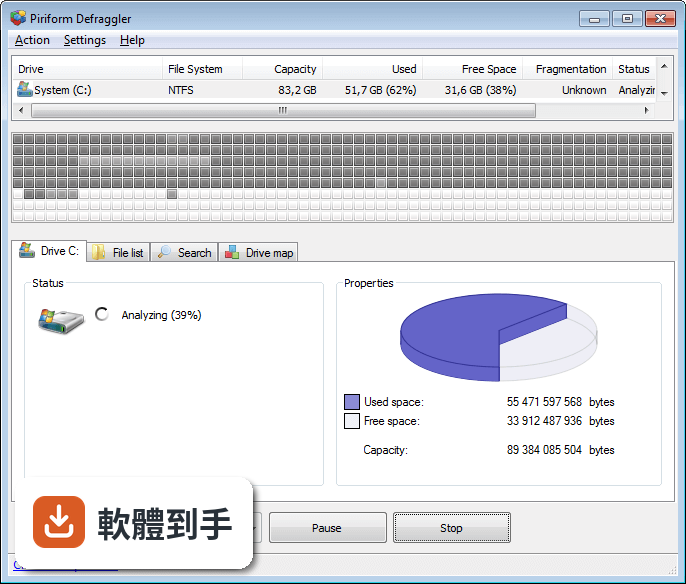
它可以整理整顆硬碟,也可以只針對單一檔案或資料夾做重組。如果你知道某個特定資料夾因為常常讀寫而變慢,可以只選那個資料夾來處理,不用每次都跑完整顆硬碟。這對硬碟容量大、重組時間長的人來說很實用,能省下不少等待時間。
02它可以設定自動整理嗎?還是每次都要自己開?
可以設定排程,讓它每天、每週或每月自動執行重組。設定好之後,時間到了它就會自己跑,不需要你手動開啟。這對固定使用電腦的人來說很方便,可以趁睡覺或下班時間讓它默默整理,隔天開機就發現硬碟變順了。
03開機時整理系統檔是什麼意思?什麼時候會用到?
有些系統檔案在 Windows 正常運作時是被鎖住的,沒辦法在一般狀態下重組。開機時重組就是讓它在進入系統前先處理這些檔案,把碎片整理好。如果你發現開機速度越來越慢,或是系統檔碎片特別嚴重,這個功能就能派上用場。不過它會讓開機時間稍微變長,這是正常的。
04它對 SSD 有用嗎?還是只適合傳統硬碟?
官方說明指出,傳統重組對 SSD 來說其實沒有必要,但這套軟體有提供 SSD 優化功能,目的是改善效能和延長使用壽命。所以如果你用的是 SSD,它不會像傳統硬碟那樣做重組,而是用另一種方式處理。不過這部分的效果如何,官方資料沒有提供具體數據,需要自己實際測試看看。
05那個磁碟地圖要怎麼看?整理前後差在哪?
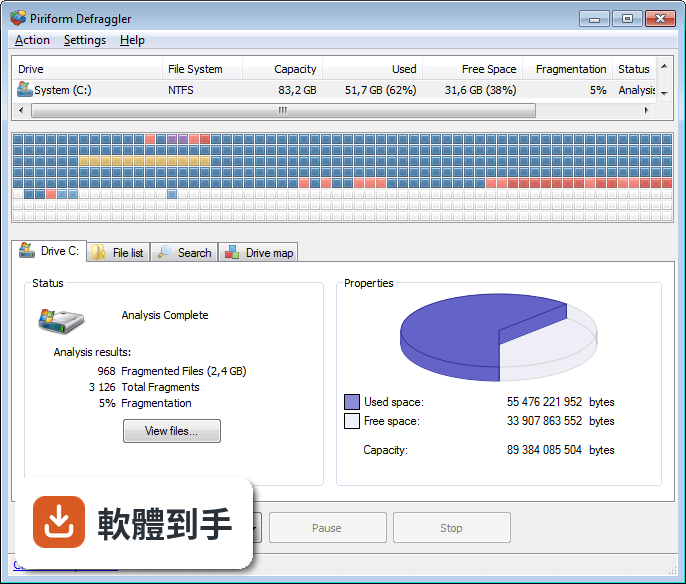
磁碟地圖會用不同顏色標示硬碟區塊的狀態,讓你看得出哪些是空的、哪些沒碎片、哪些需要重組。整理前你會看到很多散落的碎片區塊,整理完之後這些區塊會變得連續、集中。這不是拿來看的,是讓你知道硬碟到底亂在哪裡,以及整理完之後有沒有真的改善。
06這套軟體適合什麼樣的人用?
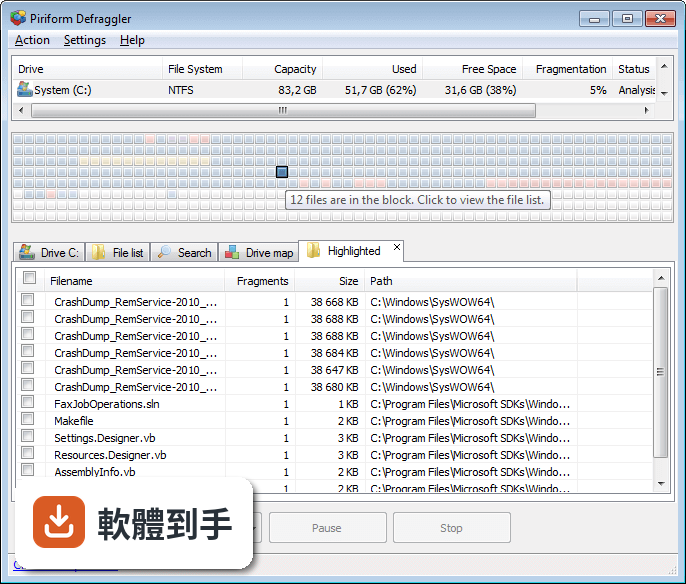
適合還在用傳統硬碟、而且電腦效能明顯變慢的人。它的介面設計得算直觀,官方說明也提到新手和進階使用者都適用。不過因為介面只有英文,如果你對英文操作介面不熟悉,使用上會多一層障礙。另外,它支援 Windows 7 到 Windows 10,舊電腦使用者也能用。
07介面只有英文,看不懂怎麼辦?
這套軟體目前只有英文介面,沒有中文選項。如果你對英文不熟,操作上會需要花時間對照功能名稱。不過它的介面不算複雜,主要功能就那幾個,可以靠翻譯工具或網路教學補足。如果你完全無法接受英文介面,可以考慮其他有中文的磁碟重組工具,但這方面需要自己另外確認。
08新手用這套會不會太難?
官方說明強調它的介面設計對新手友善,主要功能都放在明顯的位置,不需要複雜設定就能開始重組。基本操作就是選磁碟、按重組、等它跑完。進階功能像是排程、開機重組、SSD 優化,可以等熟悉之後再慢慢摸索。整體來說,只要會用滑鼠點選,應該不會太困難。
09這套軟體已經停止開發了,還值得用嗎?
官方說明明確指出它已經不再開發,屬於 legacy 工具,不會有新功能或更新。這代表如果你遇到 bug 或相容性問題,不會有人修復。不過對舊電腦來說,它還是可以正常運作,功能也完整。如果你只是要整理硬碟、不追求新功能,它依然能用;但如果你在意軟體維護和長期支援,就要考慮其他選擇。
10Windows 內建的重組工具夠用嗎?還需要另外裝嗎?
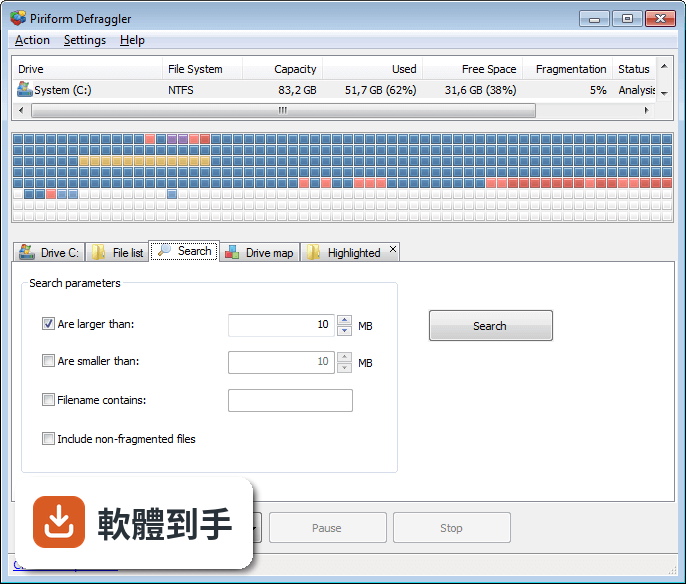
Windows 內建的重組工具可以處理基本需求,但功能比較陽春,看不到碎片細節,也無法針對單一檔案或資料夾處理。Defraggler 的優勢在於你能自己決定整理範圍、設定排程、看磁碟地圖,這些都是內建工具沒有的。如果你的硬碟碎片問題不嚴重,內建工具就夠了;如果已經明顯影響效能,這套軟體能給你更多控制權。
11有沒有其他更多人用的重組軟體可以選?
有。在功能相近的軟體中,Smart Defrag 有 237 人評分,Auslogics Disk Defrag 有 133 人評分,都比 Defraggler 的 60 人評分多,表示有更多人使用。這些軟體的功能和介面各有差異,有些可能持續更新中。如果你在意軟體是否有人維護、社群是否活躍,可以優先考慮評分人數較多的選項。
12我的電腦是 SSD,還需要裝這套嗎?
官方說明提到傳統重組對 SSD 沒有必要,但這套軟體有提供 SSD 優化功能。如果你的 SSD 使用上沒有明顯問題,其實不太需要額外安裝重組工具。SSD 的效能衰退主要來自寫入次數,而不是碎片問題。如果你只是想優化 SSD,可以考慮其他專門的 SSD 工具,但這方面官方資料沒有提供更多資訊,需要自行研究。
下載與官方連結
dfsetup221.exe · 連結指向軟體原廠
版本紀錄
- 2026-02-22 Defraggler 2.22.995 6.1 MB
- 2016-03-16 Defraggler 2.21.993
這一版改了什麼
What's new in this version:
Defraggler 2.21.993
- Improved Analysis and Defrag performance
- Improved memory usage and management architecture
- Optimized 64-bit builds on Windows 8 and 10
- Improved update checking process
- Updated exception handling and reporting
- Improved localization and language support
- Minor GUI improvements
- Minor bug fixes
Defraggler 2.20.989
- Improved SSD Optimize and Quick Optimize
- Improved Windows 10 support
- Optimized moving Files or Folders to end of drive
- Updated crash reporting architecture
- Optimized remaining time and benchmark calculations
- Minor GUI improvements
- Minor bug fixes
Defraggler 2.19.982
- Added move Files or Folders to end of drive.
- Improved SSD Optimize and Quick Optimize.
- Added new scriptable /CHECKERRORS parameter to check drive for errors.
- Added option to disable auto Benchmark after Defrag.
- Improved localization support.
- Minor GUI improvements.
- Minor bug fixes.
Defraggler 2.18.945
- Added Disk Performance graphs to Statistics tab.
- Added Quick Optimize for SSD.
- Added ability to view information for different drives when an operation is in progress.
- Improved Health tab loading speed.
- Added new scriptable /UPDATE parameter for background updates. (Defraggler Professional only).
- Improved detection of files without extensions in File list tab.
- Minor GUI improvements.
- Minor bug fixes.
Defraggler 2.17.898
- Added New Statistics tab.
- Added Intel, Plextor, Micron and OCZ SSD optimization.
- Added progress information to tray tooltip.
- Improved time remaining calculation.
- Enhanced Freespace Defrag procedure.
- Improved memory usage.
- Optimized benchmarking algorithm.
- Added Indonesian translation.
- Minor GUI improvements and bug fixes.
Defraggler 2.16.809
- Added Windows 8.1 support.
- Added SSD optimization for Windows 8.
- Added Samsung and JMicron SSD TRIM optimization.
- Enhanced Solid State Drive detection accuracy.
- Added additional SMART data to Health tab.
- Improved search procedure for finding small files.
- Updated translations.
- Minor GUI improvements.
- Minor bug fixes.
Defraggler 2.15.742
- Optimized performance of Analyze and Defrag on all OSs.
- Improved Context Menu defrag features.
- Added File Type and Last Modified Date columns to the File List.
- Added progress information to Boot-time Defrag.
- Improved handling of locked and read-only drives.
- Improved management of unmounted drives.
- Added additional drive information.
- Minor GUI improvements and bug fixes.
Defraggler 2.14.706
- Added Freespace Defrag to scheduler.
- Added single-click analysis of multiple drives.
- Added support for UDF file systems.
- Improved searching with wildcards.
- Improved shell extension on 64-bit systems.
- Improved GUI navigation.
- Fixed minor bug in the monthly scheduler.
- Minor improvements and bug fixes.
Defraggler 2.13.670
- Added Quick Defrag scheduling.
- Added Fragmentation Threshold to scheduled defrag options.
- Added option to close Defraggler after defragmentation is complete.
- Added support for 3TB external drives.
- Added support for drives with allocation units greater than 4KB.
- Added support for ReFS file systems.
- Updated translations.
- GUI and usability improvements.
- Minor bug fixes.
Defraggler 2.12.628
- Added Windows 2012 Server support.
- Added support for drives mounted as NTFS junction points.
- Scheduled defrags can now be prevented if specific processes are running.
- Improved placement of fragments larger than 100MB.
- Added advanced crash reporting.
- Updated translations.
- GUI and usability improvements.
- Minor bug fixes.
Defraggler 2.11.560
- Added support for Windows 8.
- Added Minimize to Tray.
- Added right-click Move File to end of Drive feature.
- Improvements to Free space calculation.
- Fixed exclusions in df.exe.
- SSD drives are now handled correctly when drives are queued for defrag.
- Improved drive map block calculation for very small drives.
- Shortcuts are now correctly interpreted when calculating fragmentation levels.
- Improved support for /minpercent parameter for df.exe.
- Minor GUI improvements.
- Minor bug fixes.
Defraggler 2.10.424
- Defragmentation speed improved by up to 30%.
- Optimized free space algorithms.
- Re-architected scheduling manager.
- Improved the fragmentation calculation during Defragmentation.
- Fixed keyboard support for scheduler.
- Minor UI tweaks.
Defraggler 2.09.391
- Added Defrag Time Remaining.
- Improved formatting of Smart data.
- Smart data can now be copied.
- Updated support for McAfee Endpoint Encryption.
- Performance improvement on Windows 8.
- Improved accuracy of SSD detection.
- Improved unicode support for export file list.
- Fixed issued that caused the Benchmark button to disappear.
- Benchmarking info is now included in the export file list.
- Improved usability in Options dialog.
- Added Latvian language.
- Minor bug fixes and tweaks.
Defraggler 2.08.373
- Added Disk and File benchmarking.
- Added Volume Shadow Service (VSS) compatible mode.
- Improvements to disk health tab.
- Added Real Value information to SMART data.
- Health tab now supports Fahrenheit.
- Improvements to SSD detection.
- Minor fixes to scheduler stop commands.
- Minor defrag algorithm improvements.
- Translation fixes.
Defraggler 2.07.346
- Added Drive Health information.
- Improved detection of SSD drives.
- Improved scheduler when the computer is idle.
- Fixed unnecessary creation of scheduler.his files.
- Improved uninstallation of shell commands.
- Fixed issue that could cause GDI leak in the Options dialog.
- Several small stability fixes for Windows 7.
- Macedonian language added.
- Minor bug fixes and improvements.
Defraggler 2.06.328
- Added advanced options to schedule (timeout, idle time).
- Fragmentation calculation can now be customized.
- Improvements to file placement algorithms.
- Defraggler can now be assigned as the default defrag tool for Windows.
- Added enable/disable shell extension.
- Fixed issue that could cause df.exe to abort unexpectedly.
- Scheduler now displays the time it last ran.
- Improvements to non-English translations.
- Fixed incorrect tab-stop order in scheduler dialog.
- Added support for Kurdish language.
- Minor bug fixes and improvements.
Defraggler 2.05.315
- Improved defrag speed of large files in 32-bit OSs.
- Improved drive analysis speed.
- Improved Solid State drive detection.
- Fixed bug with incorrect position of Defraggler item in file/folder context menu.
- Added option to enable/disable shell extension.
- Fixed problem with df.exe sometimes aborting.
- Fixed file type exclusion bug.
- Added support for the Kurdish language.
- Added last scheduled defrag information.
- Shell extension fixed to work correctly with UAC.
- Translation fixes.
- Online Help link fixed.
- Minor bug fixes.
Defraggler 2.04.297
- Added Windows Explorer extension for analysis and defrag.
- Added option to shutdown the system after finishing a scheduled task.
- Added minimum drive fragmentation percent parameter "/minpercent" to df.exe.
- Improved 64-bit drive analysis speed.
- Added missing strings to translations.
- Minor bug fixes.
Defraggler 2.03.282
- Added support for Windows 7 SP1.
- Improved file shuffling algorithm (allows Defraggler to move files out of the way).
- Vastly improved the speed of the file list for FAT drives.
- Faster start/stop processes for FAT drives.
- Improved support for low RAM situations.
- Drive map block size can now be updated dynamically.
- Fixed bug that could cause shutdown to fail with Freespace Defrag.
- Improved results in Search tab when 'Include non-fragmented files' is checked.
- Better support for very long non-English strings.
- Better keyboard support in the File List.
- You can now navigate tabs using Ctrl-Tab.
- Improved support for non-standard Windows colors.
- New extensions to be moved to the end of the drive are now checked by default.
- Better handling of delimiters in exclude list.
- Minor tweaks and fixes.
Defraggler 2.02.253
- Improvements to speed and accuracy of the search algorithm.
- Redesigned NTFS processes for optimized speed and memory.
- Improved event handling with Windows 7.
- Improved scheduling for non-admin users.
- Fixed issue that caused drive icons to disappear from the drive list.
- Fixed issue that caused the Analyze button to be incorrectly drawn during long tasks.
- Improved handling of long non-English strings in options dialog.
- Fixed issue with fragmentation percent when drive contains sparse files.
- Moved about dialog to a separate window.
- Improved error logging in Windows 7.
- Minor GUI changes and tweaks.
- Minor bug fixes.
Defraggler 2.01.239
- New Scheduler - Set a defrag on login, idle or specific intervals.
- Improved memory use on Windows 7 with lots of files.
- Improved placement of large files on exFAT.
- Improved caching of column sort options.
- Fixed prompt when attempting to empty the recycle bin on Vista 64.
- Added link to online docs (Help > Online Help).
- Added hot-key for Quick Defrag.
- Minor bug fixes.
Defraggler 2.00.230
- Added offline defragmentation of system files during boot process.
- New Drive Map with custom colors and styles.
- New improved defragmentation engine.
- Improved Windows 7 compatibility.
- Lots of minor GUI improvements.
Defraggler 1.21.209
- Added Free Space defrag to the command-line app.
- Internal library updates.
- 64-bit compiler optimizations.
- Fixed the flicker on the main window tabs.
- Changed internal links to piriform.com/defraggler.
- Improvements to translations.
Defraggler 1.20.201
- Improved drive map updating.
- Improved 64-bit memory addressing.
- Improved Quick Defrag file algorithms.
- Improved handling of Windows styles.
- Fixed bug with MFT buffer zone.
- Added prompt on exit when long tasks are running.
- Many improvements to UI when using non-English.
- Added Georgian translation.
- Minor stability fixes.
Defraggler 1.19.192
- Added queueing of multiple drives.
- New option to disable caching of drive analysis data to improve memory usage.
- Improved placement of files in Quick Defrag algorithm.
- Improved Windows 7 support.
- Lots of other small tweaks and fixes.
Defraggler 1.18.185
- Optimized and bug fixed defrag with large numbers of small files.
- Optimized 64-bit memory usage.
- Drive map is no longer blocked by background operations.
- Simplified the drive map highlighting to make it faster and more memory efficient.
- Fixed control sizes on file search form.
- Fixed issue with exclude files dialog.
- Fixed a few missing translations.
- Fixed bug displaying filenames containing ampersands.
- Improved memory leak detection mechanism.
- Lots of minor bug fixes.
Defraggler 1.17.172
- Improved Windows 7 support.
- Rearchitected memory management on Vista/W7.
- Improved handling of scheduled tasks.
- Fixed Vista redraw issue with the search box.
- Improved button size and placement for non-English translations.
- Added support for wildcards in the search feature.
- Lots of other little tweaks and fixes.
Defraggler 1.16.165
- New native 64-bit EXE.
- Defrag engine improvements to take advantage of 64-bit code.
- Fixed Vista and Windows 7 repaint issue when language was changed.
- Improved moving routine for small orphaned files.
- Added support for Danish, Slovak, Chinese (Simplified) and Vietnamese languages.
- Lots of small tweaks and improvements.
Defraggler 1.15.163
- Redesigned disk space usage pie chart.
- Windows 7 support added.
- Added Portable U3 installer support.
- Improved numerical and text validation.
- Fixed bug in automatic update checking.
- Many GUI fixes and improvements.
Defraggler 1.14.159
- Added 'Empty recycle bin option' before defrag.
- Improved placement of files around MFT.
- Fixed incorrect defrag button behavior (defrag checked and highlighted while using tabstop).
- Fixed crash occurring after pressing defrag button.
- Fixed tab order on cleanup drive dialog.
- Added Run Defraggler option after installation.
- Added Estonian support.
Defraggler 1.13.155
- Added quick defrag to command line version.
- Added option to view folder index entries in file list.
- Fixed bug related to excessive GDI objects.
- Fixed tab issue in search tab.
- Improved speed of moving very large files to the end of the drive.
- Several minor bugs fixed.
Defraggler 1.12.152
- Added Quick Defrag feature.
- Added exFAT compatibility.
- Architecture changes to improve defrag performance.
- Improved placement of most commonly used files.
- Various UI tweaks.
Defraggler 1.11.148
- Added custom drive map colors (Options > General > Interface).
- Fixed schedules for multiple drives.
- Fragmented info is now displayed in df.exe.
- 'Large files' can now be excluded from freespace defrag (Options > Defrag > Advanced).
- Improvements to the way crash data is collected.
- Various minor UI tweaks.
- Several minor bugs fixed.
Defraggler 1.10.143
- Added file exclusion feature.
- Added detection of Solid State Drives.
- Added "Include non-fragmented files" checkbox to file search.
- Improved interactivity of search.
- Fixed problem that could allow df.exe and Defraggler.exe to run at the same time.
- Fixed rare crash while reanalyzing.
- Minor GUI text changes.
- Minor bug fixes.
Defraggler 1.09.138
- New search feature.
- Various tweaks to the drive list.
- Improvements to freespace calculation when moving large files.
- Improved handling of of sparse files.
- Lots of minor UI tweaks.
Defraggler 1.08.132
- Improved handling of NTFS compressed files when moving to end of disk.
- Added /shutdown option to df.exe.
- Added /large file option to df.exe.
- Drive list now includes a % fragmented column.
- Blank file types no longer allowed in Large file options.
- Warning when trying to set a schedule in the past.
- Right click 'Check this' option is now greyed correctly.
- Various small UI tweaks.
Defraggler 1.07.124
- Added Shutdown after Defrag option.
- Improved Interactive Drive Map response in Vista.
- Language DLLs now stored in /lang folder.
- Program startup speed improved.
- Architecture changes to improve defrag performance.
- Minor tweaks to main UI.
- Several minor bug fixes.
Defraggler 1.06.118
- Added interactive drive map.
- Improved scheduler handling of multiple drives.
- Fixed rare crash in Vista when defragging Folder entries.
- Optimized file placement for Win2k3.
- Improved placement of large files at end of drive.
- Added Dutch, Ukranian and Norwegian translations.
- Various UI tweaks.
- Several minor bug fixes.
Defraggler 1.05.111
- Added 'Move files to end of drive' feature.
- Added 'Save settings to ini file' option.
- Added French, Croatian, Chinese Traditional, Catalan, Bulgarian and Turkish translations.
- Fixed rare crash under Vista that could happen when using menus.
- Improvements to debug logging routines.
- Various small UI tweaks.
Defraggler 1.04.098
- Multi-language release (16 new languages!).
- Improved handling of daily schedules.
- Fixed bug that could file defrag to be very slow.
- Improved logging of analysis methods.
- Loads of performance improvements.
- Loads of bug fixes.
Defraggler 1.03.093
- Added support for multiple languages.
- New options dialog.
- Added scheduler.
- Fixed display of labels for removable drives.
- Added support for tabbing between sections.
- Loads of performance improvements.
- Minor bug fixes.
Defraggler 1.02.085
- Improved progress indicator accuracy.
- Added checks for freespace.
- Various GUI and usability improvements.
- Fixed UI issues with large DPI settings.
- Fixed 64-bit compatibility issue that would ignore some files.
- Improved drive map (defragged files are now always marked as blue).
- Added background update checking.
- Fixed minor bug in progress indicator for chkdsk.
- Minor bug fixes.