
這是歷史版本頁面 — 看 GitHub Desktop 最新版本
不會用 Git 指令?GitHub Desktop 能做什麼
 GitHub Desktop 1.2.1
資料更新 2018-05-30
閱讀約 7 分鐘
你大概遇過這種狀況:手邊有個專案想丟上 GitHub 備份,或想抓別人的開源專案下來改,但開啟終端機看到 `git clone`、`git push`、`git merge` 這些指令就頭痛。明明只是想把程式碼同步一下,卻得先搞懂一堆引數,一個不小心打錯字,整個分支亂掉,更不知道怎麼救回來。你當下只想用滑鼠點一點就把事情做完,而不是背指令。
很多人遇到這情況,會硬著頭皮去查 Git 教學,但看完還是一知半解;也有人改用網頁版 GitHub 慢慢上傳檔案,但專案一多、檔案一改,這種做法馬上變成惡夢。這類圖形介面的 Git 工具,切入點就是把「版本控制」這件事變成看得見的操作——哪個檔案改了、改了什麼、要提交到哪個分支,全部用介面呈現,讓你不碰指令也能完成工作。
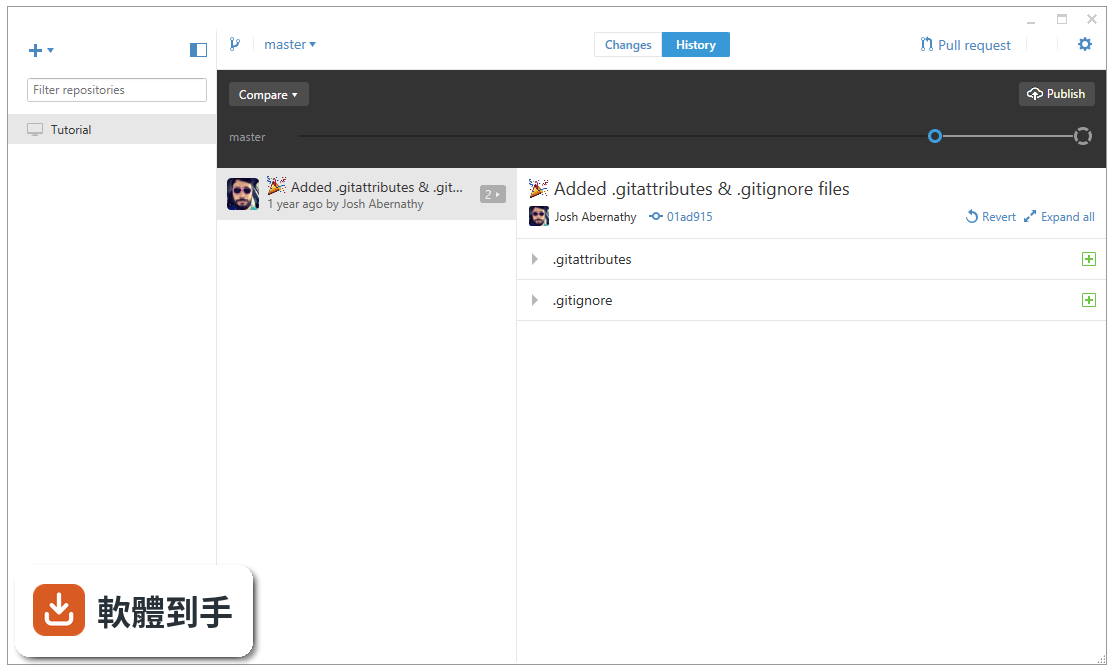
01GitHub Desktop 到底能拿來做什麼?
它是一套把 Git 操作圖形化的桌面軟體,主要功能包含複製遠端倉庫到本機、建立分支、提交變更、傳送 pull request、合併分支,以及檢視提交歷史。你不需要在終端機打指令,這些動作都能透過按鈕和選單完成。它特別針對 GitHub 平台設計,登入帳號後可以直接看到你的倉庫清單,也能一鍵複製別人的專案到本機。
02我不會任何 Git 指令,用這套軟體學得會嗎?
可以。它的介面設計就是為了降低 Git 的學習門檻,主要操作都圍繞著「複製倉庫」「建立分支」「提交變更」這幾個動作。你只要看得懂「Commit」「Push」「Pull」這幾個按鈕,就能開始用。但要注意,它不會教你 Git 的底層概念,如果你完全不懂分支、合併是什麼意思,建議還是先花半小時瞭解一下基本名詞,操作起來會更順。
03它跟直接在 GitHub 網頁上傳檔案有什麼差別?
網頁版只能一次上傳單一檔案,而且無法處理大量檔案變更、分支切換或衝突解決。GitHub Desktop 是把整個倉庫同步到本機,你可以用自己習慣的編輯器改程式碼,改完之後在軟體裡一次提交所有變更,還能看到每個檔案改了哪些內容。對於有多個檔案、多次修改的專案,這套流程比網頁版有效率得多。
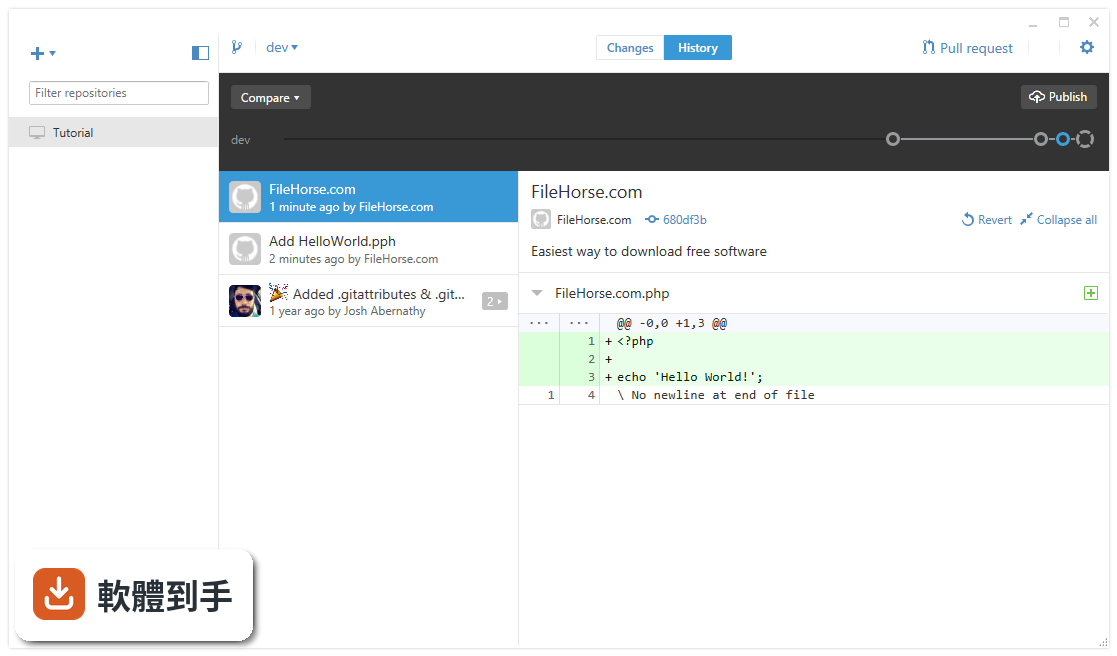
04它能不能處理多人協作的流程?
可以。它支援建立分支、傳送 pull request、合併分支,也支援共同作者標記。團隊成員各自開分支開發,完成後透過 pull request 合併回主線,這些流程都能在介面裡完成。不過它不包含程式碼審查或 issue 管理功能,那些還是要回到 GitHub 網頁上操作。它負責的是「把程式碼同步好」這一段,協作流程的討論和追蹤還是靠 GitHub 平台本身。
05遇到合併衝突時,這套軟體能幫我解決嗎?
它會標示出哪些檔案發生衝突,但不會幫你自動解決。衝突發生時,軟體會列出衝突檔案,你需要用自己慣用的編輯器開啟這些檔案,手動決定要保留哪邊的內容,改完之後再回到 GitHub Desktop 提交變更。換句話說,它負責「告訴你哪裡有衝突」,實際修改還是要靠你自己。
06這套軟體適合什麼樣的人用?
適合三種人:剛開始接觸 Git、不想碰指令的初學者;習慣用圖形介面操作、不喜歡終端機的開發者;以及主要使用 GitHub 平台、不需要支援其他 Git 服務的人。它把常見操作都變成視覺化按鈕,對設計師、檔案撰寫者這類偶爾需要提交程式碼的人來說,也比指令介面友善很多。
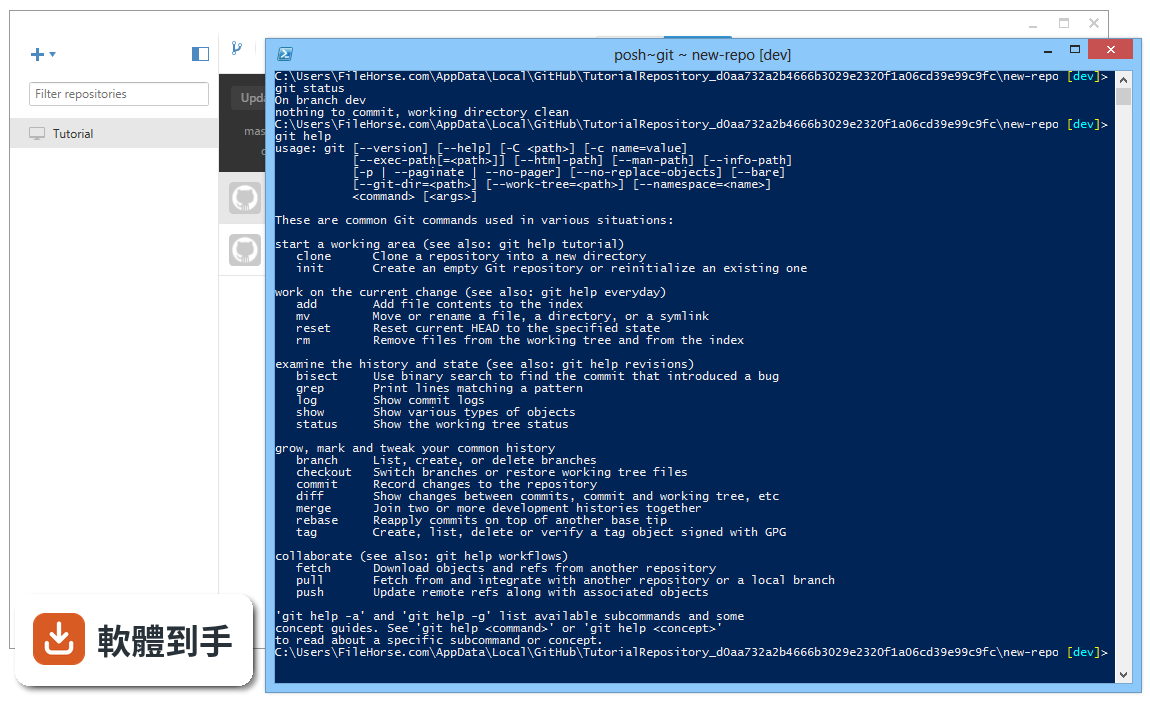
07我主要是用 GitLab 或 Bitbucket,這套軟體適合我嗎?
不適合。GitHub Desktop 是專門為 GitHub 設計的,官方說明明確指出它不支援 GitLab 或 Bitbucket。如果你用的是這兩個平台,需要改用它們各自的工具,或選擇支援多平台的 Git 使用者端,例如 SourceTree。這點在安裝前要先確認清楚,免得裝完才發現無法連上你的倉庫。
08介面只有英文,會不會很難操作?
介面確實只有英文,沒有中文語系可以切換。不過它的操作詞彙不多,主要就是 Repository、Branch、Commit、Push、Pull、Fetch 這幾個字,只要稍微熟悉一下就能上手。如果你對英文介面完全無法接受,操作時會需要一直查單字,這套軟體對你來說會比較吃力,可以考慮找有中文介面的替代工具。
09這套軟體需要付費嗎?有沒有什麼使用限制?
軟體本身是免費的,但使用完整功能必須要有 GitHub 帳號,官方說明指出沒有帳號就無法管理倉庫或與他人協作。GitHub 帳號有免費方案,可以建立不限數量的公開和私有倉庫,但進階功能如較多的 CI/CD 分鐘數、進階協作工具等,需要付費升級方案。軟體本身不會另外收費,但 GitHub 平台的高階功能不是全部免費。
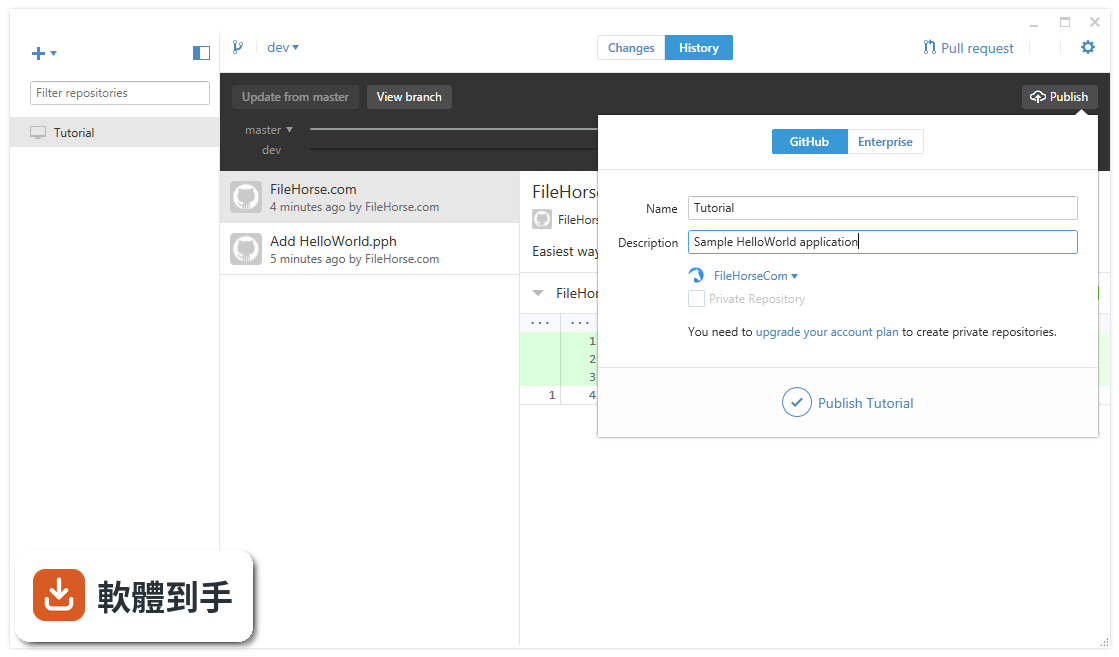
10我發現它更新頻率好像不高,會不會有什麼問題?
從版本紀錄來看,它近兩年只更新了兩次,更新頻率確實不算頻繁。這代表功能新增的速度比較慢,但對於一個功能穩定的工具來說,不頻繁更新不一定代表有問題。如果你需要的是持續有新功能、新介面的工具,這點可能要納入考量;如果你只是要一個能穩定同步倉庫的工具,更新慢反而代表介面不會一直變。
11它跟 SourceTree 比起來,我該怎麼選?
兩者都是免費的 Git 圖形介面工具,但 GitHub Desktop 只支援 GitHub,SourceTree 同時支援 GitHub 和 Bitbucket。如果你只用 GitHub,GitHub Desktop 的介面更簡潔、操作更直接;如果你需要連 Bitbucket 或其他 Git 服務,SourceTree 的彈性更大。另外,GitHub Desktop 的介面只有英文,SourceTree 有中文介面,這點也可以列入考量。
12我發現它的評分人數不多,這代表它不好用嗎?
評分人數少不代表軟體不好,只能說樣本數不多。GitHub Desktop 是 GitHub 官方推出的工具,使用人數其實不少,只是願意去評分的人不多。你可以先安裝試用看看,反正免費,實際操作過最準。如果你習慣參考大量評分來判斷軟體好壞,這套軟體的評分參考價值有限,建議直接看官方檔案或實際用過再決定。
下載與官方連結
GitHubDesktopSetup.msi · 77.1 MB · 連結指向軟體原廠
版本紀錄
- 2026-10-27 GitHub Desktop 3.6.10 257 MB
- 2026-10-25 GitHub Desktop 3.6.9 257 MB
- 2026-10-23 GitHub Desktop 3.6.8 256 MB
再看 5 筆
- 2026-10-09 GitHub Desktop 3.6.7 226 MB
- 2026-09-19 GitHub Desktop 3.6.6 293 MB
- 2026-09-03 GitHub Desktop 3.6.5 293 MB
- 2026-08-12 GitHub Desktop 3.6.4 293 MB
- 2024-02-23 GitHub Desktop 3.3.9
這一版改了什麼
What's new in this version:
GitHub Desktop 1.2.1
Added:
- Brackets support for macOS
- Pull request number and author are included in fuzzy-find filtering
Fixed:
- Decreased the max line length limit
- Updated embedded Git to 2.17.1 to address upstream security issue
Improved:
- Display the difference in file size of an image in the diff view
GitHub Desktop 1.1.1
New:
- Render WebP images in diffs
Fixed:
- Edit context menus in commit form input elements
- Escape behavior for Pull Request list does not match Branch List
- Keep caret position after inserting completion for emoji/mention
- Handle error events when watching files used to get Git LFS output
- Potential race condition when opening a fork pull request
- Show placeholder image when no pull requests found
- Disable commit summary and description inputs while commit in progress
- Ensure pull request cache is cleared after last pull request merged
- Focus two-factor authentication dialog on input
- Branches button no longer disabled while on an unborn branch
- Delete gitignore file when all entries cleared in Repository Settings
- Add visual indicator that a folder can be dropped on Desktop
Fixed:
- Attempt to focus the application window on macOS after signing in via the browser
- Refresh issues when user manually fetches
Improved:
- Add `Discard All Changes...` to context menu on changed file list
- Improve contrast for button labels in app toolbar
- Speed up check for submodules when discarding
- Make keychain known issue more clear within Desktop
- Continue past the 'diff too large' message and view the diff
- Repository association might not have expected prefix
- Add message to gitignore dialog when not on default branch
- Hide Desktop-specific forks in Branch List
- Disregard accidental whitespace when cloning a repository by URL
- Show alert icon in repository list when repository not found on disk
- Repository list now closes after removing last repository
- Move forget password link after the password dialog to match expected tab order
- More descriptive text in repository toolbar button when no repositories are tracked
- Context menu in Changes tab now supports opening file in your preferred editor
GitHub Desktop 1.1.0
New:
- Check out pull requests from collaborators or forks from within Desktop
- View the commit status of the branch when it has an open pull request
Added:
- Add RubyMine support for macOS
- Add TextMate support for macOS
- Syntax highlighting for Elixir files
Fixed:
- Update layout of branch blankslate image
- Expanded avatar stack in commit summary gets cut off
- Clear repository filter when switching tabs
- Avoid crash when unable to launch shell
- Ensure renames are detected when viewing commit diffs
- Fetch default remote if it differs from the current
- Handle Git errors when .gitmodules are malformed
- Handle error when "where" is not on PATH
- Ignore action assumes CRLF when core.autocrlf is unset
- Prevent duplicate entries in co-author autocomplete list
- Renames not detected when viewing commit diffs
- Support legacy usernames as co-authors
Improved:
- Update branch button text from "New" to "New Branch"
- Add fuzzy search in the repository, branch, PR, and clone FilterLists
- Tidy up commit summary and description layout in commit list
- Use smaller default size when rendering Gravatar avatars
- Show fetch progress when initializing remote for fork
- Remove references to Hubot from the user setup page
- Error handling around ENOENT
- Clear repository filter text when switching tabs
- Allow window to accept single click on focus
- Disable drag-and-drop interaction when a popup is in the foreground
GitHub Desktop 1.0.13
New:
- Commit together with co-authors
- PhpStorm is now a supported external editor on macOS
- Update embedded Git to 2.16.1
Improved:
- Blank slate view is now more responsive when zoomed
- Documentation fix for Open in Shell resource
- Improved error handling for Linux
Fixed:
- Allow links in unexpanded summary to be clickable
- Update Electron to 1.7.11 to address security issue
- Allow double dashes in branch name
- Sort the organization list
- Check out PRs from a fork
- Confirm deleting branch when it has an open PR
- Defer user/email validation in Preferences
- Checkout progress did not include branch name
- Don't block branch switching when in detached HEAD
- Handle discarding submodule changes properly
- Show tooltip with additional info about the build status
- Update placeholders to support Linux distributions
- Refresh local commit list when switching tabs
GitHub Desktop 1.0.12
New:
- Syntax highlighting for Rust files
- Syntax highlighting for Clojure cljc, cljs, and edn files
Improved:
- Prevent creating a branch in the middle of a merge
- Truncate long repo names in panes and modals to fit into a single line
- Keyboard navigation support in pull request list
Fixed:
- Inconsistent caret behavior in text boxes when using certain keyboard layouts
- Only render the organizations list when it has orgs
- Checkout now handles situations where a ref exists on multiple remotes
- Retain accounts on desktop when losing connectivity
- Missing argument in FullScreenInfo that could prevent app from launching
GitHub Desktop 1.0.11
New:
- Highlight substring matches in the "Branches" and "Repositories" list when filtering
- Add preview for ico files
- Fallback to Gravatar for loading avatars
- Provide syntax highlighting for Visual Studio project files
- Provide syntax highlighting for F# fsx and fsi files
- Provide syntax highlighting for Kotlin files
- Provide syntax highlighting for Clojure
Improved:
- Toggle the "Repository List" from the menu
- Prevent saving of disallowed character strings for your name and email
- Error messages now appear at the top of the "Create a New Repository" dialog
- "Repository List" header is now "Github.com" for consistency
- Rename the "Install Update" button to "Quit and Install Update"
Fixed:
- Fix ordering of commit history when your branch and tracking branch have both changed
- Prevent creating a branch that starts with a period
- Branch names are properly encoded when creating a pull request
- Re-enable all the menu items after closing a popup
- Removes option to delete remote branch after it's been deleted
- Windows: Detects available editors and shells now works even when the group policy blocks write registry access
- Windows: Menu items are no longer truncated
- Windows: Prevent disabled menu items from being accessed
GitHub Desktop 1.0.10
New:
- ColdFusion Builder is now a supported external editor
- VSCode Insiders build is now a supported external editor
- BBEdit is now a supported external editor
- Hyper is now a supported shell on Windows too
- Swift is now syntax highlighted
- Vue.js is now syntax highlighted
- CoffeeScript is now syntax highlighted
- Cypher is now syntax highlighted
- .hpp is now syntax highlighted as C++
- ML-like languages are now syntax highlighted
- Objective-C is now syntax highlighted
- SQL is now syntax highlighted
Improved:
- Better message on the 'Publish Branch' button when HEAD is unborn
- Better error message when trying to push to an archived repository
- Avoid excessive background fetching when switching repositories
- Ignore menu events sent when a modal is shown
Fixed:
- Parse changed files whose paths include a newline - #3271
- Parse file type changes
- Windows: 'Open without Git' would present the dialog again instead of actually opening a shell without git
- Avoid text selection when dragging resizable dividers
- Windows: Removed the title attribute on the Windows buttons so that they no longer leave their tooltips hanging around
- Windows: Detect VS Code when installed to non-standard locations
- Hitting Return would select the first item in a filter list when the filter text was empty
- Add some missing keyboard shortcuts
- Handle "304 Not Modified" responses
- Don't overwrite an existing .gitattributes when creating a new repository
GitHub Desktop 1.0.9
New:
- ColdFusion Builder is now available as an option for External Editor
- Swift code is now syntax highlighted
Improved:
- Better message on the 'Publish Branch' button when HEAD is unborn
- Better error message when trying to push to an archived repository
Fixed:
- Parse changed files whose paths include a newline
- Parse file type changes
- Windows: 'Open without Git' would present the dialog again instead of actually opening a shell without git
- Avoid text selection when dragging resizable dividers
GitHub Desktop 1.0.8
Fixed:
- Crash when rendering diffs for certain types of files
- Continually being prompted to add the upstream remote, even when it already exists
GitHub Desktop 1.0.7
New:
- Syntax highlighted diffs
- Add upstream to forked repositories
Fixed:
- Only reset scale of title bar on macOS
- Filter symbolic refs in the branch list
- Address path issue with invoking Git Bash
- Update embedded Git to support repository hooks and better error messages
- Provide credentials to LFS repositories when performing checkout
- Assorted changelog typos
GitHub Desktop 1.0.6
Fixed:
- The Branches list wouldn't display the branches for non-GitHub repositories
- Pushing or pulling could error when the temp directory was unavailable
GitHub Desktop 1.0.5
New:
- The command line interface now provides some helpful help!
- Create new branches from the Branches foldout
- Add support for VSCode Insiders
- Linx: Add Atom and Sublime Text support
- Linux: Tilix support
- Linux: Add Visual Studio Code support
Improved:
- Report errors when a problem occurs storing tokens
- Bump to Git 2.14.3
- Don't try to display diffs that could cause the app to hang
- Handle local user accounts with URL-hostile characters
- Cloning a repository which uses Git LFS would leave all the files appearing modified
- Signing in in the Welcome flow could hang
- Properly replace old Git LFS configuration values
GitHub Desktop 1.0.4
New:
- Report Git LFS progress when cloning, pushing, pulling, or reverting
Improved:
- Increased diff contrast and and line gutter selection
- Clarify why publishing a branch is disabled in various scenarios
- Improved error message when installing the command Line tool fails
- Improved Format the branch name in "Create Branch" like we format branch names elsewhere
Fixed:
- Avatars not updating after signing in
- Lots of bugs if there was a file named "HEAD" in the repository
- Handle duplicate config values when saving user.name and user.email
- The "Create without pushing" button when creating a new pull request wouldn't actually do anything
GitHub Desktop 1.0.3
Improved:
- Increase the contrast of the modified file status octicons
Fixed:
- Showing changed files in Finder/Explorer would open the file
- Cloning an empty repository would fail
- Catch logging exceptions
GitHub Desktop 1.0.2
Improved:
- Better message for GitHub Enterprise users when there is a network error
- Clone error message now suggests networking might be involved
- Include push/pull progress information in the push/pull button tooltip
- Allow publishing a brand new, empty repository
- Make file paths in lists selectable
Fixed:
- Disable LFS hook creation when cloning
- Use the new URL for the "Show User Guides" menu item
- Make the SHA selectable when viewing commit details
- Windows: Make `github` CLI work in Git Bash
- Use the initial path provided when creating a new repository
- Windows: Avoid long path limits when discarding changes
- Files would get deleted when undoing the first commit
- Find the repository root before adding it
- Display warning about an existing folder before cloning
- Show contents of directory when showing a repository from Show in Explorer/Finder instead of showing the parent
GitHub Desktop 1.0.1
Improved:
- Message for GitHub Enterprise users when there is a network error
Fixed:
- Disable LFS hook creation when cloning
- Use the new URL for the "Show User Guides" menu item
- Make the SHA selectable when viewing commit details
- Windows: Make `github` CLI work in Git Bash
GitHub Desktop 1.0.0
Simple Changelog:
- Use the loading/disabled state while publishing
- Lock down menu item states for unborn repositories
- Windows: Detecting the available shells and editors when using a language other than English
Image diffs:
- Easily compare changed images. See the before and after, swipe or fade between the two, or look at just the changed parts.
- @mathieudutour implemented image diffs for Kactus, a design review tool forked off GitHub Desktop. Then he was kind enough to submit the work back upstream to us!
Faster cloning:
- See all your repositories and clone them with the click of a button. Git LFS assets download in parallel for even faster cloning.
Editors and terminals:
- Open your favorite editor or shell from the app, or jump back to GitHub Desktop from your shell. GitHub Desktop is your springboard for work.
Everywhere:
- GitHub Desktop works with GitHub Enterprise. Log in to your GitHub Enterprise server, clone, commit, push, and pull. Whether you're working on a personal or company project, GitHub Desktop is here to help.