
這是歷史版本頁面 — 看 Komodo IDE 最新版本
Komodo IDE 老牌多語言編輯器,現在還值得用嗎
 Komodo IDE 11.0.1 Build 90797
資料更新 2017-10-31
閱讀約 6 分鐘
你手上同時寫著 Python、PHP、JavaScript,偶爾還要改幾行 HTML 和 CSS。你不想為了每種語言裝一套編輯器,也不想在幾個視窗之間切來切去。你找的是一套能一次打開、把這些語言都涵蓋進去的工具,最好連除錯、版控、跑測試都在同一個地方完成,不用另外開終端機或瀏覽器。
你原本的習慣可能是用記事本或陽春編輯器硬寫,但寫到後來會發現沒有語法標色、沒有自動補全,連找個變數定義都要靠肉眼。又或者你試過裝一堆外掛把編輯器拼裝成 IDE,但光是設定就耗掉一下午。這類多語言 IDE 的切入點,就是讓你在同一個介面裡完成寫程式、除錯、送版控這整條流程,減少在不同工具之間切換的成本。
01Komodo IDE 是用來做什麼的軟體?
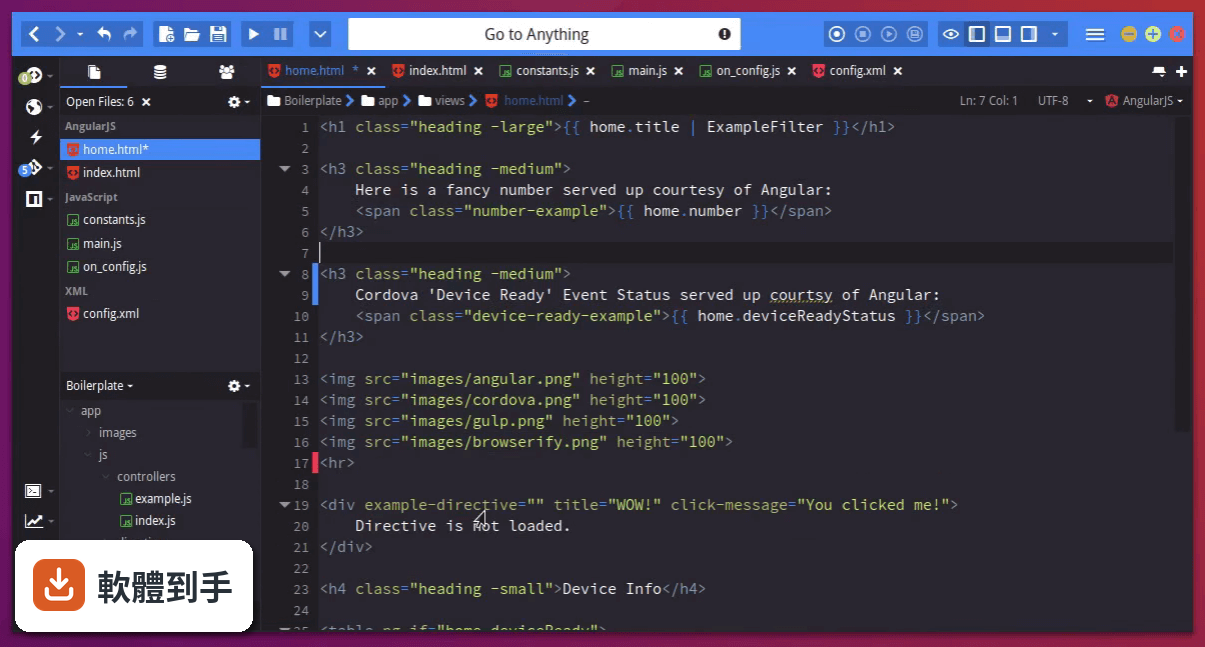
它是一套整合開發環境(IDE),主要用途是讓你在同一個程式裡撰寫、編輯、除錯和管理多種程式語言的專案。官方資料說它支援超過 100 種語言,包括 Python、PHP、Go、Perl、Ruby、NodeJS、HTML、CSS、JavaScript 等,內建除錯器、版控整合、程式碼自動補全和重構功能,適合需要同時處理多種語言專案的開發者。
02它支援哪些程式語言?
官方說明指出它支援超過 100 種語言,明確列出的有 Python、PHP、Go、Perl、Tcl、Ruby、NodeJS、HTML、CSS、JavaScript,也提到支援 Catalyst、Django、Flask、Pyramid、Rails 等框架,以及 Angular、Ember、React 等前端框架。如果你用的是這些語言或框架,它都能涵蓋;但如果你用的是比較冷門的語言,建議先確認官方文件有沒有列入支援。
03它的除錯功能實際用起來是怎樣的?
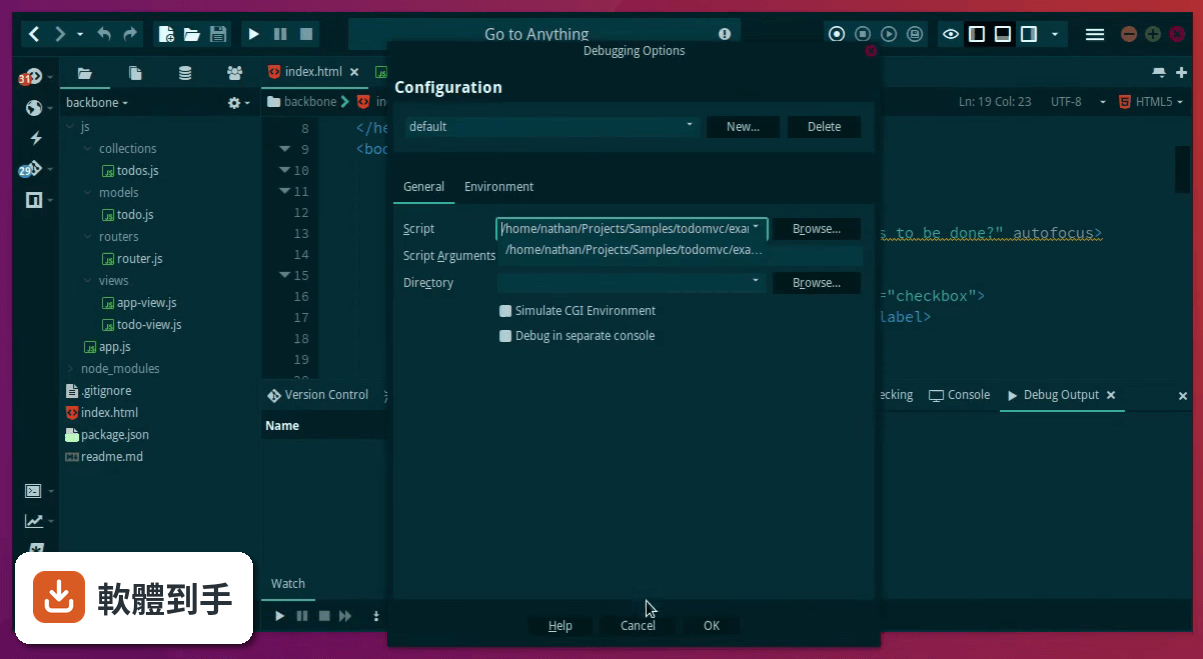
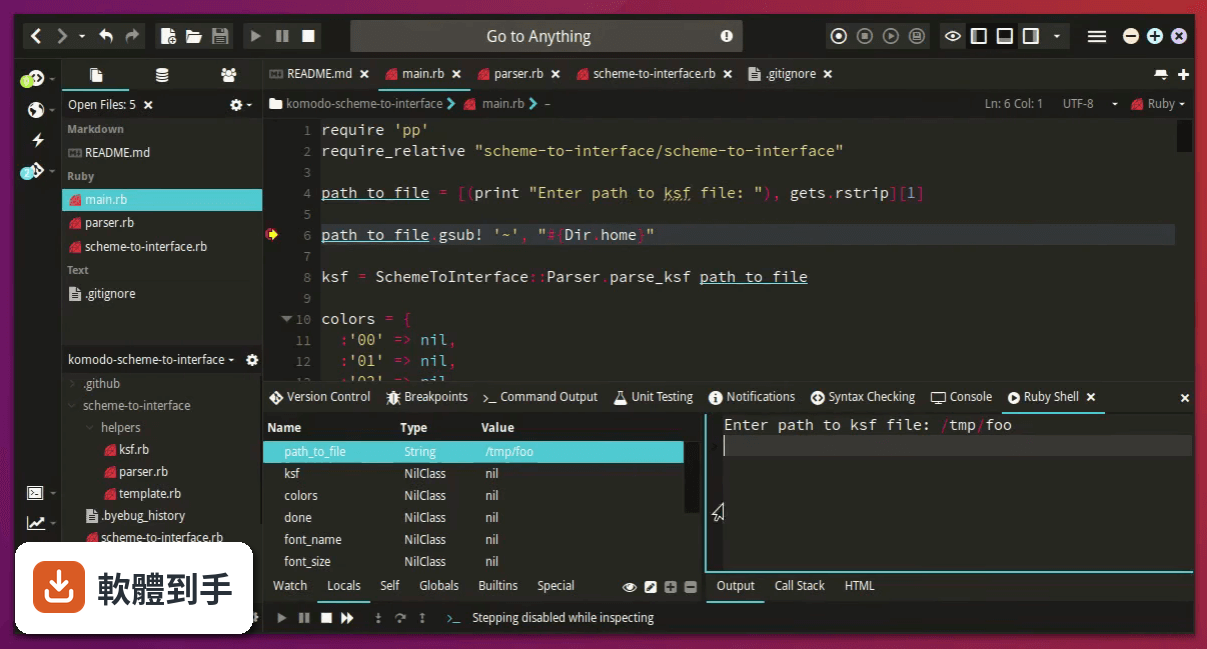
內建除錯器讓你在編輯器左邊界點一下就能設中斷點,然後執行除錯、逐步追蹤程式碼、檢查變數值。另外它支援 Chrome 除錯,可以不用開 Chrome Dev Tools,直接在寫程式的地方設中斷點來除錯 Web 應用程式。這表示你不需要另外開瀏覽器開發者工具,在同一個視窗就能完成前端除錯。
04它跟 Git 或 SVN 這些版控工具怎麼整合?
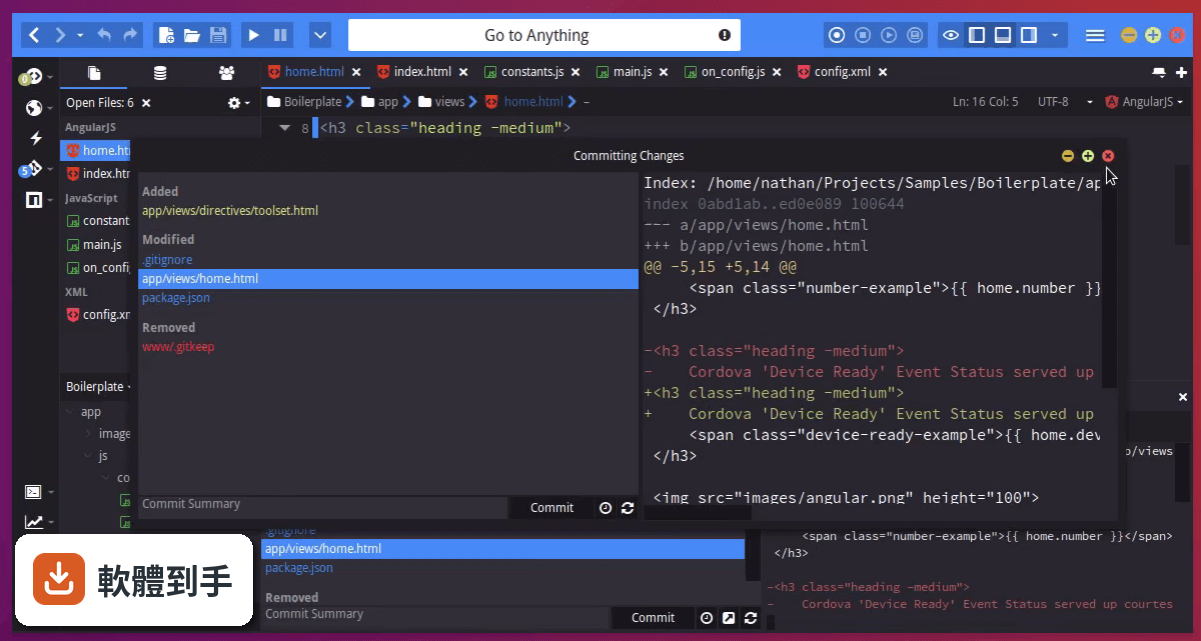
它內建版控整合,支援 Git、Mercurial 和 SVN,你可以在 IDE 裡面直接做 commit、push、pull 這些操作,不用另外開終端機。這對習慣在編輯器裡完成所有工作的開發者來說,可以少切換一個視窗。不過它沒有提到 diff 檢視或分支圖這類進階功能,如果你很依賴視覺化的版控介面,可能還是要搭配其他工具。
05它能不能連到遠端伺服器開發?
可以。官方 FAQ 明確說它支援透過 SSH 做遠端開發,也就是說你可以連到遠端的伺服器,直接編輯和執行上面的專案。這對需要部署到 Linux 主機或雲端伺服器的開發者來說很實用,不用把檔案下載下來改完再傳回去。
06什麼樣的人適合用這套軟體?
適合需要同時寫多種程式語言、而且希望把除錯、版控、跑測試都集中在同一個介面的人。它內建 Slack 分享、Gulp/Grunt/NPM/Yarn 整合、Cordova/PhoneGap 工具、單元測試框架(PHPUnit、PyUnit)支援,如果你平常的工作流程會用到這些工具,它可以把這些都收進同一個視窗。另外它支援 Windows、macOS 和 Linux,跨平台需求也能滿足。
07它跟 Komodo Edit 有什麼差別?
Komodo Edit 是同一家開發商出的免費精簡版,官方說法是「如果你只要免費基本版,可以看看 Komodo Edit」。Komodo IDE 多了除錯器、版控整合、單元測試、遠端開發這些完整 IDE 功能,Edit 版主要是純編輯器。如果你只需要寫程式碼、不需要除錯和版控,Edit 版可能就夠了;但如果你要的是整合開發環境,那就得用 IDE 版。
08這套軟體還有人在維護嗎?
從收錄的版本紀錄來看,它的更新停在 2020 年 2 月,之後就沒有再發布新版本,近兩年更新次數是零。雖然官方宣布開放原始碼,但長期沒有新版本這件事,代表你裝了之後可能不會拿到功能更新或安全性修補。如果你在意軟體有沒有持續在修 bug,這點需要列入考慮。
09介面只有英文,對中文使用者會有影響嗎?
它的介面語系只有 English,沒有繁體中文。如果你習慣英文介面,那沒有問題;但如果你對英文介面不熟悉,操作上會需要一段時間適應。另外,它對中文註解或中文內容的處理沒有特別提到,如果你寫的程式碼裡有大量中文註解,建議先裝來試試看顯示有沒有問題。
10我該拿它跟 NetBeans 比嗎?哪個比較多人用?
可以比,但要先知道兩邊的使用者規模差很多。NetBeans 在收錄資料中有 702 人評分,Komodo IDE 只有 34 人評分,NetBeans 的使用者基數明顯大得多。這代表 NetBeans 的社群資源、外掛生態、問題解答都比較豐富。如果你很在意遇到問題時找不找得到人問,Komodo IDE 的社群相對小很多,這點要先想清楚。
11這套軟體適合拿來寫大型專案嗎?
官方資料沒有明確提到大型專案的效能表現,但它的功能設計——多語言支援、除錯器、版控整合、單元測試、遠端開發——看起來是朝完整 IDE 的方向做的。不過因為它已經長期沒有更新,如果你用的是比較新的語言版本或框架,可能會遇到支援度不足的問題。大型專案通常會用到很多現代工具鏈,建議先確認你用的工具鏈有沒有在它的支援範圍內。
下載與官方連結
Komodo-IDE-11.0.1-90797.msi · 82.9 MB · 連結指向軟體原廠
版本紀錄
- 2020-02-12 Komodo IDE 12.0.1 Build 91869 90 MB
- 2020-01-16 Capture NX-D 1.6.1 338 MB
- 2020-01-16 Komodo IDE 12.0.0 Build 91824 90 MB
再看 5 筆
- 2019-01-09 Komodo IDE 11.1.1 Build 91089 89.9 MB
- 2018-06-21 Komodo IDE 11.1.0 Build 91033 74.8 MB
- 2018-06-21 Komodo IDE 11.1.20 Build 91033 74.8 MB
- 2017-12-20 Komodo IDE 11.0.2 Build 90813
- 2017-10-31 Komodo IDE 11.0.1 Build 90797 82.9 MB
這一版改了什麼
What's new in this version:
- Clipboard manager: Fix caret position not updating when pasting
- Clipboard Manager: Mouse click breaks manager
- CodeIntel: Added unit test for some previous commits
- CodeIntel: Attempt to handle non-ascii-encoded code better
- CodeIntel: Auto-import all applicable PHP symbols into the current scope
- CodeIntel: call tips while typing pref not saving
- CodeIntel: CodeIntel now runs on 127.0.0.1 instead of localhost
- CodeIntel: Completions now properly trigger on backspace
- CodeIntel: Correctly handle PHP ‘$’ variable prefixes
- CodeIntel: Do not give trailing ‘/’ for NodeJS module completions if there is an ‘index.js’ present
- CodeIntel: Do not include anonymous functions in scope completions
- CodeIntel: Do not include HTML, CSS, and JavaScript namespaces in PHP completions
- CodeIntel: Do not show completions for Python class or function names
- CodeIntel: Do not show completions in CSS value functions like rgb()
- CodeIntel: Do not show completions right after a ‘,’, as it’s often part of a non-call expression
- CodeIntel: Don’t ask to restart just for looking at the pref screen
- CodeIntel: Don’t trigger completions on whitespace
- CodeIntel: Don’t truncate log when codeintel restarts
- CodeIntel: Ensure attempted scope merges only happen on scopes for PHP completions
- CodeIntel: Ensure symbollist is always visible
- CodeIntel: Fix completion selection details disappearing while typing
- CodeIntel: Fix completions not triggering on backspace
- CodeIntel: Fix completions not working on large PHP projects
- CodeIntel: Fix completions showing stale entries when backspacing
- CodeIntel: Fix completions sometimes showing stale results
- CodeIntel: Fix completions sometimes triggering when they shouldn’t
- CodeIntel: Fixed gotoDefinition service not handling non-scope definitions properly
- CodeIntel: Fix sorting of completion results
- CodeIntel: Fix sorting, should be case insensitive and “private” properties should show last
- CodeIntel: Greatly improved the accuracy of PHP member completions
- CodeIntel: Handle “&:” pseudo-class contexts in Less
- CodeIntel: Ignore “- CodeIntel: Make completions case insensitive
- CodeIntel: PHP completion contexts should not occur when typing “- CodeIntel: Revert “Hacking previoux fix purely for Komodo 11 RC constraints.”
- CodeIntel: Support CSS completions in HTML style=“” attributes
- CodeIntel: The codeintel socket now runs on 127.0.0.1 instead of localhost (removes host lookup)
- CodeIntel: Traits should not be linked to classes
- CodeIntel: Updated language router to handle PHP’s ‘$’ variable prefixing
- Commando: Fix composer integration causing Komodo to hang
- Dependencies: binaries set to to “found” when they don’t exist
- Dependencies: “Located on PATH” being set as binary
- Dependencies: Safer way of checking for user selected value
- Editing: Respect default language-specific indentation preference
- Editor: Fixed bug cleaning line endings for lines with form-feed characters
- Editor: Fix margin click triggering repeatedly (fixes track changes repositioning on click)
- Editor: Fix position being offset improperly on macOS, Windows
- Editor: Highlight double-clicked variables
- Folder Template: Can’t use if space in name or path
- FolderTemplate: Kill progress bar when no local path
- Folder Templates: Fix regression where http urls would no longer work
- Keybindings: Fix default binding for “jump to previous section” not working
- Languages: Fixed legacy section regexes for JavaScript functions
- Linter: Log file operation exceptions so we actually have the requisite info to fix the issue
- Logging: Don’t log “key event not available on some keyboard” messages
- Other: Fix issue where sometimes opening a window twice would break the window
- Places: Fix “Refresh Status” sometimes being disabled
- Places: Fix refresh status still disabled in some cases
- Preferences: Fix certain language fields loading multiple times
- Preferences: Fix color scheme preferences sometimes defaulting to the wrong theme
- Preferences: Fix Notification categories not showing
- Prefs: lang pref checkbox icons too large on retina
- Prefs: remove bad paths for executable prefs
- Prefs: Show selected exe path
- Prefs: Show selected exe path
- Prefs: Upgrade File association prefs between versions
- Preview: Don’t allow invoking the preview for unsupported languages
- Previewer: Update preview on any buffer edit, including copy/paste
- Preview: Fix preview not available on HTML5, Angular and JSX files
- Printing: Fix printing not working
- Publishing: fix icon sizes on retina
- Scintilla: Applied upstream patch in an attempt to improve scrolling on MacOS 10.12
- SDK: DOM: fix once triggering more than once if an exception occured
- SDK: DOM: properly detect integers when setting CSS values
- SDK: Fix code intel prefs not saving
- SDK: fix filepath looking at the wrong object
- SDK: fix menulist elements not considering an empty string a valid value
- SDK: Fix topWindow.location undefined error
- SDK: menulist: fix values not always being set properly
- SDK: Modal dialogs sitting ontop of alert dialogs
- SDK: remove unused properties of listcols and listhead
- Sdk: stylesheet: Fix global stylesheets not properly reloading
- SDK UI: Allow radio to handle boolean for selected
- SDK: ui/menulist: only use element.value if it actually holds a value
- SDK: Windows: Added getWindowByName method
- Slack: Can’t open slack share snippet in browser
- Slack: Interactive bubble not shown on success
- Startup Wizard: Add border around editor sample
- Startup Wizard: binary prefs not saving
- Startup Wizard: Fix dropdown lists not getting their value defined
- Startup Wizard: Fix sample not updating when toggling classic mode
- Toolbox: Fix some tools becoming corrupted when importing to Komodo 11
- Toolbox: Upgrade code wasn’t upgrading new format tools
- UI: Don’t fail loading base UI components just cause one widget doesnt exist
- UI: Fix color picker and pref window sized incorrectly
- UI: Fix color scheme not applying to all UI components
- UI: Fix dialogs gradually growing larger each time they’re opened (Windows only)
- UI: Fix maximize sometimes not working on Windows
- UI: Fix some dialogs infinitely growing larger
- UI: Fix startup wizard resizing at the end of the depency scan, causing a black border on Windows
- UI: Remove old template UI elements that we missed
- UI: Reset all window dimensions to their defaults due to a variety of window dimension issues in v11.0.0
- Unit tests: Fix unit tests not running due to “ko undefined” error
- Update doc links to new docs URL
- Update JSDoc for some of our main modules, or modules that were just outright not showing properly
- VCS: Fix pull with Rebase not working
- Windows: Fix some windows not opening
- Windows: Fix window restore failing