
這是歷史版本頁面 — 看 Komodo IDE 最新版本
Komodo IDE 老牌多語言編輯器,現在還值得用嗎
 Komodo IDE 11.1.0 Build 91033
資料更新 2018-06-21
閱讀約 6 分鐘
你手上同時寫著 Python、PHP、JavaScript,偶爾還要改幾行 HTML 和 CSS。你不想為了每種語言裝一套編輯器,也不想在幾個視窗之間切來切去。你找的是一套能一次打開、把這些語言都涵蓋進去的工具,最好連除錯、版控、跑測試都在同一個地方完成,不用另外開終端機或瀏覽器。
你原本的習慣可能是用記事本或陽春編輯器硬寫,但寫到後來會發現沒有語法標色、沒有自動補全,連找個變數定義都要靠肉眼。又或者你試過裝一堆外掛把編輯器拼裝成 IDE,但光是設定就耗掉一下午。這類多語言 IDE 的切入點,就是讓你在同一個介面裡完成寫程式、除錯、送版控這整條流程,減少在不同工具之間切換的成本。
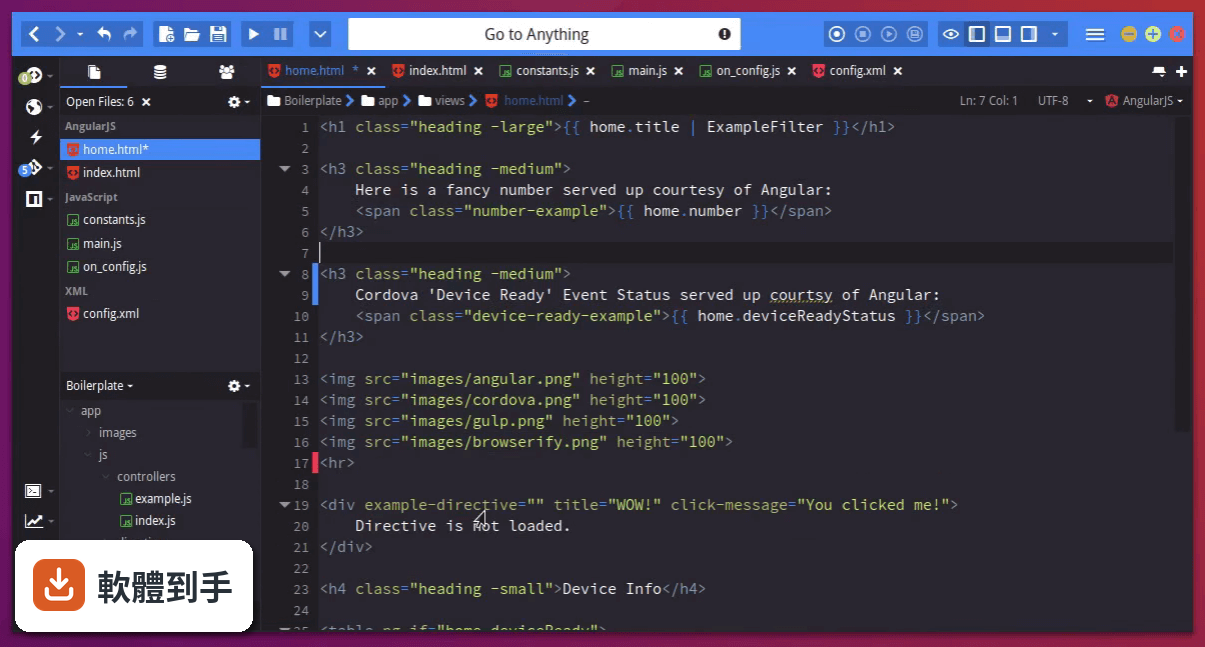
01Komodo IDE 是用來做什麼的軟體?
它是一套整合開發環境(IDE),主要用途是讓你在同一個程式裡撰寫、編輯、除錯和管理多種程式語言的專案。官方資料說它支援超過 100 種語言,包括 Python、PHP、Go、Perl、Ruby、NodeJS、HTML、CSS、JavaScript 等,內建除錯器、版控整合、程式碼自動補全和重構功能,適合需要同時處理多種語言專案的開發者。
02它支援哪些程式語言?
官方說明指出它支援超過 100 種語言,明確列出的有 Python、PHP、Go、Perl、Tcl、Ruby、NodeJS、HTML、CSS、JavaScript,也提到支援 Catalyst、Django、Flask、Pyramid、Rails 等框架,以及 Angular、Ember、React 等前端框架。如果你用的是這些語言或框架,它都能涵蓋;但如果你用的是比較冷門的語言,建議先確認官方文件有沒有列入支援。
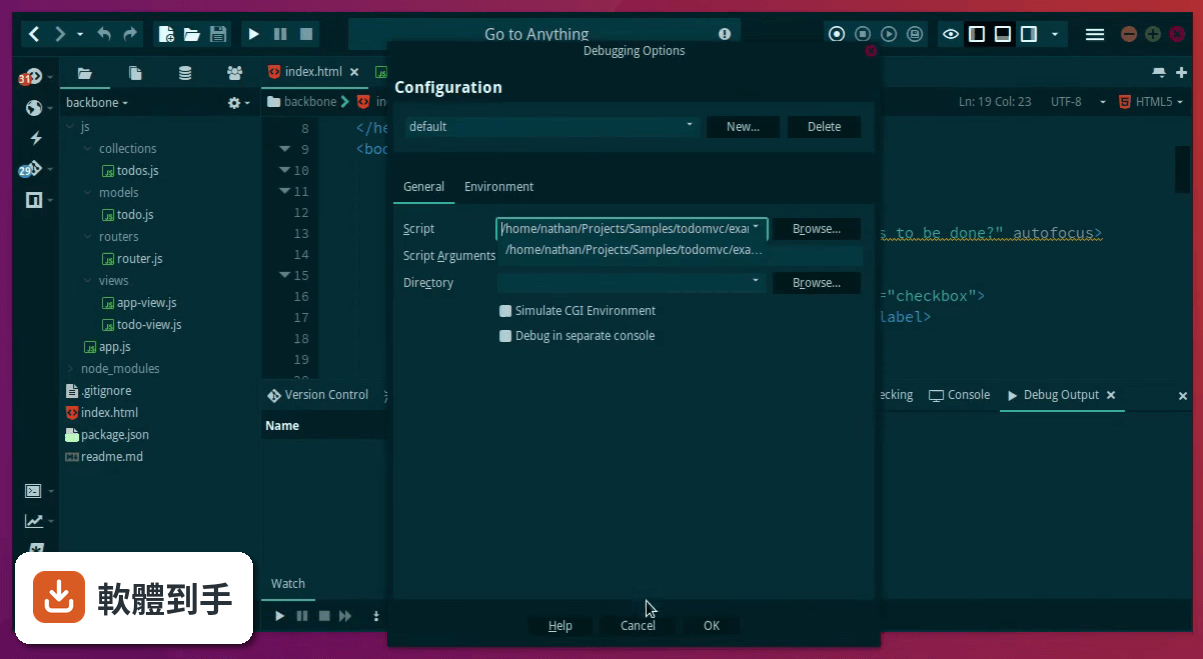
03它的除錯功能實際用起來是怎樣的?
內建除錯器讓你在編輯器左邊界點一下就能設中斷點,然後執行除錯、逐步追蹤程式碼、檢查變數值。另外它支援 Chrome 除錯,可以不用開 Chrome Dev Tools,直接在寫程式的地方設中斷點來除錯 Web 應用程式。這表示你不需要另外開瀏覽器開發者工具,在同一個視窗就能完成前端除錯。
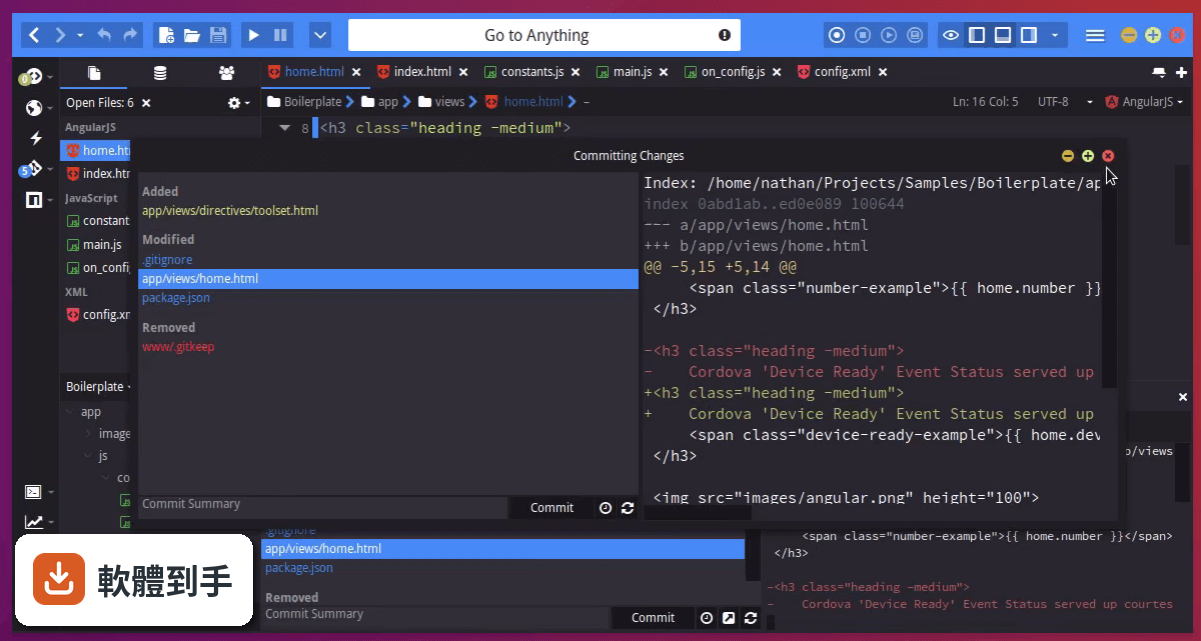
04它跟 Git 或 SVN 這些版控工具怎麼整合?
它內建版控整合,支援 Git、Mercurial 和 SVN,你可以在 IDE 裡面直接做 commit、push、pull 這些操作,不用另外開終端機。這對習慣在編輯器裡完成所有工作的開發者來說,可以少切換一個視窗。不過它沒有提到 diff 檢視或分支圖這類進階功能,如果你很依賴視覺化的版控介面,可能還是要搭配其他工具。
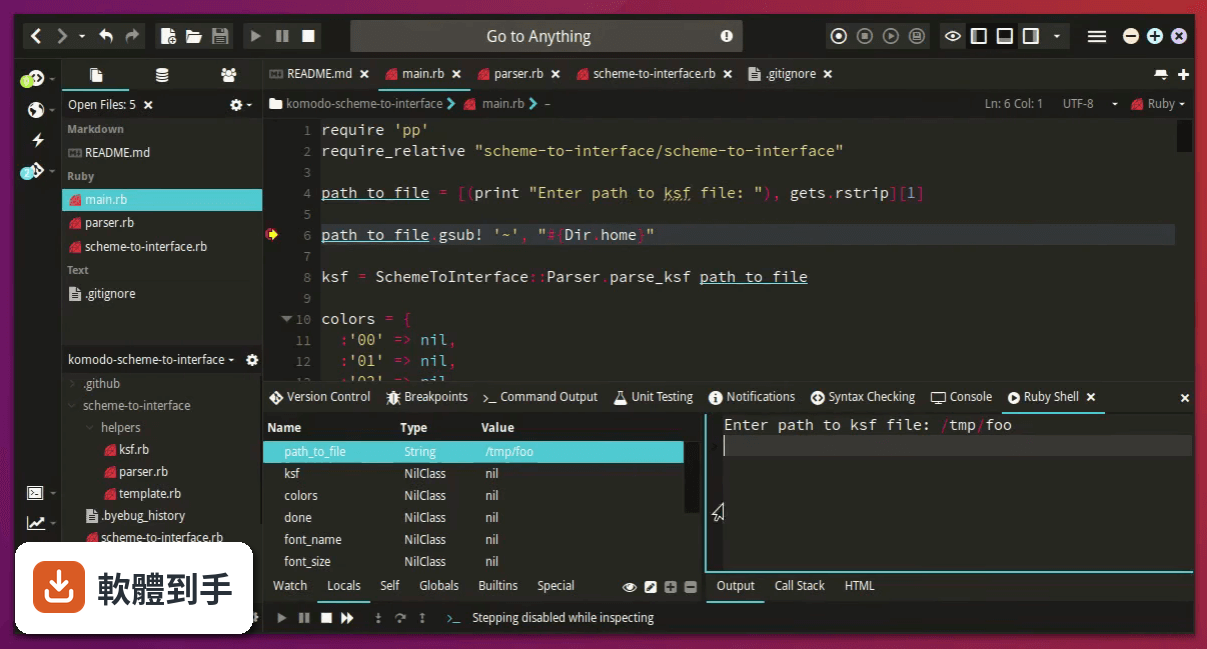
05它能不能連到遠端伺服器開發?
可以。官方 FAQ 明確說它支援透過 SSH 做遠端開發,也就是說你可以連到遠端的伺服器,直接編輯和執行上面的專案。這對需要部署到 Linux 主機或雲端伺服器的開發者來說很實用,不用把檔案下載下來改完再傳回去。
06什麼樣的人適合用這套軟體?
適合需要同時寫多種程式語言、而且希望把除錯、版控、跑測試都集中在同一個介面的人。它內建 Slack 分享、Gulp/Grunt/NPM/Yarn 整合、Cordova/PhoneGap 工具、單元測試框架(PHPUnit、PyUnit)支援,如果你平常的工作流程會用到這些工具,它可以把這些都收進同一個視窗。另外它支援 Windows、macOS 和 Linux,跨平台需求也能滿足。
07它跟 Komodo Edit 有什麼差別?
Komodo Edit 是同一家開發商出的免費精簡版,官方說法是「如果你只要免費基本版,可以看看 Komodo Edit」。Komodo IDE 多了除錯器、版控整合、單元測試、遠端開發這些完整 IDE 功能,Edit 版主要是純編輯器。如果你只需要寫程式碼、不需要除錯和版控,Edit 版可能就夠了;但如果你要的是整合開發環境,那就得用 IDE 版。
08這套軟體還有人在維護嗎?
從收錄的版本紀錄來看,它的更新停在 2020 年 2 月,之後就沒有再發布新版本,近兩年更新次數是零。雖然官方宣布開放原始碼,但長期沒有新版本這件事,代表你裝了之後可能不會拿到功能更新或安全性修補。如果你在意軟體有沒有持續在修 bug,這點需要列入考慮。
09介面只有英文,對中文使用者會有影響嗎?
它的介面語系只有 English,沒有繁體中文。如果你習慣英文介面,那沒有問題;但如果你對英文介面不熟悉,操作上會需要一段時間適應。另外,它對中文註解或中文內容的處理沒有特別提到,如果你寫的程式碼裡有大量中文註解,建議先裝來試試看顯示有沒有問題。
10我該拿它跟 NetBeans 比嗎?哪個比較多人用?
可以比,但要先知道兩邊的使用者規模差很多。NetBeans 在收錄資料中有 702 人評分,Komodo IDE 只有 34 人評分,NetBeans 的使用者基數明顯大得多。這代表 NetBeans 的社群資源、外掛生態、問題解答都比較豐富。如果你很在意遇到問題時找不找得到人問,Komodo IDE 的社群相對小很多,這點要先想清楚。
11這套軟體適合拿來寫大型專案嗎?
官方資料沒有明確提到大型專案的效能表現,但它的功能設計——多語言支援、除錯器、版控整合、單元測試、遠端開發——看起來是朝完整 IDE 的方向做的。不過因為它已經長期沒有更新,如果你用的是比較新的語言版本或框架,可能會遇到支援度不足的問題。大型專案通常會用到很多現代工具鏈,建議先確認你用的工具鏈有沒有在它的支援範圍內。
下載與官方連結
Komodo-IDE-11.1.0-91033.msi · 74.8 MB · 連結指向軟體原廠
版本紀錄
- 2020-02-12 Komodo IDE 12.0.1 Build 91869 90 MB
- 2020-01-16 Capture NX-D 1.6.1 338 MB
- 2020-01-16 Komodo IDE 12.0.0 Build 91824 90 MB
再看 5 筆
- 2019-01-09 Komodo IDE 11.1.1 Build 91089 89.9 MB
- 2018-06-21 Komodo IDE 11.1.0 Build 91033 74.8 MB
- 2018-06-21 Komodo IDE 11.1.20 Build 91033 74.8 MB
- 2017-12-20 Komodo IDE 11.0.2 Build 90813
- 2017-10-31 Komodo IDE 11.0.1 Build 90797 82.9 MB
這一版改了什麼
What's new in this version:
- Abbreviations: Not triggering in certain contexts
- Check Config: Breaks if PATH is blank
- Codeintel: Prefs missing when second window opened
- Codeintel: Added fuzzy finding of completions
- Codeintel: Added support for XUL
- Codeintel: Adding Additional Directories to CodeIntel Does Prompt a Scan
- Codeintel: Consider ‘$’ and ‘@’ as completion characters for JS and CSS languages, respectively
- Codeintel: CSS: Fixed ‘!important’ value sometimes not showing in completions
- Codeintel: Ensure @property-decorated Python functions are detected as methods
- Codeintel: Expose 3rd party API catalogs in prefs
- Codeintel: find references: Handle non-word symbol characters properly
- Codeintel: Fix calltip drawing glitch
- Codeintel: Fix calltips showing twice when calltips while typing are enabled
- CodeIntel: Fix completion queries not detected properly
- CodeIntel: Fix completions inserting redundant characters for legacy languages
- CodeIntel: Fix completions not inserting properly when in the middle of a word
- CodeIntel: Fix completions not iterable under GoLang
- Codeintel: Fix completions sometimes not triggering
- Codeintel: Fix completions triggering too aggressively on CSS/SCSS/LESS and some other languages
- CodeIntel: Fix issue where Komodo was triggering stale completions
- CodeIntel: Fix rescan button not working
- CodeIntel: Fix stale completions being triggered
- Codeintel: Fix symbolbrowser icons not aligned properly
- CodeIntel: Fixed “show calltips while typing” pref not being respected
- Codeintel: Fixed autocompletions not closing when invoking the “cancel autocompletion” command
- Codeintel: Fixed calltip info not showing after first calltip
- Codeintel: Fixed jump to next/prev section in file scope
- Codeintel: Fixed legacy Python parser to handle unicode encoding errors
- Codeintel: Handle different HTML doctype declarations and use their respective stdlibs
- Codeintel: Initial support for “Find References”
- Codeintel: JavaScript: Added JSDoc completions
- Codeintel: LESS: Show variable completions
- Codeintel: Perl: Ensure variables assigned to functions are reflected as functions
- Codeintel: Perl: Fixed failing module imports
- Codeintel: Perl: Fixed nested namespace handling
- Codeintel: Python: fix parsing errors by ignoring Python 3 type hints for now
- Codeintel: Reduce symbolbrowser entry padding (more info on screen)
- Codeintel: Remove “Section List” references
- Codeintel: remove filter on view change. Load prev. filter on new view
- Codeintel: Remove memory leak on file close
- Codeintel: SCSS: Fixed completion context after SCSS variable definition
- Colorschemes: scheme changes still occur after change name dialog cancelled
- Commando: Clear cache now clears cache for all scopes
- Commando: Fix composer integration causing Komodo to hang
- Commando: List of open files is outdated
- Completions: CSS completions trigger on ‘;’
- Completions: CSS don’t show completions on ‘,’
- Completions: Golang, don’t do completions on ‘;’
- Dialogs: Dialogs open empty on OSX
- Dynamic buttons: menupopup spans entire screen
- Dynamic toolbar: add cpanm initialize button
- Editor: Do not cancel XML tag editing on backspace
- Editor: Fixed hang with multiple selections over variables
- File Template: Add interpolation to file templates
- Find: Can’t close “Floating” find results tabs
- Find: replace: Allow “replace all” in any non-binary (text) file
- Find: Use original directory when searching again with find in files
- FTPS: Unable to connect to FTPS on OSX
- Git: commit dialog can’t show diff for deleted files
- Git: missing branches in status bar
- Help: Fix help system and tags. Fixes #1174 and probably others
- Icons: incorrect handling of local paths. Convert paths to URIs
- Interpolation: incorrect input and name of selection intrpl
- KoDoc: Allow for languages with no file extension
- Komodo: thinks it closed improperly when asked to restart
- Lint: JavaScript: Added support for EsLint by Defman21
- Lint: JSX: Switched JSX linter from legacy jsxhint to new eslint linter
- Lint: python: pyflakes: Handle unexpected indentation errors
- Macro: Workaround async paste on Linux
- Places: Exception thrown when New File exists already
- Prefs: Check config window pref buttons are broken
- Prefs: Don’t set invalid interpreter unless user chooses to
- Prefs: Project lvl lang include paths pref blocks global even when deleted
- Print Preview: Print preview not working
- Printdebug: fix icon, active state, UX updates
- PrintDebug: some property fields not loading properly
- Printing: Fix printing not working
- Projects: Project won’t load while restoring window
- Projects: Remove outdated Firefox project template
- Projects: Rmv old Komodo addon template project
- ProjectWizard: Don’t allow file path in project path field
- Publishing: Alert user if push fails due to connection issues
- Publishing: Allow to reload after sync. Don’t force reopn of dialog
- Publishing: Dialog appears to hang on large projects. Give more feedback
- Publishing: Force action confirmation dialog cuts off text
- Publishing: Force push and Pull don’t work for multiple files
- Publishing: Force Push/Pull warning msg doesn’t fit in dialog box
- Publishing: Incorrect tooltiptext for reload sync status
- Publishing: Progress bar not working in dialog
- Refactoring: “show changes” button never enables
- Refactoring: breaks in JS files on anonymous functions
- Refactoring: Fixed error raised when attempting to rename variable
- Refactoring: Komodo gets stuck after diff’ing proposed changes
- Refactoring: Make renameVar more reliable with CI3
- Refactoring: refactoring changes global “find” settings
- Refatoring: Rename Variable not working
- Remote Files: reconnect fails with SSH key configured
- Run: Preserve Windows ‘’ path separators
- Runinline: lang included directories pref ignored
- SCC: bad layout of Push dialog. Fixes #2296
- SCC: file context for SCC should override Places
- Scintilla: win32: Disallow handling of some deprecated WM_ and EM_ messages
- Scope completions now attempt to show all possible top-level symbols as approximate matches
- SDK: Fix Shell docs comments and add more informative details
- SDK: Fix textbox value not properly being set if it’s already in the DOM
- SDK: return menuitem when adding item to a UI menu
- Slack Share: Allow direct msgs and msgs to groups
- Snippets: indentation wrong when multiline selection injected
- Startup Wizard: Doc links open dialog behind wizard
- Symbol Browser: Scroll Code browser to scope. Includes scroll buffer pref
- Templates: HTML5 templates open as HTML
- Templates: file from template from places loses language
- Toolbar: Sidebar show/hide command has wrong desc
- Toolbox: Update Abbreviations with language field
- Toolbox: Add “General” lang to support snippet injection into any file type
- Toolbox: Convert snippet to Print Statement get wrong language
- Toolbox: HTML file templates empty
- Toolbox: Snippet props, prevent error when langage isn’t set
- Toolbox: update sample tool
- Toolbox: writeCleanData not writing correct wrapper for komodo meta
- Tutorials: Can’t open floating tutorials
- Tutorials: using chrome close button doesn’t close tutorial properly
- UI Layout: Save layout to prefs after customizing
- UI: toggle file tabs menu option state not propagating
- Ui/Textbox: Can’t set textbox to “”, returns curr val
- Uilayout: fix error calling saveState for prefs
- Unit testing: Fix pytest tests not parsing properly under pytest 3.3
- Unit tests: Fix unit tests not running due to “ko undefined” error
- Unittests: Troublel with dots
- View: Link Views menu item isn’t updating
- Views: Files sometimes open with blank views
- Views: Extend ko/views with splitview funcs
- Views: Implement multiview scrolling
- Widgets: bootstrapped addon widgets not restsoring from shutdown
- Widgets: Komodo sometimes hung when opening second window
- Widgets: Make sure widget opens in default location if floating pane load fails
- Widgets: restore floating pane position on reboot
- Widgets: save tab order and support placing a widget when it’s added after ui restore has run
- Widgets: UI not restored properly after crash
- Workspace2: essentially merge with original workspace code
- Workspaces: Upgrade prefs, remove stale window prefs
- Xdebug: Add PHP 7.2 bits