
這是歷史版本頁面 — 看 Virtual Serial Port Driver 最新版本
電腦沒串口怎麼接儀器?Virtual Serial Port Driver 能幫什麼
 Virtual Serial Port Driver 10.0 Build 10.0.963
資料更新 2022-02-01
閱讀約 8 分鐘
你手上有一台老儀器或開發板,只能透過 RS-232 串口連線,但換了新電腦才發現主機板上根本沒有 COM 埠。買了 USB 轉串口線,驅動程式裝了半天,裝置管理員裡卻還是出現驚嘆號,或者連上了但通訊軟體一直抓不到正確的連接埠。你只是想讓兩個程式互相傳資料,或讓舊設備跟新系統對話,卻卡在硬體規格跟驅動程式的泥沼裡。
有些人會去買擴充卡或轉接線,但這不只多花錢,還可能遇到晶片相容性問題。另一種做法是找免費的虛擬串口工具,但很多老牌免費軟體已經多年沒更新,在 Windows 11 上裝了卻無法運作。這類工具的切入點是:用軟體在系統裡模擬出虛擬的 COM 埠,讓兩個程式或兩台設備可以透過虛擬的 null-modem 線交換資料,不需要實體硬體,也不用碰驅動程式的相容性地獄。
01Virtual Serial Port Driver 到底能拿來做什麼?
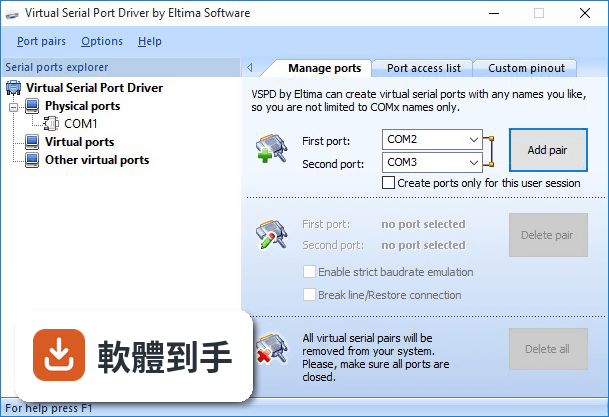
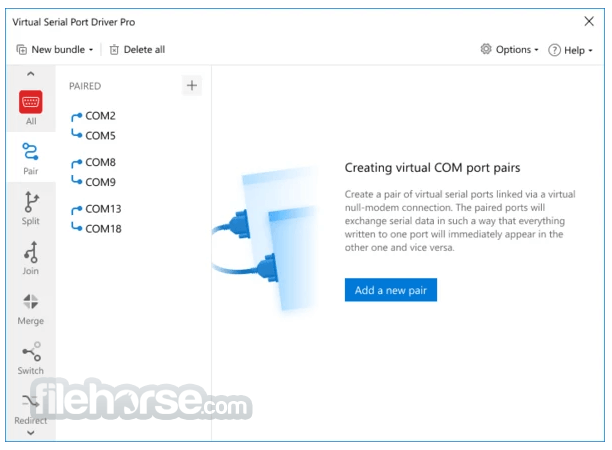
它可以在 Windows 系統裡建立虛擬的 COM 埠,並把兩個埠配成一對,模擬一條 null-modem 連線。建立之後,寫入第一個虛擬埠的資料會出現在第二個虛擬埠,反之亦然。對應用程式來說,這些虛擬埠跟實體串口一模一樣,可以正常設定鮑率、流量控制等參數。常見用途是讓兩個需要串口通訊的程式互相交換資料,或讓沒有實體串口的電腦連接模擬的串口設備。
02建立虛擬串口對的步驟會不會很複雜?
官方說明的操作流程是四步:安裝軟體、開啟程式、在 Pair 頁面點 Add a new pair、從下拉選單選預設名稱或自訂名稱、按 Create 按鈕。整個過程不需要重新開機,虛擬埠建立後會出現在裝置管理員的「連接埠」群組裡,其他軟體可以像看到實體埠一樣直接辨識。如果應用程式已經把虛擬埠開啟,你還是可以直接刪除該埠,不需要先關閉那些程式。
03這套軟體能同時建立多少個虛擬串口?
官方說明指出,你可以建立任意數量的虛擬串口對,沒有限制數量。這表示如果你的應用場景需要同時讓多組程式進行串口通訊,不需要擔心連接埠不夠用的問題。建立出來的虛擬埠不會佔用實體串口資源,就算系統裡完全沒有實體 COM 埠,虛擬埠也能正常運作。不過要注意,免費試用版可能有限制,詳細的數量上限需要自行確認。
04虛擬串口的傳輸速度跟實體的有什麼差別?
官方資料提到,虛擬串口之間的連結速度比實體 null-modem 線快很多,平均傳輸速度約 5.5 Mbytes/sec,實際速度取決於處理器效能。它也有嚴格的鮑率模擬功能,會依照你設定的鮑率來模擬傳輸行為。如果你需要的是高速、大量的資料交換,虛擬串口在速度上通常不會是瓶頸。但如果你要接的是實體設備,速度還是會受限於設備本身的規格。
05它能不能模擬硬體訊號線,像是 DTR、RTS 那些?
可以。官方說明指出,虛擬串口支援所有標準硬體訊號線,包括 DTR/DSR、RTS/CTS、RING、ERROR、DCD 等。在虛擬 null-modem 連線中,本端埠的 DTR 會連到對端埠的 DSR 和 DCD,本端的 RTS 會連到對端的 CTS。你也可以選擇 loopback 接法或自訂接線方式,配合你的硬體配置。這對需要偵測訊號狀態的應用程式來說是必要的功能。
06我沒有程式開發背景,只是想把兩個現成的軟體接起來,這樣的人適合用嗎?
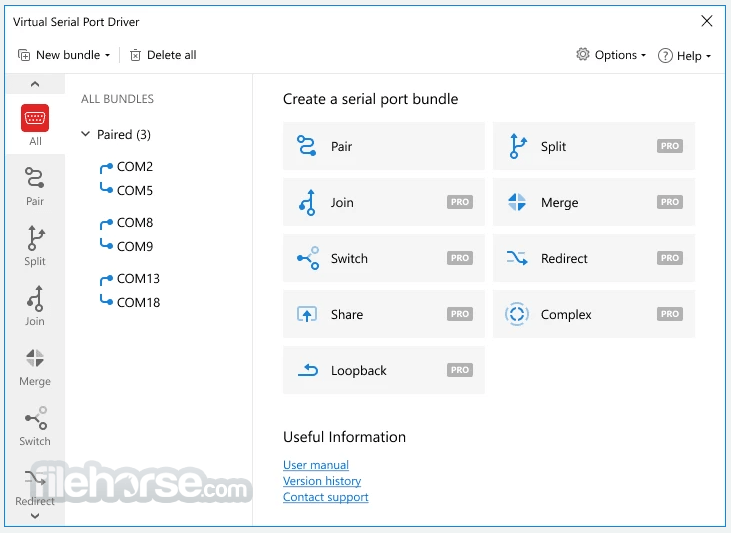
如果你只是要建立一對虛擬串口,讓兩個現成的應用程式互相通訊,那操作門檻不高,照著官方提供的四步驟就能完成。但如果你要處理的是更進階的功能,例如把一個實體串口分割成多個虛擬埠、合併多個串口、或建立複雜的連接埠組合,那些功能在 PRO 版本才有,而且需要對串口通訊有一定理解。另外,介面是英文的,不熟悉英文介面的使用者操作起來會比較吃力。
07開發者想把虛擬串口技術整合到自己的軟體裡,這套軟體有提供相關資源嗎?
官方說明提到,Eltima 的虛擬串口技術可以透過 OEM 授權整合到你的軟體中。OEM 授權持有者可以透過隨附的 Dynamic Link Library(DLL)直接從自己的應用程式控制虛擬串口。這表示你可以把虛擬串口功能包進自家產品,讓使用者不需要另外安裝這套軟體。不過 OEM 授權的價格和授權條件在官方資料中沒有列出,需要直接跟廠商洽談。
08這套軟體有免費版或試用版嗎?限制是什麼?
官方資料顯示這是 Trial 授權,提供 14 天試用期。試用版的功能限制在官方說明中沒有詳細列出,但一般來說試用版可能限制可建立的虛擬埠數量或使用天數。如果你只是短期需要虛擬串口功能,試用版可能夠用;如果是長期使用,就需要購買 PRO 版本,價格從 139.95 美元起。另外,官方也列出了幾個免費替代方案,例如 com0com 和 Virtual Serial Port Emulator,可以自行評估。
09這套軟體在 Windows 11 上跑得起來嗎?有沒有什麼相容性問題?
官方列出的支援系統包含 Windows 7、8、10、11,也支援 Windows Server 2012 到 2022 以及 Windows on ARM。它使用 Windows 核心驅動程式技術,支援 WDM、WMI、電源管理、PnP 等。不過要注意的是,介面只有英文,沒有中文。另外,這套軟體在評分網站上只有 37 人評分,樣本數不多,實際使用經驗的參考價值有限,建議先裝試用版確認你的環境沒有問題再決定是否購買。
10市面上有免費的虛擬串口軟體,為什麼還要考慮付費的這套?
官方自己列出的替代方案包含 com0com、Virtual Serial Port Emulator、Free Virtual Serial Ports 等免費工具。免費工具確實可以建立虛擬串口對,但功能通常比較基本。這套軟體的付費價值在於進階功能:串口分割、串口合併、建立複雜的連接埠組合、自動尋找可用 COM 埠的切換器等。如果你只需要簡單的虛擬串口對,免費工具可能就夠了;需要進階功能才需要考慮付費方案。
11這套軟體跟 Serial to Ethernet Connector 有什麼不同?我該選哪個?
兩者都是 Eltima 的產品,但解決的問題不同。Virtual Serial Port Driver 是在本機建立虛擬串口對,讓本機的應用程式互相通訊;Serial to Ethernet Connector 是把串口資料轉送到 TCP/IP 網路,讓遠端的設備或程式可以透過網路存取串口。如果你的需求是讓兩支程式在同一台電腦上交換資料,選前者;如果是要讓遠端電腦存取本機的串口設備,或把串口設備接到網路上,選後者。兩套軟體各有試用版,可以都裝來測試看看。
12這套軟體的使用者評價如何?有沒有什麼明顯的缺點?
在評分網站上,這套軟體獲得 7.32/10 分,但只有 37 人評分,樣本數偏少,參考價值有限。官方列出的優點包括虛擬埠建立容易、資料模擬可靠、支援多連線、介面友善、相容 Windows 系統;缺點則包括僅支援 Windows、需要技術知識、免費版功能有限。另外,這套軟體近兩年只更新過一次,更新頻率偏低,如果你很在意軟體是否頻繁維護,這點需要列入考量。
下載與官方連結
前往官方網站 下載 Virtual Serial Port Driver
vspd.exe · 連結指向軟體原廠
版本紀錄
- 2026-08-03 Virtual Serial Port Driver 11.0 Build 11.0.1096 4.2 MB
- 2023-03-25 Virtual Serial Port Driver 11.0 Build 11.0.1041
- 2022-04-01 Virtual Serial Port Driver 10.0 Build 10.0.979
再看 4 筆
- 2022-02-01 Virtual Serial Port Driver 10.0 Build 10.0.963
- 2019-05-25 WinZip Driver Updater 5.28.0.4 17.5 MB
- 2019-05-25 Virtual Serial Port Driver 9.0 Build 9.0.575 5.5 MB
- 2017-08-09 Virtual Serial Port Driver 9.0 Build 9.0.567
這一版改了什麼
What's new in this version:
Virtual Serial Port Driver 10.0 Build 10.0.963
- Change log not available for this version
Virtual Serial Port Driver 10.0 Build 10.0.944
Added:
- support for Windows 11
- new drivers signed by Microsoft
- automatic check for the required version of Microsoft .NET Framework at the software installation
- the possibility to use the Software Development Kit on ARM-based systems
- Changed: the Virtual Serial Port Driver End-User License Agreements have been updated
- Fixed: issues with enabling the automatic reopening option for shared ports
Virtual Serial Port Driver 10.0 Build 10.0.914
- Change log not available for this version
Virtual Serial Port Driver 10.0 Build 10.0.858
- Change log not available for this version
Virtual Serial Port Driver 10.0 Build 10.0.844
Added:
- a new, redesigned user interface
- the ability to create loopback connections
- the ability to assign custom names to serial port bundles
- the ability to view the port status within the selected port bundle
- detailed info about current settings and amount of data sent and received by the selected serial port
- the ability to save data from the Activity log to a file
- Improved: the Standard and PRO versions of Virtual Serial Port Driver are now put together in one build
- Improved: the software drivers have been updated
- Fixed: minor issues with a loopback pinout scheme
Virtual Serial Port Driver 9.0 Build 9.0.575
- Change log not available for this version
Virtual Serial Port Driver 9.0 Build 9.0.572
- Change log not available for this version
Virtual Serial Port Driver 9.0 Build 9.0.567
- Added: Windows Server 2016 support
- Added: full Windows 10 support
- Improved: new software protection system
- Improved: GUI compatibility with high-resolution monitors
- Improved: displaying a more detailed information about the virtual serial ports in the device manager
- Improved: drivers are digitally signed with WHQL
- Improved: the ports are marked as occupied to the system, which prevents them from being overlapped (e.g. by USB to serial driver)
- Improved: the information about created virtual ports is removed after the application uninstallation
- Fixed: displaying of the newly created virtual ports in the device manager
- Fixed: timeouts processing during the read operation
- Fixed: flow control displaying when a serial port was opened by HyperTerminal
Virtual Serial Port Driver 8.0 Build 8.0.412
- Added: possibility to create ports for the current user session only. Allows RDP users to create port with the same name (e.g. COM1) in each user session.
- Added: you can enable automatic update of ports' list, thus you can see pairs created in other user sessions
- Improved: instantaneous ports creation lets working with them even before PnP manager detects the newly added ports
- Improved: ports can be deleted even if they are open by other applications
- Fixed: loopback pinout wouldn't save for a ports pair after the system reboot
- Fixed several issues: canceling IRP and timeout Read/Write operations
Virtual Serial Port Driver 7.2 Build 7.2.308
- Added: 64-bit version of Virtual Serial Port Driver library for creating 64-bit applications
- Added: Java code sample in the OEM build
- Improved: overall application stability
- Fixed: BSOD when serial port was opened by Ham Radio Deluxe software
- Fixed: BSOD when trying to cancel IOCTL_SERIAL_GET_WAIT_MASK request
- Fixed: BSOD when trying to cancel Read call
- Fixed: BSOD caused by low timeout value used with write requests accompanied by high system load
- Fixed: several BSOD cases, including those caused by timeout requests and attempts to cancel all read, write and ioctl calls
Virtual Serial Port Driver 7.0.1.263
- Added: full Windows 7 support
- Added: signal lines pinout scheme while customizing pinouts
- Added: detection of the application virtual serial port was created with
- Added: program uninstaller verifies that Virtual Serial Port Driver is not launched
- Added: application restart is not required after entering registration info
- Added: virtual serial port pairs, created by Virtual Serial Port Driver, are removed after the program uninstallation
- Improved: Virtual Serial Port Driver and all of its internal drivers stability
- Fixed: BSOD when virtual serial port is opened with strict baud rate value less than 8 Bd
- Fixed: BSOD when virtual serial port, created by VSPD on a real machine, was used by a virtual machine as physical real port
- Fixed: data distortion during transmission on multicore systems
- Fixed: bug with granting port access to an application
- Fixed: data loss during simultaneous data transmission from both ports with "Xon/Xoff" option enabled
- Fixed: freezing of application, which opened virtual serial port created by VSPD, if RTS_CONTROL_TOGGLE parameter was enabled
- Fixed: multicore system freezing during data transmission with Xon/Xoff or Hardware Flow Control enabled
- Update: Windows 98 and Windows NT 4.0 support is available only in OEM version now