
這是歷史版本頁面 — 看 X-Mouse Button Control 最新版本
滑鼠按鍵不夠用?X-Mouse Button Control 能改出你要的按法
 X-Mouse Button Control 2.20
資料更新 2023-02-20
閱讀約 6 分鐘
你手上那支滑鼠,側鍵按了沒反應,或滾輪在某個網頁裡突然變成縮放而不是捲動。你想把多出來的按鍵設定成複製貼上、切分頁、調音量,但滑鼠原廠驅動程式不是功能太陽春,就是隻支援自家產品,換一支滑鼠就全部失效。你只是想按一個鍵就完成動作,不想為了這個去學寫程式。
一般人會先試滑鼠附的設定軟體,但那種軟體通常綁品牌,而且介面複雜,改個按鍵還要裝整套驅動。更麻煩的是,不同軟體需要的按鍵功能不一樣——在瀏覽器裡想用側鍵切分頁,在繪圖軟體裡想用側鍵當筆刷快捷鍵,同一顆按鍵在不同視窗要有不同行為,原廠驅動根本做不到。這類工具的做法是直接攔截 Windows 的滑鼠訊息,讓你針對每個應用程式指定按鍵要觸發什麼動作,不用碰驅動,也不用寫程式。
01X-Mouse Button Control 到底能改哪些滑鼠按鍵?
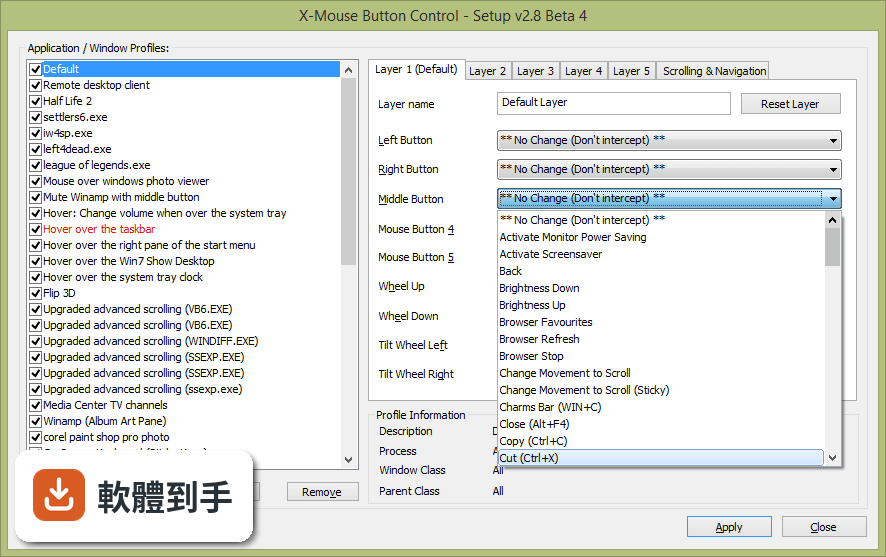
它可以把滑鼠上每個按鈕重新指定功能,包括滾輪。除了常見的左右鍵和中鍵,也支援第四、第五顆側鍵,最多到五鍵。你可以把側鍵改成模擬鍵盤按鍵、啟動應用程式、剪貼簿操作、媒體控制(播放、暫停、音量)、擷取畫面等。滾輪也能改成上下捲動或左右捲動,甚至調整捲動方向。
02它能針對不同軟體設定不同的按鍵功能嗎?
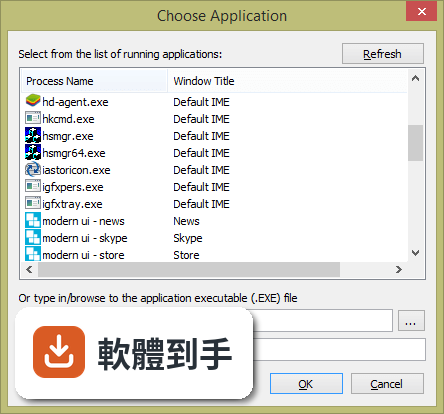
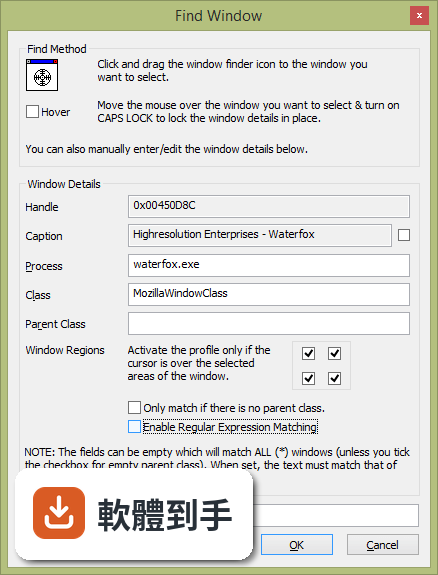
可以。它支援建立「設定檔」,每個設定檔可以指定給某個應用程式或視窗。當滑鼠移到那個視窗上,就會自動套用對應的設定檔。例如在瀏覽器裡把側鍵設為切分頁,在 Excel 裡把側鍵設為複製貼上,不用手動切換。設定檔數量沒有限制,也可以設定觸發條件,像是滑鼠移到特定區域才生效。
03我想把側鍵設成 Ctrl+C 這種組合鍵,它做得到嗎?
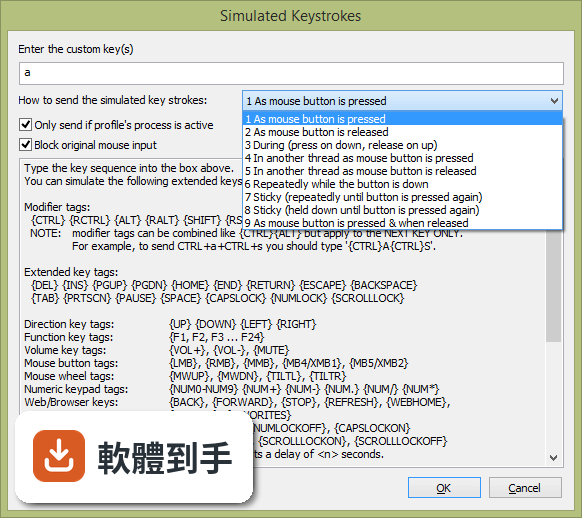
做得到。它可以把滑鼠按鈕模擬成任何鍵盤按鍵組合,包括 Ctrl、Shift、Alt 等修飾鍵。你可以在設定裡直接輸入要模擬的按鍵序列,例如 {CTRL}c 代表複製。它也支援更復雜的按鍵編碼,像是長按、連點、延遲觸發,甚至模擬連續動作。不過這些進階功能需要看說明檔案,介面是英文的。
04同一顆按鍵在不同情況下能有不同的反應嗎?例如單擊和雙擊不同?
可以。它提供「圖層」功能,每個設定檔裡最多可以設定 10 個圖層,每個圖層可以有不同的按鍵配置。你可以用熱鍵或滑鼠按鈕來切換圖層。例如設定一個圖層是普通模式,另一個是遊戲模式,按一下側鍵就切換。另外,它也支援「黏滯鍵」功能,讓按鍵保持按住狀態,方便拖曳或連續動作。
05它能控制媒體播放或調整音量嗎?
可以。它內建媒體控制功能,可以把滑鼠按鈕指定為播放/暫停、停止、上一首、下一首、音量增減、靜音等。例如把滾輪在系統列上時改成調音量,或把側鍵設為靜音。這些動作不需要額外安裝其他軟體,直接設定即可。
06這軟體適合什麼樣的人用?
適合不想寫程式、但希望滑鼠按鍵能配合自己工作流程的人。例如常剪片、寫檔案、用繪圖軟體的人,可以把側鍵設成常用指令。也適合遊戲玩家,針對不同遊戲設定不同按鍵配置。它不需要安裝驅動,只要滑鼠本身有標準五鍵就能用。但如果你需要非常複雜的巨集邏輯,可能要考慮 AutoHotkey 這類工具。
07我不會英文,介面全英文會不會很難上手?
介面確實是英文,而且沒有官方中文翻譯。但基本操作不算複雜:左邊是設定檔列表,中間是按鍵配置,右邊是觸發條件。如果你看得懂簡單的英文選單,例如 "Button"、"Action"、"Profile",應該能摸索出來。如果完全不懂英文,可能需要找網路上的中文教學文章,或改用其他有中文介面的滑鼠工具。
08我的滑鼠只有三鍵(左右鍵加滾輪),用這軟體有意義嗎?
有意義。即使沒有側鍵,你仍然可以把中鍵或滾輪改成其他功能,例如把中鍵改成雙擊、把滾輪改成水平捲動。但要注意,它依賴 Windows 的滑鼠訊息,最多支援五鍵。如果你的滑鼠有側鍵但驅動不支援,它可能無法偵測到,因為需要標準驅動傳送第四、第五鍵的訊號。建議先確認你的滑鼠在瀏覽器裡按側鍵會不會觸發上一頁/下一頁,如果會,那就能用。
09這軟體很久沒更新了,還安全嗎?會不會有相容性問題?
根據現有資訊,它最近一次更新已經是兩年前的事,開發頻率不高。它宣稱支援 Windows 7 到 11,但 Windows 11 的相容性最好自己測試。由於是免費軟體,沒有商業支援,如果遇到問題只能靠論壇或作者網站。如果你用的是最新版 Windows,建議先下載安裝試試看,確認功能正常再正式使用。另外,它佔用資源很少,不太會影響系統效能。
10有功能相近但更多人用的替代軟體嗎?我該選哪個?
有。AutoHotkey 是功能更強大的自動化工具,可以寫指令碼控制滑鼠和鍵盤,但需要學語法。Razer Synapse 和 Logitech SetPoint 是滑鼠廠商的驅動,只支援自家產品,但介面有中文。如果你只想簡單改按鍵,X-Mouse Button Control 夠用;如果你需要複雜巨集或跨軟體自動化,AutoHotkey 更靈活。評分人數方面,AutoHotkey 有 79 人評,X-Mouse 只有 69 人,差異不大,但 AutoHotkey 更新更頻繁。
11這軟體可以備份我的設定嗎?換電腦時怎麼轉移?
可以。它支援匯出和匯入設定檔,你可以把設定存成檔案,換電腦後匯入即可。設定檔會包含所有圖層、按鍵配置和觸發條件。建議在設定完成後匯出備份,避免重灌系統時遺失。另外,它安裝時可以選擇是否建立捷徑,安裝過程很標準,不需要額外設定。
下載與官方連結
前往官方網站 下載 X-Mouse Button Control
XMouseButtonControlSetup.2.20.exe · 連結指向軟體原廠
版本紀錄
- 2023-06-25 X-Mouse Button Control 2.20.5
- 2023-05-08 X-Mouse Button Control 2.20.4
- 2023-04-23 X-Mouse Button Control 2.20.3
再看 5 筆
- 2023-03-04 X-Mouse Button Control 2.20.2
- 2023-02-26 X-Mouse Button Control 2.20.1
- 2023-02-20 X-Mouse Button Control 2.20
- 2020-05-23 X-Mouse Button Control 2.19.2 2.61 MB
- 2020-03-17 X-Mouse Button Control 2.19.1 2.6 MB
這一版改了什麼
What's new in this version:
Added:
- extra RUN SimKey tags to open hidden, maximised, minimized, inactive, as administrator
- {KILL:<executable>} to force kill processes
- support for new simulated keystroke tag {VOL:<%>}
- support for custom volume increments with {VOL+:<%>} and {VOL-:<%>}
- ability to run a command/script when a profile is activated
- detection of Windows 11 and Windows Server 2019
- {FLUSH} SimKey tag to clear any already running simulated input queue
- {WAITMS:<x>-<y>} tag to add a random delay between x and y milliseconds
Fixed:
- remapped actions "Scroll up/down/left/right" and Advanced scrolling do not work in Firefox 110
- Browser command button remaps (BACK/FORWARD/HOME/REFRESH/STOP/FAVOURITES) not working in Firefox 110
- bug in [Drag to size window] which should only work with sizable windows!
- an issue that sometimes prevented the installer/updater from successfully updating XMBC
- problem scrolling Files app window (and other apps based on Windows Runtime, such as Power Toys)
- a bug in Change Movement to scroll which did not correctly save the horizontal sensitivity
- problem scrolling new Firefox windows (currently in the recent nightly builds. (**)
- an issue with VOL- caused by the native Windows acceleration of the VK_VOLUME_DOWN key
- a bug causing the chord/held cursor overlay to fail to display and/or to re-create the overlay too often (resource hog)
- a bug causing the keyboard to not respond on bootup of Windows 10 when XMBC was set to auto start
- issue loading/saving "randomisedelay" for MTS SimKey actions causing random values in the field (not a problem but weird)
- problem with SimKeys {APPS} tag which was being treated as a modifier key when it should not be
- issues with Enhanced Pointer Precision being changed when "Allow XMBC to change cursor speeds" is disabled
- issues where mouse cursor speed cycle was half the speed requested (windows is 1-20, entry allows 1-10 like the slider)
- issue with scrolling to change volume when mouse is in high resolution scroll (smooth scrolling) mode
- hard crash when importing profile file
- active profile not highlighting when description is NULL/Empty
- issue detecting right shift/alt/ctrl/apps key as modifier key
- Change DEFAULT for 'Mark scroll window scroll window under cursor' to OFF (on new installations)
- Truncate profile name (...) in profile list if it is longer than the width of the window.
- Sim Keys 'block only if active' option never saves to XML correctly!
- Sticky keys do not work from Button Held... Removed for now - will consider options in the future
- Profile window caption matching is not saved if the window class field is empty!
- Changed descriptions of XMBCS and XMBCP files in the import/export/load/save file chooser windows
- System Tray Icon does not get removed correctly
- NOTE: The Windows Volume OSD will not show when using these tags custom volume percentage tags
Also fixed a problem where the lock x axis cursor would show incorrectly after a chord/button held action
- Prevent simultaneous axis locking (if X is locked when locking Y, unlock X and visa-versa). Added additional SimKey tag {LOCKC} to cycle locked axis.
- Persist current (active) layer across reboot/restart is not working
- Add layer names to the XMBC context Layer menu (for the currently active profile)
- Increased delay between clicks when sending DOUBLE CLICK (from dropdown actions list)
- Add ability to abort button hold with HELD action if the cursor moves
Also fixed issues with this particular function, not working, clearing EPP when it should be turning it on etc
Also fixed slow down cursor so when it resets, it reverts to the cycle speed in use (if applicable).
- Improved handling of chord cancel on movement somewhat
- Further (debug) logging to help diagnose another issue on resume from sleep/unlocking desktop
- Additional SimKey tags to explicitly UNLOCK axis