
這是歷史版本頁面 — 看 AnyDesk 最新版本
人在外面想連回電腦?AnyDesk 能幫上什麼忙
 AnyDesk 3.6.3
資料更新 2017-11-18
閱讀約 5 分鐘
你可能有過這種時候:人已經離開辦公室或家裡,才想到某個檔案放在電腦桌面沒寄出來,或是家裡那台老電腦需要你遠端處理一下。你當下只想趕快連回去把事辦完,但一想到要重新安裝軟體、設定路由器、搞懂一堆網路術語,就覺得比跑一趟還累。尤其是對方不是資訊背景的人,要他在電話裡一步一步操作,更是折磨。
一般人的直覺是請對方用通訊軟體傳檔案,或拜託會的人過去一趟,但檔案太大傳不動、對方不在電腦前、時間湊不上,這些狀況都很常見。另一條路是自己架 VPN 或開遠端桌面,但那些設定對多數人來說門檻太高。這類工具切入的點,就是讓「連到另一台電腦」這件事變成下載一個小檔案、打開、輸入一組號碼就能完成,把過去最麻煩的安裝和設定環節拿掉。
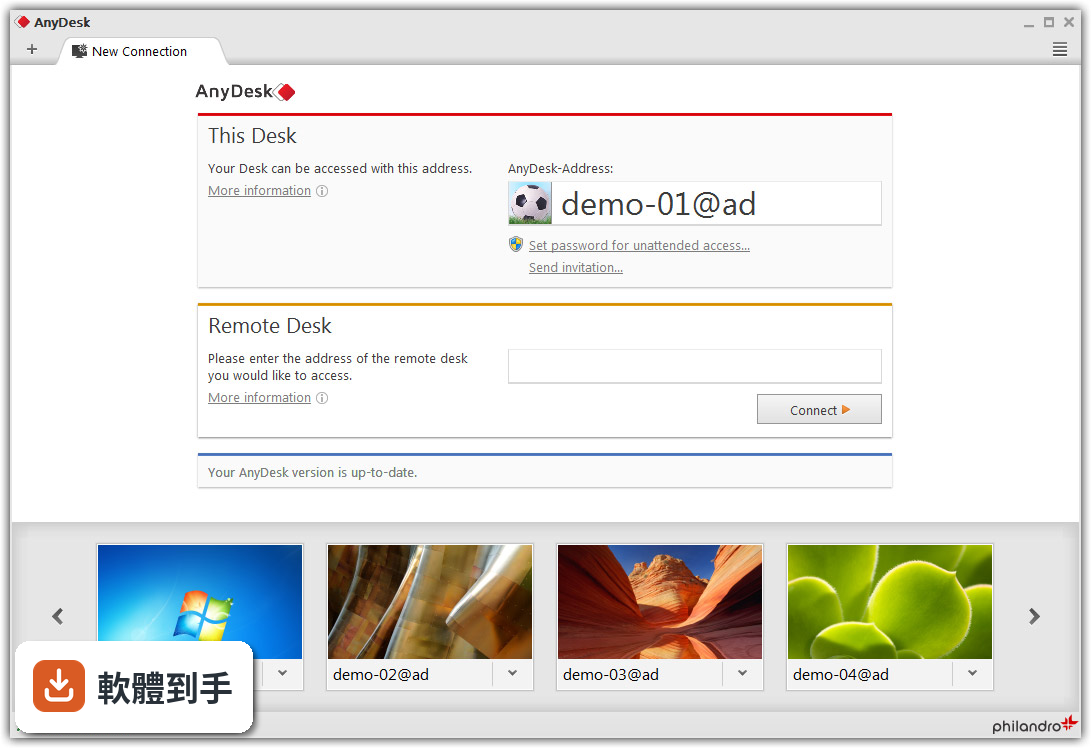
01AnyDesk 到底怎麼用?第一次接觸會不會很難?
你需要在兩台電腦上都取得這個軟體。被控制的那台打開後會顯示一組專屬位址,你從另一台輸入這組位址,再輸入對方設定的密碼就能連上。整個過程不需要安裝,下載後直接執行即可,對第一次用的人來說門檻不高。
02它除了看對方桌面,還能做什麼?
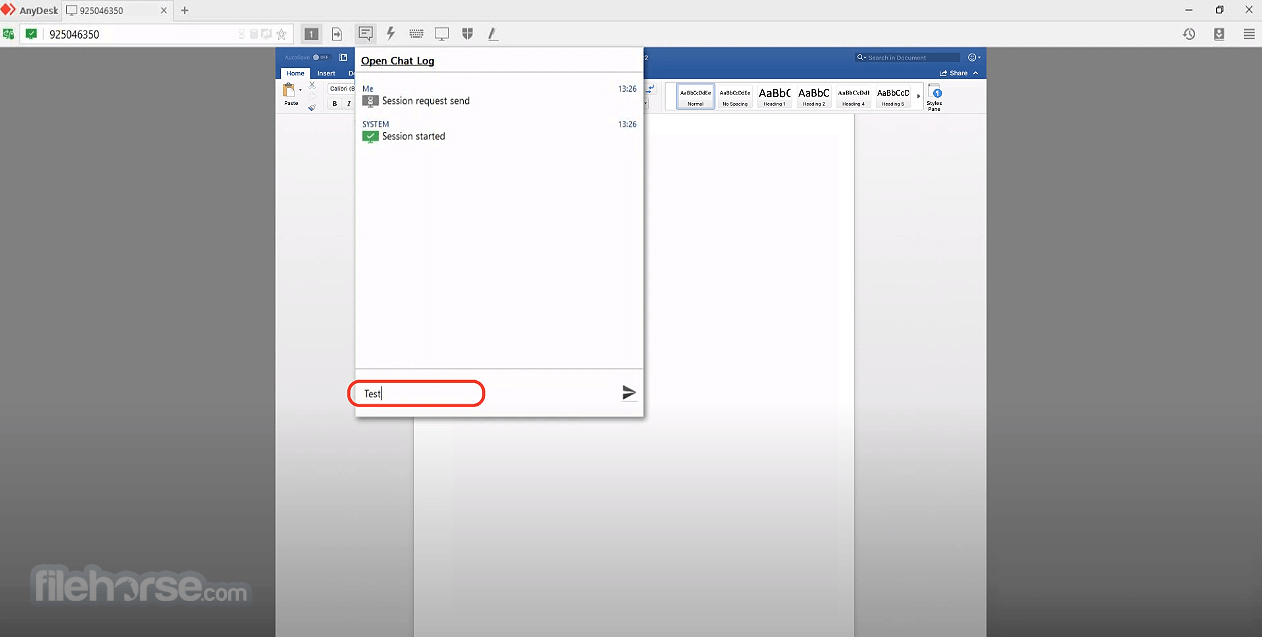
除了遠端控制,它內建檔案管理員,可以在兩台電腦之間傳檔案;也有剪貼簿共享,能複製貼上文字和截圖。遠端列印功能讓你把文件丟到本端印表機印出來,白板和聊天則是在連線時輔助溝通用的。
03連線速度會不會很慢?操作起來順不順?
官方資料提到在區域網路內延遲低於 16 毫秒,畫面更新率可達 60 fps,頻寬需求最低只要 100 kB/sec。實際感受會受雙方網路環境影響,但以官方數據來看,它在低頻寬下的表現是設計重點之一。
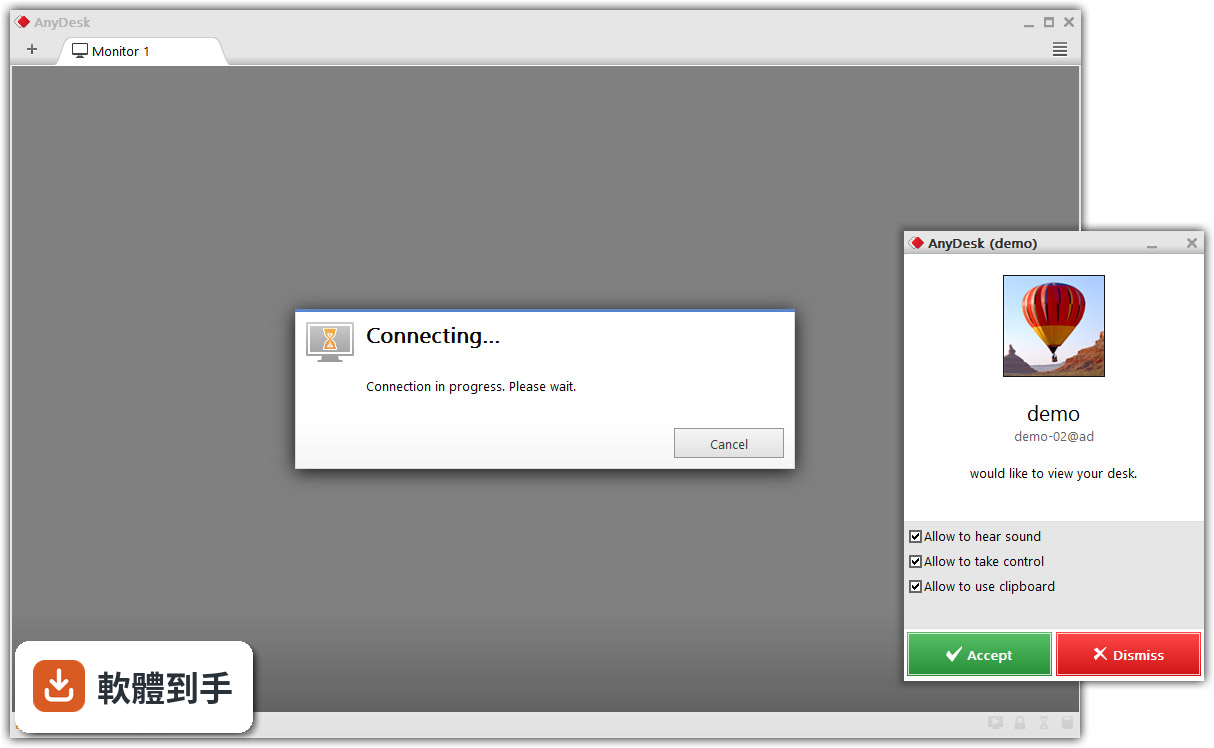
04它安全嗎?連線過程會不會被竊聽?
官方說明指出使用銀行等級的 TLS 1.2 加密技術保護連線,防止未經授權的存取。每次連線都需要密碼驗證,你也可以設定無人值守時的自動登入密碼。不過任何遠端軟體都有風險,建議只在信任的網路環境下使用。
05免費版和付費版差在哪?
官方 FAQ 說明免費版供個人使用,商業用途需要付費訂閱才能使用完整功能。免費版基本遠端控制和檔案傳輸都能用,但進階的管理工具、商業支援功能就鎖在付費方案裡。如果你只是偶爾連回家裡電腦,免費版通常夠用。
06這套軟體適合什麼樣的人?
適合需要偶爾遠端存取自己電腦的人,例如出差時要連回辦公室電腦、幫家人處理電腦問題、或是在不同地點之間移動時需要存取固定設備。因為免安裝、免設定的特性,也很適合臨時需要遠端協助、但雙方都不是資訊背景的狀況。
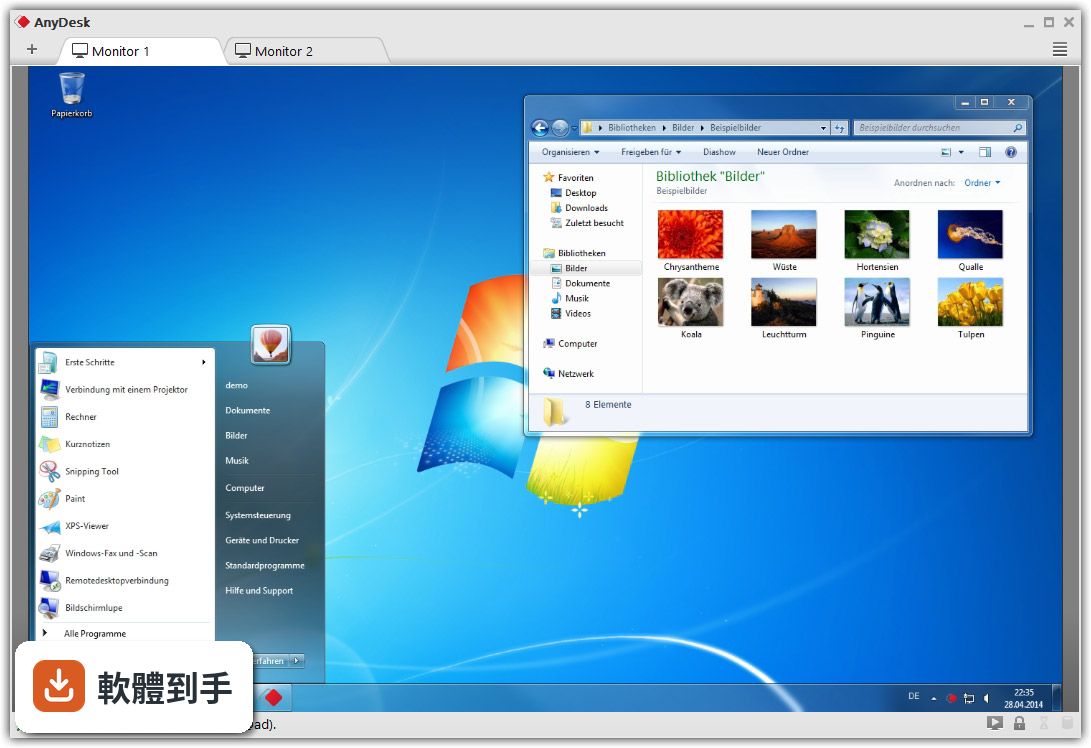
07我只有一台電腦,用它有用嗎?
沒有用。它需要兩台裝置都安裝並連上網路才能運作,一台電腦無法自己連自己。如果你只有單一設備,這套軟體對你沒有實際用途。
08它的介面只有英文,會不會看不懂?
介面語系確實只有英文,沒有中文選項。不過操作流程相對單純,主要按鈕和欄位不多,英文程度普通的人也能摸索出基本操作。如果你完全無法接受英文介面,可以考慮其他有中文的遠端軟體。
09我該拿它跟 TeamViewer 或 NoMachine 比嗎?
可以。資料中列出 TeamViewer、NoMachine、TightVNC 等作為功能相近的比較對象,其中 TeamViewer 的評分人數明顯較多,代表使用者樣本較大。AnyDesk 的優勢在於輕量、免安裝,但如果你需要中文介面或更廣泛的社群支援,其他選項可能更適合。
10它適合拿來當商業用途的主力工具嗎?
商業使用需要付費,且官方資料顯示它的管理功能偏向企業需求,例如使用者管理和權限設定。如果你的需求只是偶爾遠端協助客戶,免費版可能不夠用;但若公司需要多人、多設備的集中管理,付費方案有對應功能。建議先確認你的商業規模和預算再決定。
11這套軟體最近還有在更新嗎?
根據收錄的版本紀錄,近 12 個月更新 2 次,近 24 個月也是 2 次,代表它仍持續維護,但更新頻率不算高。官方提到 v9.6 之後有持續的效能和安全性改進,並支援 Windows 7 到 11,短期內不用擔心被放棄維護。
12它跟其他遠端軟體比起來,評分算高嗎?
它的評分是 8.4/10,共 291 人評分,在資料列出的同類軟體中,評分人數最多的是 LiteManager Free 也是 291 人,TeamViewer Host 只有 27 人。評分人數多代表參考價值較高,但 8.4 分不算特別突出,只能說是中上水準。
下載與官方連結
AnyDesk.exe · 連結指向軟體原廠
版本紀錄
- 2026-10-27 AnyDesk 9.8.3 8.2 MB
- 2026-10-16 AnyDesk 9.8.2 8.2 MB
- 2026-10-07 AnyDesk 9.8.1 8.2 MB
再看 5 筆
- 2026-09-29 AnyDesk 9.8.0 8 MB
- 2026-08-17 AnyDesk 9.7.15 8 MB
- 2026-08-10 AnyDesk 9.7.14 8 MB
- 2020-09-02 AnyDesk 6.0.8 3.5 MB
- 2020-07-28 AnyDesk 6.0.7 3.5 MB
這一版改了什麼
What's new in this version:
AnyDesk 3.6.3
- Fixed a crash when terminating AnyDesk using the tray icon while sessions were running
- Under rare conditions, connecting to Windows 10 showed no image/a black image
- Clipboard permission works again
- Disallowed to change the license key if settings are disabled
- Fixed SAS (Ctrl+Alt+Del) which did not work under some conditions on Windows Vista and upwards.On some Windows 10 systems, AnyDesk did not work when the monitor was rotated. On these systems, AnyDesk should now transmit the monitor content normally
- Fixed two rarely occuring crashes on address book close
AnyDesk 3.6.2
Fixed Bugs:
- Trying to add an address from the speed dial to an address book with a license of type free or lite
- opened a dialog instead of the address book
- Fixed screensaver settings on AnyDesk session close. This was broken due to a bug in Windows
- Fixed session comment dialog which could appear twice
Other Changes:
- Made license key removal more explicit and added option 'Change license key' to the main menu
AnyDesk 3.6.1
- Fixed Bugs
- Important security update, fixed dll injection vulnerability. Thanks to 0x09AL for reporting this
AnyDesk 3.6.0
- Transmission of system information can now be blocked. Older versions of AnyDesk will show useless information in this case
- Added a setting to disable the chat log
- Added a setting to choose the path to the chat log
- Added a setting to show the address book on startup
- Added a setting to allow the accept window to go to foreground on chat message received
AnyDesk 3.5.0
New Features:
- The remote restart feature now even works when AnyDesk is not installed
- Please note: You will need to request elevation from the remote user before using the restart feature in this case
- Custom AnyDesk: Text and title of ID and Connect Group (Main Window) can now be customized
- Custom AnyDesk: Before frontend startup a disclaimer can be shown now, which can be customized in logo, title, text, background color and the text on the accept and cancel buttons. It is shown only, if AnyDesk is not installed and the text contains non-whitespaces. All other settings are optional
- Custom AnyDesk: Added support for environment variables in paths
Fixed Bugs:
- In the D3D fullscreen menu the keyboard mode has always been set to 'translate'
- The invitation link in the main window has not been shown anymore after switching to advanced view and back
- Fixed crash on opening the chat log in the backend after session close
- Fixed crash when the session info panel was closed before the remote data was displayed
Fixed Bugs:
- Fixed custom logo layout in the main window's advanced view
- Fixed the connection panel's password edit showing clear text when disabled
AnyDesk 3.4.1
- Fixed dpi of comment session dialog
- Fixed that the comment session dialog can be shown although the licence is of type Lite
- Fixed a crash related to the comment session dialog
- Fixed that the character right of '9' on the standard hungarian keyboard layout has not been recognized before
AnyDesk 3.4.0
New Features:
- Sessions can now be commented on close. The comment can then be looked up on my.anydesk.com. If you don't want to comment, just clear the comment field. You will need a licence in order to use this new feature
- Address Book: AnyDesk now supports multiple address books. They can be added (up to a certain limit) and deleted. The number of available address books depends on your licence
- Status bars now also show the remote user name
Fixed Bugs:
- Fixed a crash on connecting due to monitor detection failure
- Address Book: Fixed tag validation on rename
- After elevation the backend user name in the chat was SYSTEM
Other Changes:
- Fixed and updated interfaces of installer, uninstaller, updater and global settings windows
AnyDesk 3.3.2
- Important security update. Please update if you have version 3.3.1
- Fixed a crash when using the drop to desktop feature
AnyDesk 3.3.1
- Fixed a crash on connecting due to monitor detection failure
- Fixed ACL denying access although the list is empty
AnyDesk 3.3.0
New Features:
- Address book: The name of an address can be set now on adding it to the address book
- Address book: Tags can now be renamed and removed from the tag tree view directly (on the left) Right click on a tag to choose
- Address book: Added commands 'Expand All' and 'Collapse All' to the tag tree view Right click on a tag or the tag tree view itself to choose
- Address Book: If a user action fails an error info dialog will be shown now
- When adding an address from the speed dial to the address book, a dialog will be shown now
- When connecting to a multi monitor system, AnyDesk now automatically switches to the primary monitor
Fixed Bugs:
- Fixed a crash after installing AnyDesk on Windows XP
- Address book: Fixed selected tags view layout (on top)
- Fixed service crash after installation due to invalid install parameters
- Fixed a crash on closing a session using OpenGL
- Using the mirror driver the backend detected more monitors than physically available, in case a software for virtual monitor creation is installed
Other Changes:
- Address Book: The list view now auto-sizes its columns
- Most text edits now select their content on getting keyboard focus
AnyDesk 3.2.5
- Fixed a crash after remote restart
- Fixed a bug in feature availability indicator in menu
- Fixed a bug in the address book that did not allow to add an item from the speed dial to the address book directly after startup
AnyDesk 3.2.4
Fixed Bugs:
- Fixed a bug which allowed two dialogs to be shown at the same time
- Fixed remote cursor rendering at the edges of the view
- Fixed a bug which let elevation fail when Windows denied access to the AnyDesk executable.
- Fixed a bug which led to the service shutting down automatically on elevating its backend, in case
- AnyDesk has not been installed on that side and the main window there has been closed before elevation
- Fixed the action menu showing elevation was available although the backend has been elevated already
- Fixed a race condition in the address book which made it unusable in some situations
- Fixed a bug in feature availability indicator in menu
Other changes:
- Added a hint in the elevation dialog that the remote user usually has to accept an elevation request
AnyDesk 3.2.3
Fixed Bugs:
- Fixed a regression which impaired AnyDesk's performance severely when connected to a Windows 8, 8.1 or 10 computer. Please update!
- Fixed a bug which caused the auto-reconnect feature after a remote restart to fail when the global settings dialog was opened previously
- Fixed a crash when using the "Retry" button in the remote desktop access denied dialog
- Improved stability
Other Changes:
- Improved feature availability indicator in menu
AnyDesk 3.2.2
Fixed Bugs:
- Fixed a bug which could lead to the service not starting timely after installing AnyDesk
- Fixed a crash which occured when closing the address book and terminating AnyDesk
- Fixed a crash by using ddraw as fallback for d3d when the graphics driver is not installed
- correctly and causes an exception during initialization
- Tags are validated now in the address book
Other Changes:
- Improved focus behaviour of controls
AnyDesk 3.2.1
Fixed Bugs:
- Fixed crash on adding an address to the address book
- Fixed elevation with credentials in case AnyDesk has been started from a user folder
- Fixed a crash which could occur when terminating a session with an open address book or multiple monitors
- Fixed character keyboard input which was not working for certain programs (GTK, QT) when connected from a mobile device
Other changes:
- Improved prompt shown in the password dialog when connecting
- Controls now show if focused
AnyDesk 3.2.0
New Features
- The address book now remembers the last used view type (list/tiles)
- The address book now offers sorting options
- The address book now opens the tag dialog immediately after an address has been added
- The accept window will no longer auto-close tabs when chat messages have been sent/received
- Sessions can now be accepted via 'Enter' and dismissed via 'Esc'
- Added session status messages to chat
- The session time is now shown during a session and after disconnect
- The remote user client ID is now shown during a session (additionally to its alias)
- Your fingerprint can now be seen in the about panel
- The password for unattended access is now controlled via a dialog
You have to enter your password twice to check for misspellings
- Added language auto-selection (will select system language)
Fixed Bugs
- Fixed WoA
- Fixed elevation with credentials
- The direct connection icon in the backend was greyed out although there was a direct connection
- The drop link feature dropped an invalid link (name instead of address)
- After disconnect it was no longer possible to mark/copy chat messages
- Fixed a crash that could occur on sending chat messages
- Some chat messages have not been recorded
- Fixed some minor bugs in the chat
- Fixed wrong message shown in the frontend on session request rejected
- Fixed some bugs with keyboard focus
- Fixed a bug with auto-selection of tabs in accept window
- Sometimes the address book did not show online states on opening it the first time
- Fixed some bugs with tag selection in the address book
- Fixed a crash that could occur when closing the main window with the address book opened
- Fixed filtering of recent connections
- Fixed recent connection being removed from favorites on name change
- In some cases a wrong text has been shown on connection request
- Fixed various minor bugs
Other Changes
- The accept/dismiss buttons are now disabled for a short time when entering a new session state to prevent accidentally clicking them
- The accept window is now only always on top when there are not yet accepted sessions left. And it will be back on top on session request
- The accept window will now auto-select an incoming session tab in some situations
- Added bottom right resize corner
- Fixed some dpi issues
- Added some localization
AnyDesk 3.1.1
Fixed Bugs:
- Improved stability
- Fixed some bugs in the chat
- Other changes
- Signed the exe and msi files with two certificates.
AnyDesk 3.1.0
New Features:
- Reworked the chat in the client
- Added an option to disable remote restart in the security settings
Fixed Bugs:
- Fixed a bug in DeskRT which caused it to be slow on certain monitor resolutions indivisible by 16 (for example 1366x768). Responsiveness should be much higher now in these cases
- In some cases, the view mode settings for remote computers were not restored correctly for future sessions
- Fixed a crash which could occur when connecting to AnyDesk while it was terminating
- Fixed a bug which could lead to the system info feature not being available
- Improved stability
- Minor user interface layout fixes
AnyDesk 3.0.0
- Added edge scrolling feature for the original view mode: use this when the remote image is much larger than the local monitor
AnyDesk 2.6.1
New Features
- Implemented customisation support for my.anydesk.com for macOS
Fixed Bugs
- Enable/disable audio works now
- Receive connection window constraints were fixed
AnyDesk 2.6.0
New Features:
- Implemented Access Control List feature. This makes it possible to restrict access to machines based on the alias. Wildcards are supported, for example "*@company", "pc-?@ad" and so on. Restrictions based solely on the numerical id are also supported. You can find the feature in the Security Panel of the AnyDesk settings.
Fixed Bugs:
- Fixed a bug where the file transfer and probably the text clipboard did not work on Windows 7 when UAC was disabled and AnyDesk was not installed.
- Fixed a regression which could lead to being unable to control the remote machine after activating a privileged window in the task bar when AnyDesk was not installed.
- Fixed a bug which could cause severe image lag after using the "switch sides" or "request elevation" features or doing a fast user switch of a remote controlled Windows session.
Other Changes:
- The remote users input is now temporarily disabled when typing on the local keyboard. In previous versions, only moving the mouse disabled remote input.
AnyDesk 2.5.0
New Features
- Implemented remote restart feature: The connection will automatically be restored once the remote machine finished restarting
- Added a confirmation dialog for the switch sides feature
- The coloured user pointer can now be disabled in the security settings
Fixed Bugs
- Fixed a bug which could lead to a wrong aspect ratio image or no image at all when connecting to a multi monitor system until the first resize of the session window
- Fixed image corruption which could occur when the mirror driver was used
- Fixed some inconsistencies in the remote capabilities for the request elevation and the switch sides feature when connecting between different platforms
- Improved stability
Other Changes
- The uninstaller (anydesk --remove) now accepts the --silent flag
AnyDesk 2.3.5
Fixed Bugs:
- Fixed image capture when connecting to outdated Windows 7 versions
- Fixed a bug in the license registration dialog
Other Changes:
- Long IDs are now displayed in groups of 3 digits
AnyDesk 2.3.4
Fixed Bugs
- Fixed image problems with 16-bit/fast rendering method.
- Fixed a few more high DPI issues.
- Fixed protocol compatibility with the Enterprise server.
- Fixed a crash that could occur when the system info tab was opened a second time.
- The system info tab could be opened before authentication, which resulted in a crash.